20.9 C
New York
Wednesday, April 1, 2026
Home Blog Page 205

Researchers uncover evidence that Roanoke colonists assimilated with Croatoans

0

NEWYou can now listen to Fox News articles!

A team of researchers believes they may have cracked one of America’s most enduring legends: Where did the settlers of the Roanoke Colony go?

The Roanoke Colony, also known as the Lost Colony, was the first permanent English settlement in the United States. A group of over 100 colonists settled on North Carolina’s Roanoke Island in 1587, led by Sir Walter Raleigh.

John White, the governor of the colony, returned to England for supplies in 1587. When he came back to Roanoke Island in August 1590, he found the settlement mysteriously abandoned – and all the colonists, including his daughter Eleanor Dare and his granddaughter Virginia Dare, gone.

DIVERS UNCOVER MYSTERIOUS 2,500-YEAR-OLD SHIPWRECK, FILLED WITH UNUSUAL ARTIFACTS, OFF COAST OF SICILY

One of the only clues remaining at the site was the word “CROATOAN” carved into a palisade. It either referred to Croatoan Island, which is now called Hatteras Island, or the Croatoan Indians.

The mystery has haunted Americans and Brits for the past four centuries, with several investigations launched into the matter. Whether the colonists were killed by Native Americans, starved to death or left for greener pastures has eluded historians.

After 10 years of research, an archaeologist spoke with Fox News Digital about his team’s discoveries related to the lost Roanoke Colony. (Mark Horton; Croatoan Archaeological Society)

But new research suggests the colonists’ fate may not have been tragic after all. 

Mark Horton, an archaeology professor at Royal Agricultural University in England, spoke with Fox News Digital about his findings.

“This is metal that has to be raised to a relatively high temperature … which, of course, [requires] technology that Native Americans at this period did not have.”

For the past decade, the British researcher has worked with the Croatoan Archaeological Society’s Scott Dawson to uncover the mystery. Horton said they’ve uncovered proof the colonists assimilated into Croatoan society, thanks to a trash heap. (See the video at the top of this article.)

EXPERTS SHOCKED BY ANCIENT KING ARTHUR MANUSCRIPT FOUND TUCKED INSIDE BOOK: ‘SURVIVED THE CENTURIES’

“We’re looking at the middens — that’s the rubbish heaps — of the Native Americans living on Hatteras Island, because we deduced that they would have very rapidly been assimilated into the Native American population,” Horton said. 

The smoking gun at the site? Hammerscale, which are tiny, flaky bits of iron that come from forging iron. 

Horton said it’s definitive proof of iron-working on Hatteras Island, which could have only been done by English colonists. 
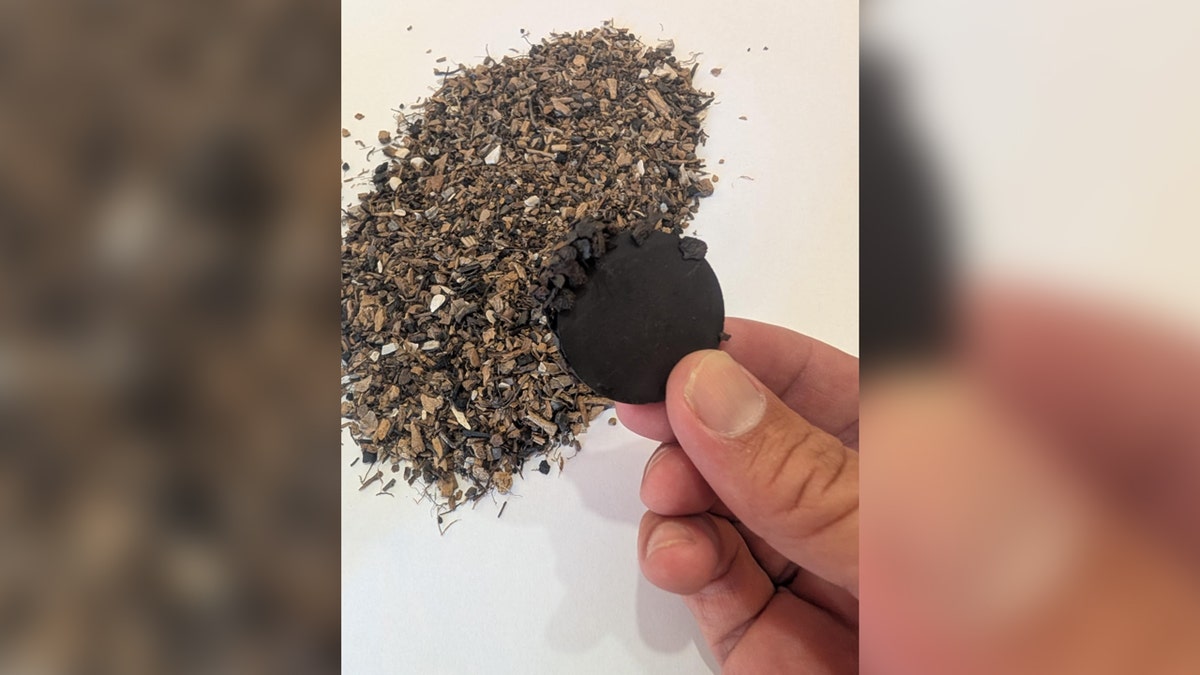
Hammerscale

The presence of hammerscale is definitive proof that the colonists moved over to Hatteras Island and lived among the Croatoans, according to archaeologists. (Mark Horton / Croatoan Archaeological Society)

“The key significance of hammerscale … is that it’s evidence of iron-working, of forging, at that moment,” he said.

“Hammerscale is what comes off a blacksmith’s forge.”

ARCHAEOLOGIST SHEDS NEW LIGHT ON ASTONISHING DISCOVERY OF WRECKED SLAVE SHIPS: ‘STRANDED ON THE COAST’

Horton added, “This is metal that has to be raised to a relatively high temperature … which, of course, [requires] technology that Native Americans at this period did not have.”
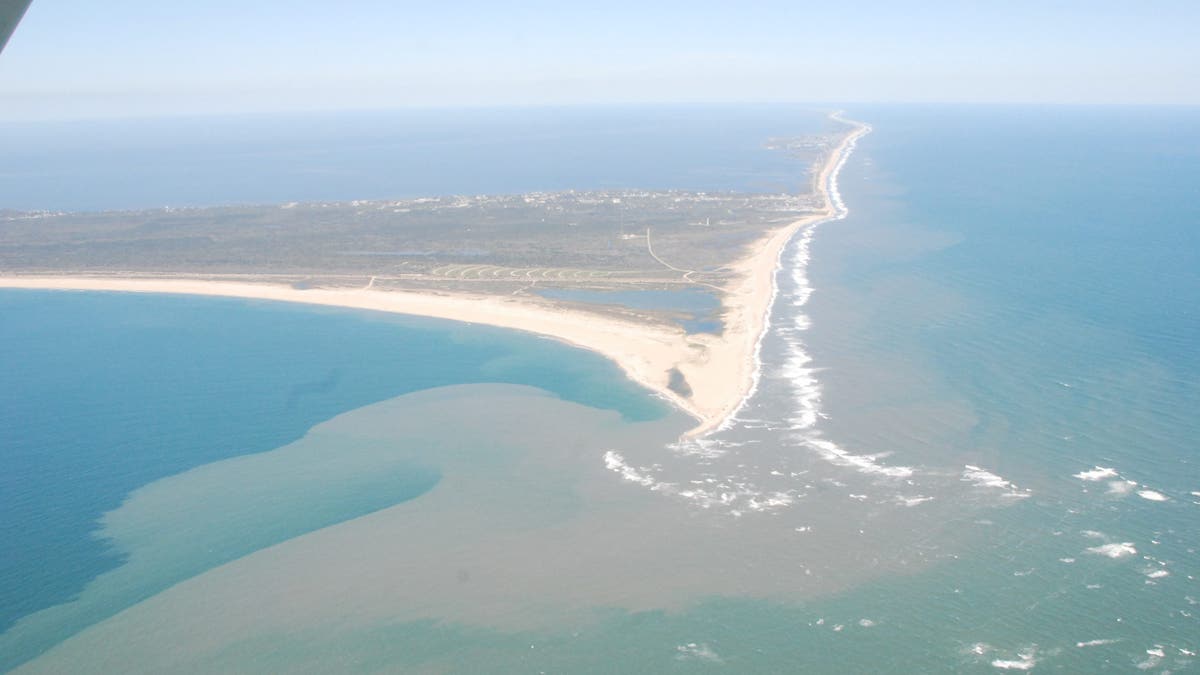
Aerial photo of Island

The excavations took place on North Carolina’s Hatteras Island, which was previously known as Croatoan Island. (Mark Horton / Croatoan Archaeological Society)

Hammerscale shows that the English “must have been working” in this Native American community, according to the expert.

But what if the hammerscale came longer after the Roanoke Colony was abandoned? Horton said that’s unlikely.

For more Lifestyle articles, visit foxnews.com/lifestyle

“We found it stratified … underneath layers that we know date to the late 16th or early 17th century,” he said. “So we know that this dates to the period when the lost colonists would have come to Hatteras Island.”

“It’s a combination of both its archaeological position but also the fact that it’s evidence of people actually using an English technology.”
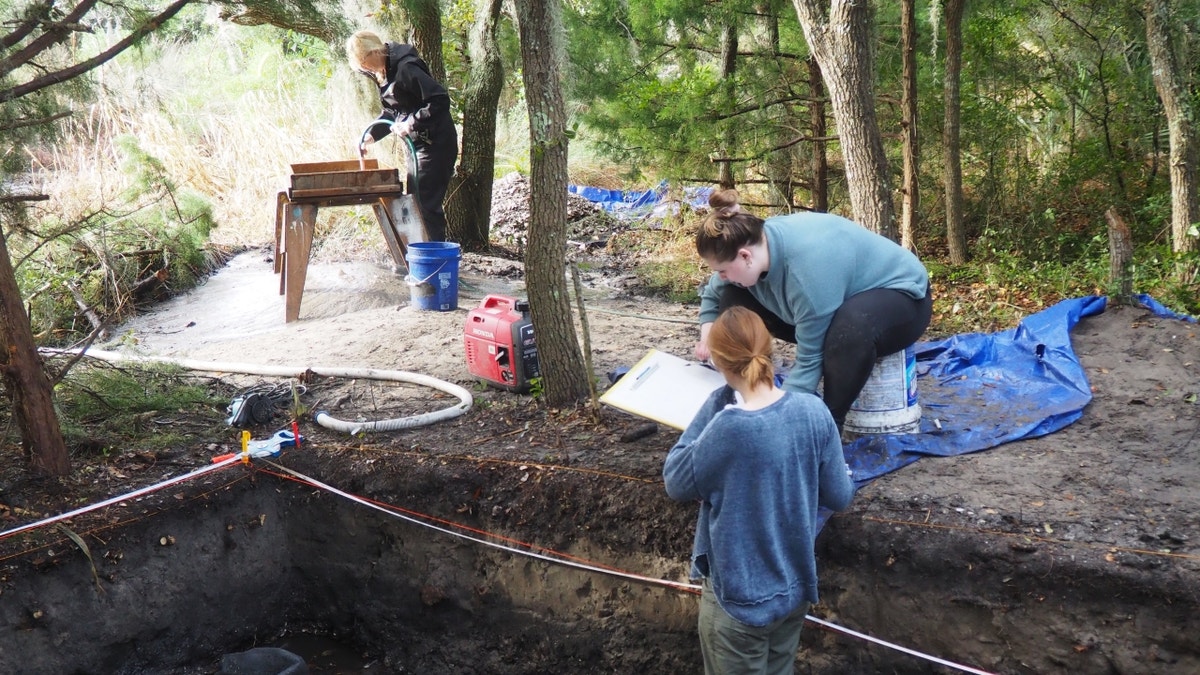
Excavators at site

Archaeologists say that the discovery of 16th-century English artifacts on Hatteras Island reveals the Roanoke settlers’ fate. (Mark Horton / Croatoan Archaeological Society)

At the site, archaeologists also found guns, nautical fittings, small cannonballs, an engraved slate and a stylus, in addition to wine glasses and beads – which all paint a vivid picture of life on Hatteras Island in the 17th century.

When asked if the colonists could have been killed in a later war, Horton said they survived among the Croatoans and successfully assimilated.

“We have one little snippet of historical evidence from the 1700s, which describes people with blue or gray eyes who could remember people who used to be able to read from books,” he said. “Also, they said there was this ghost ship that was sent out by a man called Raleigh.”

CLICK HERE TO SIGN UP FOR OUR LIFESTYLE NEWSLETTER

Horton added, “We think that they assimilated into the Native American community and their descendants, their sons, their granddaughters, their grandsons carried on living on Hatteras Island until the early 18th century.”

When asked if he’s officially solved the mystery, Horton said that though the archaeological evidence is definitive, the legend will probably still endure.
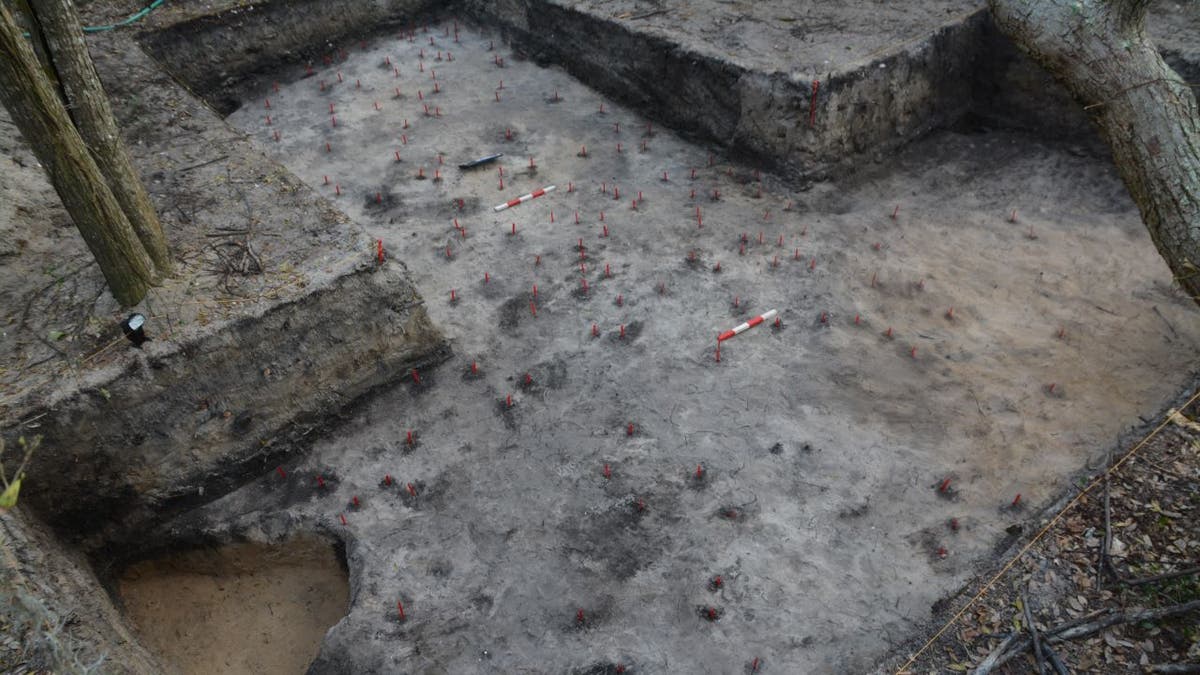
Aerial photo of excavation site

The colonists’ fate may not have been tragic, and they likely assimilated into Native American society based on archaeological excavations, said an expert. (Mark Horton / Croatoan Archaeological Society)

“Have we solved the mystery? Well, you know, it’s pretty good evidence, but there’s always more work to be done,” he said.

CLICK HERE TO GET THE FOX NEWS APP

Horton added, “And people love mysteries. They hate resolving things one way or the other. So I’m sure that the mystery will continue, you know, whatever the scientific evidence says.”

Fox News Digital’s Brooke Curto contributed to this report.

AI video tools Sora and Veo compared: create videos with just text

0


NEWYou can now listen to Fox News articles!

I’ve said it before, and I’ll say it again, AI is changing everything. And now, it’s coming for video in a huge way. We’re not just talking about deepfakes or filters anymore. This is next-level, movie-magic stuff.

Enter to win $500 for you and $500 for your favorite person or charity in our Pay It Forward Sweepstakes. Hurry, ends soon!

Let’s talk about the wild part first. 

FOX NEWS AI NEWSLETTER: SCAMMERS CAN EXPLOIT YOUR DATA FROM JUST 1 CHATGPT SEARCH

You don’t need any editing software. You don’t need a green screen. Heck, you don’t even need a camera. Your keyboard is now the director, the producer, the editor, and your creative partner. All you have to do is type what you want to see, and boom, AI turns your words into high-def, studio-quality video clips. It’s like having a Hollywood studio tucked inside your laptop.

Two of the biggest names in this space right now are Sora from OpenAI and Veo from Google. And yes, you can actually try them both right now. I’ve tested them side by side, and you can watch my results at the end to see which one came out on top.

hands using a computer keyboard

AI is changing everything – now, we can even generate our own videos with cutting-edge software. (Thomas Trutschel/Photothek via Getty Images)

Sora: OpenAI’s text-to-video powerhouse

Sora is built right into ChatGPT and is shockingly good. Type something simple like, “a golden retriever puppy playing on the beach with a tennis ball,” and within seconds, Sora delivers a smooth, visually rich video clip. No stock footage. No need to mess with editing timelines or export settings. Just write what you want to see.

Here’s the breakdown:

  • If you’re subscribed to ChatGPT Plus ($20/month), you can create videos up to 10 seconds long in 720p.
  • Want to go bigger? ChatGPT Pro ($200/month) gives you 20-second videos in full 1080p HD, with no watermark and faster processing.

And here’s a hot tip: Microsoft just announced that Sora is being integrated into their new Bing Video Creator, so you’ll start seeing it pop up in more places soon.

FEDERAL AI POWER GRAB COULD END STATE PROTECTIONS FOR KIDS AND WORKERS

Veo: Google’s take on AI filmmaking

Now over to Google’s Veo, and wow, this one is aiming for cinematic quality. Veo gives you up to 60-second videos in 1080p, and the realism is something else. You can include camera moves, lighting shifts, and smooth transitions, just by typing a sentence. For example: “A cat runs across a Paris rooftop at sunset.” And it delivers exactly that, complete with lens flares and realistic shadows.

To get your hands on Veo, you’ll need to sign up for Google’s Gemini plans:

  • Pro Plan: Free for the first month, then $19.99/month. It gives you basic access to Veo and a video-editing tool called Flow.
  • Ultra Plan: $124.99/month for the first three months (normally $249.99). This unlocks all the bells and whistles, that is, full Veo access, higher-quality exports, and cool features like “ingredients to video,” where you can mix different elements into your creation.
Google search

Google’s Veo is one option for AI videomaking. (AP Photo/Don Ryan, File)

The test: puppy vs puppy

I wanted to see how each platform handled the same prompt, so I asked both to generate a video based on: “Show me a golden retriever puppy playing on the beach with a tennis ball.”

Now you can watch the videos side-by-side. My AI puppy Bella stars in both (Veo’s on the left, Sora’s on the right).

My thoughts? Sora nailed the adorable close-up details, Bella’s floppy ears, the texture of the fur, the light hitting the waves. But it fumbled a bit when it came to physics. The ball’s bounce didn’t feel quite right. On the other hand, Veo did a better job with the action. The puppy’s movements were more lifelike but it wasn’t as sharp on the visual details.

The OpenAI ChatGPT logo is seen on a mobile phone

OpenAI’s Sora is another top choice. (Photo by Jaap Arriens/NurPhoto via Getty Images)

We are entering a new age of video creation where your ideas are enough. No gear, no crew, no edits. Just imagination and a little typing. Whether you’re a marketer, content creator, educator, or just someone who likes to experiment, this is the future of storytelling.

Trust me, it’s just getting started.

CLICK HERE TO GET THE FOX NEWS APP

Get tech-smarter on your schedule

Award-winning host Kim Komando is your secret weapon for navigating tech.

Copyright 2025, WestStar Multimedia Entertainment.


Source link

Mount Everest defibrillator saves woman’s life just weeks after installation

0

NEWYou can now listen to Fox News articles!

A man who climbed Mount Everest to install a defibrillator there says the device wound up saving a woman’s life just three weeks afterward.

David Sullivan, 62, made the journey to the Himalayas to place the lifesaving device on the mountain.

He believes it is the world’s highest-positioned defibrillator, sitting more than 16,000 feet above sea level, according to news agency SWNS.

EXTREME TRAVEL DESTINATION TO RESTRICT POPULAR MOUNTAIN ACCESS

After losing four close friends — all under age 45 — to sudden cardiac arrest, Sullivan founded Code Blue CPR.

He began traveling the globe as an advocate to provide CPR training and install life-saving equipment in hard-to-reach places.

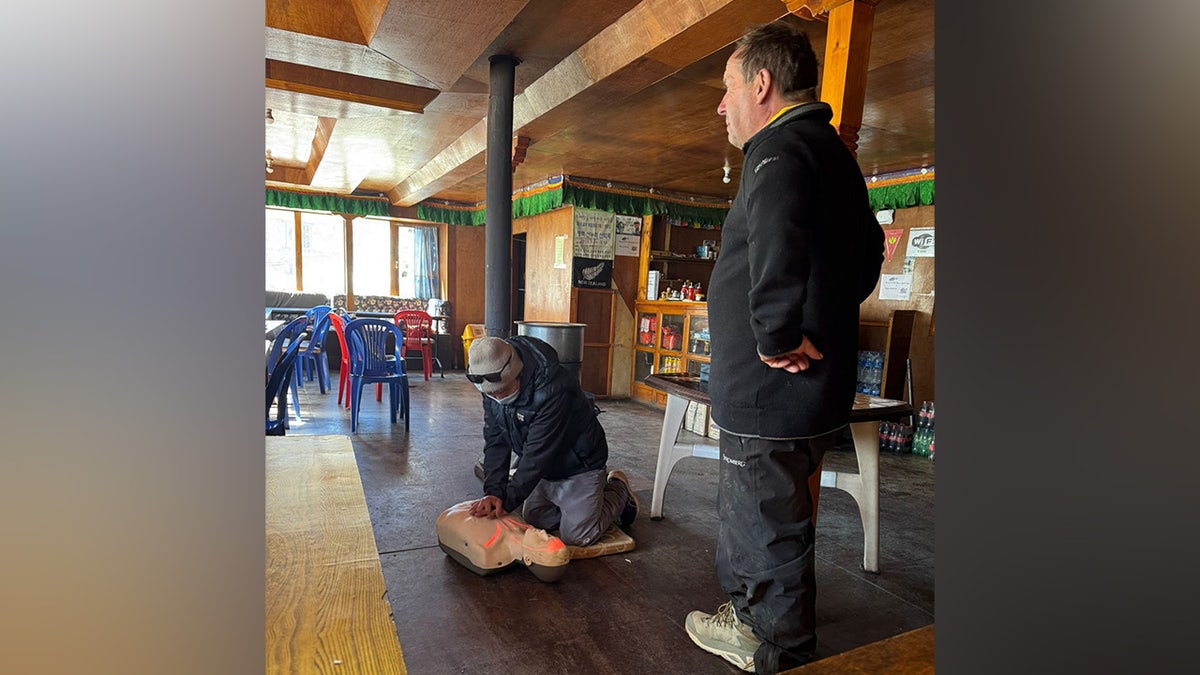
David Sullivan, 62, pictured here, made the journey to the Himalayas to place the lifesaving device on the mountain. (David Sullivan / SWNS)

Earlier this year, Sullivan climbed to an altitude of 22,000 feet to test a defibrillator.

He then descended to a village near Everest Base Camp to install it for emergency use.

Sullivan returned home to Surrey on April 30, glad about what he’d accomplished — but with no idea how quickly his work would make an impact.

Just three weeks later, he got a phone call.

HOT TRAVEL TREND HAS PEOPLE ‘TOWNSIZING’ BY VISITING QUAINT AMERICAN TOWNS

“It was … Friday (May 23), at around 3:45 a.m.,” Sullivan told SWNS. “I have kids traveling the world, so I initially thought, ‘Oh my God, something’s happened.’”

He added, “But it was a Sherpa [a Tibetan mountain guide] who told me the defibrillator had been activated and saved a 30-year-old woman’s life,” Sullivan said. “It was the proudest moment of my life.”

“I hope it will help people realize how important it is to have access to defibrillators.”

The rescue confirmed why he’d taken on the physically and emotionally demanding journey.

While in the Himalayas, Sullivan didn’t just install the defibrillator – he also trained local Sherpas and villagers, many of whom had never received emergency medical instruction, according to SWNS.

“It is incredible that something so simple can save someone’s life – and I hope it will help people realize how important it is to have access to defibrillators,” Sullivan said.

David Sullivan in Nepal. Release date June 2 2025. A campaigner who climbed Mount Everest to install a defibrillator has revealed the device saved a woman's life - just two weeks later. David Sullivan founded Code Blue CPR, an organisation which aims to teach people life-saving CPR and install more defibrillators across England, after he lost four close friends - all under the age of 45 - to cardiac arrest. Mr Sullivan, 62, has spent the last several years travelling around the world trying to improve cardiac survival rates - and earlier this year ventured to the Himalayas, where he installed what he says is the world's highest defibrillator. The dad-of-four, from Oxted, Surrey, first climbed to an altitude of 22,000 feet to test the defibrillator - and then descended to one of the villages near Everest Base Camp, at just over 16,500 feet, to install the device for use. Just two weeks after he returned from his expedition, Mr Sullivan learnt that the defibrillator had saved a climber's life when her heart stopped. He said: "It was the proudest moment of my life when I learnt what had happened.

While in the Himalayas, Sullivan didn’t just install the defibrillator – he also trained local Sherpas and villagers, many of whom had never received any kind of emergency medical instruction. (David Sullivan / SWNS)

“Being within three minutes of a defibrillator increases your chance of survival from 8% to more than 50%,” he added.

For Sullivan, there’s another personal angle. 

“It was the proudest moment of my life.”

He once had to use his CPR training just months after learning it himself. “I performed nine minutes of CPR for a young man and used a defibrillator just three months after I had been shown how to,” he told SWNS.

“While I was doing this, around 30 people just watched and didn’t help – because they didn’t know how.”

CLICK HERE TO SIGN UP FOR OUR LIFESTYLE NEWSLETTER

When the young man’s mother called him the next day to say her son was alive, Sullivan said it changed his life.

“I knew then that everyone should know how to save a life,” Sullivan said. 

Now, Sullivan wants to dedicate himself to reshaping others’ lives.

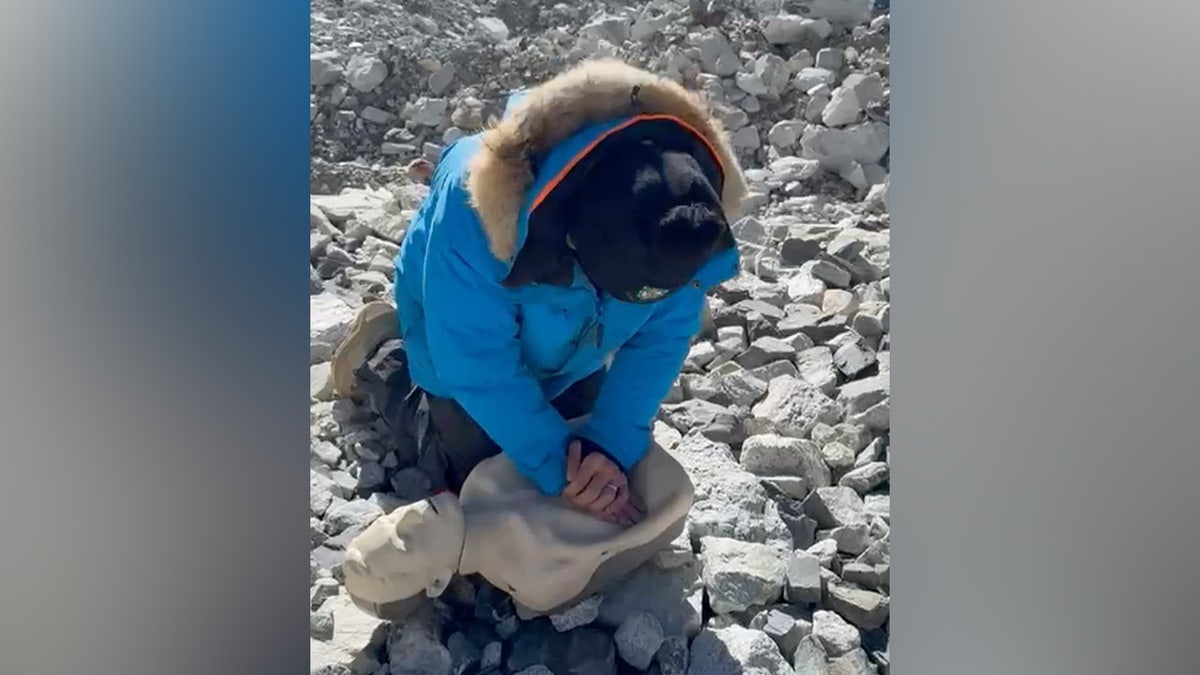
David Sullivan in Nepal. Release date June 2 2025. A campaigner who climbed Mount Everest to install a defibrillator has revealed the device saved a woman's life - just two weeks later. David Sullivan founded Code Blue CPR, an organisation which aims to teach people life-saving CPR and install more defibrillators across England, after he lost four close friends - all under the age of 45 - to cardiac arrest. Mr Sullivan, 62, has spent the last several years travelling around the world trying to improve cardiac survival rates - and earlier this year ventured to the Himalayas, where he installed what he says is the world's highest defibrillator. The dad-of-four, from Oxted, Surrey, first climbed to an altitude of 22,000 feet to test the defibrillator - and then descended to one of the villages near Everest Base Camp, at just over 16,500 feet, to install the device for use. Just two weeks after he returned from his expedition, Mr Sullivan learnt that the defibrillator had saved a climber's life when her heart stopped. He said: "It was the proudest moment of my life when I learnt what had happened.

“Being within three minutes of a defibrillator increases your chance of survival from 8% to more than 50%,” said Sullivan, pictured above performing CPR on a training Manikin.  (David Sullivan / SWNS)

He is moving forward with a plan to train 1.2 million students in CPR through a school initiative.

CLICK HERE TO GET THE FOX NEWS APP

“We want every school to have a new defibrillator and every person in the school – students, teachers, staff – to have all the training necessary to save someone’s life,” he told SWNS.

For more Lifestyle articles, visit foxnews.com/lifestyle

“We won’t stop until we achieve that,” he also said. 

Menopause drug Duavee shows promise for breast cancer prevention in study

0

NEWYou can now listen to Fox News articles!

A drug intended to treat menopause symptoms could double as breast cancer prevention.

New research from Northwestern University in Illinois found that Duavee, a Pfizer-made drug, “significantly reduced” breast tissue cell growth, which is a major indicator of cancer progression.

A phase 2 clinical trial included 141 post-menopausal women who had been diagnosed with ductal carcinoma in situ (DCIS), also known as stage 0 breast cancer, according to a press release from Northwestern.

PROSTATE CANCER DRUG NOW AVAILABLE TO MORE PATIENTS WITH AGGRESSIVE FORM OF DISEASE

This non-invasive breast cancer affects more than 60,000 American women each year, often leading to an outcome of invasive breast cancer.

The women were separated into two groups — one received Duavee and the other took a placebo for a month before undergoing breast surgery.

A drug intended to treat menopause symptoms could double as breast cancer prevention, new research suggests. (iStock)

Duavee is a conjugated estrogen/bazedoxifene (CE/BZA) drug, which combines estrogen with another medication that minimizes the potential harmful side effects of the hormone.

“The key takeaway from the study is that CE/BZA slows the growth (proliferation) of cells in milk ducts of DCIS that expressed the estrogen receptor significantly more than placebo,” Dr. Swati Kulkarni, lead investigator and professor of breast surgery at Northwestern University Feinberg School of Medicine, told Fox News Digital.

EXPERIMENTAL WOMEN’S CANCER DRUG BOOSTS SURVIVAL RATES IN NOTABLE STUDY

Another major finding is that the quality of life did not differ significantly between the two groups, but patients who took the CE/BZA reported fewer hot flashes during the study, she noted.

“This would be expected, as the drug is FDA-approved to treat hot flashes.”

“What excites me most is that a medication designed to help women feel better during menopause may also reduce their risk of invasive breast cancer.”

Kulkarni presented the study last week at the American Society of Clinical Oncology (ASCO) Annual Meeting in Chicago. 

The findings are preliminary and have not yet been published in a medical journal.

“What excites me most is that a medication designed to help women feel better during menopause may also reduce their risk of invasive breast cancer,” said the doctor, who is also a Northwestern Medicine breast surgeon.

Woman getting ultrasound

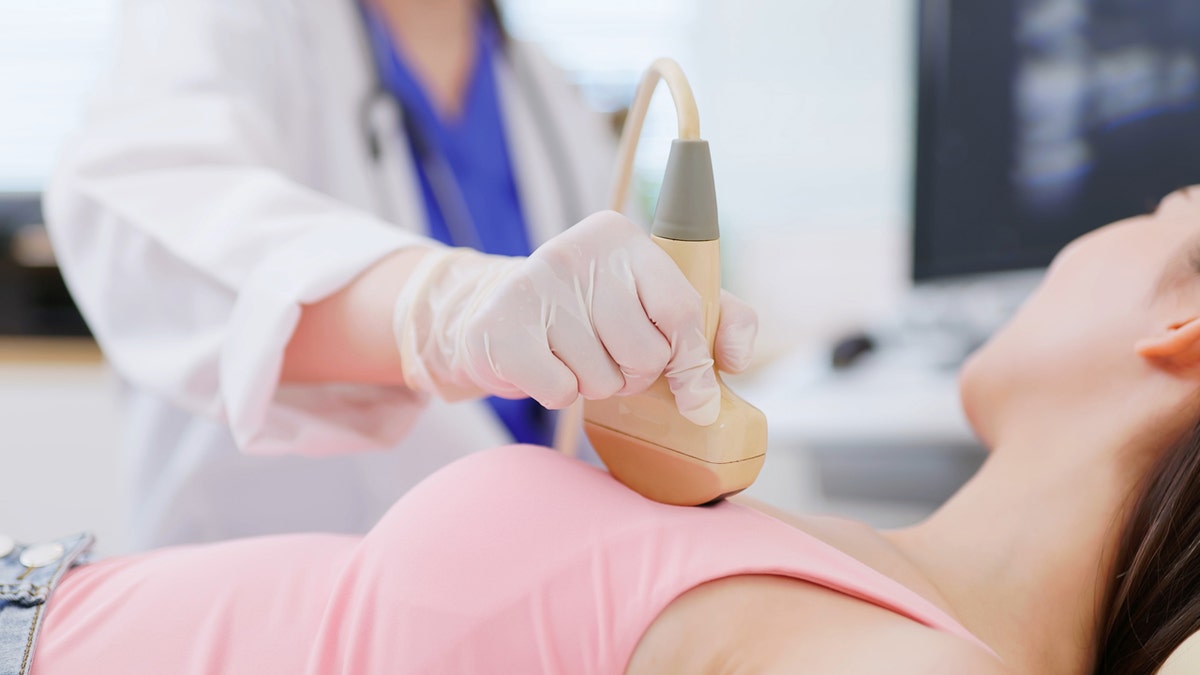
Ductal carcinoma in situ (DCIS), also known as stage 0 breast cancer, affects more than 60,000 U.S. women each year. (iStock)

Women who face a higher risk of breast cancer — including those who have experienced “high-risk lesions” — and who also have menopausal symptoms are most likely to benefit from the drug, according to Kulkarni. 

“These women are typically advised against standard hormone therapies, leaving them with few menopausal treatment options,” the release stated. 

Study limitations

The researchers said they are “encouraged” by these early results, but more research is required before the medication can be considered for approval as a breast cancer prevention mechanism.

CLICK HERE TO GET THE FOX NEWS APP

“Our findings suggest that CE/BZA may prevent breast cancer, but larger studies with several years of follow-up are needed before we would know this for sure,” Kulkarni told Fox News Digital.

Woman hot flashes menopause

Post-menopausal patients who took the CE/BZA reported fewer hot flashes during the study. (iStock)

Dr. Sheheryar Kabraji, chief of breast medicine at the Roswell Park Comprehensive Cancer Center in Buffalo, New York, was not involved in the study but commented on the findings.

“While intriguing, this study is highly preliminary, and more research will be needed before we can conclude that conjugated estrogen/bazedoxifene (CD/BZA), a form of the hormone estrogen commonly prescribed to address symptoms of menopause, prevents invasive breast cancer or is effective at reducing cancer risk,” she told Fox News Digital.

CLICK HERE TO SIGN UP FOR OUR HEALTH NEWSLETTER

Kabraji also noted that the study focused on reducing levels of one specific protein, “which does not always predict reduced recurrence of breast cancer.” 

“This study did not directly show that CE/BZA treatment reduces the risk of DCIS recurrence or development of invasive cancer,” she noted. 

“While intriguing, this study is highly preliminary.”

“Importantly, however, patients who received this therapy experienced no worsening of quality of life, and saw improvement in vasomotor symptoms, such as hot flashes. If found to be effective in preventing breast cancer, CE/BZA is likely to have fewer side effects than current medications used for breast cancer prevention.”

For more Health articles, visit www.foxnews.com/health

Lead researcher Kulkarni emphasized that this medication is not for the treatment of invasive breast cancer or DCIS.

“Right now, we can say that women who are concerned about their risk of developing breast cancer can consider this medication to treat their menopausal symptoms,” she added.

5 phone settings that make your device work harder for you

0


NEWYou can now listen to Fox News articles!

Sometimes it feels like our phones take up more of our time than they save. Between constant notifications, repetitive tasks and digital clutter, it’s easy to forget they’re supposed to make life easier.

But with a few simple setting tweaks, your phone can actually help you stay organized, reduce distractions and save time. 

These built-in tools don’t require any extra apps or subscriptions, and once you set them up, they work quietly in the background so you don’t have to.

Join the FREE “CyberGuy Report”: Get my expert tech tips, critical security alerts and exclusive deals, plus instant access to my free “Ultimate Scam Survival Guide” when you sign up!

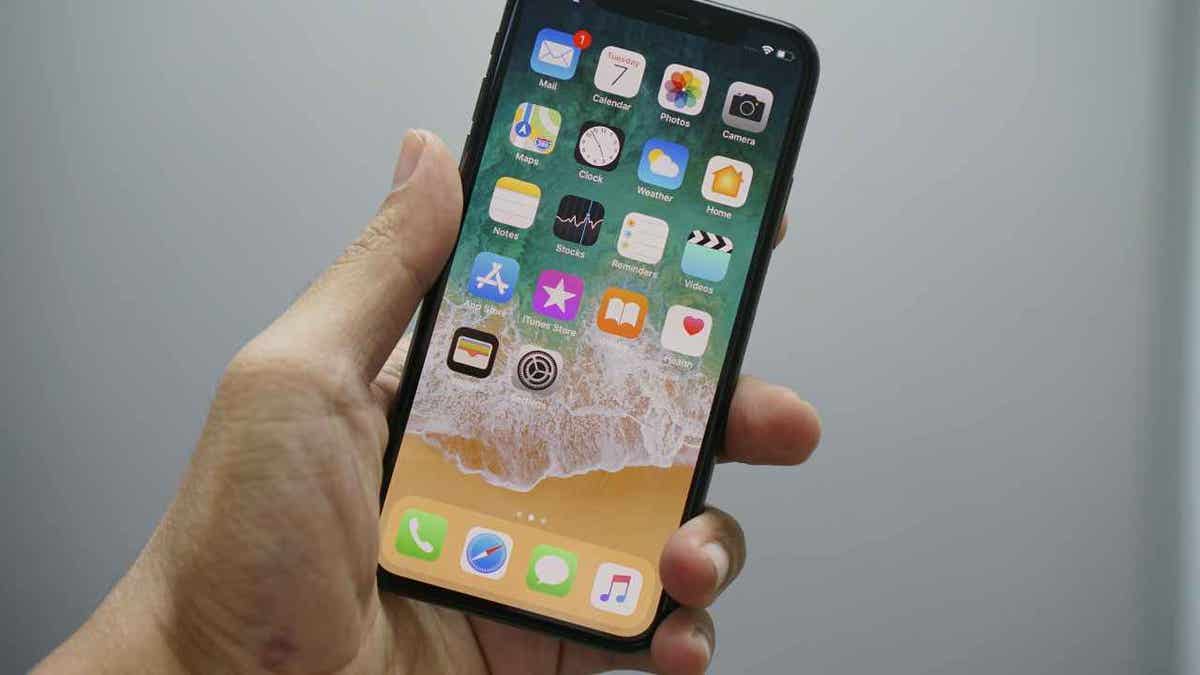
iPhone

An iPhone (Kurt “CyberGuy” Knutsson)

5 ways to make your phone work harder for you and save time

1. Use keyboard shortcuts to speed up typing on your phone

If you’re constantly typing your email address, home address or the same greeting, you can save time by using built-in text shortcuts.

On iPhone:

  • Click Settings.
  • Click General.
  • Click Keyboard.
  • Click Text Replacement (2nd row).
  • Click the “+” button at the top.
  • Enter a phrase and the associated shortcut.
  • Click Save in the upper right-hand corner.

CLEAN UP YOUR PHONE: SPEED, STORAGE AND PRIVACY BOOST IN MINUTES

On Android:

Settings may vary depending on your Android phone’s manufacturer. 

  • Click Settings.
  • Scroll to General management.
  • Click Samsung Keyboard settings. If you have a different keyboard set as your default, head to Keyboard list and default to find Samsung Keyboard. For this trick to work, you’ll need Samsung Keyboard set as your default. You can do that at the top of this page. Then select “Samsung Keyboard” before the next step. Finally, select Text Replacement.
  • Click More typing options, or on some devices you may not see this, and you can proceed to click Text shortcuts and then click the ADD/+ button in the upper right.
  • Enter the shortcut and the expanded phrase and then click add.

A few of the shortcuts I use include “@@” for my email, “adr” for my address and “gm” for a quick “Good morning!” but I’ve also put together a full guide of my most useful keyboard shortcuts here.

smartphones

Smartphones (Kurt “CyberGuy” Knutsson)

HOW TO REMOVE YOUR PERSONAL INFO FROM PEOPLE-SEARCH SITES 

2. Schedule Do Not Disturb mode to reduce phone interruptions

Instead of turning off notifications manually, let your phone do it for you based on a schedule or even your physical location.

On iPhone: 

  • Go to Settings.
  • Click Focus.
  • Here you’ll find different Focus modes, like Do Not Disturb, Work and Personal, and each can be customized with its own schedule, app filter and notification settings.
  • Select the Focus mode you would like to set up and then click Add a Schedule.
  • From there you can customize Time, Location and App.

For example, when you click Work, you can allow notifications from key apps like Outlook or Slack and silence the rest. You can also allow for notifications from important people, like your co-workers and family members. When you click Add a Schedule, you’ll be able to customize a Time for your phone to know exactly when to turn Work mode on and off. Or, if you work odd hours, you can even set up Location, so when you arrive to work, your phone does, too.

On Android: 

Settings may vary depending on your Android phone’s manufacturer. 

  • Go to Settings.
  • Click Focus.
  • Then click Do Not Disturb.
  • Tap Schedules to create custom rules by day, time or calendar event.

This feature helps reduce distractions while working, sleeping or commuting without needing to remember to toggle it on. 

3. Set location-based reminders to never forget important tasks

Rather than setting reminders for a specific time, you can have them appear when you arrive or leave a location. This can be useful for reminders like “Pick up eggs” when you arrive at the store or “Bring laptop” when you leave home.

On iPhone:

  • Open the Reminders app.
  • Click New Reminder in the bottom left of the screen.
  • Tap Details.
  • Then toggle on Location.
  • From here, select the Location where you would like to be reminded of your task.

On Android:

Settings may vary depending on your Android phone’s manufacturer. 

  • Open Google Keep and create a new note.
  • Tap the reminder icon and then select Place.
  • From here, select the Location where you would like to be reminded of your task.

Now, your phone works like a virtual assistant, reminding you of your tasks when you need them most.

GET FOX BUSINESS ON THE GO BY CLICKING HERE

person with cellphone

A person holding a smartphone (Kurt “CyberGuy” Knutsson)

HOW TO INCREASE THE TEXT SIZE ON YOUR PHONE

4. Automatically delete old text messages to free up phone space

Instead of scrolling back through months or years of messages to clean up, you can set your phone to delete them automatically.

On iPhone:

  • Go to Settings.
  • Click Apps, then find and tap Messages.
  • Scroll down and click Message History.
  • From here, you’ll have the option to keep messages for 30 Days, 1 year or Forever.

On Android:

Settings may vary depending on your Android phone’s manufacturer. 

  • Open the Messages app.
  • Go to Settings, then Message history.
  • Look for an option to auto-delete old threads or limit stored messages.

This keeps your device from getting bogged down with old group chats or spam texts.

HOW SECURE IS MY PASSWORD? USE THIS TEST TO FIND OUT 

5. Enable auto-updates for apps to keep your phone secure and updated

Make sure your apps stay up to date with the latest features and security fixes without needing to check manually.

On iPhone:

  • Go to Settings.
  • Click Apps.
  • Then find and tap App Store.
  • Toggle on App Updates.

On Android:

Settings may vary depending on your Android phone’s manufacturer. 

  • Open the Play Store.
  • Tap your profile icon.
  • Click Settings.
  • Tap Network preferences.
  • Click Auto-update apps.
  • Choose whether to update over Wi-Fi or on any network.

Turning on auto-updates saves you time and helps keep your phone running smoothly and securely.

SUBSCRIBE TO KURT’S YOUTUBE CHANNEL FOR QUICK VIDEO TIPS ON HOW TO WORK ALL OF YOUR TECH DEVICES

Kurt’s key takeaways

These five small automations can make a big difference in how you use your phone. Setting up text shortcuts helps you type faster. Scheduling Do Not Disturb cuts down on unwanted distractions. Location-based reminders take the mental load off your to-do list. Auto-deleting old messages keeps things tidy. And auto-updating apps ensures you always have the latest improvements without lifting a finger.

CLICK HERE TO GET THE FOX NEWS APP

Got a tip you’d like to share and/or what other everyday tech challenges would you like help solving? Let us know by writing us at Cyberguy.com/Contact.

For more of my tech tips and security alerts, subscribe to my free CyberGuy Report Newsletter by heading to Cyberguy.com/Newsletter.

Ask Kurt a question or let us know what stories you’d like us to cover.

Follow Kurt on his social channels:

Answers to the most-asked CyberGuy questions:

New from Kurt:

Copyright 2025 CyberGuy.com. All rights reserved.


Source link

Reagan National Airport to halt flights during Army’s 250th birthday parade

0

NEWYou can now listen to Fox News articles!

President Donald Trump will be hosting a military parade next Saturday honoring military veterans and active-duty service members to commemorate the U.S. Army’s birthday.

The parade is scheduled for June 14, the 250th birthday of the United States Army, Flag Day, and Trump’s birthday. 

Ronald Reagan National Airport (DCA) announced the airport is expected to halt flights during the parade.

FIRST LADY MELANIA TRUMP WELCOMES MILITARY MOMS TO WHITE HOUSE FOR MOTHER’S DAY

“To accommodate aircraft flyovers along the parade route, followed by a fireworks display, the Federal Aviation Administration is expected to suspend airline operations at DCA – affecting scheduled flights,” reads an airport press release. 

The airport cautions that “customers with flight reservations for the evening of June 14 should check the status of their flights directly with their airline.”

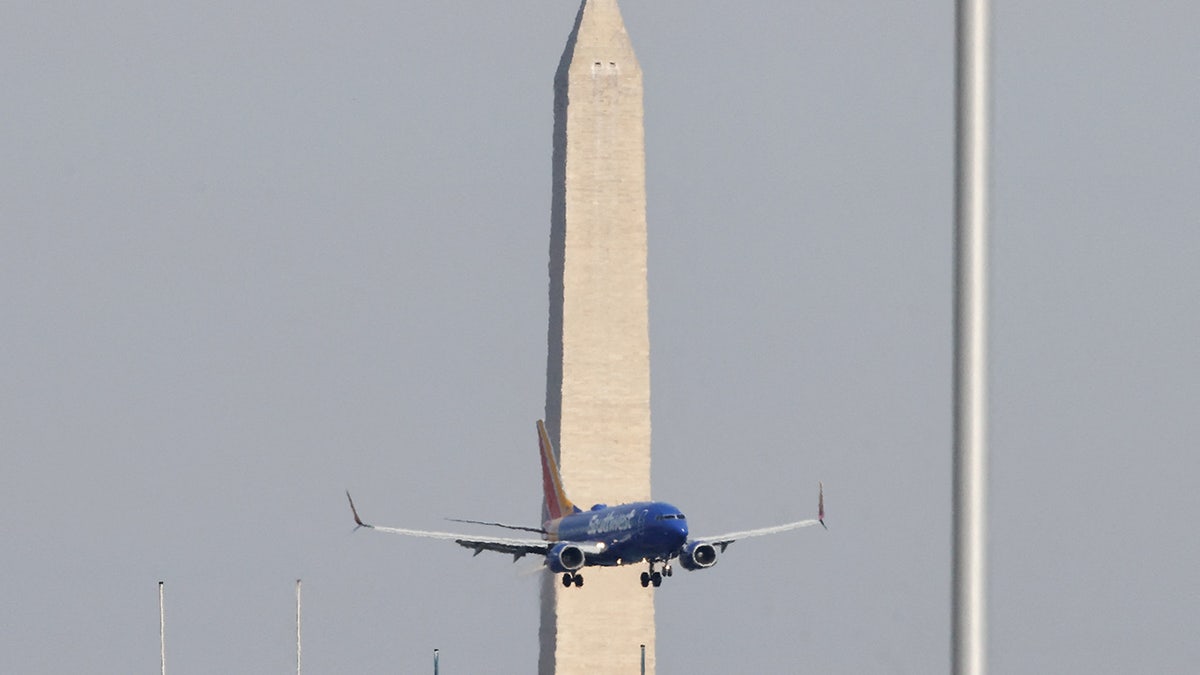
Flight operations at Ronald Reagan National Airport will be suspended during President Trump’s military parade on June 14. (iStock)

An FAA spokesperson told Fox News Digital the agency is working with the Department of Defense to finalize a flyover plan detailing the number and types of aircraft involved.

Temporary Flight Restrictions (TFRs) for the Washington, D.C., area will be issued in partnership with the Department of Homeland Security “to ensure safety and security during the celebration.”

For more Lifestyle articles, visit foxnews.com/lifestyle

Fox News Digital is told the restrictions “will expand the Washington, D.C., Metropolitan Area Special Flight Rules Area (DC SFRA) and the Washington, D.C. Metropolitan Area Flight Restricted Zone (DC FRZ).”

A plane flies near Ronald Reagan Washington National Airport

The FAA will issue Temporary Flight Restrictions for the Washington, D.C., area before, during and after the June 14 events. (Eduardo Munoz/Reuters)

“The FAA will implement traffic management initiatives (TMI) at DCA before, during, and after the event to ensure safety and will facilitate a return to normal operations once the event concludes. During the peak of the celebration, the TMI stops all arrivals and departures,” said the FAA spokesperson. 

The parade on June 14 is scheduled to begin at 6:30 p.m. and conclude at 9:30 p.m.

CLICK HERE TO SIGN UP FOR OUR LIFESTYLE NEWSLETTER

Flight passengers are advised to use the D.C. Metrorail to reach the airport and can expect roadway closures off-airport to increase the travel time.

There will be “no fireworks viewing” due to construction and event parking is strongly discouraged, says the DCA release.

President Donald Trump greets members of the military after speaking at a hanger rally at Yokota Air Base, Sunday, Nov. 5, 2017, in Fussa, on the outskirts of Tokyo, Japan. Trump is on a five country trip through Asia traveling to Japan, South Korea, China, Vietnam and the Philippines. (AP Photo/Andrew Harnik)

At the event on June 14, there will be historical U.S. Army personnel re-enactors, period-accurate equipment, vehicles, flyovers and military bands. (AP Photo/Andrew Harnik)

“Expect delays from road closures and increased pedestrian and vehicle traffic in the area,” it states.

The landmark event will take place on Constitution Ave NW between 15th Street and 23rd Street.

CLICK HERE TO GET THE FOX NEWS APP

At the event, there will be historical U.S. Army personnel re-enactors, period-accurate equipment, vehicles, flyovers and military bands, according to America250.

“The event is designed not only to showcase the Army’s modern capabilities but also to inspire a new generation to embrace the spirit of service, resilience, and leadership that defines the United States,” the America250 site says.

10 time-saving Android automations you can set up right now

0


NEWYou can now listen to Fox News articles!

Many people don’t know that they can automate certain tasks on their Android devices. 

These automations can save them time and streamline their workflows, and they only take a few taps to set up. 

It can take some trial and error to figure out which automations work for you, but the good news is that we have 10 of them you can try right now.

Note: We are using a Samsung Galaxy phone for this guide. Due to Android phones having different user interfaces, depending on the manufacturer, the steps might be slightly different on your device.

Join the FREE “CyberGuy Report”: Get my expert tech tips, critical security alerts and exclusive deals, plus instant access to my free “Ultimate Scam Survival Guide” when you sign up!

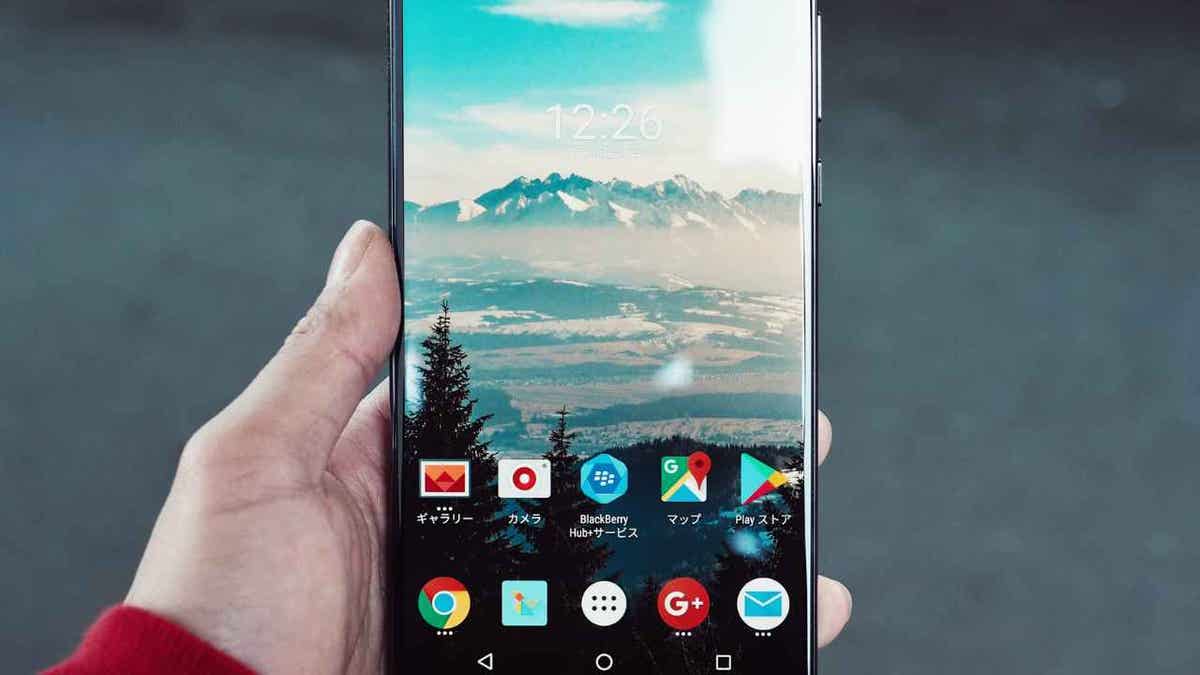
android

An Android phone (Kurt “CyberGuy” Knutsson)

1. How to schedule ‘Do Not Disturb’ mode on Android

If you have a well-defined work schedule, automating when Do Not Disturb (DND) mode turns on and off ensures uninterrupted focus during those times.

CLEAN UP YOUR PHONE: SPEED, STORAGE AND PRIVACY BOOST IN MINUTES

Here’s how you can set it up:

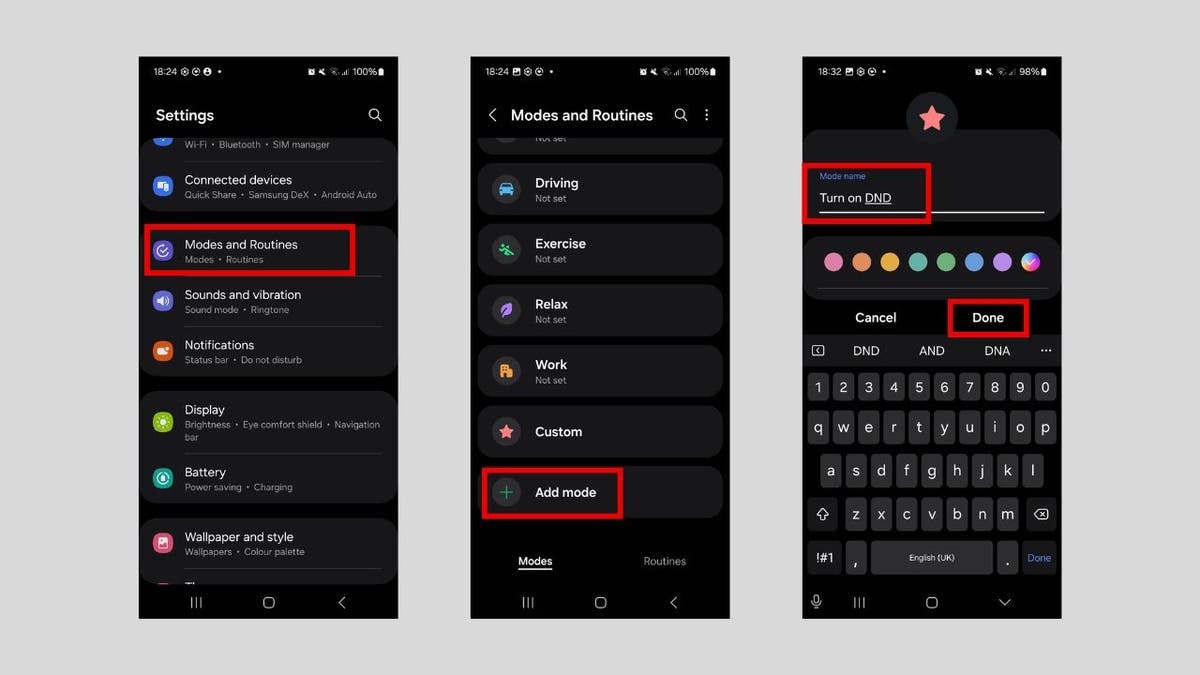
  • Go to Settings.
  • Click Modes and Routines.
  • Tap Add Mode.
  • Give the mode a name, such as Turn on DND, and tap Done.
android automation 2

Steps to schedule “Do Not Disturb” mode (Kurt “CyberGuy” Knutsson)

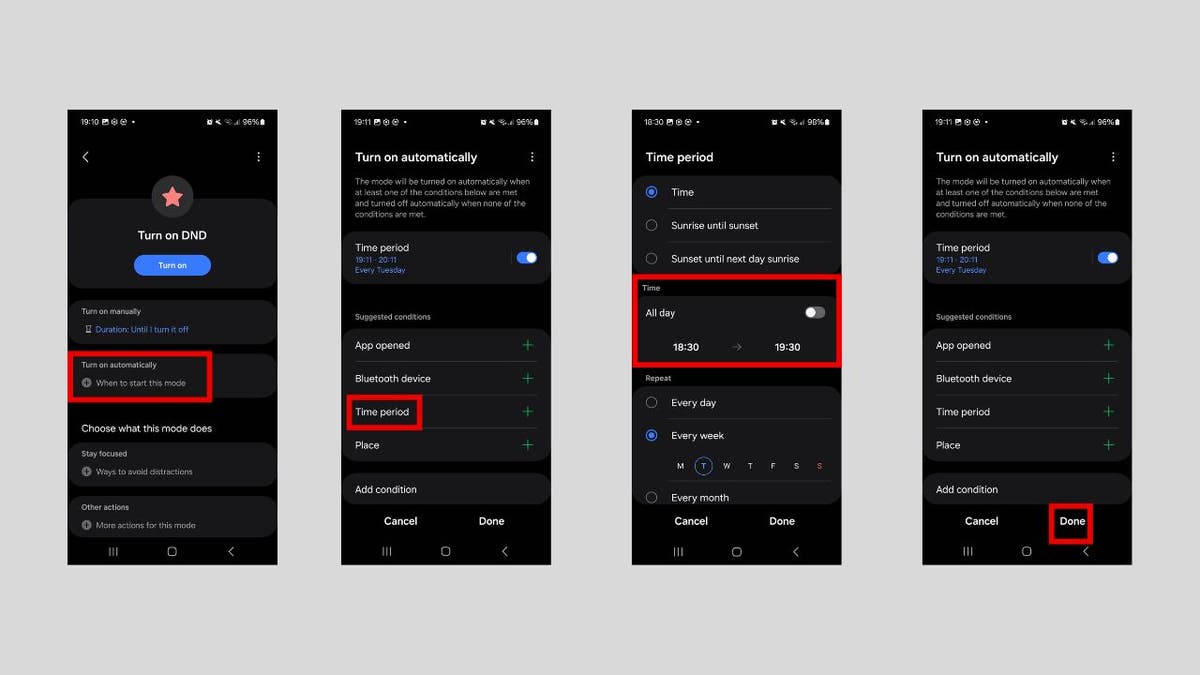
  • Tap Turn on automatically.
  • Tap Time period.
  • In the Time section, set when you want the mode to be enabled and disabled, then tap Done.
  • Tap Done.
android automation 3

Steps to schedule “Do Not Disturb” mode (Kurt “CyberGuy” Knutsson)

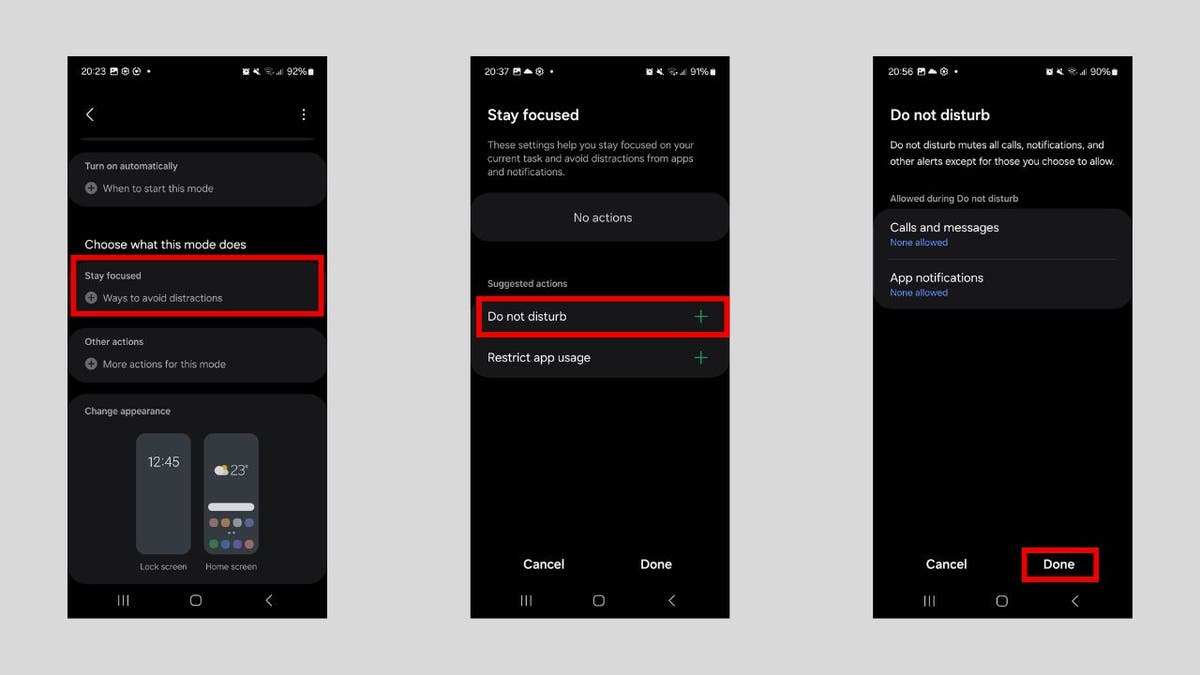
Now you need to choose what the mode does. Follow the steps below:

  • In the Choose what this mode does section, tap Stay focused.
  • Tap Do not disturb.
  • Tap Done.
android automation 4

Steps to schedule “Do Not Disturb” mode (Kurt “CyberGuy” Knutsson)

ANDROID SCAM LETS HACKERS USE YOUR CREDIT CARD REMOTELY

2. How to schedule text messages on Android 

You might need to send a message later, but you might not always remember to do so. Luckily, your Android allows you to schedule it to go out at a specific time in case you’re tied up.

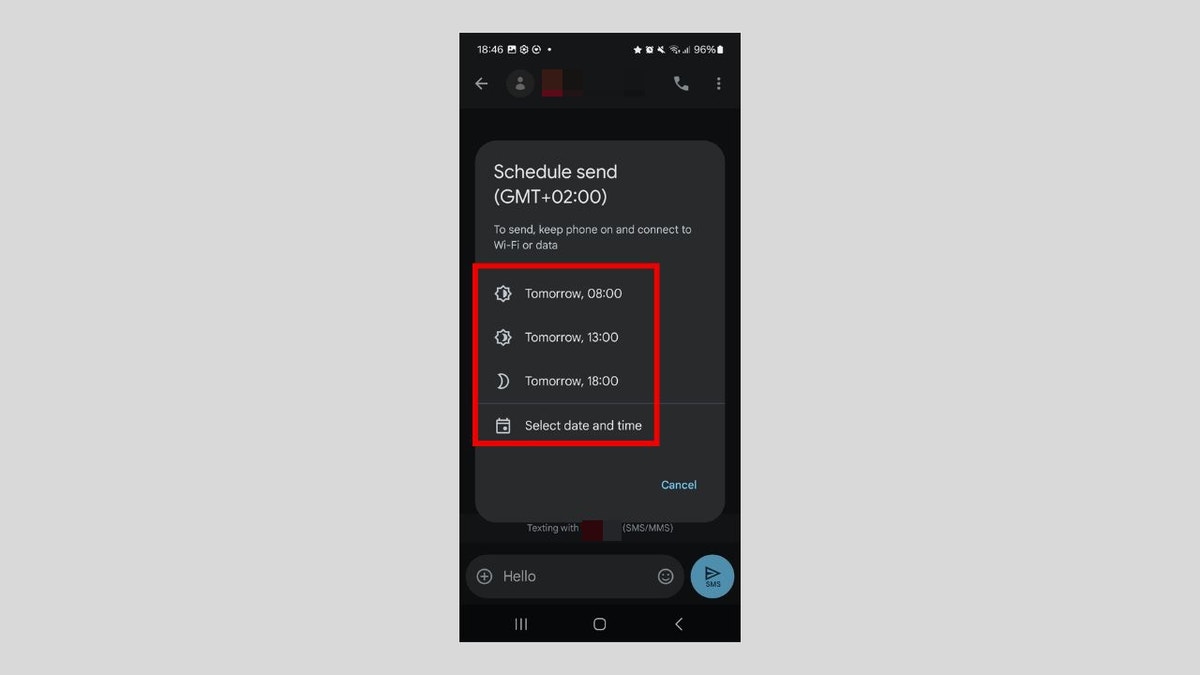
Open the Messages app and compose your message as you normally would. Instead of sending the message, do this instead:

  • Tap and hold the Send button until the Schedule send menu appears.
  • Select one of the dates and times or enter a custom one.
android automation 5

Steps to schedule text messages for later (Kurt “CyberGuy” Knutsson)

  • The message will be sent automatically at the scheduled time.

BEST ANTIVIRUS FOR ANDROIDS – CYBERGUY PICKS 2025

3. How to automatically silence your Android phone at night

Setting up a bedtime mode on your phone ensures you can sleep through the night without interruptions from your Android phone. It simply silences notifications and minimizes distractions automatically.

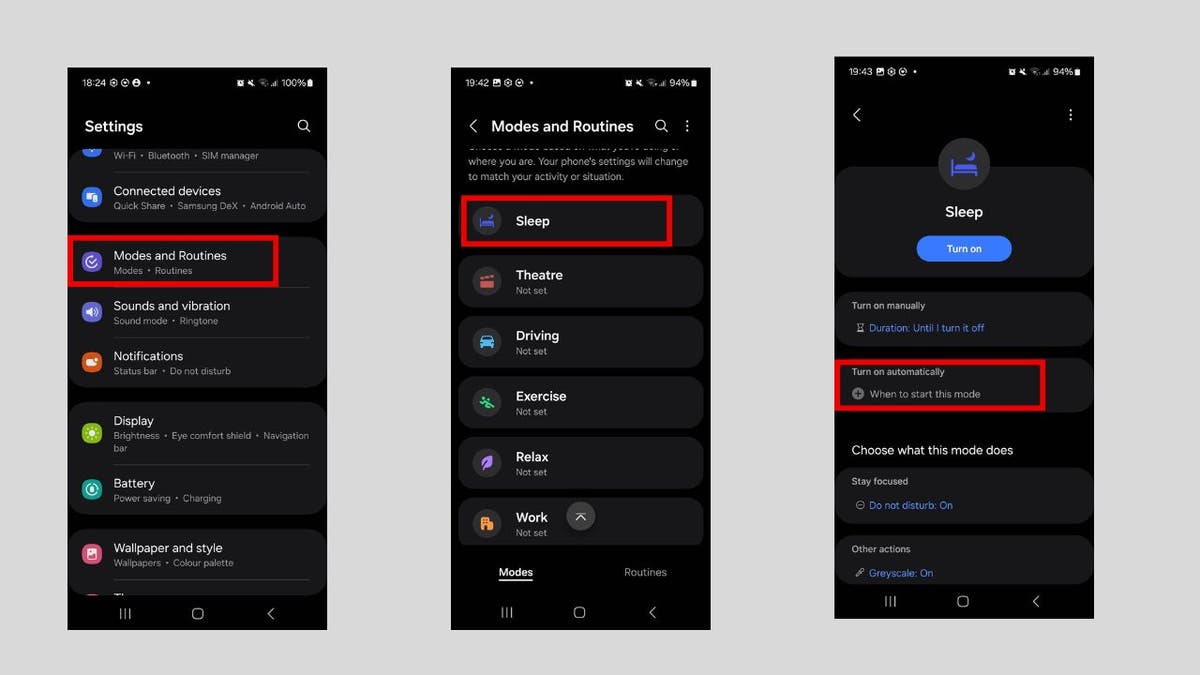
To set it up, you will need to create a sleep routine. Follow the steps below:

  • Go to Settings.
  • Click Modes and Routines.
  • Tap Sleep.
  • Tap Turn on automatically.
android automation 6

Steps to silence your phone during bedtime (Kurt “CyberGuy” Knutsson)

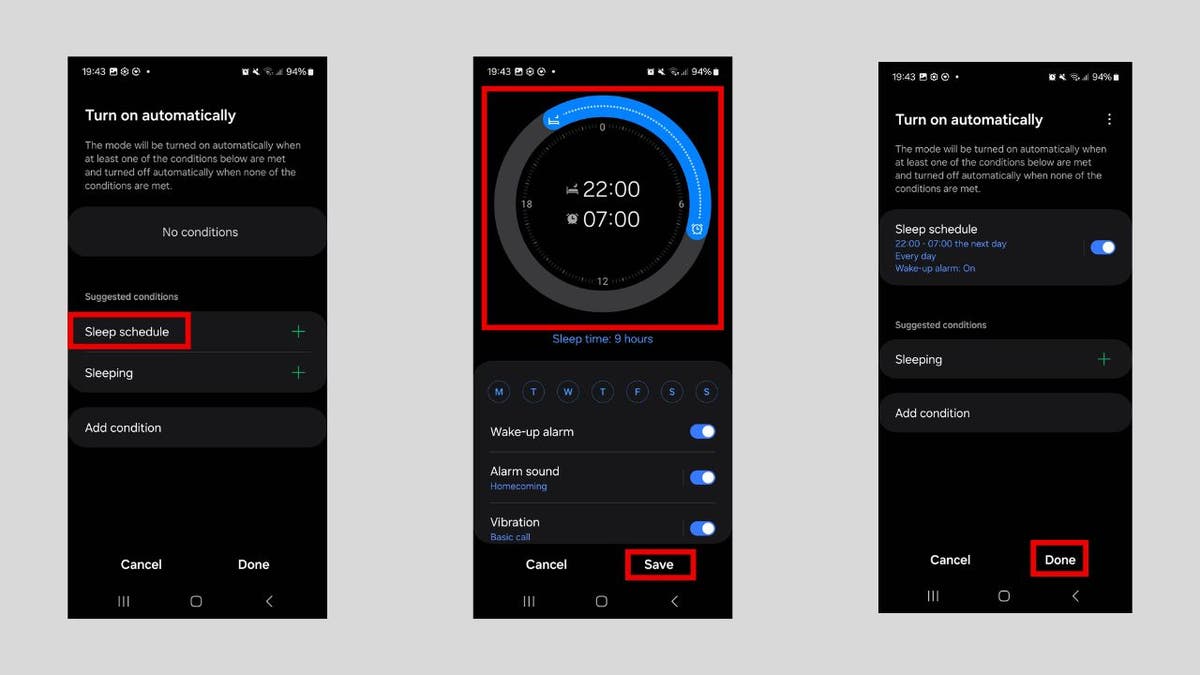
  • Tap Sleep schedule.
  • Set your sleep schedule. You can also tweak other settings, such as Alarm sound and Snooze. Afterward, tap Save.
  • Tap Done.
android automation 7

Steps to silence your phone during bedtime (Kurt “CyberGuy” Knutsson)

HOW TO UPDATE YOUR PIN OR PASSWORD ON YOUR ANDROID

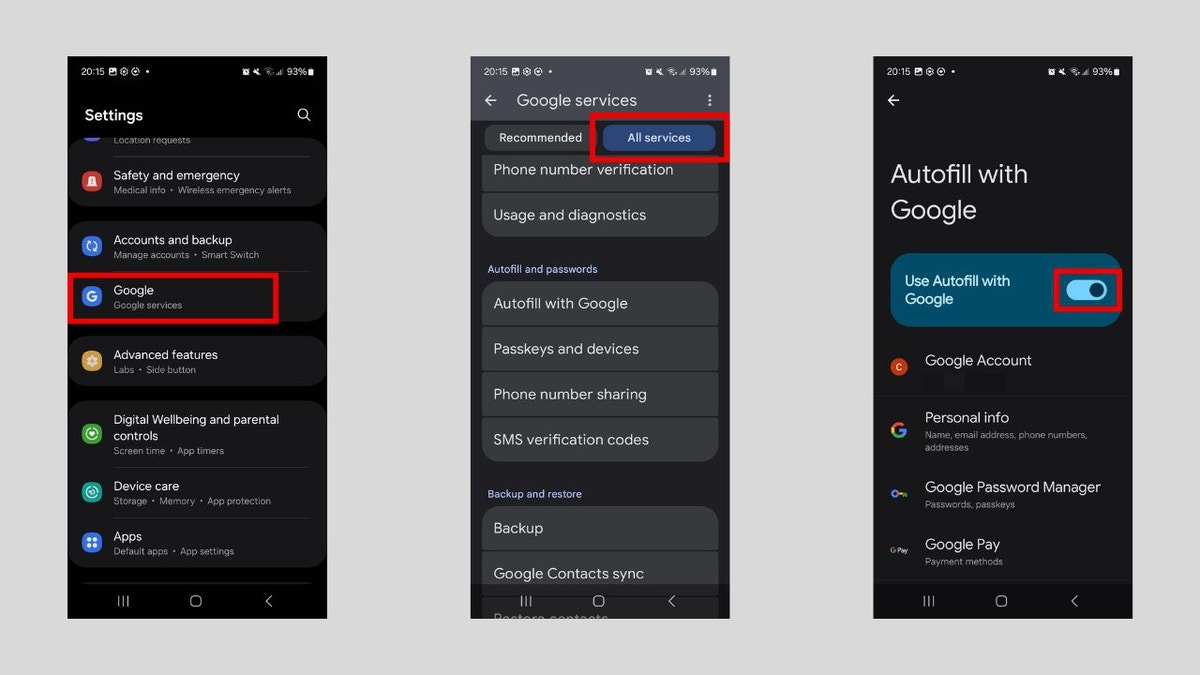
4. Enable Google Autofill to save time on Android

Enabling Google Autofill can save precious time by automatically filling in forms, passwords and payment details across apps and websites. Here’s how to enable it:

  • Go to Settings.
  • Click Google.
  • Select the All services tab and tap Autofill.
  • Toggle on Use Autofill with Google.

 SUBSCRIBE TO KURT’S YOUTUBE CHANNEL FOR QUICK VIDEO TIPS ON HOW TO WORK ALL OF YOUR TECH DEVICES

android automation 8

Steps to autofill details with Google (Kurt “CyberGuy” Knutsson)

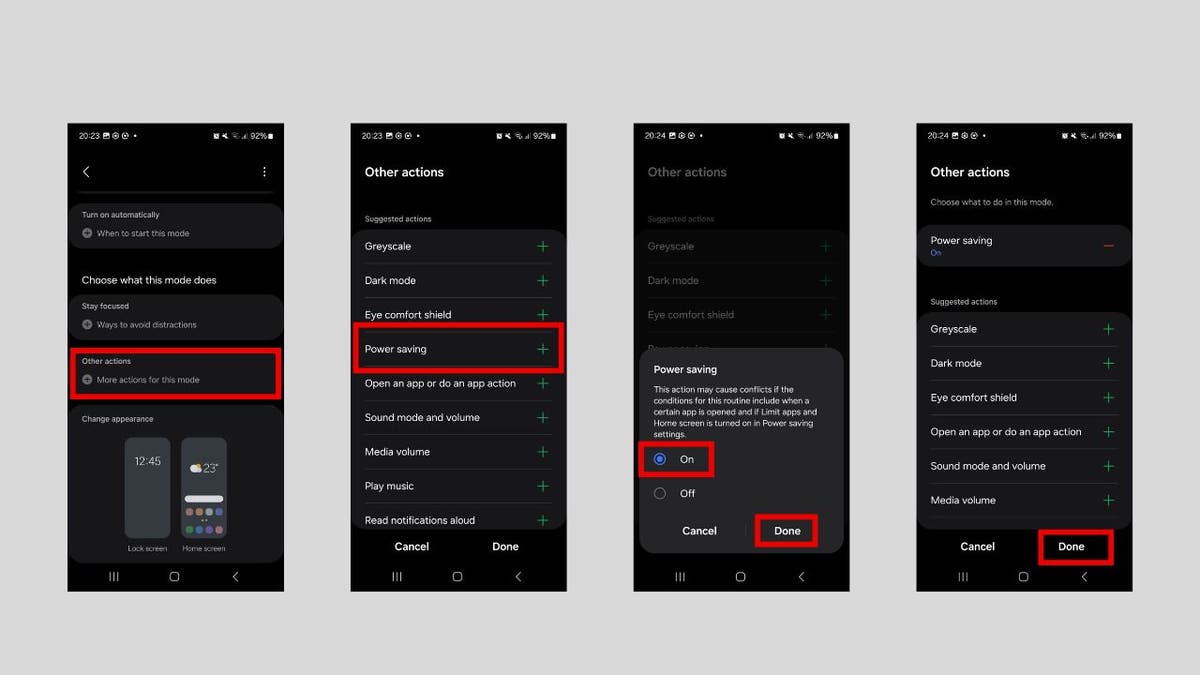
5. Set up automatic battery-saver mode on Android

Setting your phone to automatically switch to power-saving mode when the battery gets low helps you conserve battery life, with no manual intervention required.

Let’s start by setting up the time period for when you want the phone to turn on power-saving mode. Follow these steps:

  • Go to Settings.
  • Click Modes and Routines.
  • Tap Add Mode.
  • Give the mode a name, such as “Turn on power saving.”
  • Tap Done.
  • Tap Turn on automatically.
  • Tap Time period.
  • In the Time section, set when you want the mode to be enabled and disabled.
  • Tap Done.

Now you need to set it to switch to power-saving mode at the set time. Follow these steps:

  • In the Choose what this mode does section, tap Other actions.
  • Tap Power saving.
  • In the prompt, tap the On radio button and then Done.
  • Tap Done.
android automation 9

Steps to toggle battery saver automatically (Kurt “CyberGuy” Knutsson)

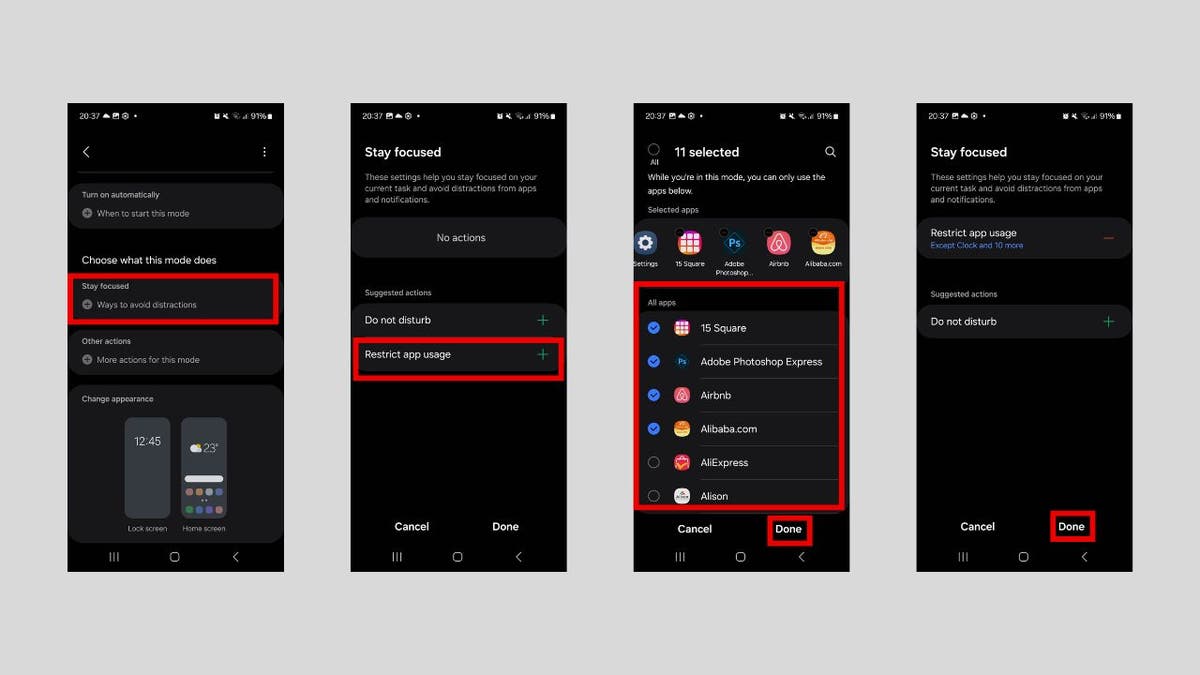
6. Restrict app usage during work hours on Android

Social media, games and other time-consuming apps can be a hindrance when you need to focus on work. This automation is a good one for automatically blocking them during work hours and unblocking them when you’re out of the office. To set it up, you must first set the period with the steps below:

  • Go to Settings.
  • Click Modes and Routines.
  • Tap Add Mode.
  • Give the mode a name, such as “Block Apps During Work.”
  • Tap Done.
  • Tap Turn on automatically.
  • Tap Time period.
  • In the Time section, set when you want the mode to be enabled and disabled.
  • Tap Done.

Now to restrict the apps:

  • In the Choose what this mode does section, tap Stay focused.
  • Tap Restrict app usage.
  • Select the apps you want restricted when the focus mode is on, then tap Done.
  • Tap Done.
android automation 10

Steps to restrict app usage (Kurt “CyberGuy” Knutsson)

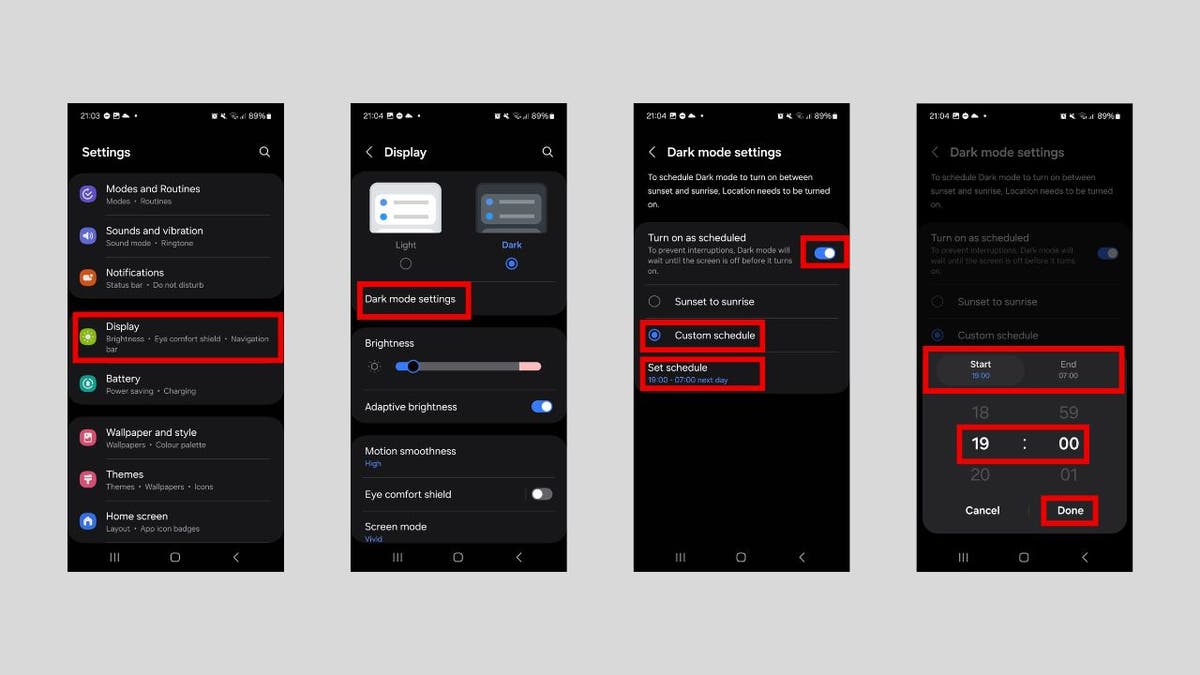
7. Automatically enable dark mode on Android at night

It’s always a good idea to enable dark mode during the evening hours. That way, you can reduce eye strain in low-light conditions. Here’s how you can do that:

  • Open Settings.
  • Click Display.
  • Tap Dark mode settings.
  • Tap Turn on as scheduled.
  • Tap Custom schedule.
  • Tap Set schedule – the ideal time would be between 6 p.m. to 6 a.m.
  • Set the start and end times of the dark mode.
  • Tap Done in the prompt.

HOW TO REMOVE YOUR PERSONAL INFO FROM PEOPLE-SEARCH SITES 

android automation 11

Steps to enable dark mode automatically (Kurt “CyberGuy” Knutsson)

HOW TO HIDE APPS ON YOUR ANDROID TO KEEP THEM SECRET

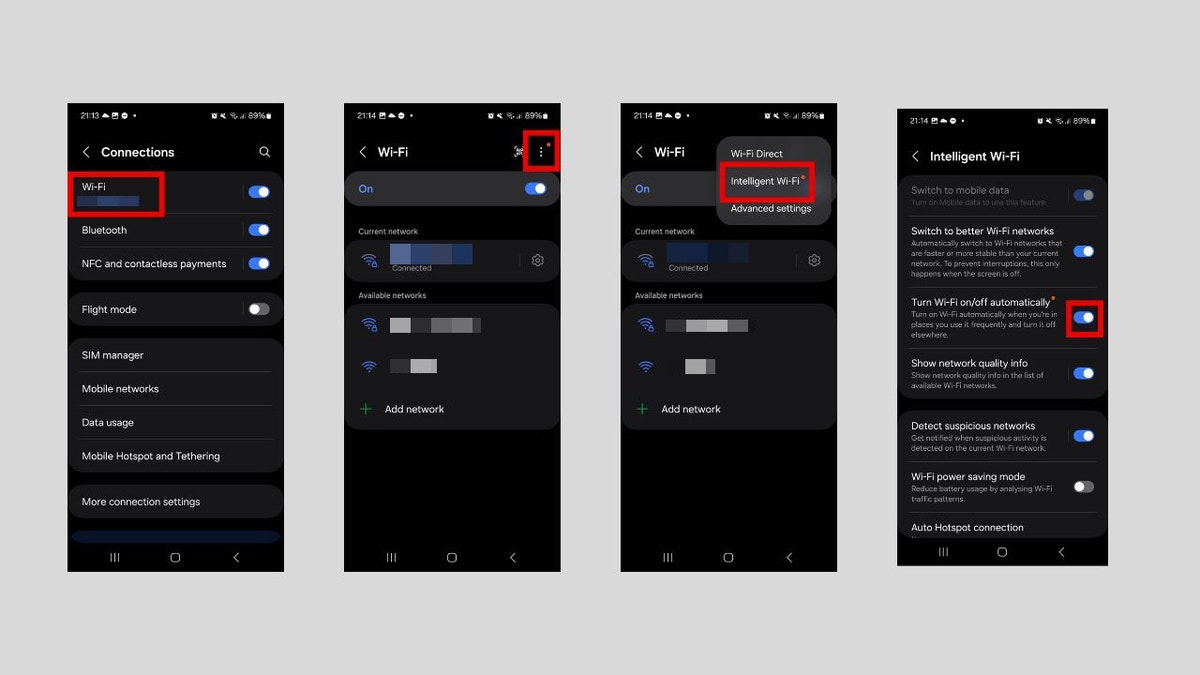
8. Turn Wi-Fi on or off automatically based on location on Android

This location-based Wi-Fi automation helps conserve battery life and enhance security by automatically connecting to trusted networks when you’re at specific locations, like at home or work. It will remain disconnected everywhere else. Here are the steps to do that:

  • Open Settings > Connections > Wi-Fi.
  • Tap the three-dot icon in the top-right corner.
  • Tap Intelligent Wi-Fi in the menu.
  • Toggle on Turn Wi-Fi on/off automatically.
android automation 12

Steps to turn on Wi-Fi based on location (Kurt “CyberGuy” Knutsson)

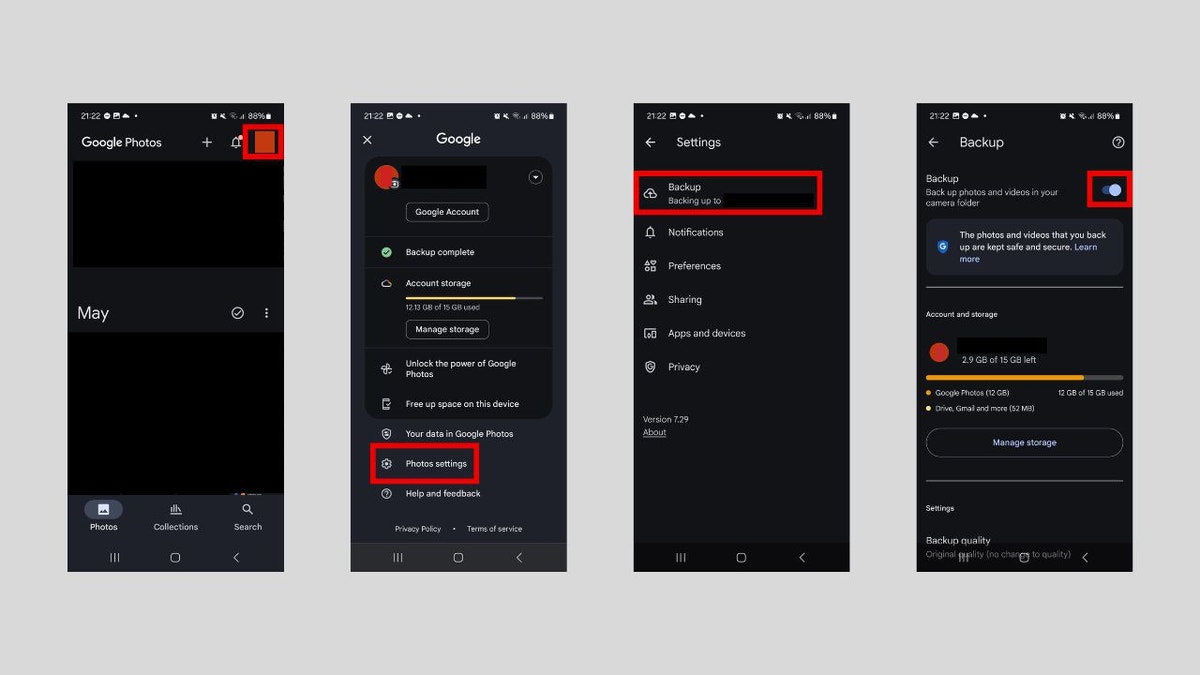
9. Automatically back up photos and videos on Android

By automating your photo backups, you’ll never have to manually save or transfer photos again. They’ll automatically sync to the cloud whenever you take new pictures, giving you peace of mind that your memories are always protected.

While there are several apps you can use to do this, we will use Google Photos. Here are the steps:

  • In the Google Photos app, tap the profile picture icon in the top right corner.
  • Tap Photo settings.
  • Tap Backup.
  • Toggle on Back up photos and videos in your camera folder.

WHAT HACKERS CAN LEARN ABOUT YOU FROM A DATA BROKER FILE 

android automation 13

Steps to automatically back up photos and videos (Kurt “CyberGuy” Knutsson)

10. Enable auto-rotate for specific apps on Android

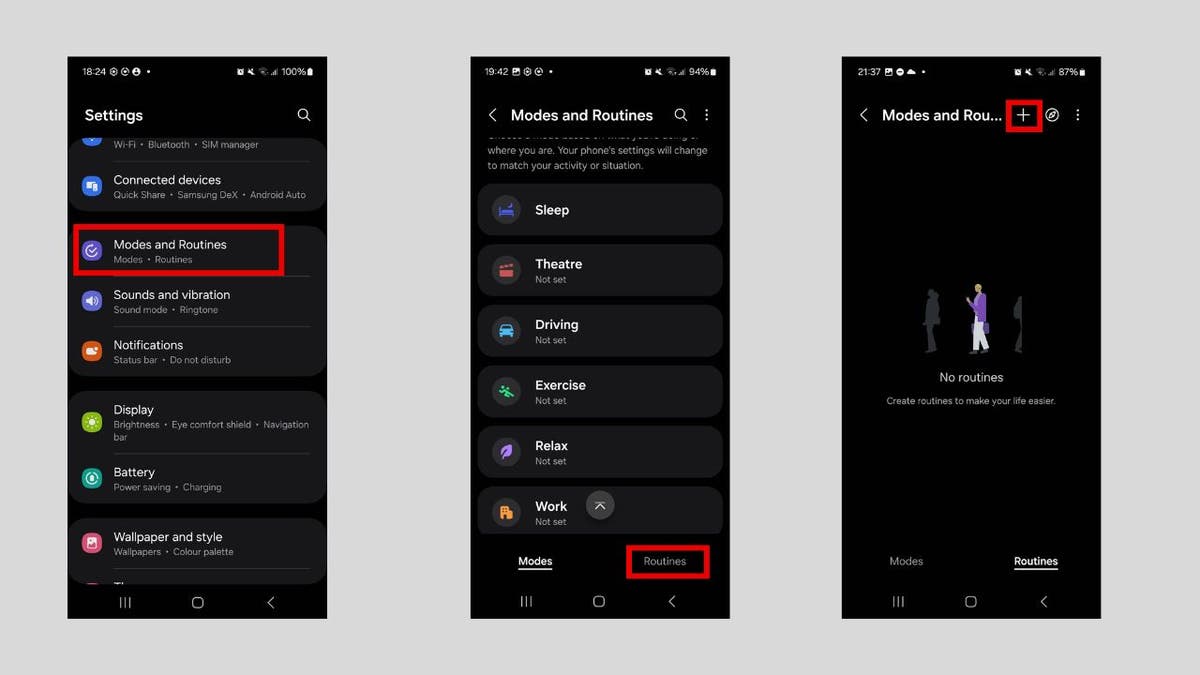
It’s understandable to disable auto-rotation to prevent the screen from unintentionally rotating when you move your device. However, you might want it to turn on again when, for example, watching a movie on Netflix or viewing a photo. To save yourself some frustration, it’s best to automate the process. First, let’s create the routine with the steps below:

  • Go to Settings > Modes and Routines.
  • Tap the Routines tab in the bottom menu.
  • Tap the plus icon in the top menu.

HOW SECURE IS MY PASSWORD? USE THIS TEST TO FIND OUT 

android automation 14

Steps to enable auto-rotate when opening certain apps (Kurt “CyberGuy” Knutsson)

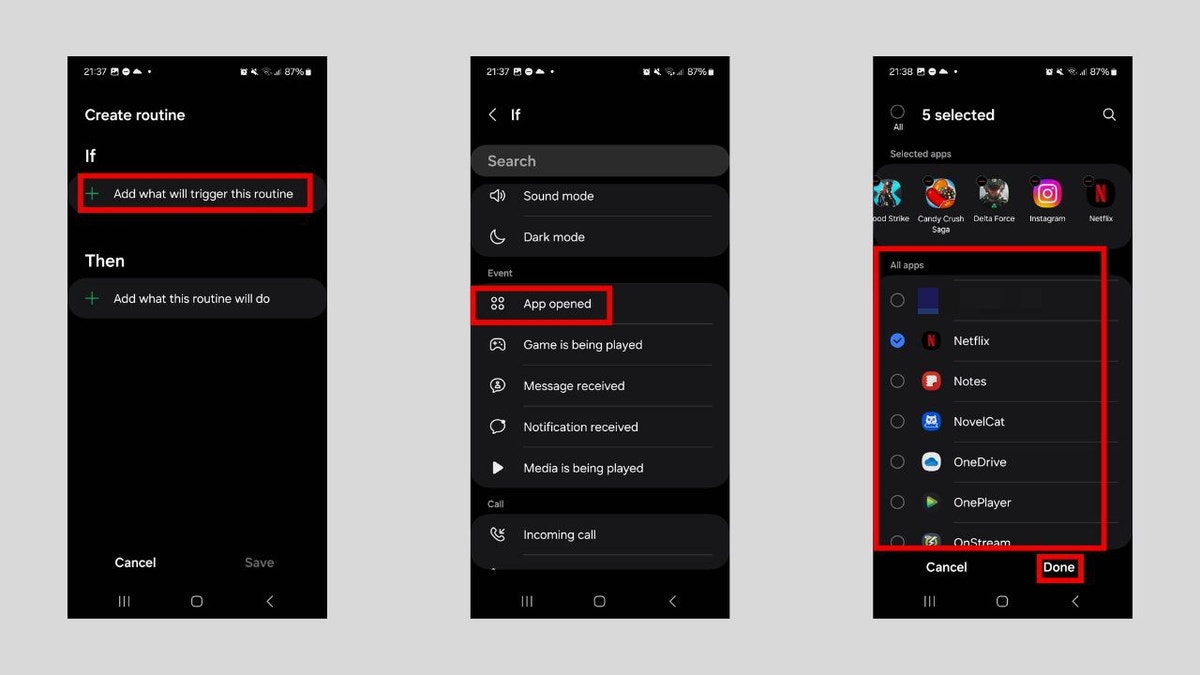
  • Tap Add what will trigger this routine under the IF section.
  • Scroll down to the Event section and tap App opened.
  • Select your media apps and then tap Done.

GET FOX BUSINESS ON THE GO BY CLICKING HERE

android automation 15

Steps to enable auto-rotate when opening certain apps (Kurt “CyberGuy” Knutsson)

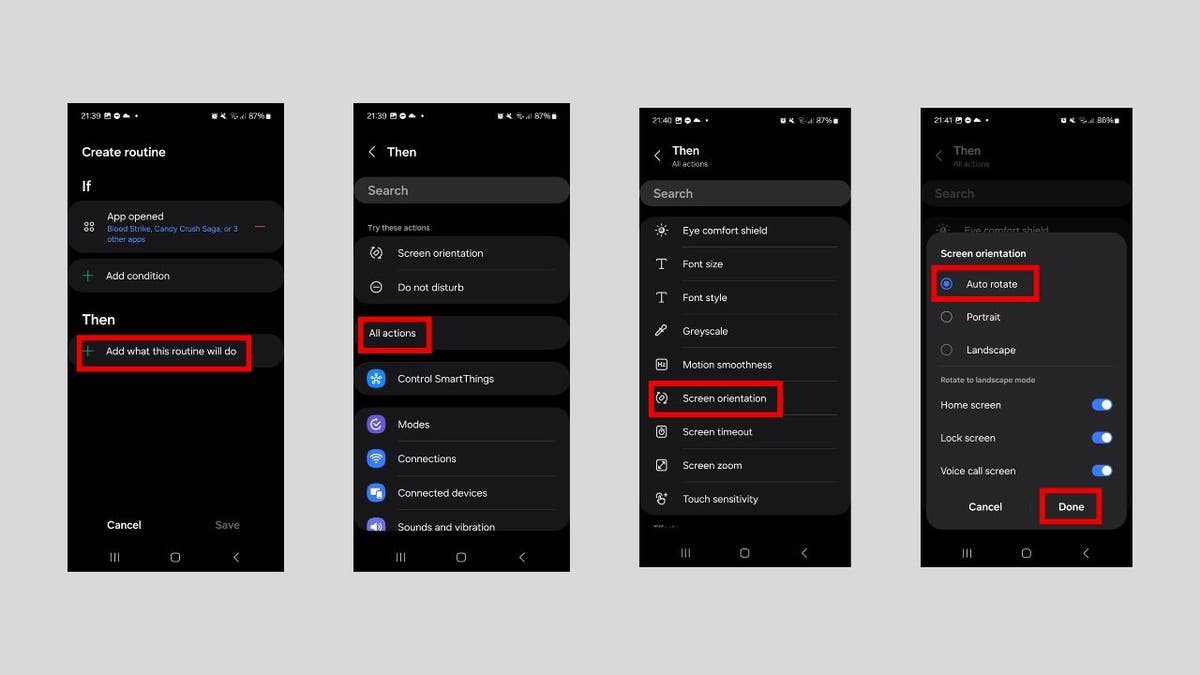
  • Tap Add what this routine will do in the Then section.
  • Tap All actions.
  • Scroll down to the Display section and tap Screen orientation.
  • In the pop-up, select Auto rotate and then tap Done.
android automation 16

Steps to enable auto-rotate when opening certain apps (Kurt “CyberGuy” Knutsson)

  • Tap Save.
  • Give the routine a name and tap Done.

BEST FATHER’S DAY GIFTS FOR EVERY DAD

Kurt’s key takeaways

Automation isn’t just about convenience. It’s about creating habits that improve the way your Android phone works for you, especially in scenarios where it seems like it’s working against you (e.g., causing too many distractions). Your Android phone is smarter than you think. While many of these automations can work for you as is, don’t be afraid to tweak them to your particular scenario.

CLICK HERE TO GET THE FOX NEWS APP

What tedious task are you going to automate now that you know how to go about it? Let us know by writing us at Cyberguy.com/Contact.

For more of my tech tips and security alerts, subscribe to my free CyberGuy Report Newsletter by heading to Cyberguy.com/Newsletter.

Ask Kurt a question or let us know what stories you’d like us to cover.

Follow Kurt on his social channels:

Answers to the most-asked CyberGuy questions:

New from Kurt:

Copyright 2025 CyberGuy.com. All rights reserved.


Source link

Charlamagne says ‘nobody wants to hear’ from Jean-Pierre after Biden cover-up

0

NEWYou can now listen to Fox News articles!

Radio host Charlamagne Tha God on Thursday said while he would gladly read former White House spokeswoman Karine Jean-Pierre’s new book, her credibility is dubious.

Former Biden White House press secretary Karine Jean-Pierre on Wednesday revealed she was registering as an independent and announced a forthcoming book about her time in the tumultuous administration. The longtime Democratic Party operative is urging Americans to step outside harsh party lines in her new book, “Independent: A Look Inside a Broken White House, Outside the Party Lines.”

“Until January 20, I was responsible for speaking on behalf of the President of the United States,” she said in a statement, according to The Associated Press. “At noon on that day, I became a private citizen who, like all Americans and many of our allies around the world, had to contend with what was to come next for our country. I determined that the danger we face as a country requires freeing ourselves of boxes. We need to be willing to exercise the ability to think creatively and plan strategically.”

Charlamagne, who hasn’t been shy about criticizing either party, offered mixed praise for Jean-Pierre’s move during his radio show.

Charlamagne said he was interested in Karine Jean-Pierre’s book, but still questioned her credibility.

FOX NEWS WHITE HOUSE CORRESPONDENTS SHARE SHOCK OVER KARINE JEAN-PIERRE’S PARTY SWITCH

“I respect her being independent because I feel like if you Black in this country, you shouldn’t be loyal to any party,” he said on Thursday’s episode. “You should only be voting your interest. You should only be voting for politicians who are implementing legislation and policies for your communities and your people. And if you ask me, none of these parties have done enough for us to be screaming, ‘We Republican or Democrat,’ so independent is the way to go.”

Jean-Pierre’s reputation is still questionable in his eyes, however.

“When it comes to her in particular, I’m probably going to read the book, but nobody wants to hear from anyone who got up there and lied for the Biden administration,” he said.

He argued such proclamations from people like Jean-Pierre are too little, too late, even if he approves of her general points.

President Biden and White House Press Secretary Karine Jean-Pierre

Karine Jean-Pierre’s sudden shift after defending Biden for years has baffled many commentators. ( Kevin Dietsch/Getty Images, left, AP Photo/Ben Curtis, right.)

CLICK HERE FOR MORE COVERAGE OF MEDIA AND CULTURE

“It’s like a lot of these folks are having a come to Jesus moment way too late,” he said. “They should have been talking like this two or three years ago, and she had a very interesting quote in her press release. The quote was, ‘We need to be willing to exercise the ability to think creatively and plan strategically. We need to be clear-eyed and questioning rather than blindly loyal and obedient as we may have been in the past.’ And that right there is the problem with Democrat supporters, especially Black ones, just blindly loyal and obedient for no damn reason.”

When asked by a co-host about whether such loyalty is referring to Biden or to the presidency as an institution, Charlamagne argued it ultimately resulted in betraying the American people.

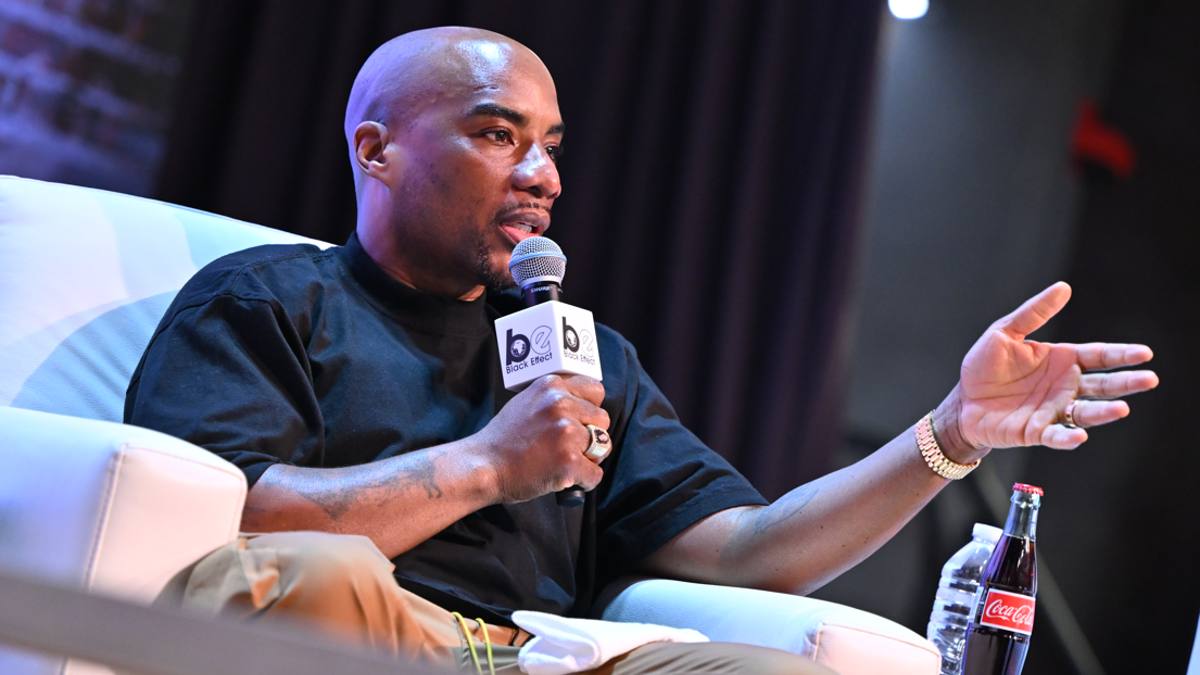
Charlamagne speaks on stage

Charlamagne has spoken multiple times about the Democratic Party’s cover-up of Biden’s purported decline. ((Photo by Derek White/Getty Images for iHeartMedia and The Black Effect Podcast Network))

CLICK HERE TO GET THE FOX NEWS APP

Fox News’ Hanna Panreck contributed to this report.

Underweight luggage rejected at airport as passenger shares unusual complaint

0

NEWYou can now listen to Fox News articles!

A flight passenger shared frustrations about a surprising issue involving a checked bag — garnering plenty of comments from other users.   

Posting in the “r/delta” Reddit forum with the title, “My checked bag was rejected for being underweight,” the user wrote that large souvenirs from a trip would not fit in any of the person’s existing bags. 

So “I stuffed them into the secret duffel bag that I always bring for such contingencies and tried to check it,” the post said. 

FLIGHT PASSENGERS COMPLAIN ABOUT MASKLESS COUGHING ON BOARD AS SUMMER TRAVEL HEATS UP

“Imagine my surprise when the agent said I couldn’t check my fluffy bag because it didn’t weigh enough,” read the post.

“Is this the bizarro luggage counter?” the user asked. 

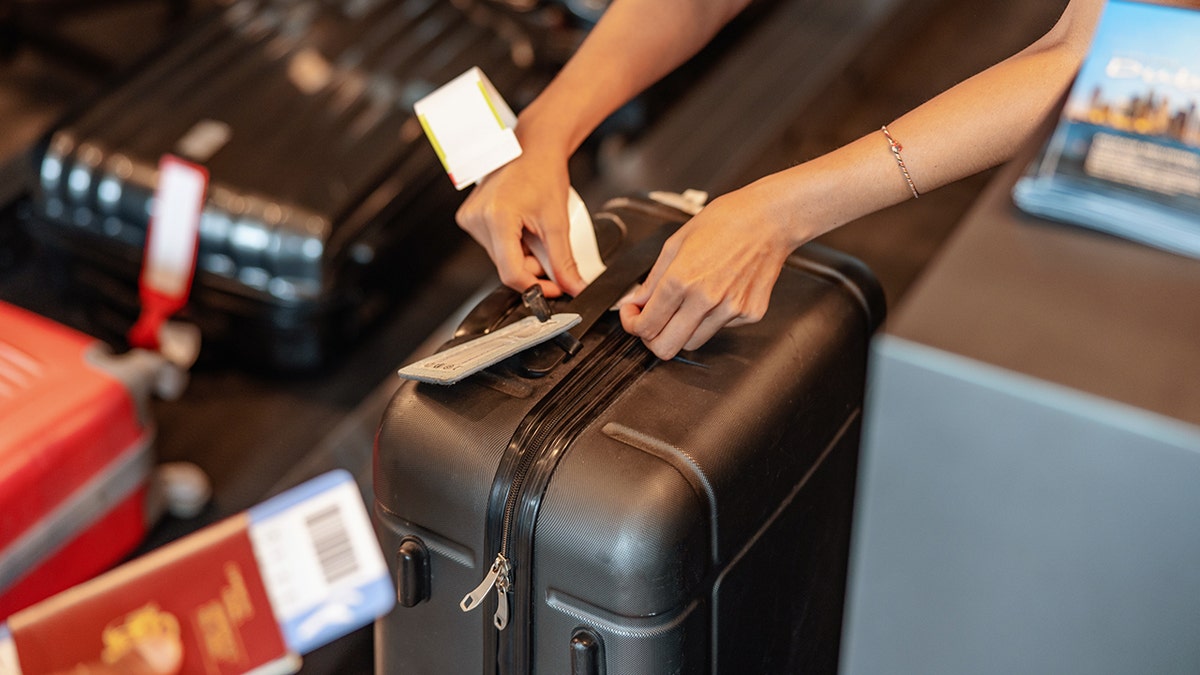
A flight passenger (not pictured) shared frustrations on Reddit when an airline agent rejected a checked bag for being underweight. (iStock)

“The agent said I should go ahead and take it as a third carry-on, but I didn’t want to get hassled by the gate agent,’” continued the post.

The person did not want to be forced to check a backpack at the gate and ended up finding a few “heavy things” from the carry-on to add more weight. 

MAJOR AIRLINE HOLDING FLIGHTS TO ACCOMMODATE FLYERS WITH CONNECTIONS

“Has this happened to anyone else?” asked the Reddit user. “What do you think is the reasoning behind this?”

Users took to the comments section to discuss whether they’d ever heard of a checked bag rejected for being “underweight” and speculated about possible reasons for the rejection.

"Is this the bizarro luggage counter?" the Reddit user asked in a viral post. 

“Is this the bizarro luggage counter?” the Reddit user asked in a viral post.  (iStock)

“Might have been too lightweight and flexible to make it through the sorting machines and various belts to get from the bag check conveyor to the plane,” suggested one user.

Another Redditor wrote, “Could easily be blown from the belt or from the cart.”

CLICK HERE TO SIGN UP FOR OUR LIFESTYLE NEWSLETTER

Said another person, “I would’ve just checked my carry-on and taken souvenirs with me.”

Another user said, “Gate agents lately are super strict … Trying to get three obvious bags past them would most likely not work.”

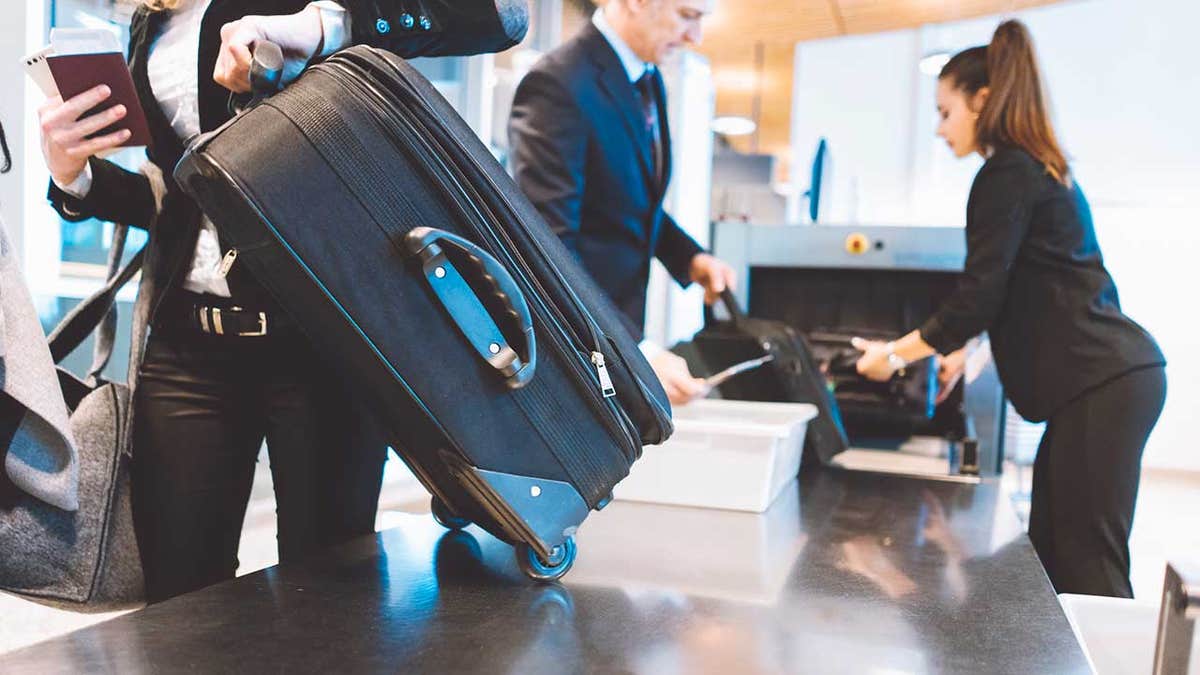
luggage at airport

Most airlines list the maximum weight of a checked bag on their websites, but they do not state whether there is a minimum weight limit. (iStock)

“You checking helium balloons?” joked one user. 

Another Redditor said, “Gate checking usually results in the bag getting damaged less. It’s the unknown airport bag mazes that cause trouble.”

For more Lifestyle articles, visit foxnews.com/lifestyle

Most airlines list the maximum weight of a checked bag on their website, but they do not state whether there is a minimum weight limit.

Delta’s website lists its price for the first and second “standard checked bag under 50 lbs.”

CLICK HERE TO GET THE FOX NEWS APP

Bags on Frontier “must weigh 40 lbs or less,” according to that company’s website. 

Texas woman dies from brain-eating amoeba after using nasal irrigation device

0

NEWYou can now listen to Fox News articles!

A woman in Texas has died after contracting a fatal brain amoeba from contaminated water.

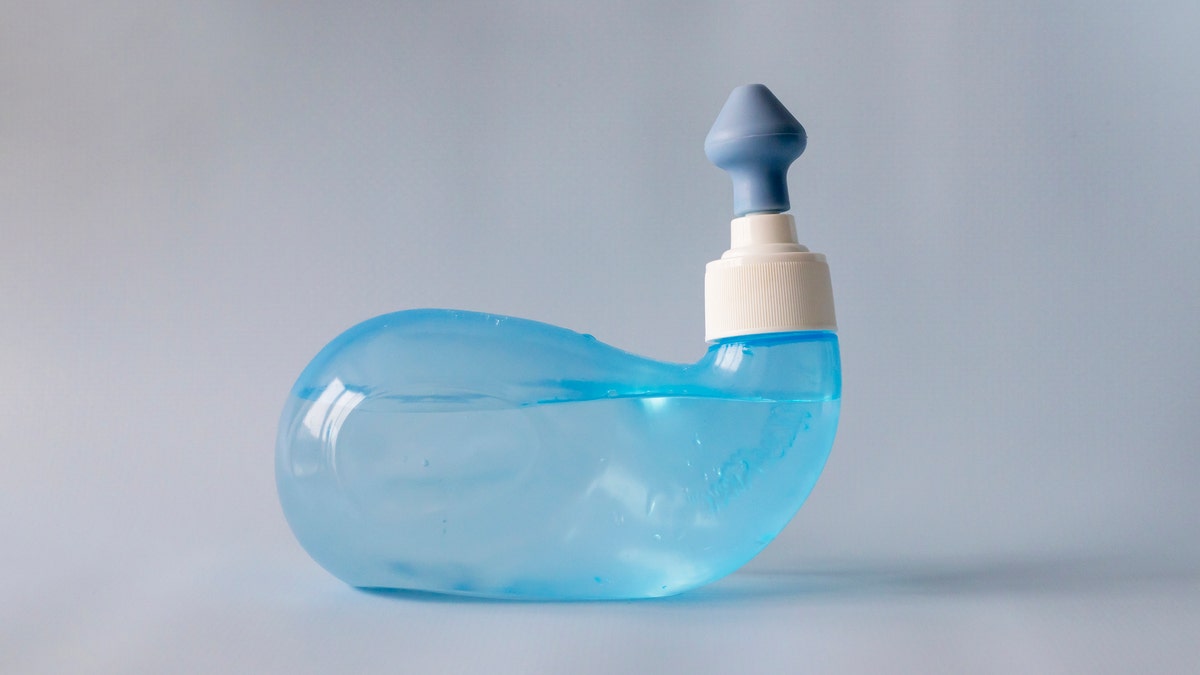
The patient, 71, had used a nasal irrigation device filled with unboiled tap water from an RV’s water faucet, according to an alert from the U.S. Centers for Disease Control and Prevention (CDC).

The “previously healthy” woman was staying at a local campground at the time, the agency stated.

DANGEROUS FUNGUS COULD SPREAD TO PARTS OF US, RESEARCHERS CLAIM

Within four days of using the nasal rinse, the woman developed “severe neurologic symptoms,” including fever, headache and altered mental status. 

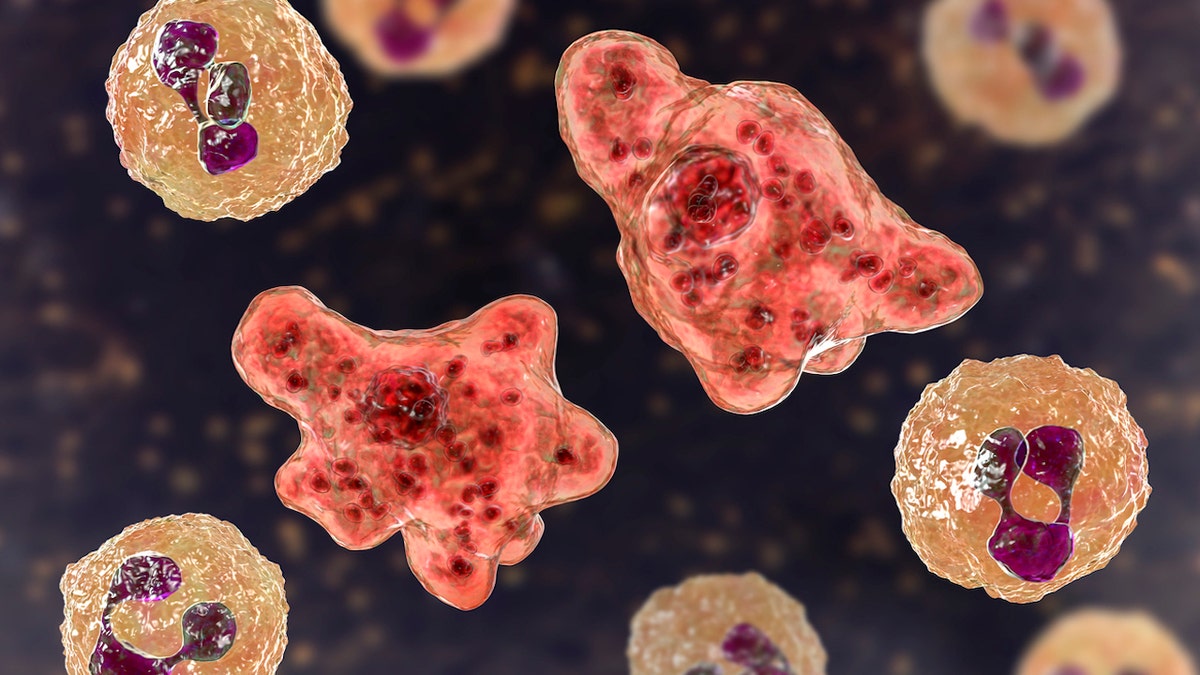
The patient was treated for a potential infection of primary amebic meningoencephalitis (PAM), a rare, deadly brain infection caused by Naegleria fowleri, also known as the brain-eating amoeba.

The woman was treated for a potential infection of primary amebic meningoencephalitis, a rare, deadly brain infection caused by Naegleria fowleri, also known as the brain-eating amoeba. (iStock)

Despite treatment, the woman began having seizures and died eight days after symptoms began.

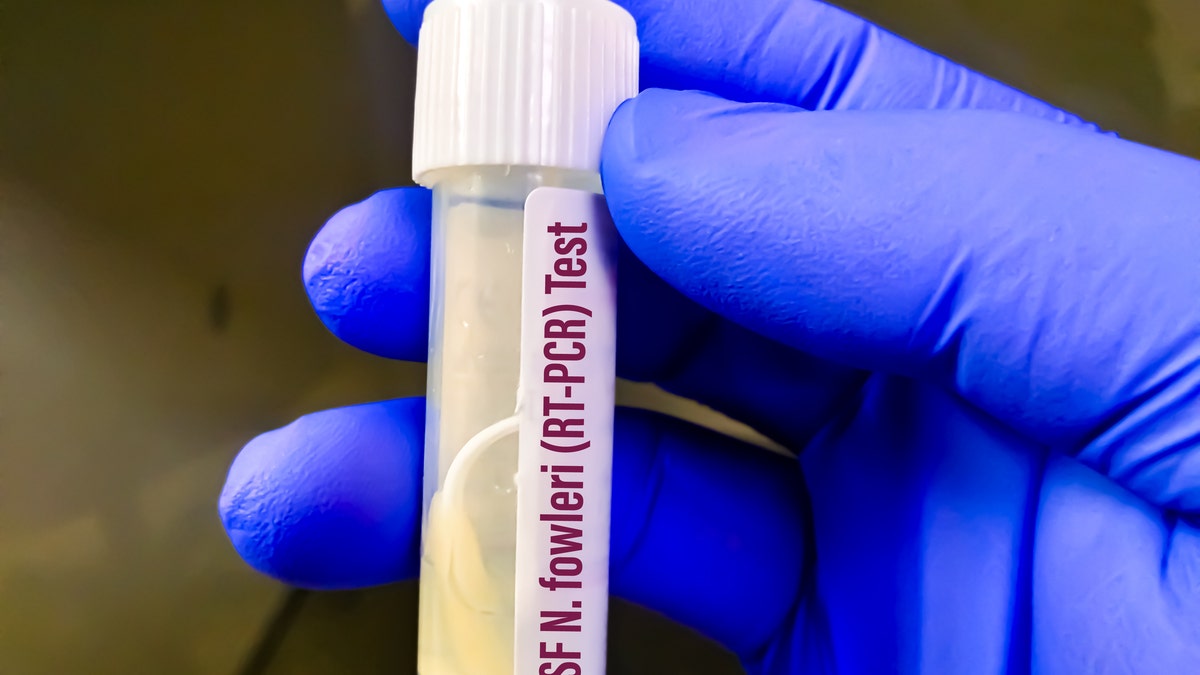
Testing of the patient’s cerebrospinal fluid confirmed she had contracted N. fowleri, according to the CDC.

“This case reinforces the potential for serious health risks associated with improper use of nasal irrigation devices, as well as the importance of maintaining RV water quality and ensuring that municipal water systems adhere to regulatory standards,” the health agency stated.

“Fewer than 10 people in the U.S. every year get infected — but unfortunately, most cases are fatal.”

Naegleria fowleri can also be a risk when swimming in fresh water. It is more prevalent during hotter months, as the amoeba grows best in high air and water temperatures.

Fox News Digital previously spoke with Tammy Lundstrom, chief medical officer and infectious disease specialist for Trinity Health in Michigan, about the risks of infection.

Nasal irrigation

The patient had used a nasal irrigation device (not pictured) filled with unboiled tap water from an RV’s water faucet. (iStock)

“The risk of brain-eating amoeba is very low,” she said. “Fewer than 10 people in the U.S. every year get infected — but unfortunately, most cases are fatal. There are only a handful of survivors of known cases.”

The death rate for Naegleria fowleri exceeds 97%, per the CDC.

Warning signs to recognize

The initial symptoms of PAM usually begin about five days after exposure, but they can be noticed sooner.

Early signs usually include headache, nausea, fever and/or vomiting, the CDC’s website states.

As the infection progresses, people may experience confusion, stiff neck, disorientation, hallucinations, seizures and coma.

DANGEROUS FUNGUS SPREADING IN US HOSPITALS HAS ‘RAPIDLY INCREASED’

“People usually start to feel ill one to 12 days after water exposure,” Lundstrom said. “Early symptoms should prompt a medical evaluation, as they are also signs of bacterial meningitis.”

Death can occur anywhere between one and 18 days of infection, at an average of five days.

Prevention of infection

To prevent contracting the fatal infection, the CDC recommends using “distilled, sterile or boiled and cooled tap water for nasal irrigation,” as “improperly maintained” municipal water and RV water systems carry the risk of disease.

It is also best to avoid immersing your head in the water when swimming in summer, Lundstrom told Fox News Digital.

Naegleria fowleri

Testing of the patient’s cerebrospinal fluid confirmed she had contracted N. fowleri, according to the CDC. (iStock)

“Infection occurs when water harboring the amoeba goes up a person’s nose, usually during swimming,” she said. “It is not known why some people get infected and others, even swimming companions, do not.”

Drinking contaminated water does not present a risk, and the infection does not spread from one person to another, Lundstrom added.

CLICK HERE TO GET THE FOX NEWS APP

Because the amoeba is found in soil, the CDC also recommends avoiding stirring up the sediment at the bottom of lakes, ponds and rivers.

Treatment of brain-eating amoebas

When a patient has been diagnosed with a brain-eating amoeba, treatment usually includes a variety of antifungal medications, as well as antibiotics like rifampin and azithromycin, according to Lundstrom. 

CLICK HERE TO SIGN UP FOR OUR HEALTH NEWSLETTER

Miltefosine, a newer antifungal drug, has been shown to kill Nagleria fowleri in laboratory tests and was used to treat some surviving patients, the CDC states on its website.

“However, the effect of all of these drugs on actual infected people is unknown due to the high fatality rate,” Lundstrom noted.

Brain-eating amoeba

Naegleria fowleri can also be a risk when swimming in fresh water. It is more prevalent during hotter months, as the amoeba grows best in high air and water temperatures. (iStock)

Those who experience sudden headache, fever, stiff neck or vomiting — especially if they have recently been swimming in warm freshwater — should seek immediate medical attention, the CDC recommends.

For more Health articles, visit www.foxnews.com/health

Despite the infection’s high fatality rate, Lundstrom emphasized the rarity of cases. 

“Millions of people enjoy swimming every summer, but only a few become infected,” she said.