12.8 C
New York
Sunday, March 29, 2026
Home Blog Page 225

Measles exposure warning issued for travelers at Newark Airport

0

Following last week’s air traffic control crisis, health officials are now reporting a potential measles outbreak at New Jersey’s Newark Airport.

Travelers were warned of possible measles exposure after a case was confirmed in an individual who traveled through the airport on May 12.

MEASLES SCARE AT MAJOR AIRPORT: WHAT TO KNOW ABOUT POTENTIAL EXPOSURE

The New Jersey Department of Health (NJDOH) released a notice on Thursday addressing the situation, detailing that the newly identified measles case was a non-New Jersey resident who visited the state while infectious.

Passengers arrive at Terminal B at Newark Liberty International Airport in Newark, New Jersey, on May 7, 2025. Health officials are now reporting a potential measles outbreak at the airport. (KENA BETANCUR/AFP via Getty Images)

The department noted the following times and locations where exposure could have potentially occurred.

  • Newark Liberty International Airport, Terminal B – May 12, 2025, between 12:30 p.m. and 4 p.m.

Infected individuals could potentially see symptoms develop as late as June 2.

CLICK HERE TO SIGN UP FOR OUR HEALTH NEWSLETTER

The NJDOH urged parents and caregivers to be aware of symptoms and to stay up to date with the measles, mumps and rubella (MMR) vaccination to prevent the “highly contagious virus” from spreading.

travelers walk through newark airport

The state health department noted the following times and locations where exposure could have potentially occurred: Newark Liberty International Airport, Terminal B – May 12, 2025, between 12:30 p.m. and 4 p.m. (KENA BETANCUR/AFP via Getty Images)

If symptoms arise or exposure is confirmed, NJDOH recommends that individuals contact their healthcare provider before showing up to a medical office or emergency department.

As of May 15, the health department confirmed that no additional associated cases have been identified in New Jersey.

For more Health articles, visit www.foxnews.com/health

Measles symptoms can include high fever; cough; runny nose; red, watery eyes; and a rash that first appears on the face and spreads down the body.

The virus is transmitted through particles from coughing or sneezing, and can remain in the air for up to two hours after an infected person has departed the area.

girl with measles sores on her chest

Measles symptoms can include high fever; cough; runny nose; red, watery eyes; and a rash that first appears on the face and spreads down the body. (iStock)

The NJDOH stressed that the most effective way to prevent measles is to receive two doses of the MMR vaccine, as the highest-risk group includes unvaccinated and partially vaccinated individuals.

The department encourages all individuals to get vaccinated before traveling internationally

CLICK HERE TO GET THE FOX NEWS APP

One dose can be given to infants aged six to 11 months before travel. Two more doses can be administered after their first birthday, according to officials.

Endurance swimmer to circle Martha’s Vineyard in frigid waters to protect sharks

0

A daring endurance swimmer is taking it to the next level as a tribute to the 50th anniversary of the film “Jaws.”

Lewis Pugh, 55, will be swimming 62 miles around the island of Martha’s Vineyard in Massachusetts with the water temperature predicted to be 47 degrees.

“On this swim, it’s very different: We’re just talking about sharks all the time,” Pugh told The Associated Press (AP).

ANGLER SHATTERS PREVIOUS FISH STATE RECORD BY REELING IN BLACK CRAPPIE

He said that he plans on wearing his usual swimming uniform, which is not a wetsuit. Rather, he’ll be wearing just trunks, a cap and goggles, he said.

The daredevil has gone swimming near glaciers and volcanoes, as well as among hippos, crocodiles and polar bears.

Lewis Pugh will swim in 47-degree waters without a wetsuit in an effort to change the public’s perception of sharks, he said. (AP Photo/Robert F. Bukaty)

Pugh said his goal is to raise awareness of the need to protect sharks and to change public perception of the mighty fish.

The American Association for the Advancement of Science estimates about 274,000 sharks are killed globally each day.

ANGLER SHATTERS PREVIOUS FISH STATE RECORD BY REELING IN BLACK CRAPPIE

Pugh said the popular 1975 movie “Jaws” showcased sharks as “villains, as cold-blooded killers.” 

He told AP, “It was a film about sharks attacking humans and for 50 years, we have been attacking sharks … It’s completely unsustainable. It’s madness. We need to respect them.”

Jaws Anniversary Shark Swim

“Jaws” was released in June 1975 and directed by Steven Spielberg. It was based on a novel by Peter Benchley, who also wrote the screenplay.  (AP Photo/Charles Krupa)

He added, “We need to protect life in our oceans — all our futures rely on it.”

On the swim, safety personnel in a boat and kayak will follow Pugh. They’ll have a “shark shield” device that uses an electric field without harming sharks to deter them.

For more Lifestyle articles, visit foxnews.com/lifestyle

He plans to start the swim on Friday, which is estimated to take about 12 days.

“Jaws” was released in June 1975; it was directed by Steven Spielberg, with a screenplay by Peter Benchley. It starred Richard Dreyfuss, Roy Scheider, Robert Shaw and Lorraine Gary. 

Jaws Anniversary Shark Swim

Endurance swimmer Lewis Pugh will swim around Martha’s Vineyard island.

The film tells the story of a great white shark that terrorizes the island of Martha’s Vineyard.

CLICK HERE TO SIGN UP FOR OUR LIFESTYLE NEWSLETTER

“Jaws” was an “instant blockbuster and the highest-grossing film in movie history until it was bested by 1977’s Star Wars,” according to History.com.

Jaws Anniversary Shark Swim

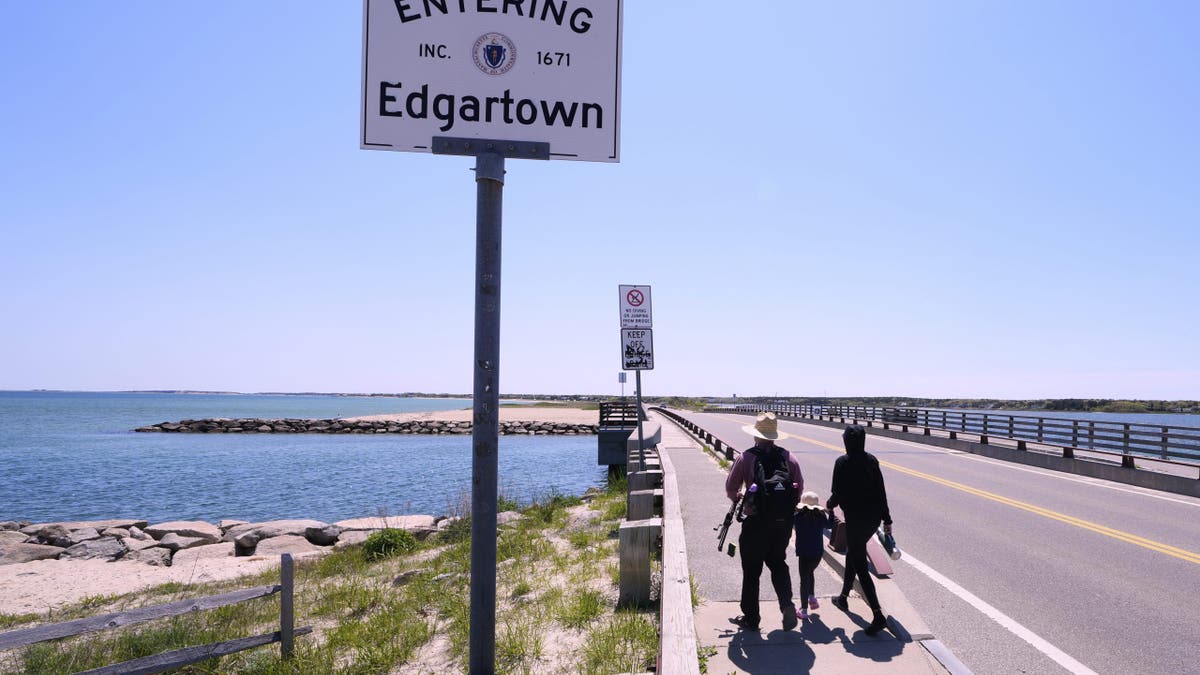
A famous bridge known to tourists and locals as “Jaws Bridge” (pictured) is on Beach Road connecting the towns of Edgartown and Oak Bluffs. (AP Photo/Charles Krupa)

A famous bridge known to tourists and locals as “Jaws Bridge” is on Beach Road connecting the towns of Edgartown and Oak Bluffs.

The bridge is popular among beachgoers, with people jumping off the ledge into the water.

CLICK HERE TO GET THE FOX NEWS APP

Pugh said he will spend the rest of his time on the Vineyard educating the public about sharks.

The Associated Press contributed to this report.

Mom of 5 earns degree after going completely blind, now aims to help others

0

When a Tennessee mother of five received her college degree on May 9, she couldn’t see her family cheering in the audience – because she is completely blind.

Even so, as Amanda Juetten, 47, crossed the stage to accept her degree – magna cum laude – from Tennessee Tech University, she was more certain than ever about her path forward.

“I’m totally blind,” Juetten told Fox News Digital in an interview. “So I’ve got my guide dog by my side.”

FOOD CHOICES THAT CAN BOOST YOUR VISION AND PROTECT AGAINST EYE DISEASE

“The two guys I was sitting by told me to follow them — we were a team. I’m concentrating on shaking all the hands and getting across the stage. I was thinking, ‘This isn’t the end. It’s really the beginning of what’s next.’”

Juetten, who recently became a grandmother, began her college journey nearly 30 years ago, but had to postpone her studies when she had a baby right out of high school — and immediately went to work to provide for her new family.

Amanda Juetten, 47, graduated magna cum laude from Tennessee Tech University with her guide dog by her side. (Tennessee Tech University)

She eventually returned to higher education, but in 2020, after years of progressive vision loss from a condition called retinitis pigmentosa, she found herself in the dark — literally.

“I was left totally blind with no skills for blindness,” Juetten said. “Over the years, I had been taught a lot of skills for using my remaining vision, but not what to do with no vision at all.’”

GIRL DESPERATE TO SEE THE WORLD BEFORE SHE GOES COMPLETELY BLIND

Determined to regain her independence, she enrolled in an eight-month program at the Colorado Center for the Blind.

“I thought, ‘I know blind parents make their kids’ lunches. I know blind parents go to PTA meetings. I can do this. I just need to be around a bunch of other blind people,’” she recalled.

“I want to help give people the skills to find their voice.”

“Blind people are not sitting in their basements waiting for the end. They’re out there living their lives, and I wanted to do that, too.”

With her new skills and adaptive techniques — and a renewed sense of confidence — Juetten enrolled at Tennessee Tech in the fall of 2022, pursuing a professional studies degree with a concentration in organizational leadership.

CLICK HERE TO GET THE FOX NEWS APP

“It’s been great,” Juetten said. “The instructors were asking, ‘What are your needs? How can I make this accessible to you?’ They have been fantastic for doing that. I never got pushback. I didn’t get people saying, ‘Why are you taking these classes?’”

Now, the newly graduated Juetten is advocating for more acceptance and understanding of the blind.

A blind woman in graduation robes raises her fist in celebration during her commencement ceremony.

Juetten became completely blind in 2020 after years of progressive vision loss from a condition called retinitis pigmentosa. (Tennessee Tech University)

“The blind need a voice,” Juetten said. “I have a voice and I love to use it. I want to help give people the skills to find their voice. We need more teachers and more people in the field who believe in the full capacity of the blind.”

Next, she plans to pursue a graduate degree in blindness rehabilitation and possibly even a doctorate.

CLICK HERE TO SIGN UP FOR OUR HEALTH NEWSLETTER

“I want to begin offering services in assistive technology, Braille and the things I’ve learned and am doing well,” Juetten said. “I want to teach blind people as a vendor of vocational rehabilitation.”

Juetten has traveled to Washington, D.C., to lobby for blindness-related initiatives and to San Francisco to protest rideshare drivers who deny service to passengers with wheelchairs or service animals.

A woman smiles as she receives a paw shake from her guide dog in a warmly lit room

After conquering blindness, the devoted mom of five rebuilt her life with the help of her guide dog, who has been by Juetten’s side through every step of her academic journey. (Tennessee Tech University)

She also serves on the board of the National Federation of the Blind of Tennessee and is a past president of the Tennessee Association of Guide Dog Users. 

Her guide dog, Colonel, is always by her side.

For more Health articles, visit www.foxnews.com/health

Juetten has the below message for anyone facing blindness.

“You still have the same hopes and dreams,” she said. “All of those things that you wanted to do before you were blind, you still want to do those things. So let’s find a way to do that.”

How to free up PC storage space and improve performance with these proven methods

0


Using a PC is all fun and games until you run out of storage. We’ve all been there, and the problem becomes more frequent if you’ve been using your PC for years. Over time, the hard disk starts filling up with everything, including PDFs, video files, random screenshots, and duplicate photos transferred from an SD card or your phone.

Once your PC’s storage fills up, it slows down because the resources required to process tasks become limited. I will discuss some proven methods to reclaim valuable space and improve your computer’s performance.

If you’re not a PC user, find more ways to free up space on these devices: iPhoneAndroidMac

JOIN THE FREE CYBERGUY REPORT: GET MY EXPERT TECH TIPS, CRITICAL SECURITY ALERTS, AND EXCLUSIVE DEALS — PLUS INSTANT ACCESS TO MY FREE ULTIMATE SCAM SURVIVAL GUIDE WHEN YOU SIGN UP!

a desktop computer

Empty recycle bin

When you delete something on your PC, it remains in the Recycle Bin and still takes up space on your hard disk. The Recycle Bin usually holds deleted files for 30 days, but if you need to free up space right away, emptying it is a good first step. Note that “Recycle Bin” is the term used on Windows. To free up disk space from the Recycle Bin:

  • Search for Recycle Bin on your desktop and right-click it.
  • Select Empty Recycle Bin.
  • Confirm the deletion.

HOW TO FREE UP SPACE ON YOUR ANDROID

Free up PC space 2

Step to empty recycle bin on PC. (Kurt “CyberGuy” Knutsson)

BEST ANTIVIRUS FOR PCS & MACS — CYBERGUY PICKS 2025

Delete unnecessary apps

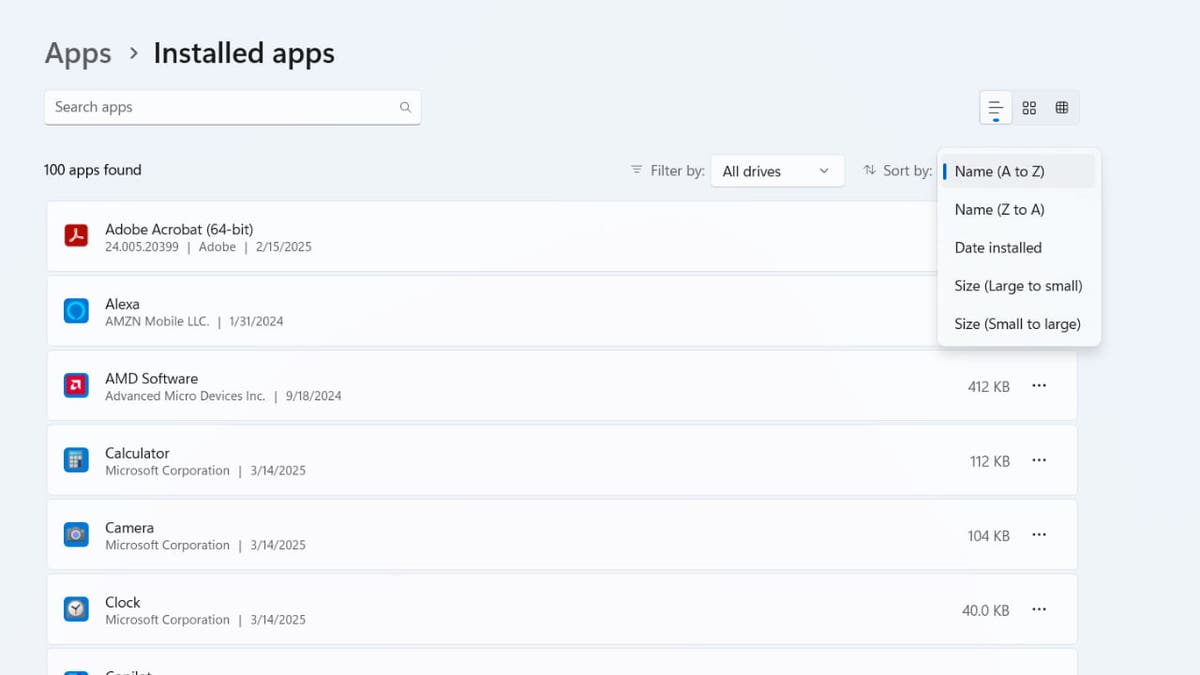
After clearing the Recycle Bin, the next step is to delete unnecessary apps. Unused applications take up valuable storage space and can slow down your system. Removing them will free up space and improve performance on your Windows PC.

  • Go to Settings
  • Click Apps
  • Select Installed apps.
  • Sort apps by size to find large ones.
  • Click an app and select Uninstall.
free up PC space 3

Image of Installed apps on a PC. (Kurt “CyberGuy” Knutsson)

WHAT TO DO IF YOU THINK YOUR PC HAS A VIRUS

Delete the files you don’t need

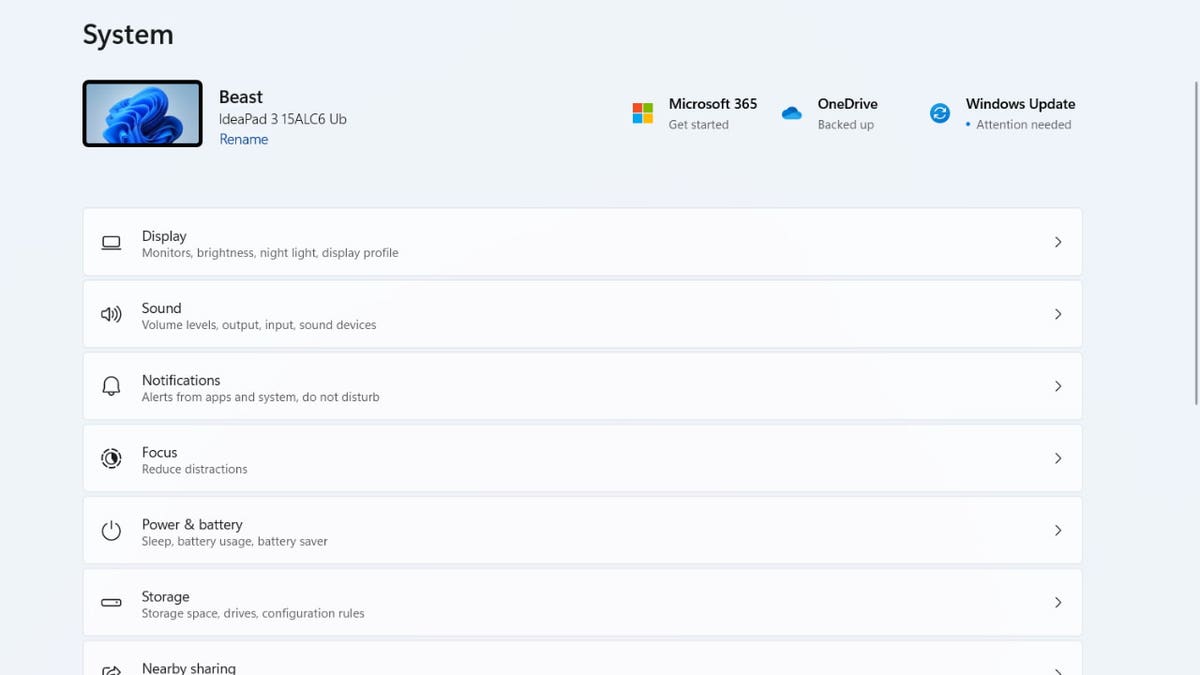
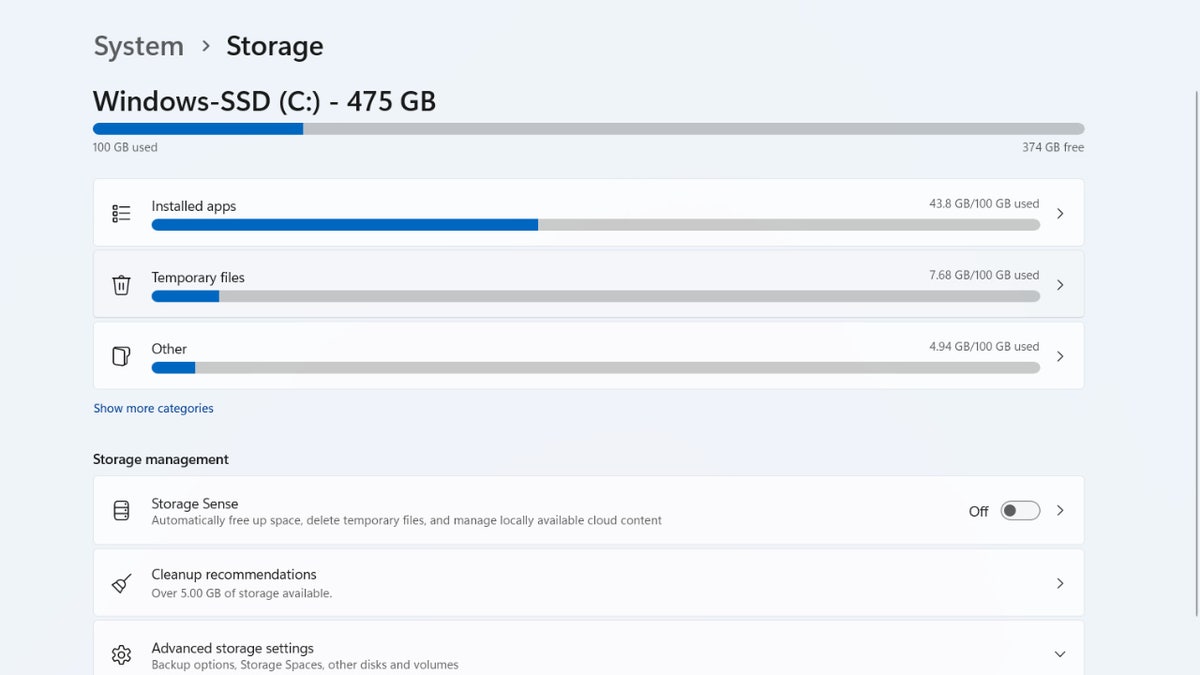
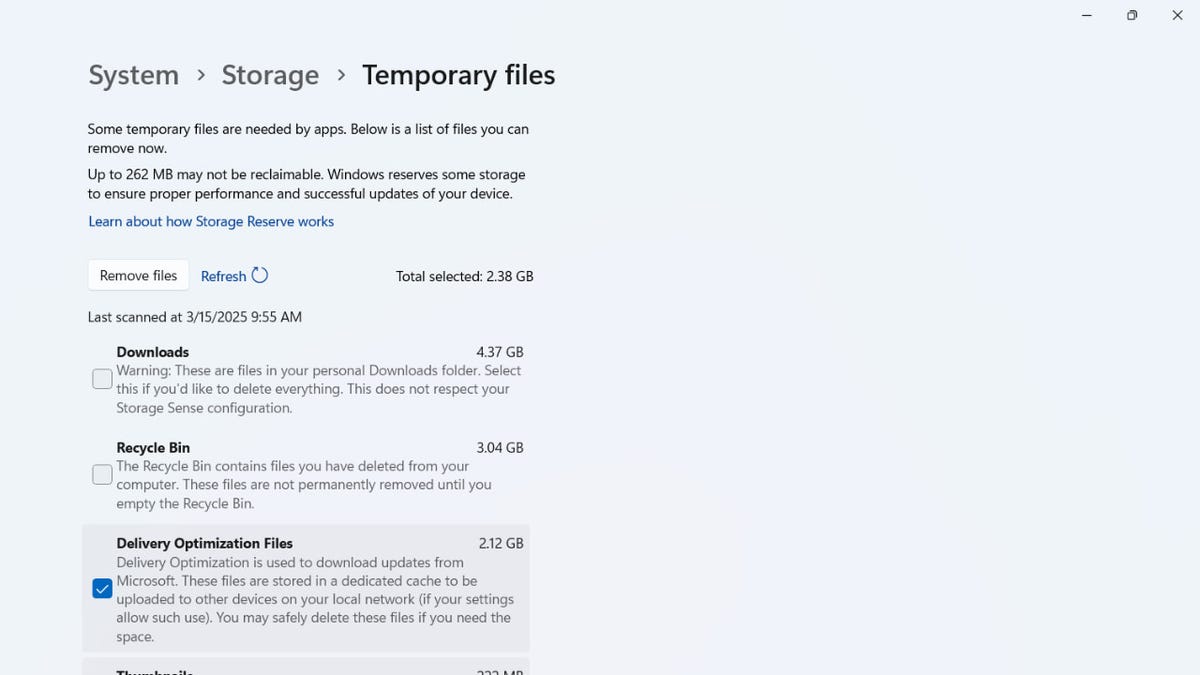
Take some time to go through your files and delete anything you no longer need. Old documents, large video files, duplicate photos, and outdated downloads can take up a surprising amount of space. If you are unsure about deleting certain files, move them to an external drive or cloud storage before permanently removing them from your Windows PC.

  • Open Settings
  • Click System.
  • Select Storage.

YOUR IPHONE HAS A HIDDEN FOLDER EATING UP STORAGE SPACE WITHOUT YOU EVEN KNOWING

free up pc space 4

Steps to delete the files you don’t need on a PC. (Kurt “CyberGuy” Knutsson)

Free up PC space 5

Steps to delete the files you don’t need on a PC. (Kurt “CyberGuy” Knutsson)

  • Check the boxes for items like temporary files, downloads and recycle bin.
free up pc space 6

(Kurt “CyberGuy” Knutsson)

  • Click Remove files.
  • You can also use Disk Cleanup: Type “Disk Cleanup” in the Start menu, select a drive and choose files to delete.

Enable Storage Sense on Windows

If you’re using Windows, Storage Sense is a built-in feature that can automatically free up space by removing temporary files and old items from the Recycle Bin. How to enable storage sense on Windows:

  • Open Settings and go to System > Storage.
  • Click on Storage Sense and toggle it On.
  • Under the Configure cleanup schedules sectionchoose how often it should run (every day, week or month). Once enabled, Storage Sense will automatically clean up space based on your preferences.

DOES YOUR WINDOWS 11 PC KEEP RESTARTING? LET’S FIX THAT FRUSTRATING PROBLEM

Transfer files to external storage

  • Choose the right external drive: Opt for an external hard drive or solid-state drive (SSD) that suits your needs. SSDs offer faster speeds and better durability, while HDDs provide larger capacities at lower costs.
  • Transfer files: Connect your external drive, copy your files to it and verify that all files are successfully transferred.
  • Delete original files: After verifying the transfer, delete the original files from your PC to free up space. On Windows, use File Explorer to delete files and empty the Recycle Bin. On Mac, use Finder to move files to Trash and then empty it.

Consider cloud storage

Cloud storage services like Google DriveDropbox and Microsoft OneDrive offer convenient, flexible options for storing large files without consuming your laptop’s limited space. These services allow you to securely store your photos, videos and documents in the cloud, freeing up valuable storage on your device. One significant advantage of cloud storage is accessing files from any device with an internet connection, whether on your phone, tablet or another computer.

Most cloud services provide a certain amount of free storage (typically between 2GB and 15GB) before upgrading to a paid plan. For instance, Google Drive offers 15GB of free storage shared across Google services, while Dropbox provides 2GB for free with options to upgrade for more space. OneDrive provides 5GB for free, but Microsoft users can get additional storage through Office 365 subscriptions, granting access to the Microsoft Office suite.

Additionally, cloud storage services come with features like automatic syncing and backup, making it easier to organize and safeguard your files. This can be particularly helpful for large photo and video libraries, which can be set to upload automatically from your phone or computer. With features like file versioning and collaboration tools, cloud platforms offer more than just storage  — they enhance productivity and allow seamless file sharing with friends, family or colleagues.

Finally, many cloud storage providers offer encryption and other security measures to protect your files for added peace of mind. However, it would be best always to take extra precautions, such as enabling two-factor authentication and using strong, unique passwords, to ensure your data is safe. Kurt’s favorite cloud services can be seen here.

Protect your data: Essential security steps after managing storage

After you’ve freed up space on your PC-whether by deleting old files, moving data to an external drive or leveraging cloud storage, it’s just as important to make sure your valuable information stays secure. The following steps will help you protect your files and personal data from cyber threats and accidental loss.

1. Use strong passwords: Create unique, complex passwords for all your accounts and devices. Consider using a password manager to generate and store secure passwords. Get more details about my best expert-reviewed Password Managers of 2025 here.

2. Enable encryption: Encrypt your external hard drives and cloud storage accounts to add an extra layer of protection to your data.

3. Implement two-factor authentication (2FA): Enable 2FA on all accounts that offer this feature, especially for cloud storage services.

4. Install and maintain strong antivirus software: Use a strong antivirus program and keep it updated to protect against malware and other security threats. The best way to safeguard yourself from malicious links that install malware, potentially accessing your private information, is to have antivirus software installed on all your devices. This protection can also alert you to phishing emails and ransomware scams, keeping your personal information and digital assets safe. Get my picks for the best 2025 antivirus protection winners for your Windows, Mac, Android and iOS devices.

5. Regularly update your operating system and applications: Keep your devices and software up to date to ensure you have the latest security patches.

6. Be cautious with public Wi-Fi: Avoid accessing sensitive information when connected to public networks, or use a VPN for added security. Using a VPN (Virtual Private Network) service can enhance your privacy by encrypting your internet traffic, making it harder for hackers and third parties to intercept your data, especially on public Wi-Fi. A VPN masks your IP address, helping to obscure your location and online activity. While VPNs don’t directly prevent phishing emails, they reduce the exposure of your browsing habits to trackers that may use this data maliciously. With a VPN, you can securely access your email accounts from anywhere, even in areas with restrictive internet policies. For best VPN software, see my expert review of the best VPNs for browsing the web privately on your Windows, Mac, Android and iOS devices

7. Backup your data regularly: Create multiple backups of your important files, including at least one offline copy.

8. Use secure file transfer methods: When sharing files, use encrypted transfer methods or password-protected links.

By following these steps, you can significantly enhance the security of your data and protect yourself from potential cyber threats.

Kurt’s key takeaway

Your PC’s storage can fill up fast, but you can always free up some space. I personally prefer storing images and videos that take up too much space on an external drive. This way, I can access them whenever I need to while keeping my PC storage free. If an external drive feels like too much of a hassle, you can always opt for cloud storage. Windows supports a range of cloud storage options, including its own services like OneDrive.

CLICK HERE TO GET THE FOX NEWS APP

What’s the most surprising thing you’ve found taking up space on your computer?  Let us know by writing us at Cyberguy.com/Contact

For more of my tech tips and security alerts, subscribe to my free CyberGuy Report Newsletter by heading to Cyberguy.com/Newsletter

Ask Kurt a question or let us know what stories you’d like us to cover.

Follow Kurt on his social channels:

Answers to the most-asked CyberGuy questions:

New from Kurt:

Copyright 2025 CyberGuy.com. All rights reserved.



Source link

Why emails are disappearing from your iPhone and 5 proven ways to fix it

0


Despite not wanting to be inundated by tons of emails, it’s quite another thing to have emails you need to read or keep disappear suddenly. It’s important to know why your emails are disappearing as much as it is important to figure out how to fix it. Mary Ann from Southport, North Carolina, had this question for us:

“Help – my emails stored in individual email folders disappear on my iPhone 13 Pro Mail app. Why? Is there a fix so this won’t happen again?”

Though we’ve all wished that our inboxes would magically get read and cleaned up, we certainly don’t want emails disappearing for no particular reason and without our knowledge. Usually, when something unexpected happens on our devices, it isn’t just a one-person issue. That’s why we thought it was important to investigate why your emails are disappearing and how to fix it, Mary Ann.

If you’re experiencing disappearing emails on an Android device, don’t worry, we also cover solutions for Android users further down in this article.

Join The FREE CyberGuy Report: Get my expert tech tips, critical security alerts and exclusive deals — plus instant access to my free Ultimate Scam Survival Guide when you sign up!

woman with phone

A woman using her iPhone.

1. Disappearing emails? Start here to solve the mystery

If your emails disappear from your iPhone like they did for Mary Ann, there are several reasons this could happen. But before you troubleshoot the many different potential culprits, the easiest one to start with is to restart your iPhone. Even though it may seem too easy, sometimes restarting your iPhone can restore your missing emails. To restart your iPhone for iPhone X or later: 

DON’T FALL FOR THAT SNEAKY ICLOUD STORAGE ALERT IN YOUR INBOX

disappearing email 2

Apple Support photo of restarting iPhone X or later. (Apple)

  • While holding the iPhone with the screen facing toward you, press the volume up or down button on the left side of your phone and at the same time, press the power button on the right side.
  • When the power-off slider shows up on your screen, slide it across the screen to the off position.
  • Once your phone turns off (it’ll be just a blank black screen), leave it off for 10 seconds.
  • Turn your phone back on by pressing and holding the side button (on the right side of your iPhone) until you see the Apple logo. Once you see the logo, release the button.
  • Go check to see if that resolved your mail issues.

If that doesn’t resolve the issue, try the steps below.

HOW TO PROTECT YOUR IPHONE & IPAD FROM MALWARE

2.  It could be a problem with your mail settings

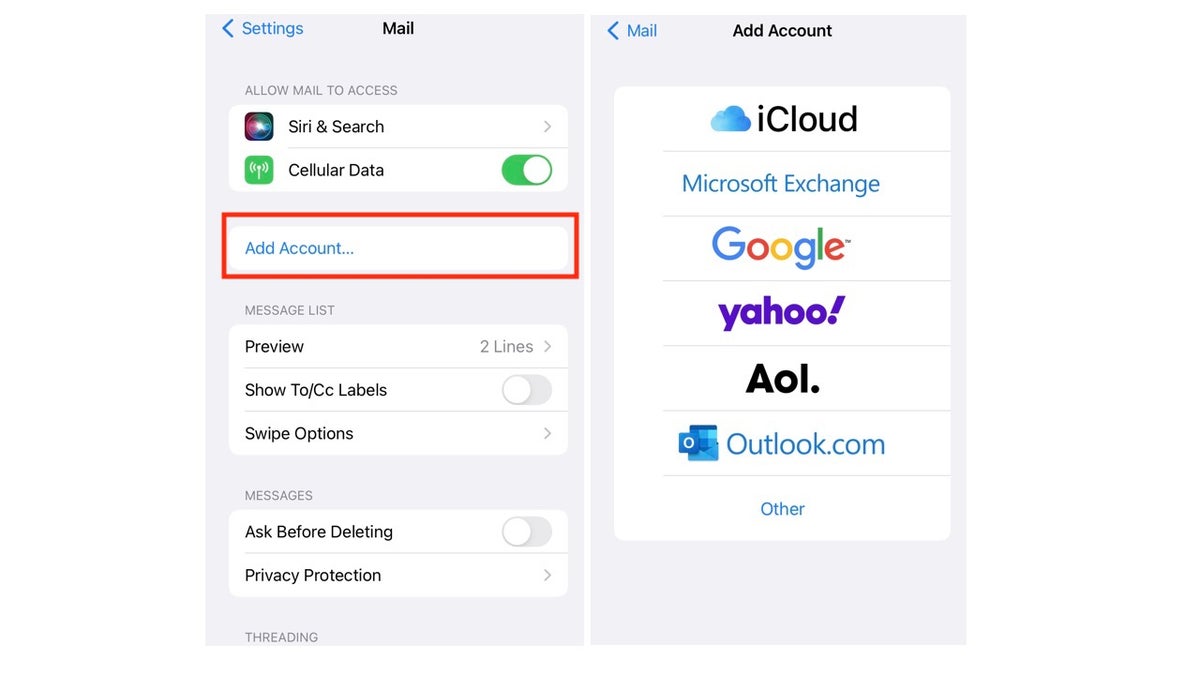
While the iPhone usually keeps the mail setup process pretty simple, sometimes how we step up can cause problems down the road. Or even if we did set it up correctly, it just needs to be reset to get it working properly-the solution. Delete your email account on your iPhone, and then set it up again.

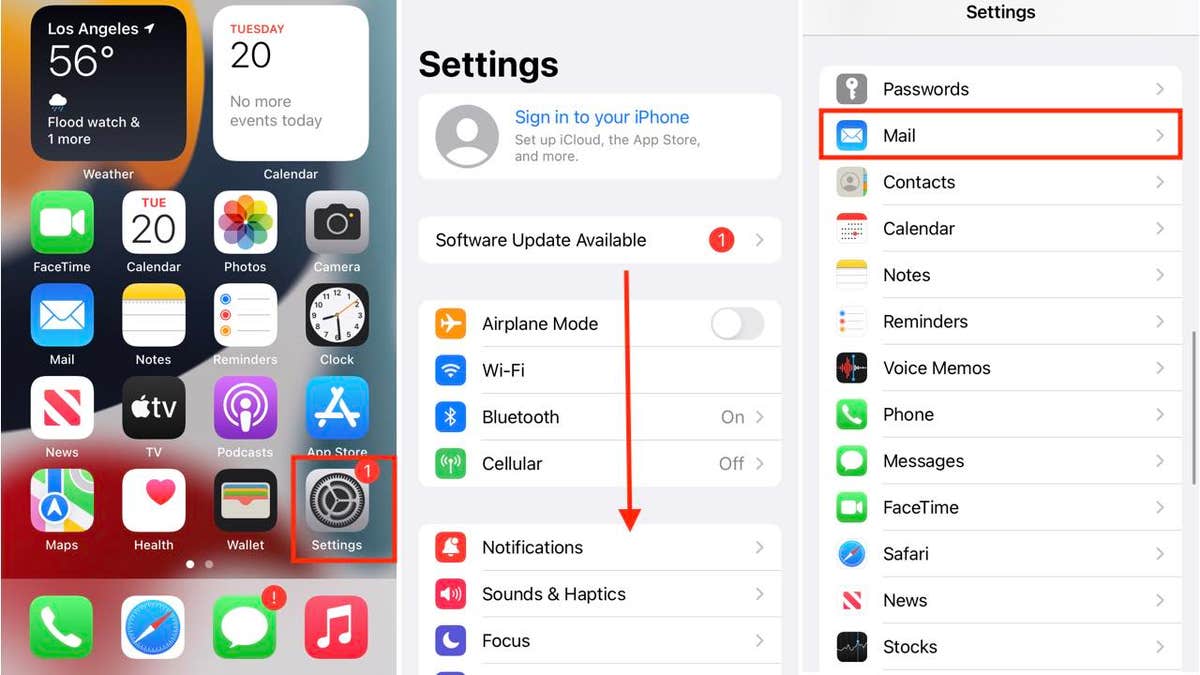
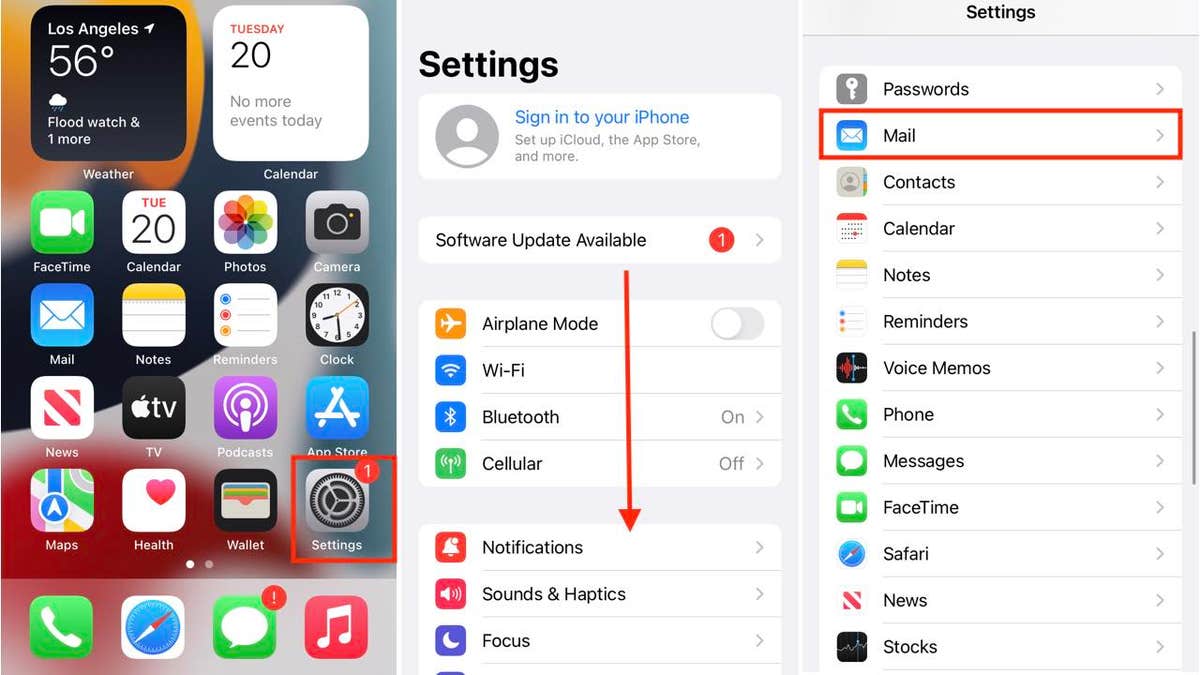
  • On the main screen of your iPhone, tap Settings.
  • Scroll down and tap Apps.
  • Then tap Mail.

THAT APPLE ID DISABLED MESSAGE? IT’S A DANGEROUS SCAM

disappearing emails 3

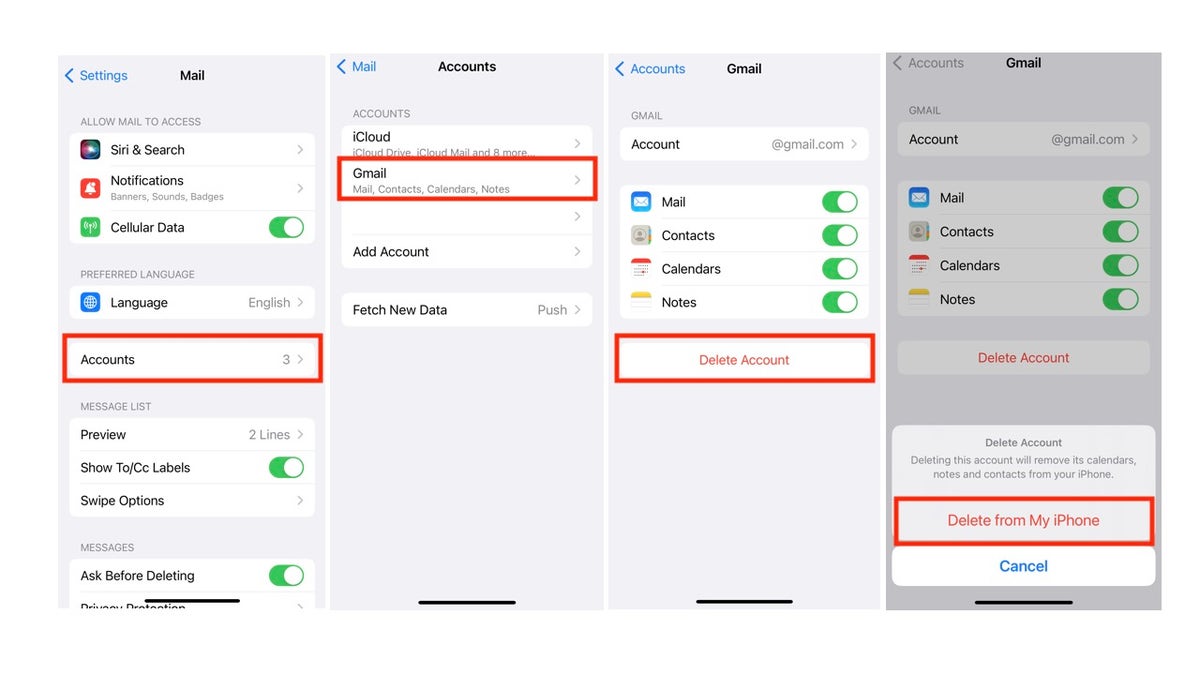
How to delete your email account on iPhone mail app. (Kurt “CyberGuy” Knutsson)

  • Tap Mail Accounts.
  • Select the account you are having problems with and wish to delete.
  • Tap ‘Delete Account.’
  • You will get a pop-up asking you to confirm that you want to delete this account. Tap ‘Delete from My iPhone.’
disappearing email 4

How to delete your email account on iPhone mail app. (Kurt “CyberGuy” Knutsson)

How to add your email account again

  • On the main screen of your iPhone, tap Settings.
  • Scroll down and tap Apps
  • Then tap Mail Accounts.
disappearing email 5

How to add your email account on iPhone mail app. (Kurt “CyberGuy” Knutsson)

  • Select ‘Add account.’
  • Then select your email service and follow the prompts to add your email account back on your phone, which includes inputting your email address and email password.
disappearing email 6

How to add your email account on the iPhone mail app   (Kurt “CyberGuy” Knutsson)

THE ONE SIMPLE TRICK TO HELP KEEP OUT CYBER CREEPS ON IPHONE

3. There is a conflict between IMAP and POP3 protocols

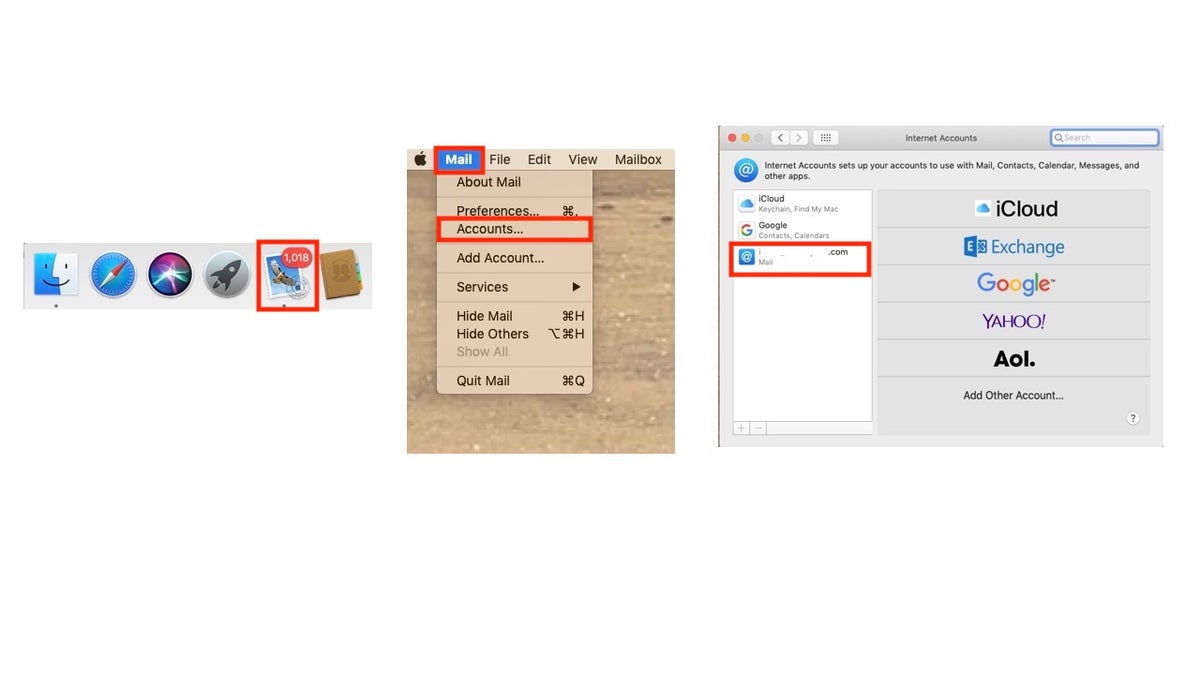
Desktop mail applications usually use POP3, while most smartphones use IMAP protocol, which can cause conflict and mail disappearance. The solution to fix this problem. You’ll need to see if your email is set up on any other devices using POP3. If possible, change all email account setups to IMAP on other devices. For example, on Mail on an iMac:

  • On your iMac or MacBook (Pro), open the ‘Mail’ application, usually found in the dock on the bottom or right or left side of your desktop screen.
  • Under ‘Mail’ on the menu bar on the top left of your screen, select ‘Accounts.’
  • Select the specific account you want to check.
disappearing email 7

How to check your mail setting on your desktop. (Kurt “CyberGuy” Knutsson)

  • Under your email login and password information, click the ‘Advanced’ button.
  • A pop-up should open showing you the hostname, and it should say ‘pop.’ or ‘imap.’ before your domain host.
  • ‘If you see ‘pop.,’ you should take steps to change the settings to imap.

DITCH BORING EMOJI AND CREATE YOUR OWN UNIQUE ONES WITH GENMOJI ON IPHONE

4. IOS updates required

Sometimes, emails can disappear with outdated iOS. The solution is to find out if your iOS is old and/or update your iOS by performing the following steps:

  • On the main screen of your iPhone, tap Settings.
  • You’ll either have a notification on the top of ‘Settings’ that says ‘Software Update Available,’ or you can scroll down and click General.
disappearing email 5

How to add your email account on iPhone mail app. (Kurt “CyberGuy” Knutsson)

Tap ‘Software Update’

  • If there is an iOS update available, you will see it listed and the option to download and install it.
  • If you’re ready to update, click ‘Update Now.’

5. System error

If none of these resolve your disappearing emails, it may be a system error that can occur on any device. You can also contact Apple Support for further support if nothing seems to work.  You can reset your device to start fresh to see if that will resolve the disappearing email problem. Check out How to factory reset my iPhone for step-by-step instructions on how to reset your device.

What to do if your emails disappear on Android

While this article focuses on iPhone fixes, Android users can face similar issues with disappearing emails. Here’s a brief guide tailored for Android devices:

Settings may vary depending on your Android phone’s manufacturer.

1. Check all folders and search for missing emails

  • Sometimes emails are accidentally archived, deleted, or marked as spam. Use the search function in your email app and check the Spam, Trash, and Archive folders to locate missing messages.
  • For Gmail, also check the Social, Promotions and Updates tabs, as emails can be automatically sorted there.

2. Review email sync settings

  • Open your email app’s settings, go to your account settings, and check the “Sync period.” Set it to “All time” to ensure older emails are not hidden.
  • Make sure the sync function is enabled so your device is regularly updating with the mail server.

3. Check email protocol: POP3 vs. IMAP

  • If your account is set up as POP3, emails may be downloaded to one device and removed from the server, causing them to disappear from other devices. IMAP keeps emails synced across all devices.
  • If using POP3, look for a setting like “Leave messages on server” and make sure it is enabled.
  • Switching to IMAP is recommended for most users to avoid these issues.

4. Inspect email filters and rules

  • Filters or rules may automatically move emails to specific folders or delete them. Review your filter settings in your email app or webmail interface.

5. Restart and re-add your account

  • Log out of your email account, restart your device, and log back in. If issues persist, remove the email account from your device and add it again.

6. Network and app issues

  • Ensure your device has a stable internet connection. Sometimes sync issues are caused by temporary network problems.
  • If problems continue, try updating your email app or reinstalling it.

By following these steps, most Android users can resolve the issue of disappearing emails and keep their inboxes under control.

SUBSCRIBE TO KURT’S YOUTUBE CHANNEL FOR QUICK VIDEO TIPS ON HOW TO WORK ALL OF YOUR TECH DEVICES

Kurt’s key takeaways

It is very disconcerting when emails start disappearing with no rhyme or reason from your phone. Not only does it keep you from getting information and responding in a timely manner, but it can also start causing consistent problems in your professional and personal life. Thankfully, there are several ways to troubleshoot this problem, from the most basic (restarting your phone) option to the most intense (resetting your entire device).

CLICK HERE TO GET THE FOX NEWS APP

Have your emails ever disappeared from your phone? How did you notice this? What steps have you taken to restore your email to its optimal functioning state? Let us know by writing us at Cyberguy.com/Contact

For more of my tech tips and security alerts, subscribe to my free CyberGuy Report Newsletter by heading to Cyberguy.com/Newsletter

Ask Kurt a question or let us know what stories you’d like us to cover.

Follow Kurt on his social channels:

Answers to the most-asked CyberGuy questions:

New from Kurt:

Copyright 2025 CyberGuy.com. All rights reserved.



Source link

Black crappie fish record broken in West Virginia with 3.6-pound freshwater fish

0

A West Virginia angler just broke a fish record in the Mountain State. 

Jerry Porter of Harts, West Virginia, caught a black crappie while fishing at East Lynn Lake in Wayne County.

Porter reeled in the 17.7-inch fish that weighed in at 3.6-pounds, according to the West Virginia Department of Natural Resources (WVDNR).

LUCKY ANGLERS BREAK TWO STATE FISHING RECORDS ON SAME DAY: ‘DEDICATION AND PASSION’

The sunfish was caught on a minnow-tipped jig on a 6-pound test line.

The previous black crappie state record was a 3.15-pound, 17.76-inch fish caught in 2024.

A fisherman in West Virginia broke the black crappie record when he caught a 3.6-pound freshwater fish. (WVDNR)

Black crappies stretch 10.8 inches on average, with the heaviest ever reported at six pounds, according to the U.S. Fish & Wildlife Services (FWS).

CLICK HERE TO SIGN UP FOR OUR LIFESTYLE NEWSLETTER

The fish are commonly found in freshwater lakes, often traveling in schools while swimming in clear water, according to FWS.

black crappie fish

Black crappies stretch 10.8 inches on average, with the heaviest ever reported at six pounds. (iStock)

Porter’s record marks the third state record shattered so far in 2025.

For more Lifestyle articles, visit foxnews.com/lifestyle

Two West Virginia fishermen recently broke state records while reeling in their catches on the same day in April.

Split image of fishermen

Two West Virginia anglers managed to break state records while fishing on the same day. (West Virginia Division of Natural Resources (WVDNR))

Jason Floyd caught a 24.57-inch, 5.75-pound redhorse sucker, according to the WVDNR and as previously reported by Fox News Digital. 

John Plott caught a hefty 12.44-inch, 1.60-pound redear sunfish, marking his second record-breaking catch of the species.

CLICK HERE TO GET THE FOX NEWS APP

In order to fish in West Virginia, anglers over the age of 14 must obtain a state fishing license. 

Trump and the judiciary’s conflicts are coming to a head

0

NEWYou can now listen to Fox News articles!

The more aggressive elements of President Trump’s immigration agenda have run into resistance from federal district judges. These courts question the administration’s expedited deportations of illegal Venezuelan migrants with minimal, or no, due process. But a more fundamental constitutional question lies beneath the struggle over immigration. Federal judges that block the deportations risk interference with the executive branch’s constitutional authority over foreign relations and national security. At the same time, if the White House presses his claims of unilateral power too far, it jeopardizes the deference that the judiciary has long offered presidents in their management of national security.

The president and the judiciary are coming to a head because of decisions by two separate federal district judges last week. On May 1, Judge Fernando Rodriguez of Texas held that Trump could not claim power under the 1798 Alien Enemies Act to remove members of the Venezuelan Tren de Aragua gang (TdA) to El Salvador. On May 6, Judge Charlotte Sweeney in Colorado agreed and also enjoined the executive branch from any further deportation of Venezuelans without a hearing before a judge. While only temporary orders, no federal courts have ever before overruled the decision of a president or congress that the United States has suffered an attack or invasion.

Part of the blame for this executive-judicial conflict also rests with the Trump administration’s unprecedented use of the Alien Enemies Act. The act authorizes the president to detain and expel aliens of “a hostile nation or government” with which the United States is in a “declared war” or by which it has suffered an “invasion or predatory incursion.” The United States had only used the act during the declared War of 1812 and World Wars I and II.

VENEZUELAN GOVERNMENT USES TREN DE ARAGUA AS PROXIES TO UNDERMINE US PUBLIC SAFETY, FBI ASSESSMENT FINDS

But on March 15, President Trump sent TdA members to El Salvador under his authority under the Act. He proclaimed that the gang was conducting an invasion or predatory incursion through “irregular warfare” such as “drug trafficking” and “mass illegal migration” into the United States. Trump claimed that TdA is “closely aligned with, and indeed has infiltrated,” the Venezuelan government, so as to meet the Act’s requirement of an invasion by a “hostile nation or government.” The White House made the extraordinary claim that a gang has risen to the level of a foreign government that is conducting an invasion or predatory incursion into the United States.

Regardless of the challenge of showing this to be true factually, district judges have made the mistake of concluding this is a question for the courts to resolve. On some important questions, the Constitution reserves judgment to the elected branches of government alone. As Chief Justice John Marshall conceded in Marbury v. Madison, which first announced the power of judicial review, “the President is invested with certain important political powers, in the exercise of which he is to use his own discretion.” For his decisions, “he is accountable only to his country in his political character, and to his own conscience.” His decision cannot be questioned in court because “the subjects are political.” These issues “respect the nation, not individual rights, and being entrusted to the executive, the decision of the executive is conclusive.”

CLICK HERE FOR MORE FOX NEWS OPINION

War raises exactly the sort of “political questions,” as the Supreme Court has come to describe them, that fall outside judicial competence. The Constitution vests the president with the executive power and makes him commander in chief of the armed forces. Congress has the power to raise and fund the armed forces and to declare war. The courts have no power to direct the elected branches in their exercise of these authorities.

CLICK HERE TO GET THE FOX NEWS APP

Federal courts have never questioned the decisions of the elected branches over whether a war or invasion has occurred. In the Prize Cases, for example, the Supreme Court would not second-guess President Abraham Lincoln’s awesome decision to wage war to stop secession. “Whether the President in fulfilling his duties as Commander in Chief” was justified in launching military operations against the South, the Court declared, was “to be decided by him.” The Court could declare that it must reserve to the President the decisions on the force to be used to “the political department of the Government to which this power was entrusted.” Following this precedent, federal judge rejected lawsuits seeking a halt to the wars in Korea, Vietnam, Kuwait, Afghanistan, or Iraq.

But in the Texas and Colorado cases, federal judges have overturned the judiciary’s deference on war. They rejected President Trump’s claim that Venezuela had launched an invasion of the United States using TdA as an arm of its military. The federal appeals courts, and ultimately the Supreme Court, must review these decisions as soon as possible. They must recognize that trial judges lack the competence to review the sensitive information and judgments necessary to make the more dire national security decisions. Courts excel at resolving cases or controversies with formal rules of pleading, evidence, and deliberation. They are ill-equipped to judge the probabilities and risks that govern the world of national security.

Taurine in energy drinks may fuel blood cancer growth, new research reveals

0

A common ingredient in some foods and drinks has been linked to an increased risk of blood cancers.

Taurine — a non-essential amino acid that also occurs naturally in the bone marrow, brain, heart and muscles — was found to promote the growth of leukemia cells, according to a study by Wilmot Cancer Institute investigators at the University of Rochester in New York.

The compound is also found in meats, fish and eggs, as well as some energy drinks and protein powders.

BLOOD CANCER AWARENESS: COMMON TYPES, SIGNS AND TREATMENT OPTIONS

“The key takeaway from this study is that taurine can be used by leukemia cells to promote cancer progression,” Jeevisha Bajaj, PhD, an assistant professor in the Department of Biomedical Genetics and a member of Wilmot’s Cancer Microenvironment research program, told Fox News Digital. 

“Developing new methods to block the cancer cells’ ability to take in taurine may improve outcomes for leukemia patients.”

A common ingredient in some foods and drinks has been linked to an increased risk of blood cancers. (iStock)

The scientists made the discovery by happenstance as they were investigating the bone marrow with an eye toward improving treatments for blood cancer, according to a press release from the university.

“Our finding that taurine can be produced by the bone marrow microenvironment was completely unexpected and therefore surprising,” Bajaj said. “No one had shown this before, and it added critical information to studies of the bone marrow microenvironment, where blood cancers arise and expand.”

KIDS WHO CONSUME ENERGY DRINKS ARE MORE PRONE TO MENTAL HEALTH DISORDERS, STUDY FINDS

The taurine triggers cancer growth in leukemia cells by promoting a process called glycolysis, which breaks down glucose to produce energy.

In particular, taurine fuels certain types of cancer that emerge from blood stem cells in the bone marrow, including acute myeloid leukemia (AML), chronic myeloid leukemia (CML) and myelodysplastic syndromes (MDS), the release stated.

Blood cancer

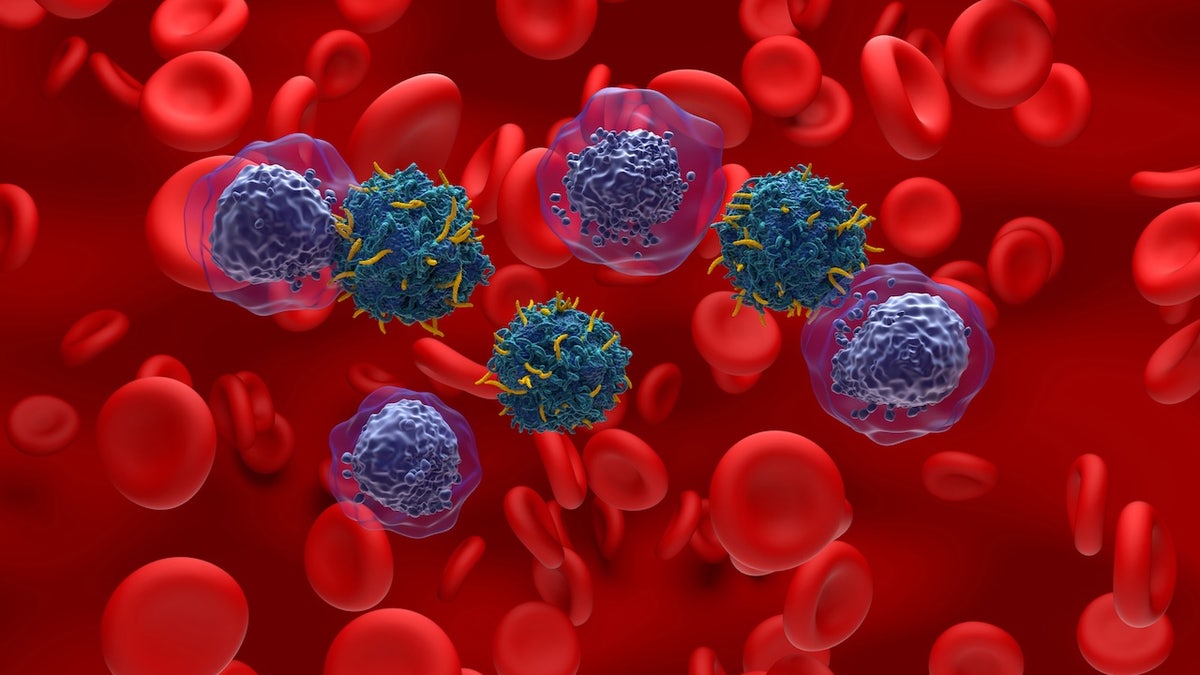
Acute myeloid leukemia AML, a type of blood cancer, starts in the bone marrow, the soft inner parts of bones. Taurine triggers cancer growth in leukemia cells by promoting a process called glycolysis, which breaks down glucose to produce energy. (iStock)

The findings were published in the journal Nature.

“We are very excited about these studies because they demonstrate that targeting uptake by myeloid leukemia cells may be a possible new avenue for treatment of these aggressive diseases,” said Bajaj.

TERMINAL COLON CANCER PATIENT SAVED BY BREAKTHROUGH TREATMENT

“Our work suggests that developing and testing effective drugs that can impede leukemia cells from using taurine could lead to new treatment approaches for these deadly cancers.”

The study did have some limitations, according to the researchers.

Chemo session

“We are very excited about these studies because they demonstrate that targeting uptake by myeloid leukemia cells may be a possible new avenue for treatment of these aggressive diseases,” said the lead researcher (not pictured). (iStock)

“While we can find that taurine levels are high in the bone marrow of mice with leukemia compared to healthy mice, we do not have any evidence on taurine levels in humans with acute myeloid leukemia,” Bajah noted. “This is something we hope to study in the future.”

Looking ahead, the researchers also plan to study how myelodysplastic syndromes lead to acute leukemia.

CLICK HERE TO GET THE FOX NEWS APP

Based on the findings, the scientists recommend that patients with leukemia speak with their healthcare providers before adding any new supplements or foods rich in taurine to their diet.

“Since taurine is a common ingredient in energy drinks and is often provided as a supplement to mitigate the side effects of chemotherapy, our work suggests that it may be of interest to carefully consider the benefits of supplemental taurine in leukemia patients,” the researchers concluded in the paper.

Dr. Marc Siegel, clinical professor of medicine at NYU Langone Health and Fox News senior medical analyst, was not involved in the study but commented on the findings.

Soda cans

“There is concern that high-powered energy drinks containing too much taurine could fuel leukemia cells,” a doctor told Fox News Digital.  (iStock)

“The study from the University of Rochester determined that leukemia cells in the bone marrow rely on the amino acid taurine that they don’t make themselves,” he told Fox News Digital. “Future therapies promise to block the uptake of taurine into leukemia cells.”

Further research is needed to determine the exact process for blocking taurine, according to Siegel.

CLICK HERE TO SIGN UP FOR OUR HEALTH NEWSLETTER

“This is preliminary, but marks an important link between diet and cancer.”

The study was primarily funded by the National Cancer Institute, National Institute on Aging, and the National Institute of Diabetes and Digestive and Kidney Disease, all of which are part of the National Institutes of Health. The American Society of Hematology, the Leukemia Research Foundation and Leukemia & Lymphoma Society also provided support.

Do energy drinks pose a risk?

Some popular energy drinks list taurine as an ingredient.

“There is concern that high-powered energy drinks containing too much taurine could fuel leukemia cells,” Siegel told Fox News Digital.

“This is preliminary, but marks an important link between diet and cancer.”

“But at the same time, there is no evidence that these drinks cause the conversion of regular bone marrow cells into leukemia cells.”

As the body naturally produces taurine, additional supplementation — especially from energy drinks — is “often unnecessary,” according to Dr. Hooman Melamed, a board-certified orthopedic spine surgeon and sports medicine expert based in Marina Del Rey, California.

Blood cancer research

Further research is needed to determine the exact process for blocking taurine, the experts said. (iStock)

“From a clinical perspective, I always advise patients to give their bodies what they need, but not to overload them with substances they don’t,” Melamed, who was not involved in the study, told Fox News Digital. 

In general, Melamed said he recommends avoiding energy drinks altogether, especially those containing many synthetic additives or excessive ingredients. 

For more Health articles, visit www.foxnews.com/health

“You’ll often find 20+ components in these products — many of which you can’t pronounce. That alone is a red flag,” he cautioned. 

“If you don’t recognize what’s in your food or drink, it’s probably not something your body needs.”

Capodagli Property Company Announces The Approval of Final Phase of Meridia Brownstones Project by The Rahway Planning Board, Marking Significant Milestone in The Continued Revitalization of the Area

0
20250516 142948136
Capodagli Property Company Announces The Approval of Final Phase of Meridia Brownstones Project by The Rahway Planning Board, Marking Significant Milestone in The Continued Revitalization of the Area 58

The final phase of the development will bring 200 new residential apartments to Rahway, spread across five stories. The unit mix includes 108 one-bedroom units, 90 two-bedroom units, and two three-bedroom units—offering a range of living options tailored to today’s renters.

Rahway, New Jersey, May 15, 2025, Meridia Brownstones was designed with community and lifestyle in mind, the development will feature a host of outdoor amenities including landscaped courtyards, fire pits, bocce courts, cornhole, and open green spaces. Indoors, residents will benefit from approximately 5,000 square feet of curated amenity space, potentially including lounge areas, co-working spaces, a state-of-the-art fitness center, and reservable party rooms.

Groundbreaking is anticipated in 2025, with construction expected to span approximately 24 months. The project will be completed in multiple phases, with full delivery targeted within that timeline.

Capodagli Property Company continues to play a pivotal role in the transformation of Rahway through thoughtfully designed developments that support the city’s long-term growth and vibrancy.

“We’re excited to be moving forward with the final phase of this amenity-rich development. With thoughtfully designed spaces and a strong mix of indoor and outdoor features, we’re confident this project will remain a long-term asset to the Rahway community and a highly desirable place to live for years to come.” – Thomas Visaggio, Assistant Vice President of Development

About Capodagli Property Company:

Capodagli Property Company is a premier real estate development, construction, and property management firm specializing in multi-family and mixed-use real estate projects. Founded in 1970, Capodagli Property Company is recognized for its ability to envision thriving communities on underutilized assets, playing a major role in redeveloping these communities.

Capodagli Property Company develops, owns, and manages over 6,000 rental apartments with over 4,000 units in the pipeline.

They are proud of their reputation for building and managing exceptional residential communities under the brand name “Meridia Living.” Meridia Living strives to ensure all the properties they manage are well maintained while instilling a sense of belonging among their residents.

For complete information, visit: https://www.meridiabrownstones.com/

Media Contact:

Capodagli Property
Attn: Media Relations
201 S. Wood Avenue
Linden, NJ  07036
973-694-3000
marketing@meridialiving.co

20250513 141006320
Capodagli Property Company Announces The Approval of Final Phase of Meridia Brownstones Project by The Rahway Planning Board, Marking Significant Milestone in The Continued Revitalization of the Area 59
20250415 140248162
Capodagli Property Company Announces The Approval of Final Phase of Meridia Brownstones Project by The Rahway Planning Board, Marking Significant Milestone in The Continued Revitalization of the Area 60

Trump administration may drop CDC COVID vaccine push for kids, pregnant women

0

The Trump administration is backing away from the Centers for Disease Control and Prevention (CDC) recommendations to vaccinate children and pregnant women against COVID-19, according to a new report.

The Department of Health and Human Services (HHS), led by Secretary Robert F. Kennedy, Jr., is planning to pull federal recommendations that these groups get the COVID vaccine as a routine measure, The Wall Street Journal reported Thursday.

The CDC currently recommends that everyone aged 6 months and older get vaccinated, but that guidance may be scrapped in the coming days.

MULTIMILLION-DOLLAR BIDEN-ERA COVID-19 VAX PROJECT HALTED BY TRUMP’S HHS

Secretary of Health and Human Services Robert F. Kennedy, Jr. testifies before the House Appropriations Committee in the Rayburn House Office Building in Washington, D.C., on Wednesday. (Samuel Corum/Getty Images)

It’s unclear whether HHS plans to drop the recommendation entirely or simply stop pushing it for everyone across the board, the report said.

The move would be a major shift in federal health policy and would mark a break from the blanket-vaccine approach that dominated the early years of the pandemic.

Few parents and expectant mothers have followed through with recent COVID boosters. As of April, CDC data shows just 13% of children and 14% of pregnant women had received the latest shot.

The change comes as the FDA, under Commissioner Dr. Marty Makary, prepares to roll out a tougher approval process for vaccines. 

TRUMP HEALTH SECRETARY NOMINEE RFK JR CLEARS SENATE FINANCE CONFIRMATION VOTE

Closeup of man's arm receiving the Moderna COVID-19 vaccine

A man receives the COVID-19 vaccine. (Steve Pfost/Newsday via Getty Images)

Speaking Thursday at a gathering of food and drug lawyers, Makary said, “We want to see vaccines that are available for high-risk individuals, and at the same time, we want some good science. We want some good clinical data.”

Kennedy has long been critical of mRNA vaccines and mass vaccination campaigns. As HHS secretary, he now has the authority to revise CDC guidance. 

The Trump administration said it plans to drop routine COVID vaccination guidance for kids and pregnant women, marking a major shift in federal health policy, the WSJ reported.

Virus Outbreak Fall Vaccines

Syringes and vials of COVID-19 vaccine. (AP Photo/Steve Helber)

The expected shift would undercut one of the most promoted health policies of the first Trump administration, Operation Warp Speed, and raise questions about whether insurers will continue covering the shots.

CLICK HERE TO GET THE FOX NEWS APP

Critics of the move told the Journal it could discourage vaccination and leave immunocompromised people more vulnerable. Supporters say it brings policy back in line with science and common sense.

Both HHS and CDC did not immediately respond to Fox News Digital’s request for comment.