3.9 C
New York
Friday, March 6, 2026
Home Blog Page 379

Got new electronics for the holidays? Here’s what to do first

0


Got new electronics for the holidays? Whether you’ve unwrapped a shiny new smartphone, tablet or laptop, the first steps you take can set the tone for your entire experience. 

We’ll walk you through essential steps to ensure your devices are secure, functional and ready for your enjoyment. 

From setting strong passwords to enabling tracking features, these tips will help you make the most of your new gadgets.

GET SECURITY ALERTS, EXPERT TIPS — SIGN UP FOR KURT’S NEWSLETTER — THE CYBERGUY REPORT HERE

gifts

A person opening up new tech gifts. (Kurt “CyberGuy” Knutsson)

What do I do if I get a new laptop, tablet or smartphone?

Set up strong passwords and PINs

Change default passwords and PINs immediately. Use a combination of letters, numbers and special characters. Avoid using easily guessable information like birthdays or names. Consider using a password manager to generate and store complex passwords.

Enable two-factor authentication (2FA)

Wherever possible, activate 2FA for added security. This provides an extra layer of protection by requiring a second verification step, such as a text message or authentication app.

Consider privacy screen protectors (for smartphones and laptops)

Privacy screen protectors can prevent others from viewing your screen from the side, enhancing your privacy when using your device in public spaces.

Create a backup system for photos and documents

If your device stores important data (e.g., photos, documents), immediately set up a backup system. This can be done through cloud services or external storage devices to ensure your data is safe.

Install strong antivirus protection on all your new devices

The best way to ensure that your devices are protected and that no one is snooping around on your data or browsing history is by purchasing antivirus software. To protect yourself from having your data breached, have antivirus protection installed on all your new devices. Having good antivirus software actively running on your new devices will alert you of any malware in your system, warn you against clicking on any malicious links in phishing emails, and ultimately protect you from being hacked. Get my picks for the best 2024 antivirus protection winners for your Windows, Mac, Android and iOS devices.

woman with smartphone

A woman looking at her new smartphone. (Kurt “CyberGuy” Knutsson)

Avoid these common mishaps on your new device

Ignoring updates: Don’t skip software updates when setting up your new device. These updates often include critical security patches and new features. Enable automatic updates wherever possible to ensure your device remains up-to-date.

Overloading with apps: It’s tempting to download every app or tool that catches your eye. However, too many apps can slow your device and increase the risk of downloading malicious software. Stick to trusted sources like the Apple App Store or Google Play.

Forgetting about privacy settings: Take time to review and configure privacy settings on your devices. Disable features like location tracking or data tracking if they’re not necessary for your usage.

Neglecting physical protection: A single drop can ruin your brand-new device. In order to protect and enhance them, it’s important that you have some quality accessories, like a laptop bag or backpack, messenger bag, laptop sleeve, portable hard drive, headphones, webcam cover, attachable portable display, portable laptop stand, Bluetooth mouse, a good power strip and surge protector for your devices. You’ll also want a good phone charger. Check out our picks for these five best portable phone chargers. The last thing you’ll want is a device that dies on you all because you didn’t have a decent charging accessory.

5 BEST PORTABLE PHONE CHARGERS FOR ANY OCCASION

Set your new devices to be findable if lost

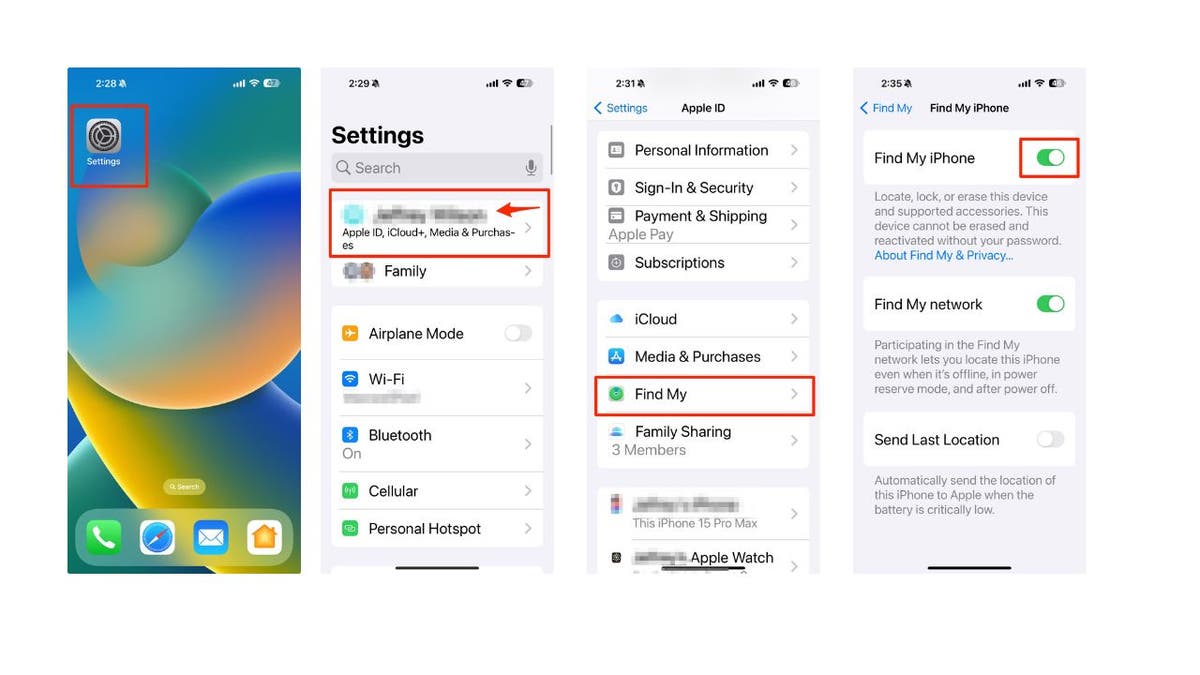
The best step to take if you have received a new laptop, tablet or smartphone, whether it’s an Apple or Android product, is to turn on any ‘Find My’ settings in case your device ever gets lost or stolen. Here are the steps you can take for the following options:

How to turn on Find My on iPhone

  • Open the Settings app.
  • Tap your name.
  • Select Find My.
  • Tap Find My iPhone and toggle it ON.
find my phone steps

Steps to turn on Find My on iPhone. (Kurt “CyberGuy” Knutsson)

WHAT IS ARTIFICIAL INTELLIGENCE (AI)?

How to turn on Find My on my MacBook

  • Go to the Apple menu (the small Apple icon) in the top left corner and select System Settings.
  • Then click Privacy & Security in the sidebar (you may need to scroll down).
  • Click Location Services on the right.
  • Turn ON Location Services, then turn ON Find My in the list of apps.

Note: If you don’t see Find My, go to System Services in the list of apps, click Details, then turn on Find My Mac.

How to turn on Find My Device on Windows 11

  • Select the Start button at the bottom left of your PC screen.
  • Go to Settings.
  • Select Privacy & security.
  • Select Find My Device and select ON.
  • Go to Location Services and select ON.

How to turn on Find My on iPad

  • Go to Settings.
  • Tap your Name.
  • Click Find My.
  • Tap Find My iPad and select ON.

How to turn on Find My Device on Android or Google Tablet

 Settings may vary depending on your Android phone’s manufacturer.

  • Go to your Settings app.
  • Select Security.
  • Tap Find My Device.
  • Enable Find My by toggling the slider on.

LOST OR STOLEN PHONE? THERE’S POTENTIAL TROUBLE ASIDE FROM THE COST OF REPLACING A PHONE

What do I do if I get a new Smart TV?

video game

A boy playing a video game on a Smart TV. (Kurt “CyberGuy” Knutsson)

Smart TVs are a great device to receive for the holidays. Not only do they give you access to tons of streaming apps, but they also allow you to browse the internet, stream music and videos, and even look at photos. With all these features comes a certain amount of risk regarding targeted ads and malware. While any Smart device can be infected with malware, Smart TVs are usually not the devices that experience this kind of attack. Although it has happened in the past with both Samsung and Apple TVs, those cases are extremely rare. However, before you begin enjoying your favorite movies and TV shows, take these steps to protect your Smart TV:

Disable ads and tracking

Disabling ads and tracking on your Smart TV will mostly limit your TV from collecting data on you and the content you’re watching. Here’s how to disable that feature on Samsung, LG and Vizio TVs:

LG

Some models may have different settings or options, so you should always check the user manual or the official website of LG for the most updated information.

  • Go to Settings > Additional Settings > General.
  • Select Live Plus to disable Automated Content Recognition (ACR).
  • Select Advertisements and change the setting to “Do Not Sell My Personal Information.
  • Review terms of use and privacy policy and then opt out of Viewing Information, Voice Information, Interest-Based & Cross-Device Advertising, and Live Plus Automatic Content Recognition.

Samsung

Some models may have different settings or options, so you should always check the user manual or the official website of Samsung for the most updated information. For example, some models may have Smart Features instead of Support in the Settings menu.

  • Go to Settings > Support > Terms & Privacy > Privacy Choices.
  • Select Viewing Information Services to disable Automated Content Recognition (ACR).
  • Select Voice Recognition Services to adjust voice data collection.

Vizio

Some models may have different settings or options, so you should always check the user manual or the official website of Vizio for the most updated information.

  • Go to Settings>Admin & Privacy.
  • Select Viewing Data to turn off Automated Content Recognition (ACR).
  • Select Advertising to adjust ad tracking.

GET FOX BUSINESS ON THE GO BY CLICKING HERE

Disable all camera and voice recognition settings

Most Smart TVs do not come with built-in microphones and cameras, but there is a way to turn off those features for the brands that do.

Samsung

Some models may have different settings or options, so you should always check the user manual or the official website of Samsung for the most updated information. For example, Some models may have Smart Features instead of Support in the Settings menu. Some models may have Voice Recognition instead of Voice Recognition Services in the Terms & Policies menu.

  • Go to Settings > Support > Terms & Policies.
  • Go to Voice Recognition Services and select Off.
  • Some Samsung models come with retractable cameras in the middle of the device. Gently push it back without touching the lens until you hear it click to turn it off.

LG

  • Go to Settings > All Settings > General.
  • Select User Agreements.
  • Disable the Voice Information setting.
  • Some LG TV models come with retractable cameras. Keep the lens pushed down when you are not using it.

Other Smart TV brands may come with external cameras. Make sure they are unplugged whenever you are not using them.

TOP 10 SOUNDBARS TO ENHANCE YOUR TV AUDIO EXPERIENCE

Sell, donate or recycle your old devices

woman on cellphone

A woman scrolling on her smartphone. (Kurt “CyberGuy” Knutsson)

If you have old devices that you don’t need, you can sell them or recycle them. Some services will pay you even if your devices are not working. To get the best deal for your devices, you need to choose the right service. Here are some services that you can use:

Amazon Trade-In: If you’re a big Amazon shopper, it might be worth it to try trading in your old device with their trade-in company. You can swap your device in exchange for an Amazon gift card, and they accept even non-functional items. This is a convenient way to get rid of your unwanted electronics and get some credit for your future purchases on Amazon. You can also check the trade-in value of your device before sending it in. Before you do get rid of your old device, be sure to follow these steps: How to securely get rid of your old PC or Mac.

More: How to securely get rid of your old cellphone.

Kurt’s key takeaways

As you dive into setting up your new electronics, remember that taking a few moments to secure and personalize them can save you a lot of headaches down the line. By following these initial steps, you’re not just protecting your investment; you’re also enhancing your overall experience.

CLICK HERE TO GET THE FOX NEWS APP

Have you encountered any challenges while setting up your new devices? How did you overcome them? Let us know by writing us at Cyberguy.com/Contact

For more of my tech tips and security alerts, subscribe to my free CyberGuy Report Newsletter by heading to Cyberguy.com/Newsletter

Ask Kurt a question or let us know what stories you’d like us to cover.

Follow Kurt on his social channels:

Answers to the most-asked CyberGuy questions:

New from Kurt:

Copyright 2024 CyberGuy.com. All rights reserved.



Source link

8 holiday train rides and toy train shows to enjoy amid the season’s travels

0

Nothing beats the childhood joy of seeing a choo-choo train display during the holiday season. 

Especially when that includes boarding a Christmastime caboose brimming with holiday decor, smelling hot cocoa wafting through the cars, and enjoying plenty of picturesque views. 

Here’s a roundup of some of the best holiday train rides and model train displays in the U.S. for this season of celebration.

‘HOME ALONE’ HOUSE AND OTHER POPULAR CHRISTMAS MOVIE LOCATIONS TO VISIT IN AMERICA

Set your sights on your favorites — and add them to your wish list for a holiday memory for the books. 

Here are eight to catch while you can (some run well into January). It’s always best to check dates and ticket prices on each location’s website ahead of time.

Tweetsie Christmas in Blowing Rock, North Carolina

Enjoy a holiday railroad experience in the beautiful Blue Ridge Mountain scape. (Tweetsie Railroad)

Have a very Tweetsie Christmas in Western North Carolina at Tweetsie, a Wild West-inspired holiday railroad experience. 

Up in the scenic Blue Ridge Mountains, you’ll ride a train behind a real-deal 1866 steam locomotive decorated with twinkling lights. 

Round that out with Christmas carolers, live holiday performances and the chance to meet Santa in the Gingerbread House back at the home base, and you’ve got the makings of a great holiday memory. 

AMERICANS TRAVEL TO FAMILY-OWNED CHRISTMAS TREE FARMS TO PICK THE PERFECT PINE: ‘PEOPLE LOVE IT’

The Tweetsie Railroad grounds also boast four classic amusement rides, including the holiday-themed Little Drummer Boy Tea Cup, and there’s a fire pit where you can enjoy s’mores and hot cocoa and restaurants if you need to sit on solid ground for a while. Learn more at tweetsie.com.

The Eiteljorg Jingle Rails in Indianapolis, Indiana

The Eiteljorg Jingle Rails

Check out the stunning toy train displays in Indianapolis at The Eiteljorg Museum’s Jingle Rails. (Visit Indy)

For an unforgettable toy train show, head to Indy, where you can scope out The Eiteljorg Museum’s Jingle Rails. The model train display sprawls across some 1,200 square feet with 25 model trains wending their way through landscapes as diverse as the White House, the Indianapolis skyline and the Grand Canyon. 

Fun fact: All the 30-plus locations featured in the display are handcrafted from natural materials and adorned with holiday lights to up the yuletide quotient. 

‘CHRISTMAS GAS’ JOKE GOES VIRAL AS WOMEN PRANK THE MEN IN THEIR LIVES WITH DISASTROUS AUTO ERROR

While here, guests can also enjoy the new winter market where local artists peddle everything from artwork to candles. Learn more at eiteljorg.org/exhibitions.

Waumbek Wonderland, The Mt. Washington Cog Railway in Carroll, New Hampshire

The Mt. Washington Cog Railway

Join Mr. and Mrs. Claus for a wintry ride filled with hot chocolate, warm huts and a crackling fire. (The Mt. Washington Cog Railway)

All aboard to climb up Mount Washington on the Cog Railway for a cuppa hot cocoa with Mr. and Mrs. Claus.

This winter, Cog Railway trains terminate at the alpine meadow marvel that is Waumbek Station. With an elevation of some 4,000 feet, the venue boasts panoramas of the southern Presidential mountain range to the Canadian border. 

THESE US STATES ARE IDEAL FOR A WINTER WONDERLAND GETAWAY

Travelers can enjoy a 25-minute pit stop to savor that aforementioned hot chocolate, get cozy in warming huts or stand beside a crackling fire pit. Learn more at brettonwoodsvacations.com.

Potomac Eagle Scenic Railroad North Pole Express in Romney, West Virginia  

Potomac Eagle Scenic Railroad North Pole Express

Immerse yourself in a Christmas movie scene on this vintage train that travels through the rolling hills of West Virginia. (West Virginia Department of Tourism)

Throw yourself into a Hallmark movie scene on a vintage train ride that traverses West Virginia’s rolling hills while channeling some North Pole merriment. 

Voyagers will be treated to a 75-minute ride complete with caroling, “The Nutcracker” character dance performances, and “Yes, West Virginia, There is a Santa Claus” story time. 

All of this and more can be washed down with Mrs. Claus’s milk and cookies. A scenic caboose final approach showcases glowing Christmas lights, dancing elves and a Santa cameo. 

FIREFIGHTER DRESSES AS SANTA CLAUS TO BRING JOY TO SICK KIDS: ‘SOMETHING TO BELIEVE IN’

Back at the Christmas Event Barn after the trip, kids can enjoy a petting farm, crafts, photo opps, s’mores roasting and more. 

P.S. A first class ticket will have you hopping aboard a handsomely restored vintage 1940s-1950s dining car with lounge-style seating. Learn more at potomaceagle.com.

The Polar Express, Grand Canyon Railway & Hotel in Williams, Arizona

The Polar Express

Jump into a Christmas children’s book classic filled with hot chocolate and chocolate chip cookies while aboard the Polar Express. (Xanterra Travel Collection)

In the otherworldly vistas of the American Southwest, holiday splendor is chugging along on the Grand Canyon Railway, which morphs into the wintertime classic, The Polar Express. 

For 90 minutes, you’ll zigzag through landscapes as Chris Van Allsburg’s eponymous children’s book is read. 

10 WHIMSICAL WINTER READS TO GET YOU IN THE HOLIDAY SPIRIT

Music, Santa visits, hot chocolate and chocolate chip cookies sweeten the deal on this excursion. Learn more at thetrain.com.

Santa Train Jolly Journeys on the Napa Valley Wine Train in Napa, California 

Santa Train Jolly Journeys on the Napa Valley Wine

Choose from an assortment of holiday desserts or a festive dinner in an antique Pullman dining car when in Napa. (Visit California)

Known for its wine-tasting locomotive excursions in Napa Valley, the Napa Valley Wine Train during the holiday season hosts the Santa Train Jolly Journeys, much to the delight of kids — and kids at heart. 

Once you’ve boarded, expert carolers, cookies and cocoa, and Santa visits — plus printed and digital photo opps at four spots along the way. 

HERE’S THE CHRISTMAS TOWN WHERE SANTA’S ELVES ANSWER THOUSANDS OF LETTERS

Food-wise, choose desserts at Santa’s Cookie car or a full holiday dinner on an antique Pullman dining car dubbed the Gourmet Holiday Express. 

Don’t forget to soak up the stunning views from the Very Merry Vista dome observation cart before your time on this special train ride concludes. Learn more at winetrain.com. 

Trains at NorthPark in Dallas, Texas

Trains at NorthPark Dallas

NorthPark is celebrating its 37th year, with over 600 trains on display this holiday season. (Trains at NorthPark)

For another fabulous toy train show, check this out.

Now in its 37th year of operation, this highly detailed display has about 600 trains, a slew of famous landmarks such as the Golden Gate Bridge, Grand Central Station and the Dallas Skyline — plus a new display made entirely from LEGO bricks, all across 1,600 feet of track. 

For more Lifestyle articles, visit www.foxnews.com/lifestyle

Bonus: Visitors can leave the exhibit knowing their admission fees benefit Ronald McDonald House of Dallas, which helps families with ill or injured children. Learn more at trainsatnorthpark.org.

‘Season’s Greenings’ Outdoor Train Display at US Botanic Garden in Washington, DC 

A model train extravaganza is on full display at the U.S. Botanic Garden as cabooses chug around the spectacular flowers.

A model train extravaganza is on full display at the U.S. Botanic Garden as cabooses chug around the spectacular flowers. (Courtesy Washington.org)

A third holiday train show not to be missed is the impressive setup at the U.S. Botanic Garden in our nation’s capital city.

CLICK HERE TO SIGN UP FOR OUR LIFESTYLE NEWSLETTER

Here, get excited about an outdoor model train extravaganza where the miniature cabooses circulate through — fittingly for the setting — pollinators and their plants. 

train-displays-across-america

Train enthusiasts will want to know more about these standout locomotive displays across America this holiday season. (Courtesy Washington.org; West Virginia Department of Tourism)

Throughout the show, which is made from plant parts, you’ll see oversized models of our country’s native flowers like milkweed, an orchid bee pollinating a vanilla orchid flower, a chocolate midge pollinating a cacao flower and much more. 

CLICK HERE TO GET THE FOX NEWS APP 

FYI: As with many museums in D.C., the U.S. Botanic Garden is free of charge. Learn more at usbg.gov/holiday.  

The life-changing benefits of Apple’s Personal Voice and Live Speech

0


Imagine losing the ability to speak and communicate with your loved ones. It sounds scary, right? What if you could preserve your unique voice and continue expressing yourself, even when speaking becomes challenging?

Apple’s Personal Voice and Live Speech features are groundbreaking accessibility tools designed to do exactly that. These innovative technologies allow you to create a synthesized voice that sounds just like you, giving individuals at risk of losing their speech a powerful way to maintain their personal communication style. 

Whether you’re dealing with a progressive medical condition, recovering from an injury, or simply want a backup communication method, Personal Voice and Live Speech offer an incredible solution.

GET SECURITY ALERTS, EXPERT TIPS — SIGN UP FOR KURT’S NEWSLETTER — THE CYBERGUY REPORT HERE

iPhone live speech 1

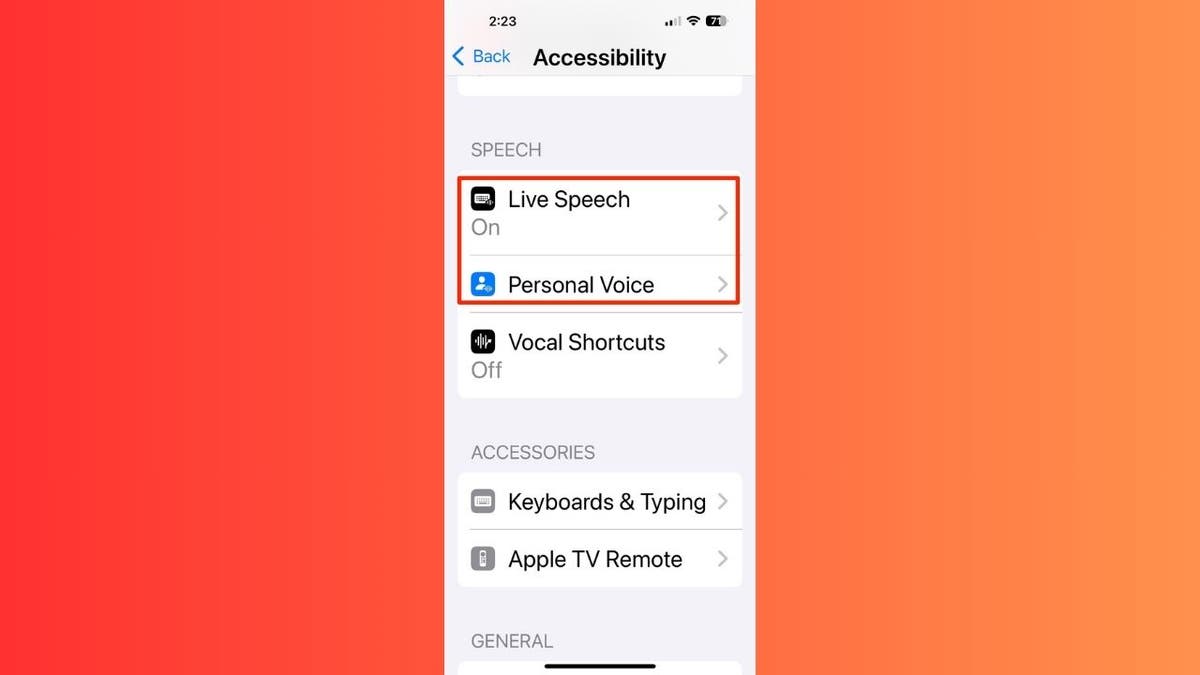
Live Speech and Personal Voice features on iPhone. (Kurt “CyberGuy” Knutsson)

 How does Personal Voice work?

Personal Voice lets you create a digital version of your own voice by recording a series of phrases. Here’s how it works:

  • Personalized voice synthesis: Record your voice using your iPhone, iPad or Mac.
  • Privacy-focused: Voices are encrypted and stored securely on your device.
  • Compatibility: Works across Apple devices running iOS 17, iPadOS 17 or macOS Sonoma or later.
iPhone live speech 2

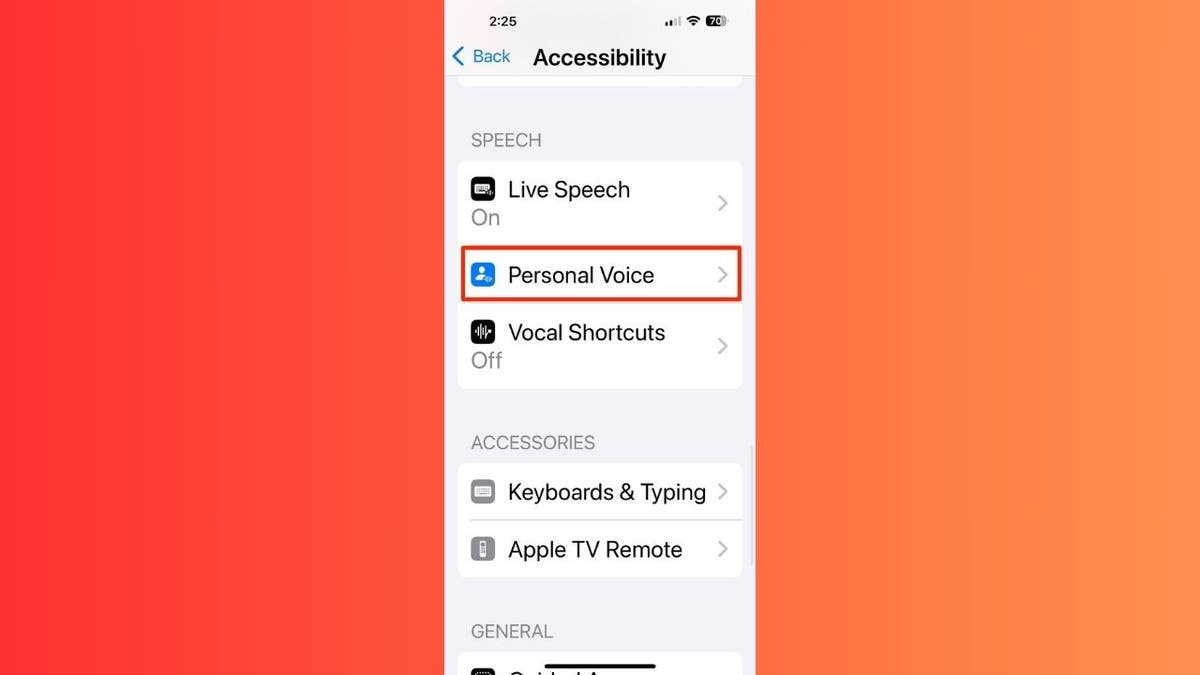
Personal Voice feature on iPhone.

BEST ANTIVIRUS FOR MAC, PC, IPHONES AND ANDROIDS — CYBERGUY PICKS

Setting up Personal Voice

Personal Voice allows you to create a synthesized voice that sounds like your own. But first, ensure you have a compatible device running iOS 17, iPadOS 17 or macOS Sonoma or later. Choose a quiet room with minimal echo or background noise. You can pause and resume the recording session as needed. Now, here’s how to set it up:

On iPhone or iPad:

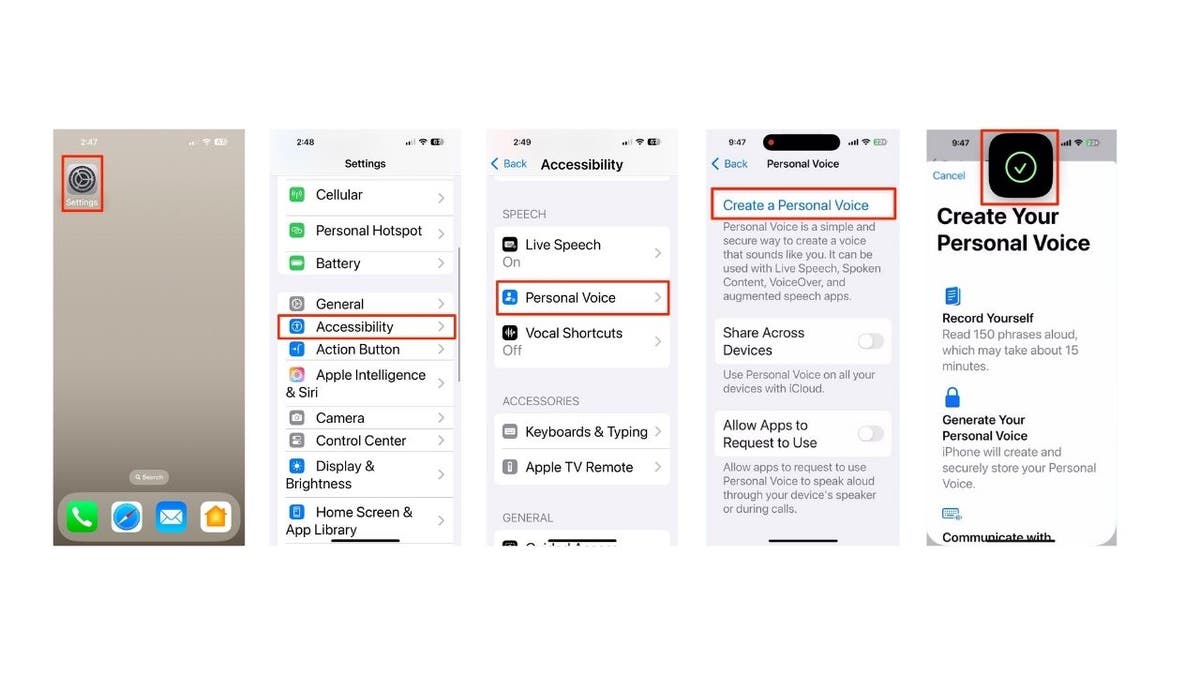
  • Open the Settings app.
  • Go to Accessibility.
  • Click Personal Voice.
  • Tap “Create a Personal Voice.”
  • Authenticate using Face ID, Touch ID or your device passcode.
iPhone live speech 3

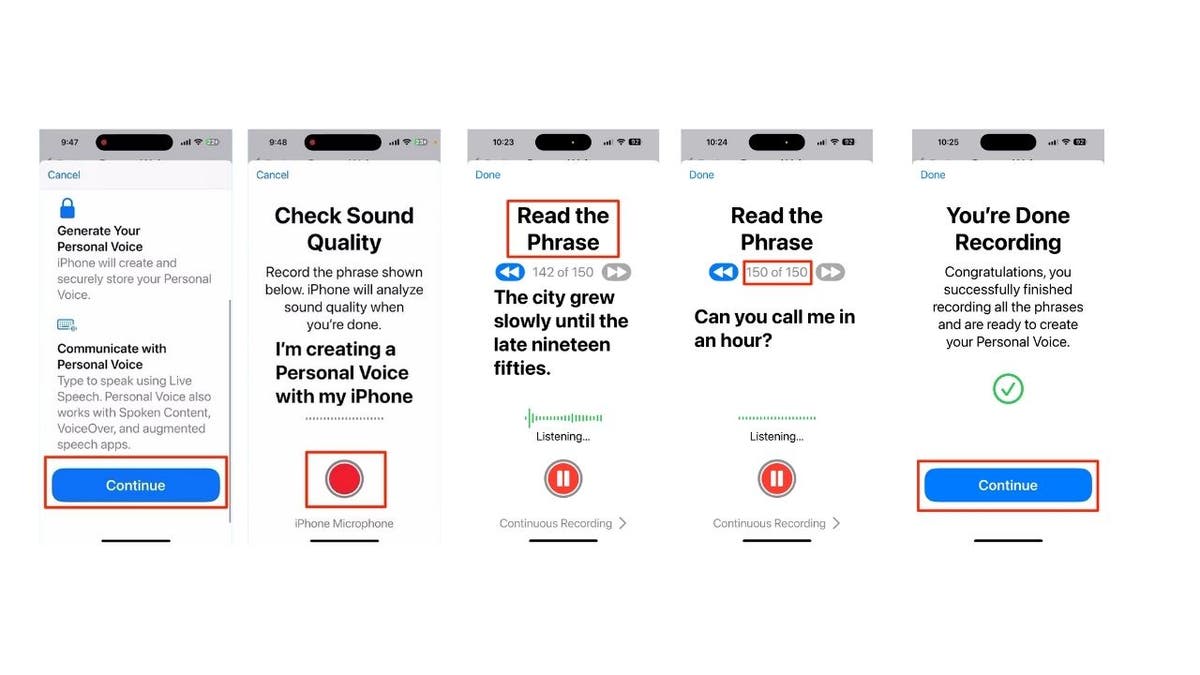
Steps to set up Personal Voice feature on iPhone. (Kurt “CyberGuy” Knutsson)

  • Click Continue.
  • Click the record button at the bottom of the screen.
  • Follow the on-screen instructions, which require you to “Read the Phrase” on the screen to record 150 randomly chosen phrases.
  • It will tell you once you are done recording. Then click Continue.
iphone live speech 4

Steps to set up Personal Voice feature on iPhone. (Kurt “CyberGuy” Knutsson)

On Mac:

iphone live speech 5

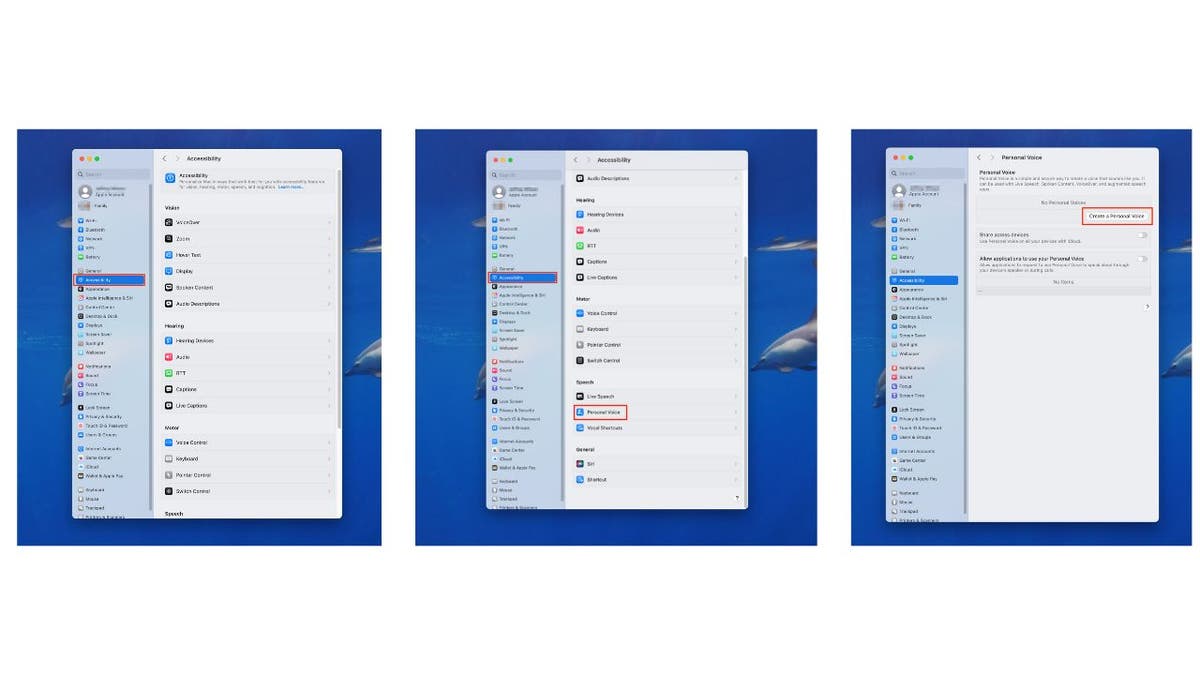
Steps to set up Personal Voice feature on Mac. (Kurt “CyberGuy” Knutsson)

  • Click System Settings.
  • Then, select Accessibility.
  • Click Personal Voice on the left of the screen.
  • Then, click “Create a Personal Voice.”
Personal voice 7

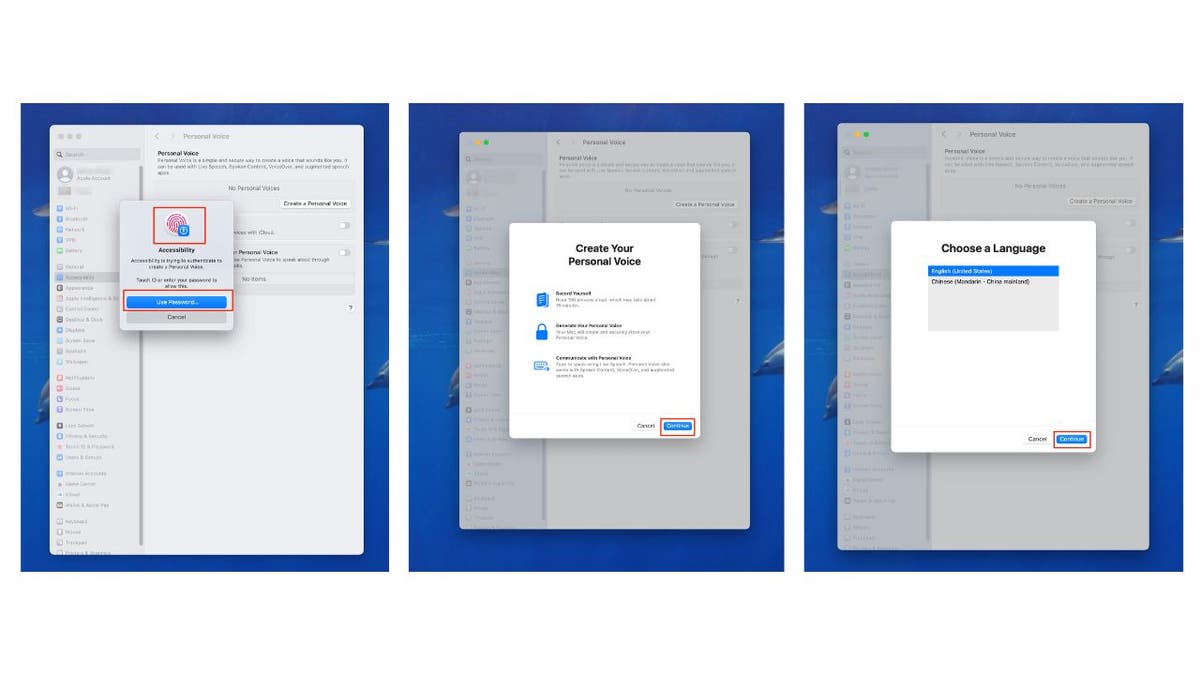
Steps to set up Personal Voice feature on Mac. (Kurt “CyberGuy” Knutsson)

  • Authenticate using Touch ID, or your device passcode.
  • Then tap Continue, and then Continue again.
personal voice 8

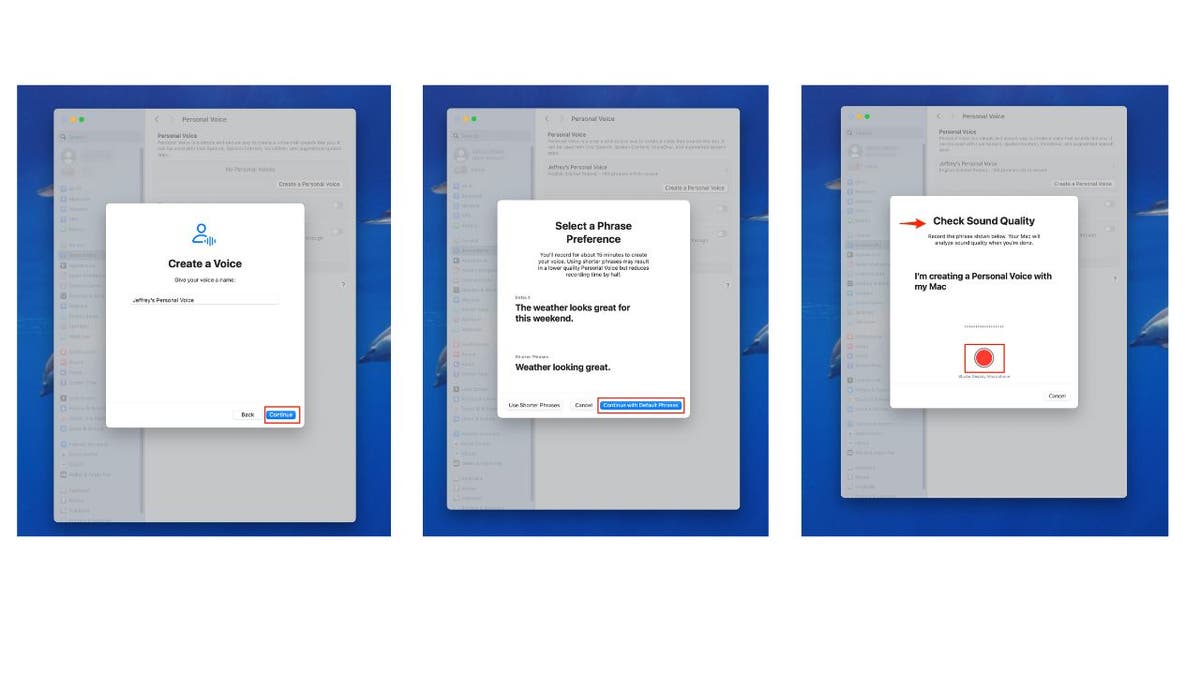
Steps to set up Personal Voice feature on Mac. (Kurt “CyberGuy” Knutsson)

  • Click Continue one more time.
  • Click “Continue with Default Phrases.”
  • Click the record button at the bottom of the screen to check the sound quality.
  • Then tap Done. 
personal voice 9

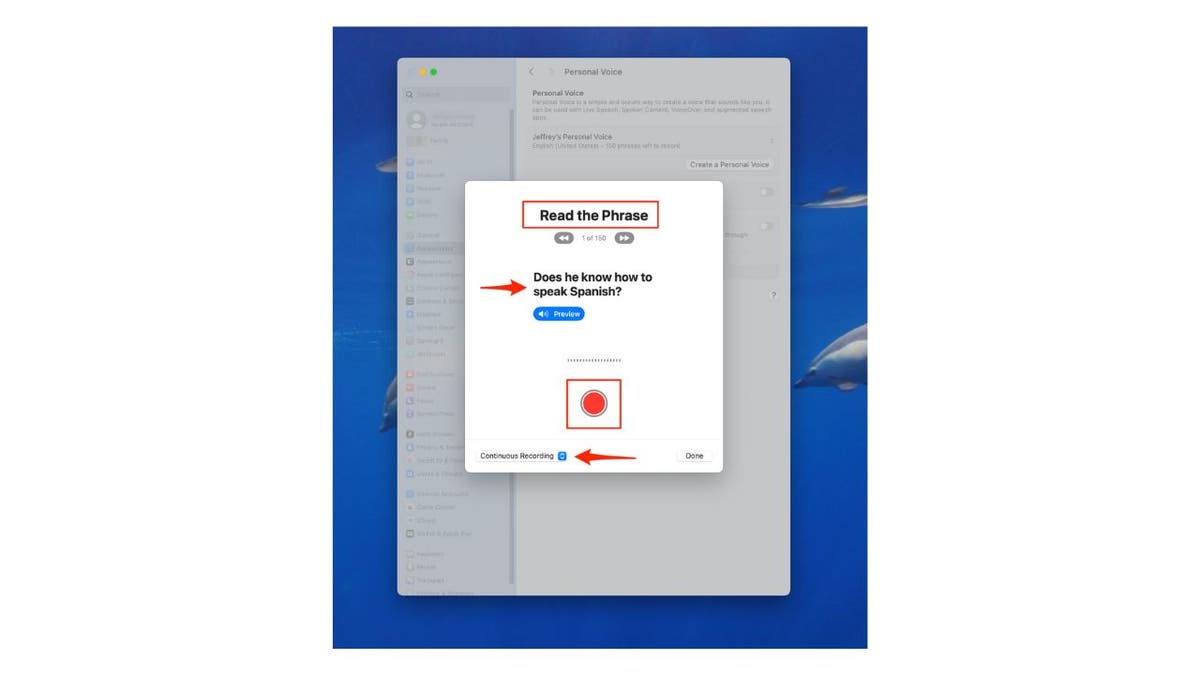
Steps to set up Personal Voice feature on Mac. (Kurt “CyberGuy” Knutsson)

  • Follow the on-screen instructions, which require you to “Read the Phrase” on the screen to record 150 randomly chosen phrases. In this example, you’d say, “Does he know how to speak Spanish?”
  • Make sure it’s set to Continuous recording so that you can go from reading one phrase to the next without stopping.
  • It will tell you once you are done recording. Then click Continue.

WHAT IS ARTIFICIAL INTELLIGENCE (AI)?

personal voice 10

Steps to set up Personal Voice feature on Mac. (Kurt “CyberGuy” Knutsson)

Note: The device will generate your personal voice after you complete the 150-phrase recording process, which typically takes a few hours to days to fully process. It will process your speech securely on your device overnight while it is charging and connected to Wi-Fi. You can create multiple voices on each device, and the voice generation occurs only when your device is locked and charging.

TALK IN TWO LANGUAGES WITH APPLE WATCH’S REAL-TIME TRANSLATIONS

Using Live Speech

Live Speech allows you to type what you want to say and have it spoken aloud using your Personal Voice or other system voices. Here’s how to set it up and use Live Speech:

On iPhone/iPad: 

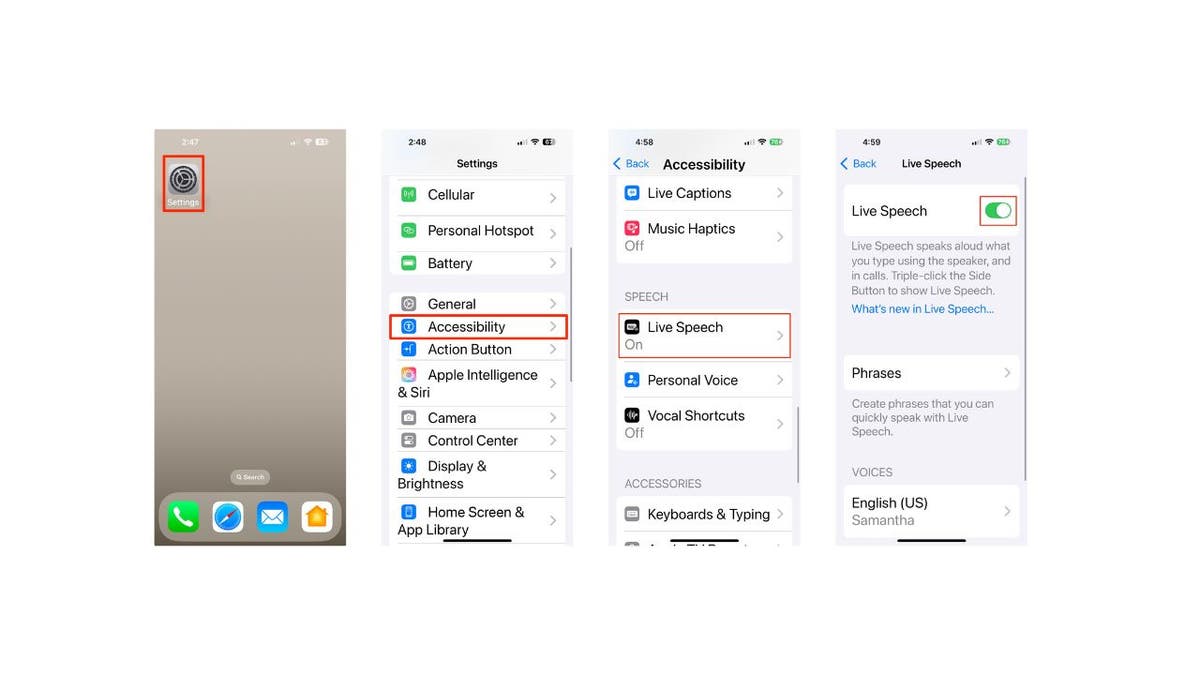
  • Click Settings.
  • Tap Accessibility.
  • Click Live Speech.
  • Toggle on Live Speech.
LIVE SPEEch steps 11

Steps to use Live Speech on iPhone. (Kurt “CyberGuy” Knutsson)

On Mac: 

  • Tap Apple menu.
  • Click System Settings.
  • Select Accessibility.
  • Click Live Speech.
live speech 12

Steps to use Live Speech on Mac. (Kurt “CyberGuy” Knutsson)

On Apple Watch: 

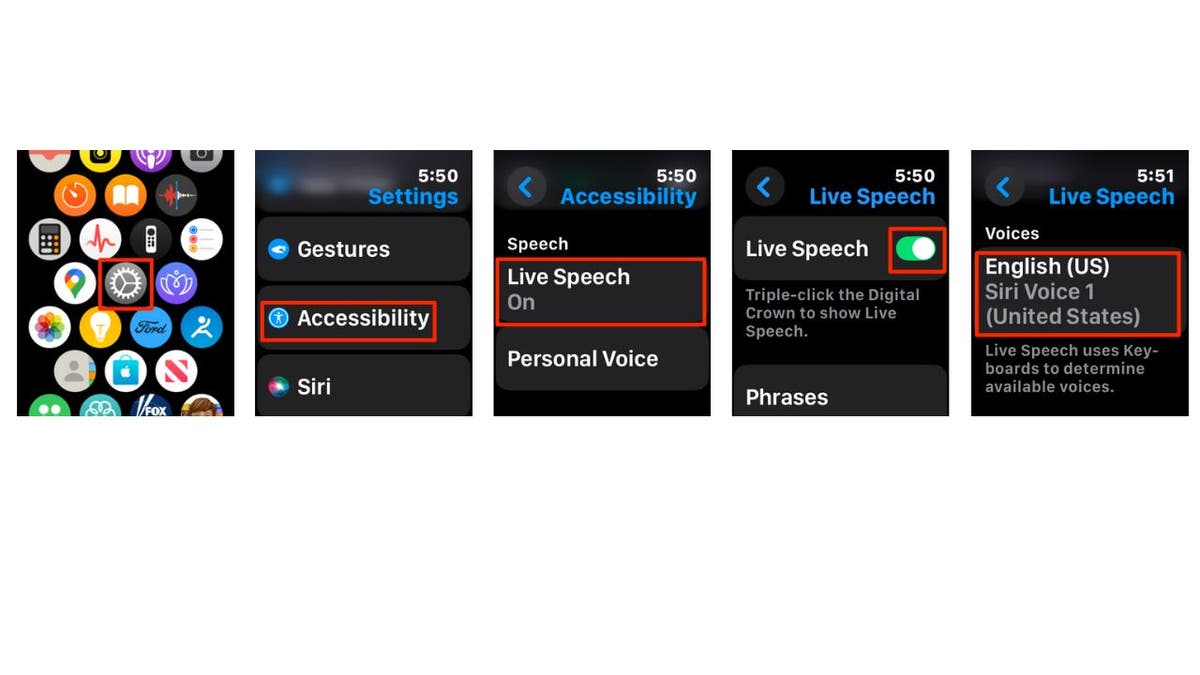
  • Go to the Settings app.
  • Tap Accessibility.
  • Click Live Speech.
  • Toggle on Live Speech. 
  • Then scroll down and select a voice to use, including your created Personal Voice, if available.

GET FOX BUSINESS ON THE GO BY CLICKING HERE

live speech 13

Steps to use Live Speech on Apple Watch. (Kurt “CyberGuy” Knutsson)

APPLE AIRPODS PRO 2 MAKES HEARING TESTS AS EASY AS A FEW TAPS

How to use Live Speech

On iPhone/iPad:

  • Triple-click the side or top button.
  • Tap “Live Speech.”
  • Type your message.
  • Tap “Send” to have it spoken aloud.

On Mac:

  • Click the Type to Speak text field in the Live Speech window.
  • Type your message.
  • Tap the play button to have it spoken aloud.

On Apple Watch:

  • Triple-click the Digital Crown.
  • Tap Live Speech
  • Tap where it says “Type to Speak.”
  • Type your message using the letters below it.
  • Tap “Send” to have it spoken aloud.

SUBSCRIBE TO KURT’S YOUTUBE CHANNEL FOR QUICK VIDEO TIPS ON HOW TO WORK ALL OF YOUR TECH DEVICES

Kurt’s key takeaways

Personal Voice and Live Speech provide a means of communication for those who may lose their ability to speak and offer a deeply personal touch by allowing users to maintain their own voice. The ability to use these features across multiple Apple devices ensures continuity and accessibility in various situations, from phone calls to in-person conversations. It’s important to note that Apple has designed these features with privacy and security in mind. Personal Voice data is encrypted and stored securely on the device, and when shared across devices, it uses end-to-end encryption in iCloud.

CLICK HERE TO GET THE FOX NEWS APP

Can you share a personal experience where advanced accessibility tools made a significant difference in your or someone else’s life? Let us know by writing us at Cyberguy.com/Contact

For more of my tech tips and security alerts, subscribe to my free CyberGuy Report Newsletter by heading to Cyberguy.com/Newsletter

Ask Kurt a question or let us know what stories you’d like us to cover.

Follow Kurt on his social channels:

Answers to the most-asked CyberGuy questions:

New from Kurt:

Copyright 2024 CyberGuy.com. All rights reserved.


Source link

What is ‘sunset anxiety?’ Experts reveal cause of late-day distress

0

Join Fox News for access to this content

Plus special access to select articles and other premium content with your account – free of charge.

By entering your email and pushing continue, you are agreeing to Fox News’ Terms of Use and Privacy Policy, which includes our Notice of Financial Incentive.

Please enter a valid email address.

Nearly 20% of American adults reported having an anxiety disorder in the past year, data shows — and many are more likely to feel uneasy and anxious as the sun sets.

While “sunset anxiety” isn’t an official medical diagnosis and does not appear in the Diagnostic and Statistical Manual of Mental Disorders (DSM-5), some mental health experts agree that it’s a very real phenomenon.

The symptoms aren’t limited to just anxiety, according to Andrea D. Guastello, PhD, a licensed psychologist at the University of Florida Department of Psychiatry.

ADDING LAUGHTER TO YOUR LIFE CAN BOOST HEALTH AND HEALING, EXPERTS SAY

“It can be any psychiatric symptom that increases in frequency or intensity as the sun goes down or at night,” Guastello told Fox News Digital. 

While “sunset anxiety” isn’t an official medical diagnosis and does not appear in the Diagnostic and Statistical Manual of Mental Disorders (DSM-5), some mental health experts agree that it’s a very real phenomenon. (iStock)

Symptoms may include feelings of depression, isolation and hopelessness that tend to increase at night, the expert said.

What exactly is sunset anxiety?

Sunset anxiety occurs when a person starts to feel anxious as the sun goes down at the end of the day, Beena Persaud, Psy.D., clinical psychologist with Cleveland Clinic Akron General in Akron, Ohio, told Fox News Digital. 

“The lack of natural light can cause people to have less energy and motivation, restless discomfort, worry and nervousness about accomplishing tasks,” she said.

GRATEFUL CHILDREN MAKE PARENTS HAPPIER AND LESS STRESSED, NEW STUDY SUGGESTS

People who have previously experienced episodes of anxiety and are generally more on the anxious side are more susceptible, Persaud said, as are people who have a heightened sensitivity to light changes and those who consider themselves to be “night owls.”

Women watching sunset

“Adults are more likely to feel it than teens or children, and this may be due to adults’ sense of responsibility for daily activities,” one expert said. (iStock)

There are no specific gender or racial tendencies for sunset anxiety, the expert noted.

“Adults are more likely to feel it than teens or children, and this may be due to adults’ sense of responsibility for daily activities,” she added.

Common triggers

The onset of sunset anxiety could be related to the circadian rhythm, which is the body’s internal, natural 33% that regulates many of the body’s functions, according to experts.

The circadian rhythm is influenced by the production of melatonin, Persaud said. 

CLICK HERE TO GET THE FOX NEWS APP      

“We know there can be hormonal changes with winter and daylight saving time,” she told Fox News Digital. 

“Since our production of melatonin is easily affected by light, early darkness can cause symptoms of both anxiety and depression. The body believes it should be getting ready for bed because of the darkness.”

“The lack of natural light can cause people to have less energy and motivation, restless discomfort, worry and nervousness about accomplishing tasks.”

Experts report an increase in seasonal anxiety from October to late March. 

“The changing of the seasons and earlier darkness make it a prime time for people to experience both sunset anxiety and seasonal depression,” Persaud said.

CLICK HERE TO SIGN UP FOR OUR HEALTH NEWSLETTER

Anxiety can also occur if someone is carrying a heavy mental load of activities and responsibilities and struggles to complete them all by the evening.

“Darkness occurring earlier makes us physically and emotionally tired, and we feel as if the day is ending before we can achieve our daily goals,” said Persaud.

Tips to alleviate sunset anxiety

Guastello at the University of Florida offered the following tips to help curb anxiety around sunset.

Woman watching sunset

If you experience worsening or persistent symptoms of sunset anxiety that don’t improve with the above lifestyle changes, experts recommend consulting with a mental health provider. (iStock)

– Set reasonable goals for yourself

– Plan enjoyable activities around the time your anxiety usually kicks up

– Practice good sleep hygiene

– Get sun exposure outdoors and use a sun lamp in times of low light

– Pay attention to your nutrition and get a checkup with your primary care provider if needed

– Get regular exercise to help with low levels of anxiety, but avoid working out within two hours of bedtime

For more Health articles, visit www.foxnews.com/health

If you experience worsening or persistent symptoms of sunset anxiety that don’t improve with the above lifestyle changes, experts recommend consulting with a mental health provider.

Flight passenger’s social media post on ‘overhead bin ownership’ sparks debate

0

Join Fox News for access to this content

Plus special access to select articles and other premium content with your account – free of charge.

By entering your email and pushing continue, you are agreeing to Fox News’ Terms of Use and Privacy Policy, which includes our Notice of Financial Incentive.

Please enter a valid email address.

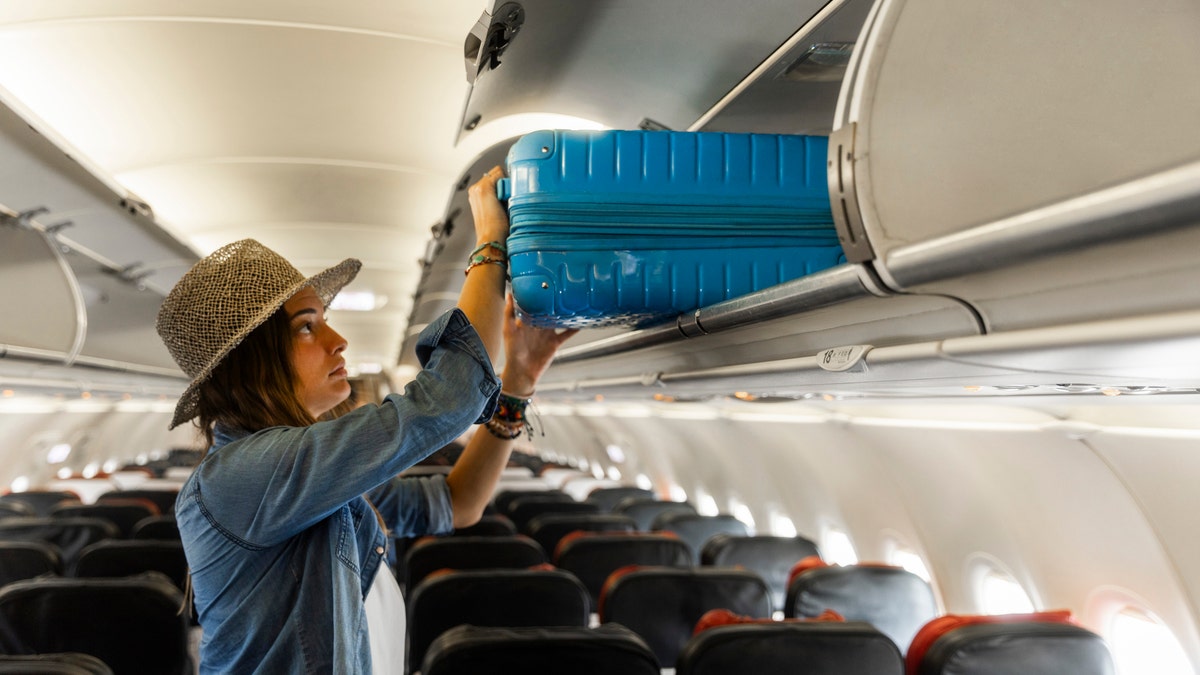
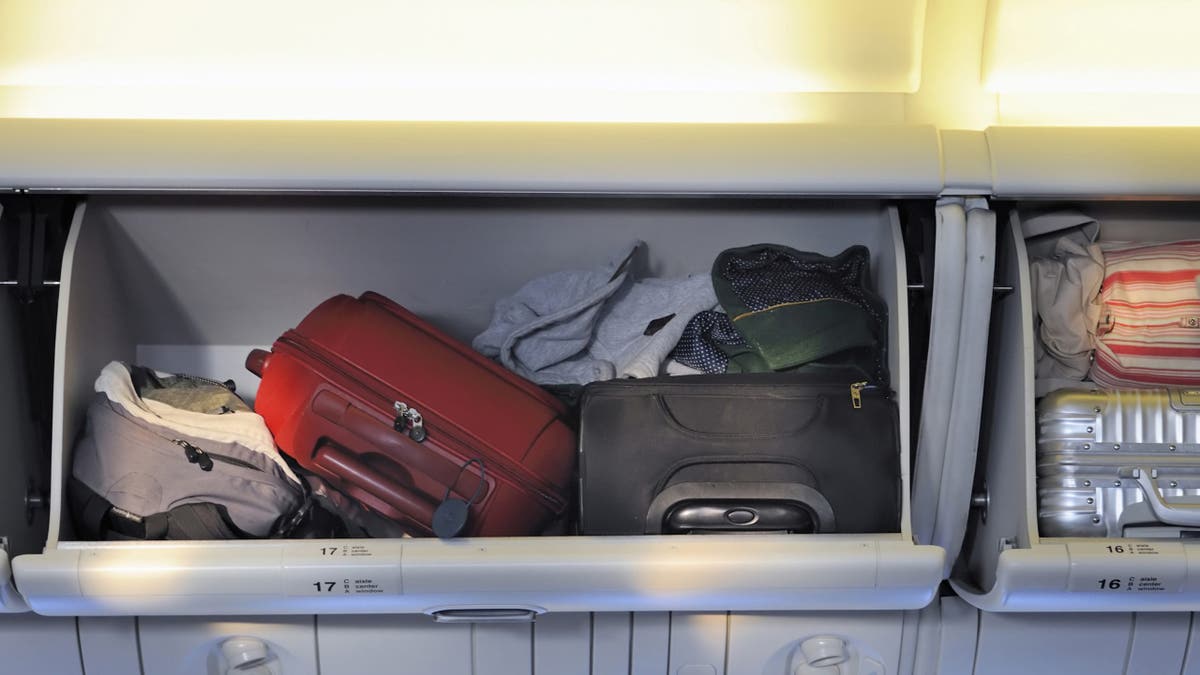
Flight passengers are battling over baggage, with flyers taking to social media to discuss where to stow carry-on bags and the policies behind it.

One traveler shared a recent experience on Reddit in the “r/unitedairlines” forum with the title, “Overhead bin “ownership”, and smaller carryon items.”

The user claimed they had a recent travel experience involving overhead bins, writing, “I was on a flight yesterday where the FA [flight attendant] announced your items do not have to go directly above your seat and to look for any overhead space.”

AMERICAN AIRLINES PASSENGERS REACT AS CABIN FLOODS WITH ‘DISGUSTING’ LIQUID MIDFLIGHT

“The flight was packed and room ran out quickly and people were scrambling up and down the aisles. To help that, it was also asked that IF your carryon can fit under the seat please do so. That seems like a kind thing to do,” the user posted.

Fox News Digital reached out to United Airlines for comment.

Reddit passengers debate frustrations with flyers placing their carry-ons in overhead bins and other grievances. An etiquette expert weighs in. (iStock)

Redditors took to the comments section to point out the sizing of carry-ons taking up too much space.

“Some of these ‘carry ons’ are monsters, let’s be honest,” said one user.

Another chimed in, “part of the problem is passengers ‘abusing’ their carry on allowances. Some people would max out on the size of their carry on, and bring along an oversized ‘personal item.’”

DRONE SIGHTINGS NEAR AIRPORTS: WILL IT AFFECT HOLIDAY TRAVEL? EXPERTS WEIGH IN

Other users drew attention to passengers traveling with multiple bags.

“This is a pet peeve of mine-passengers should only be allowed 1 carry on to be put overhead. I see people board with a carry on, a backpack and a snowboard in addition to their computer bag and purses,” said one.

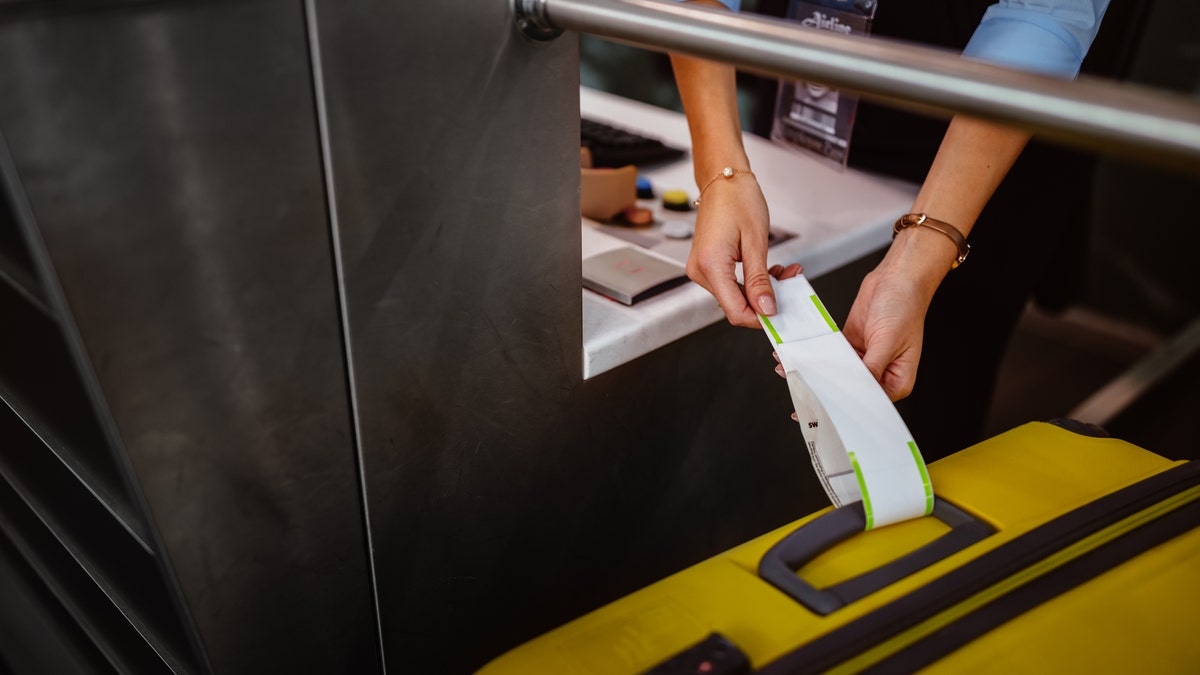
Airport check-in counter employee attaching tag on luggage

“Some of these ‘carry ons’ are monsters, let’s be honest,” one user commented on Reddit. (iStock)

One added, “Biggest frustration is when the early passengers board, but 2-3 items in the overhead bins then when group 3 boards there is no space left and bags have to be passed back out to be gate checked.”

“If I skip a carry on and only bring a personal backpack that bad boy goes up in the bin,” shared a user.

Another person shared a preference on where they place their bags.

RISE OF ‘SEAT SQUATTERS’ ON FLIGHTS PROMPTS ETIQUETTE DEBATE: EXPERT WEIGHS IN

“I always put my carry on in the bin across the aisle from where I am sitting. That way I can watch it to make sure other passengers don’t mess with it when they put their own luggage into the bin,” the user shared.

On United’s website it says, “You can bring a few items in addition to your carry-on bag and personal item for free,” listing items such as a jacket or coat. 

In another Reddit forum titled, “r/onebag,” a user titled a post “Overhead Bin Etiquette,” asking for others to weigh in on the proper placement of personal items.

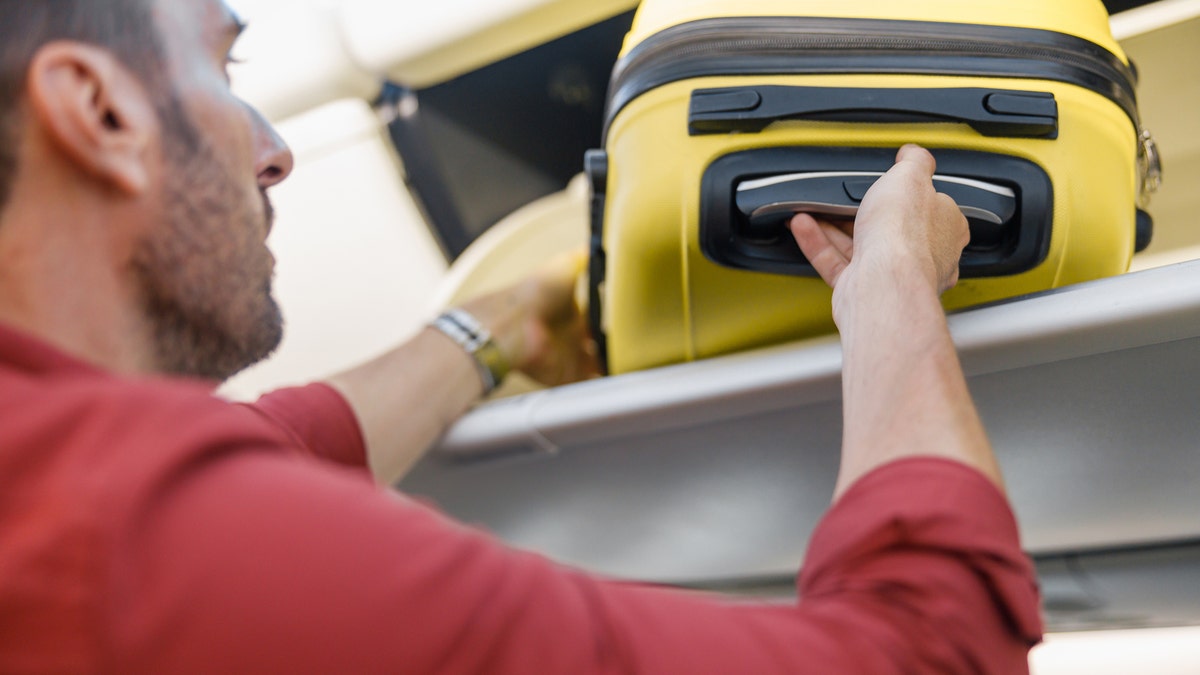
Man pulling out hand luggage from compartment while traveling by plane

One Reddit user (not pictured) commented, “If I’m paying for a ticket that includes overhead space, I won’t move my backpack.” (iStock)

“While I can fit either bag under my seat, I choose to put it in the overhead bin to enjoy all the leg/foot space,” said the user.

Adding, “I never really thought it was an issue until I had another traveler ask me to move my backpack to make room for their wheeled carryon on a full flight.”

One Reddit user commented, “If I’m paying for a ticket that includes overhead space, I won’t move my backpack.”

‘FLYING NAKED’ IS THE LATEST TRAVEL TREND DIVIDING THE INTERNET, AND IT DOESN’T MEAN WHAT YOU THINK

One said, “Every single plane I’ve been on they announce over the intercom that if your bag can fit under the seat, that’s where it should be.”

Storing luggageStoring luggage

Randall (not pictured) said carry-ons should go in bins associated with seat assignment. (iStock)

California-based etiquette expert Rosalinda Randall told Fox News Digital “overhead bins are for carry-on luggage, not your jacket, handbag, a book or snack you’ll later get up to retrieve.”

Randall shared the message that is often stated by flight attendants during the boarding process to allow usable space for everyone’s carry-on.

“If boarding early or in the first couple of boarding groups, you will probably have a spot in the overhead bin directly above your row, where your carry-on belongs,” she added.

For more Lifestyle articles, visit foxnews.com/lifestyle.

Randall said it may be necessary to place a carry-on several rows behind an assigned seat due to occupied bins.

“If the inconvenience of waiting once you reach the gate is too much for you, politely request they check-it. Instead of waiting on the plane, you’ll wait for it at baggage claim,” said Randall.

Getting her suitcase out of the luggage compartment

Randall (not pictured) said it may be necessary to place a carry-on several rows behind an assigned seat due to occupied bins. (iStock)

Randall advised not to rush to retrieve carry-ons when the plane leaves.

“The courteous thing to do is wait until you can retrieve your carry-on without inconveniencing others.”

Randall said there are a few things that passengers may do with their carry-ons that may be considered rude and inconsiderate.

CLICK HERE TO SIGN UP FOR OUR LIFESTYLE NEWSLETTER

“Place it in a class you have not paid for. In the end, those passengers have priority, your bag will be checked if all bins are full,” she said. 

She also said it is in poor taste to place your carry-on in the front of the plane if your seat is in the back or to remove someone’s carry-on so that yours fits.

plane overhead bin

Randall said it is in poor taste to move someone else’s carry on. (iStock)

“This is not first-class behavior; it’s low class. Besides, what are they supposed to do with their carry-on,” said Randall.

She said passengers should be courteous when putting their luggage in an overhead bin instead of “carelessly [shoving] shopping bags or crushing them to fit your carry-on, the items could be fragile.”

CLICK HERE TO GET THE FOX NEWS APP

She added that some people “thoughtlessly maneuver carry-ons or use someone’s seat as a step stool when trying to fit it into the bin.”

12-25 | Fox News

0

Fox News’ Health newsletter brings you stories on the latest developments in health care, wellness, diseases, mental health and more.

TOP 3:

– Stem cell therapy could correct heart failure in children, say doctors and specialists at the Murdoch Children’s Research Institute in Melbourne, Australia.

– Doctors saved a pregnant woman and her baby after discovering a grapefruit-sized tumor in her chest cavity.

– A second-grade boy saved his friend from choking by doing the Heimlich maneuver in the school cafeteria – and it was caught on camera.

Researchers at MCRI are studying and reprogramming the potential of the blood to treat disease, specifically heart failure in children. (iStock)

MORE IN HEALTH

REST AND RECHARGE – Quality sleep can be tough to come by during the holidays. A clinical psychologist offers expert advice for snoozing during the busy season. Continue reading…

‘MAJOR STEP FORWARD’ – The FDA has approved the first medication for obstructive sleep apnea, which also promotes weight loss. Continue reading…

FOLLOW FOX NEWS ON SOCIAL MEDIA

Facebook

Instagram

YouTube

Twitter

LinkedIn

SIGN UP FOR OUR NEWSLETTERS

Fox News First

Fox News Opinion

Fox News Lifestyle

Fox News Health

Fox News Autos

Fox News Entertainment (FOX411)

DOWNLOAD OUR APPS

Fox News

Fox Business

Fox Weather

Fox Sports

Tubi

WATCH FOX NEWS ONLINE

Fox News Go

STREAM FOX NATION

Fox Nation

Trump and Biden offer Christmas greetings as US approaches transfer of power

0

As a change in presidential administrations approaches, President-elect Trump and President Biden both marked the Christmas holiday, with Biden acknowledging that it would be his last time as president to wish the nation a merry Christmas.

Trump, who will be sworn in on Jan. 20, exclaimed in a post on Truth Social, “MERRY CHRISTMAS TO ALL!” In another post he shared a photo of himself and his wife Melania — the photo bore the message “MERRY CHRISTMAS!”

In a post on the @POTUS presidential X account, Biden said: “For the last time as your president, it’s my honor to wish all of America a very Merry Christmas. My hope for our nation, today and always, is that we continue to seek the light of liberty and love, kindness and compassion, dignity and decency. May God bless you all.”

A post on the @JoeBiden X account that features a photo of the president and first lady Jill Biden reads, “Merry Christmas, everyone!”

THE TOP FIVE ABSURD TIPS FROM LIBERAL PUNDITS FOR SURVIVING HOLIDAYS WITH TRUMP-VOTING FAMILY

President-elect Trump and President Biden (Getty Images)

THE YEAR OF THE PODCAST: 5 TIMES TRUMP’S PODCAST INTERVIEWS SIDELINED LIBERAL LEGACY MEDIA 

Former President Donald Trump and Vice President Kamala Harris

Vice President Kamala Harris shakes hands with former President Trump during their presidential debate at the National Constitution Center in Philadelphia on Sept. 10, 2024. (Saul Loeb/AFP via Getty Images)

Trump – who defeated Vice President Harris in the November election – made history this year by becoming the second president ever to win election to two non-consecutive terms. The first was Grover Cleveland in the 19th century. While the new year will mark a new chapter in Trump’s political career, it also marks the end of Biden’s decades-long stint at the top levels of Washington politics. 

TRUMP PLEDGES TO BRING BACK FEDERAL EXECUTIONS AFTER BIDEN COMMUTES DEATH SENTENCES FOR 37 INMATES

President Joe Biden

President Biden speaks at the Department of Labor on Dec. 16, 2024, in Washington, D,C. (Kevin Dietsch/Getty Images)

Biden, the oldest president in U.S. history, bowed out of the 2024 presidential contest earlier this year in the face of tremendous pressure from within his party after a widely panned debate performance against Trump.

Zelenskyy lambastes Putin over Christmas strikes: ‘What could be more inhumane?’

0

Ukrainian President Volodymyr Zelenskyy excoriated Russian President Vladimir Putin on Wednesday for launching attacks against energy infrastructure on Christmas Day.

Zelenskyy suggested the attacks were “inhumane,” but said they would not ruin Christmas.

“Today, Putin deliberately chose Christmas for an attack. What could be more inhumane? Over 70 missiles, including ballistic ones, and more than a hundred attack drones. The targets are our energy infrastructure. They continue to fight for a blackout in Ukraine,” he declared in a post on X.

The Russian Defence Ministry acknowledged a “massive strike” on its part, saying it hit energy facilities that supported Ukraine’s “military-industrial complex,” Reuters reported.

“The aim of the strike was achieved. All facilities have been hit,” the ministry said.

RUSSIA BATTERS UKRAINE POWER GRID AMID RISING CONCERN PUTIN COULD ORDER BALLISTIC MISSILE ATTACK THIS WEEKEND

Ukrainian President Volodymyr Zelenskyy talks with the media during the European Council Meeting in Brussels on Thursday. (Pier Marco Tacca/Getty Images)

Strikes against Ukrainian fuel and energy sources involved 78 air, ground and sea-launched missiles, in addition to 106 Shaheds and other kinds of drones, Ukraine’s air force claimed, according to The Associated Press.

“Unfortunately, there have been hits. As of now, there are power outages in several regions. Power engineers are working to restore power supply as soon as possible,” Zelenskyy noted. 

Still, the Ukrainian leader declared that “Russian evil will not break Ukraine and will not spoil Christmas.”

US CITIZEN IMPRISONED IN RUSSIA GIVEN NEW 15-YEAR SENTENCE IN WAKE OF ESPIONAGE CONVICTION

Russian President Vladimir Putin

Russian President Vladimir Putin holds his annual end-of-year press conference in Moscow on Thursday. (Alexander Nemenov/AFP via Getty Images)

The U.S. has provided billions of dollars’ worth of aid to help Ukraine fight the Russian onslaught that erupted in 2022, but Americans and their congressional representatives have been divided regarding whether the U.S. should continue supplying aid to Ukraine.

President-elect Trump, who will take office on Jan. 20, has called for a cease-fire and negotiations.

TRUMP MEETS WITH MACRON, ZELENSKYY AHEAD OF NOTRE DAME REOPENING CEREMONY IN PARIS

President-elect Trump

President-elect Trump looks on during Turning Point USA’s AmericaFest at the Phoenix Convention Center in Phoenix on Sunday.  (Rebecca Noble/Getty Images)

CLICK TO GET THE FOX NEWS APP

In a post on Truth Social this month, Trump declared that “Zelenskyy and Ukraine would like to make a deal and stop the madness. They have ridiculously lost 400,000 soldiers, and many more civilians. There should be an immediate ceasefire and negotiations should begin.”

The Associated Press and Reuters contributed to this report.

Google Maps is deleting location history soon, so act now to save your data

0


Google is rolling out significant changes to its Maps Timeline feature, which tracks your location history. As part of this update, you will soon receive notifications that your Timeline data will be automatically deleted after a specific deadline unless you take action to back it up. This transition represents a shift towards enhanced privacy as Google plans to store Timeline data locally on your device instead of on its servers. While this change aims to protect your data from unauthorized access, it also means that any unbacked location history may be permanently lost.

GET SECURITY ALERTS, EXPERT TIPS, SIGN UP FOR KURT’S NEWSLETTER – THE CYBERGUY REPORT HERE

Google Maps is deleting location history soon, so act now to save your data

Google Maps (Kurt “CyberGuy” Knutsson)

What’s changing with Google Maps Timeline? 

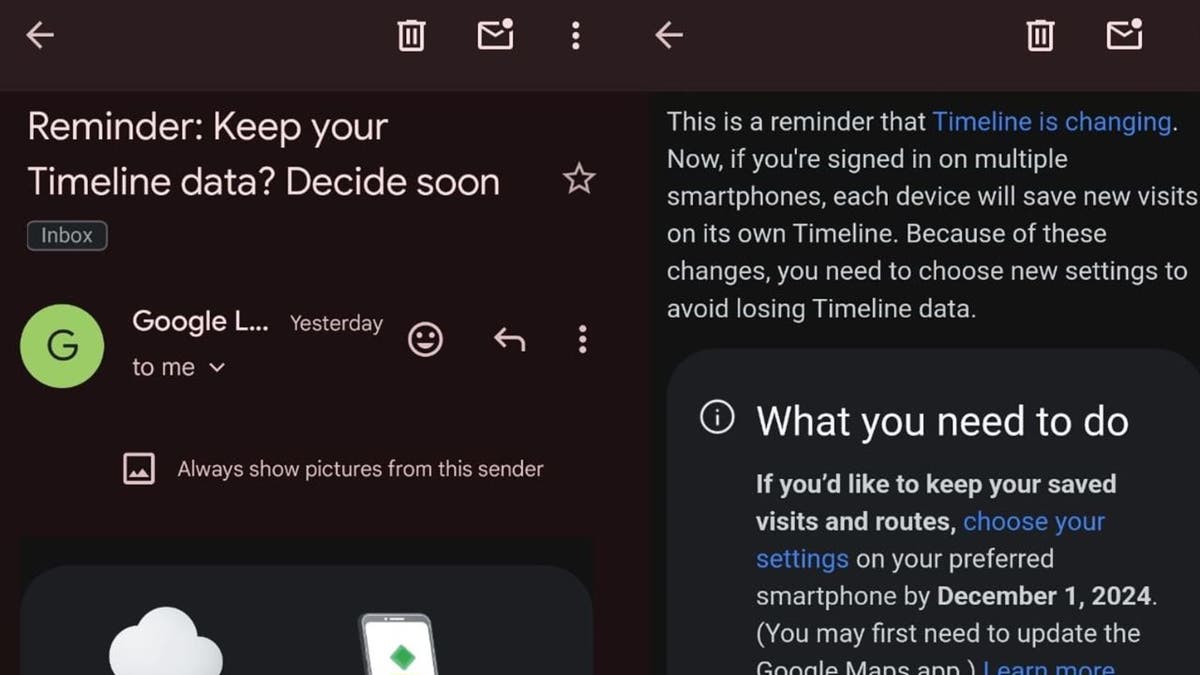
Google Maps’ location-tracking feature, known as Timeline, is undergoing a major update. Previously, Google announced plans to shift this data to local storage. Now, the company is sending out emails alerting you to this upcoming change.

Google will start deleting the last three months of Timeline data unless you take action. While this shift to local storage offers more privacy for those concerned about sharing location data with Google, it also means that if you don’t act, your past location history may be permanently lost.

After receiving the notification, you will have about six months to save or transfer your Timeline data before it’s deleted. The email will be sent by “Google Location History,” with the subject line: “Keep your Timeline? Decide by [date].”

Keep in mind that not everyone has received these notifications yet, so there’s no immediate rush. But once you get the email, you’ll have a six-month window to decide.

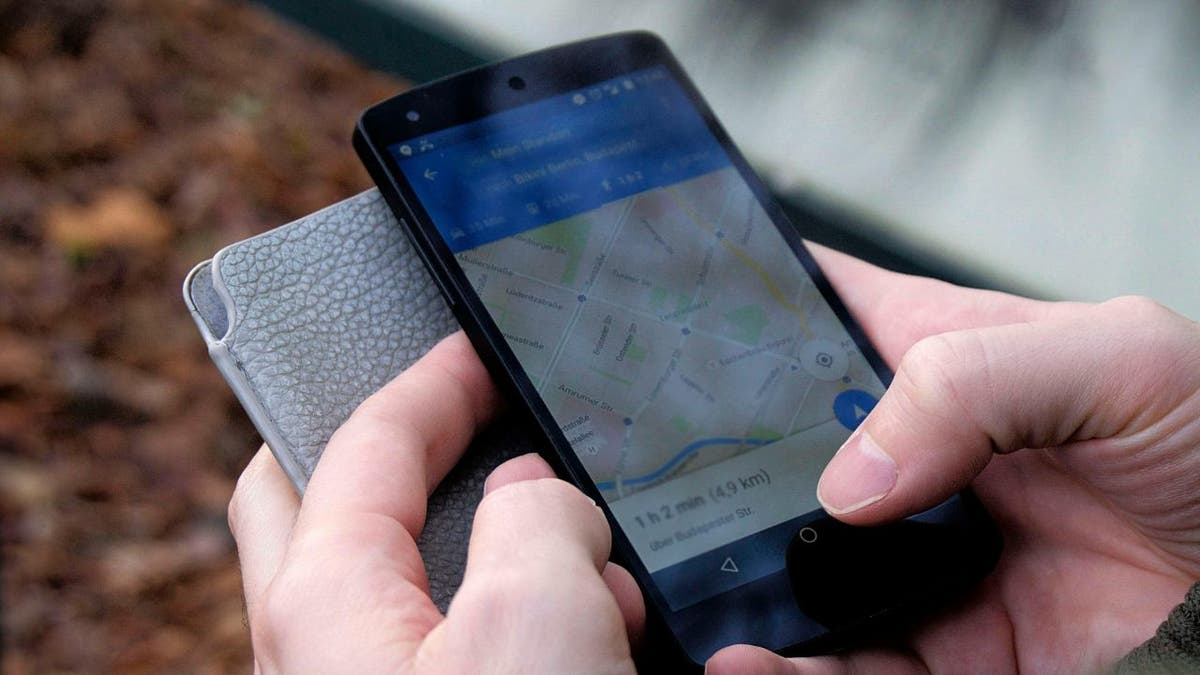
Google Maps is deleting location history soon, so act now to save your data

A man using Google Maps on his phone (Kurt “CyberGuy” Knutsson)

HOW GOOGLE MAPS IS GIVING YOU MORE POWER OVER YOUR LOCATION DATA

Why save your Timeline data?

There are several compelling reasons why users may want to save their Google Maps Timeline data.

Personal memories: The Timeline feature allows you to revisit past trips and experiences, serving as a digital diary of places visited and routes taken. For many, these memories are valuable and worth preserving.

Travel planning: Accessing historical location data can aid in future travel planning. You can analyze previous trips to make informed decisions about destinations, accommodations and activities based on past experiences.

Safety and security: Keeping a record of locations visited can be beneficial for personal safety. In case of emergencies or disputes, having a detailed history of movements can provide crucial information.

Data ownership: With the shift to local storage, you have greater control over your data. Saving this information ensures that it remains accessible and private without relying on cloud services that may be vulnerable to breaches.

Avoiding loss: Google has indicated that any unbacked location history will be deleted after the transition. Those of you who wish to retain your data must act promptly to prevent permanent loss.

BRUSSELS SPROUTS CHRISTMAS TREE LIGHTS UP SCIENCE

How to back up your location history 

If you’ve received the above email or simply want to make sure your Timeline data is preserved, here’s what you can do:

1) Google’s Timeline export tool:

  • Visit takeout.google.com
  • Deselect all options except for Location History (Timeline)
  • Click Next Step
  • Choose Create Export. You’ll receive a backup of your data and see this note at the bottom of the screen, “Google is creating a copy of data from Location History (Timeline).” This process can take a long time (possibly hours or days) to complete. You’ll receive an email when your export is done.

2) Google is rolling out a feature that allows you to export your Timeline data directly from your devices. To use it:

On your phone or tablet:

  • Open the Google Maps app
  • Tap your profile picture or initial in the top right corner.
  • Select Your Timeline
  • Tap the three dots in the top right corner.
  • Select Location & privacy setting
  • Scroll down and tap Export Timeline data
  • You will likely be presented with various options for exporting your data, such as sharing via email, messaging apps or saving to a cloud service. Select the method that suits your needs best. 1) If you choose to share via email, tap on the email option, and it will open your email app with the exported data attached. Enter the recipient’s email address and send it. 2) If you select a messaging app, follow the prompts to send the file through that app.

On your computer:

  • Go to Google Maps in your web browser
  • Click the three horizontal lines in the upper left corner of the screen
  • Select Saved
  • Click the Maps tab.
  • Scroll down and click Create a map
  • Tap Create 
  • In the new window, click Import to upload your exported data.

Keep in mind that this backup will be specific to that device, so you may need to repeat the process on other devices you use.

Note: Some users have reported their data being deleted even after they requested not to lose anything. To avoid this, we recommend regularly backing up your Timeline data.

Google Maps is deleting location history soon, so act now to save your data

Google reminder email (Kurt “CyberGuy” Knutsson)

THIS GOOGLE MAPS TRICK CAN SUPERCHARGE YOUR ABILITY TO NAVIGATE DIRECTIONS

More ways to stay private

While this update may help you avoid sharing location data with Google, it’s important to remember that Google collects personal data in other ways as well. Here are some additional steps you can take to protect your privacy.

1) Turn off location data on Google: This prevents Google Photos from estimating where your photo was taken. Here’s how to do it.

On your phone or tablet:

  • Open your Google Photos app
  • Click your profile icon in the top right corner of the screen
  • Select Google Photos settings
  • Click Privacy 
  • Click Location options 
  • Toggle off next to where it says Estimate missing locations. This will prevent Google Photos from estimating where your photos were taken based on location history data.

2) Disable facial recognition: Sharing your facial data with Google puts you at risk of the company collecting information without your consent, potentially sharing it with third parties and using it in ways you may not be aware of. Here’s how to turn it off.

  • Open Google Photos on your phone
  • Tap your profile icon in the top right corner
  • Go to Google Photos settings and select
  • Click Privacy
  • Disable Face Grouping by toggling off next to where it says Face Groups 

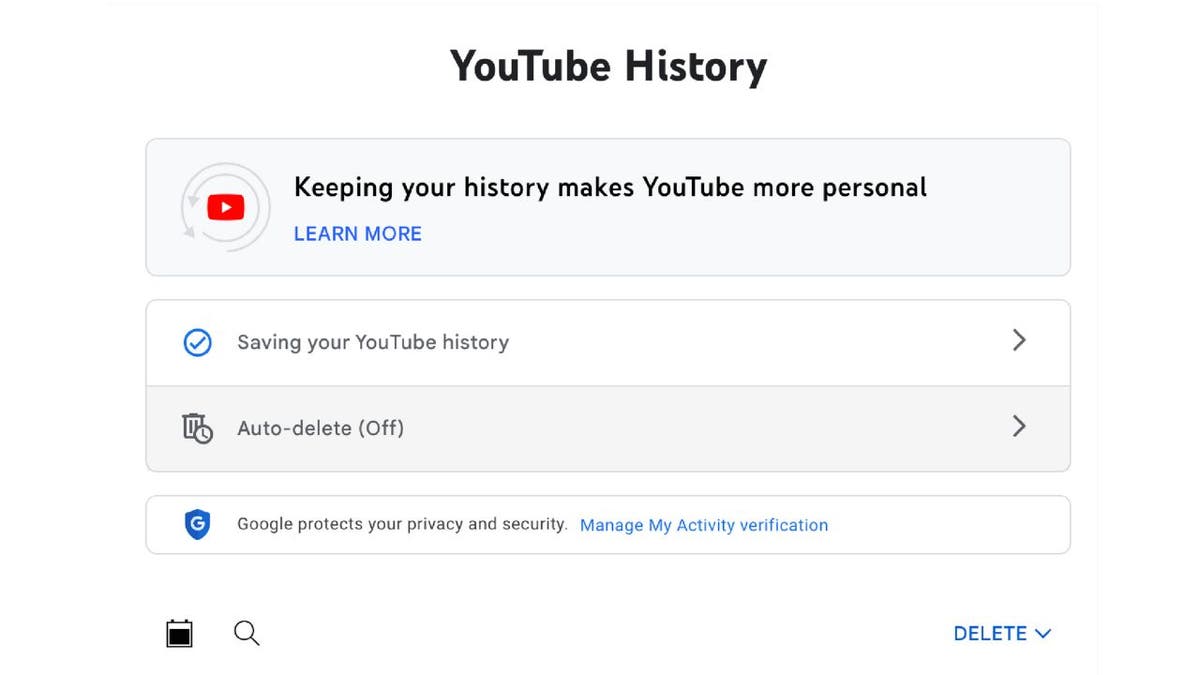
3) Delete your YouTube history: Google tracks your YouTube viewing history and suggests videos based on your past activity. While this can be convenient for discovering similar content, it can also feel like an intrusion on your privacy. Here’s how to end it.

On desktop:

  • Go to YouTube.com
  • Sign in to your YouTube account
  • Click your Profile icon in the top right corner
  • Click Your Data in YouTube
  • Click Manage your YouTube Seach History
  • Click Delete, then click Delete all time
  • It will ask you to confirm your decision by clicking Delete
  • Then click Got it

On mobile:

  • Open the YouTube app on your phone
  • Tap your profile icon in the bottom right corner
  • Go to Settings in the upper right-hand corner of the screen and give it a tap
  • Select History & Privacy
  • Tap Clear Watch History
  • Confirm your decision by clicking Clear watch history
  • You get a pop-up notice that your watch history has been cleared
Google Maps is deleting location history soon, so act now to save your data

YouTube history example (Kurt “CyberGuy” Knutsson)

4) Use a VPN: A virtual private network (VPN) can significantly enhance your privacy when using Google Maps and other online services. Here’s how it helps:

  • Masks your IP address: A VPN hides your real IP address, making it harder for Google to track your physical location.
  • Encrypts your data: VPNs encrypt your internet traffic, protecting your data from potential eavesdroppers.
  • Bypasses geo-restrictions: You can access Google Maps and other services as if you’re in a different location, potentially avoiding location-based tracking.

To use a VPN with Google Maps:

  • Choose a reputable VPN service provider
  • Install the VPN app on your device
  • Connect to a VPN server before opening Google Maps
  • Use Google Maps as usual, with added privacy protection

Important caveat: While using a VPN can enhance your privacy, it may interfere with Google Maps’ ability to provide accurate directions. This is because a VPN may route your connection through a server in a different location, causing the app to misidentify your current position. If you need precise navigation or directions from your current location, consider temporarily disabling the VPN while using Google Maps to ensure accurate results.

Pro tip: For maximum privacy, combine the use of a VPN with Google Maps’ incognito mode. This ensures that your searches and location data aren’t tied to your Google account, providing an added layer of anonymity.

Recommended VPN Services: To find the best VPNs that work across devices like Windows, Mac, Android and iOS, check out my expert reviews of top VPN software. These reviews highlight options that prioritize privacy, speed and reliability.

6 WAYS TO TAKE BACK YOUR PRIVACY ON GOOGLE

Kurt’s key takeaways

Google’s decision to delete location history after three months is a big move toward giving you more control over your data and offering improved privacy by storing information locally. As privacy concerns grow, it’s encouraging to see companies like Google take steps toward greater transparency and user choice.

What other Google privacy concerns do you have? Let us know by writing us at Cyberguy.com/Contact.

For more of my tech tips and security alerts, subscribe to my free CyberGuy Report Newsletter by heading to Cyberguy.com/Newsletter.

Ask Kurt a question or let us know what stories you’d like us to cover.

Follow Kurt on his social channels:

Answers to the most asked CyberGuy questions:

New from Kurt:

Copyright 2024 CyberGuy.com. All rights reserved.



Source link

How iOS 18.2 now lets you share your AirTag’s location with anyone

0


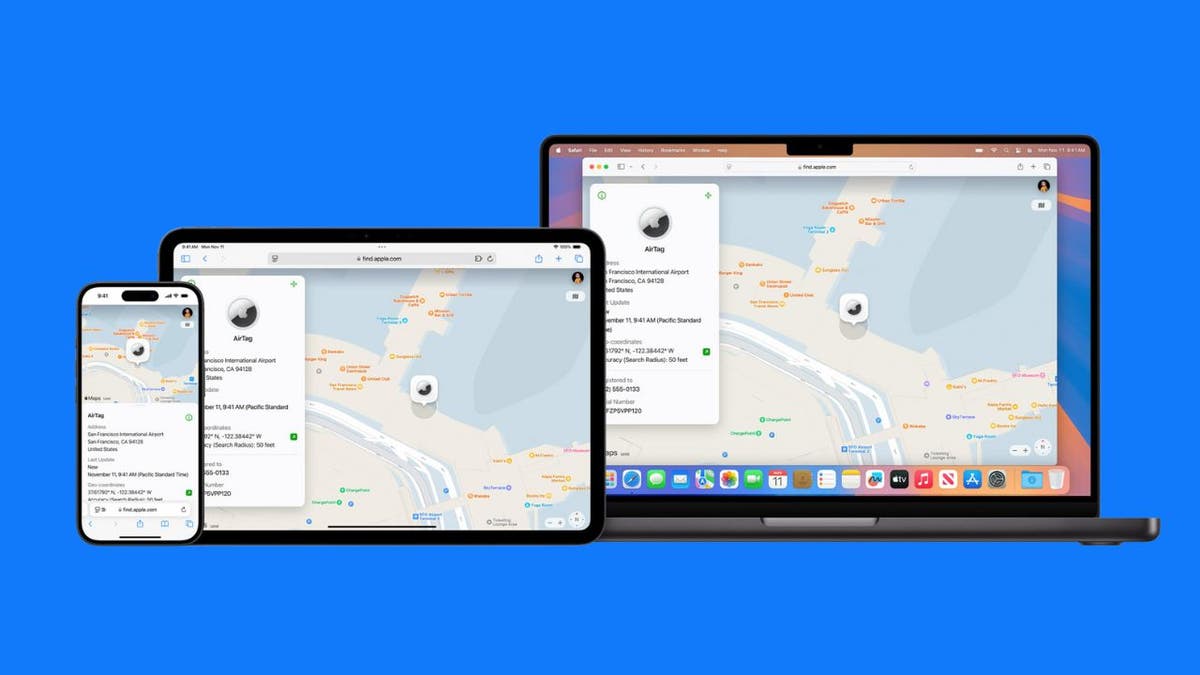
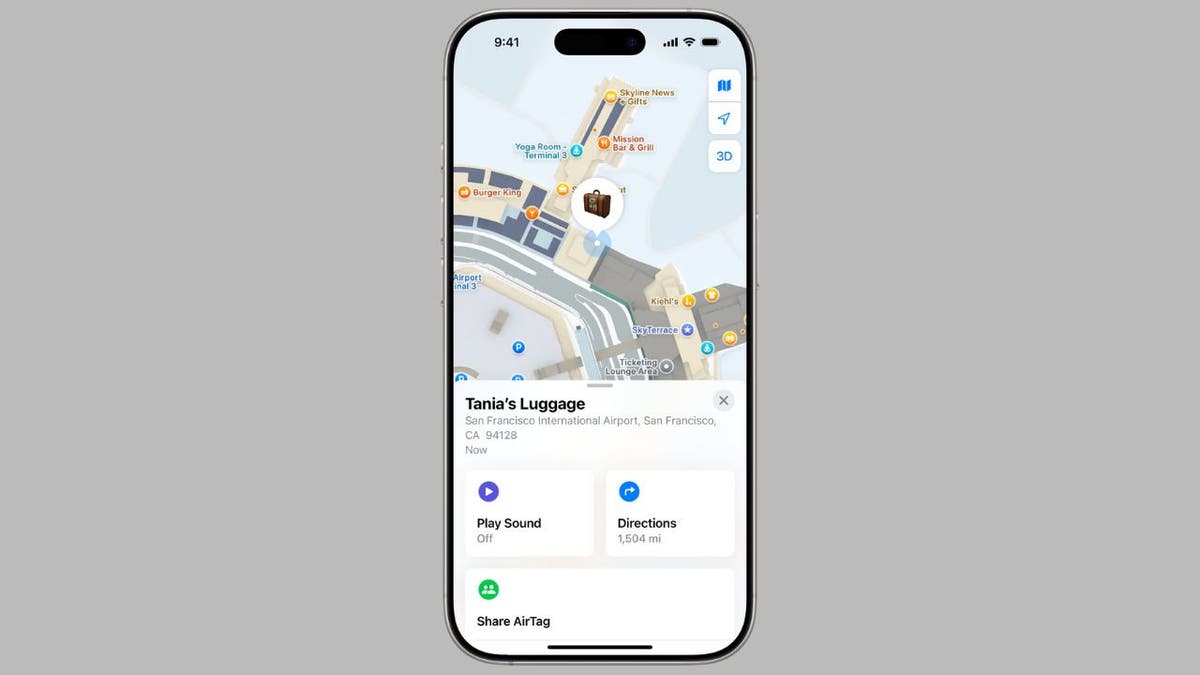
With the release of iOS 18.2, AirTag owners can now enjoy a powerful new feature that enhances their ability to keep track of personal belongings: Share Item Location. This innovative capability allows you to share the location of your AirTag or Find My network accessory with anyone you trust, significantly easing the recovery of lost items. Whether you’re traveling and need to keep track of your luggage or simply want to share the location of a valuable item with a friend or family member, this feature is designed to provide peace of mind and convenience.

GET SECURITY ALERTS, EXPERT TIPS – SIGN UP FOR KURT’S NEWSLETTER – THE CYBERGUY REPORT HERE

How iOS 18.2 now lets you share your AirTag's location with anyone

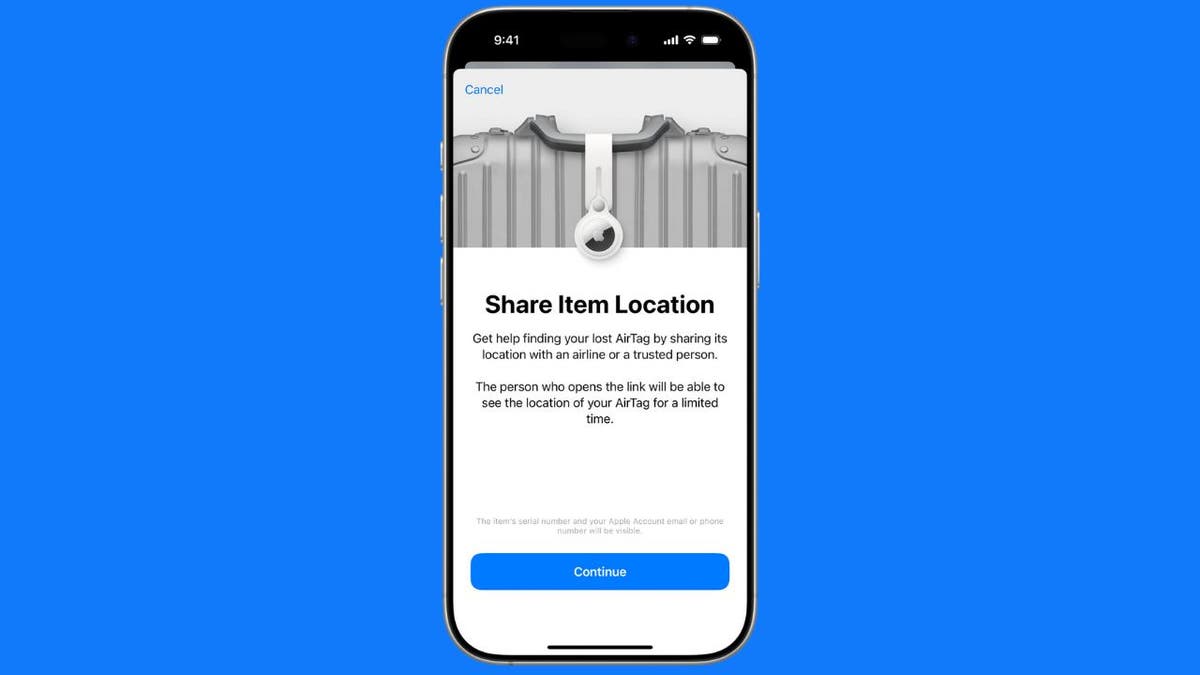
Share Item Location AirTag feature (Apple) (Kurt “CyberGuy” Knutsson)

What is Share Item Location?

Share Item Location is a new feature in the Find My app that enables you to create a secure link showing the location of your AirTag or compatible Find My network accessory. This link can be shared with trusted individuals or organizations, such as airlines, to help locate misplaced items.

How iOS 18.2 now lets you share your AirTag's location with anyone

Share Item Location AirTag feature (Apple) (Kurt “CyberGuy” Knutsson)

ASK KURT: HOW DOES AN APPLE AIRTAG WORK AND HOW FAR CAN YOU TRACK?

How Share Item Location works

When you share an item’s location, the recipient can view it on an interactive map through a web browser. The location updates automatically, and a timestamp shows when it was last refreshed. The shared location expires after seven days or when you’re reunited with your item, whichever comes first.

How iOS 18.2 now lets you share your AirTag's location with anyone

Share Item Location AirTag feature (Apple) (Kurt “CyberGuy” Knutsson)

IS YOUR AIRTAG ABOUT TO DIE?

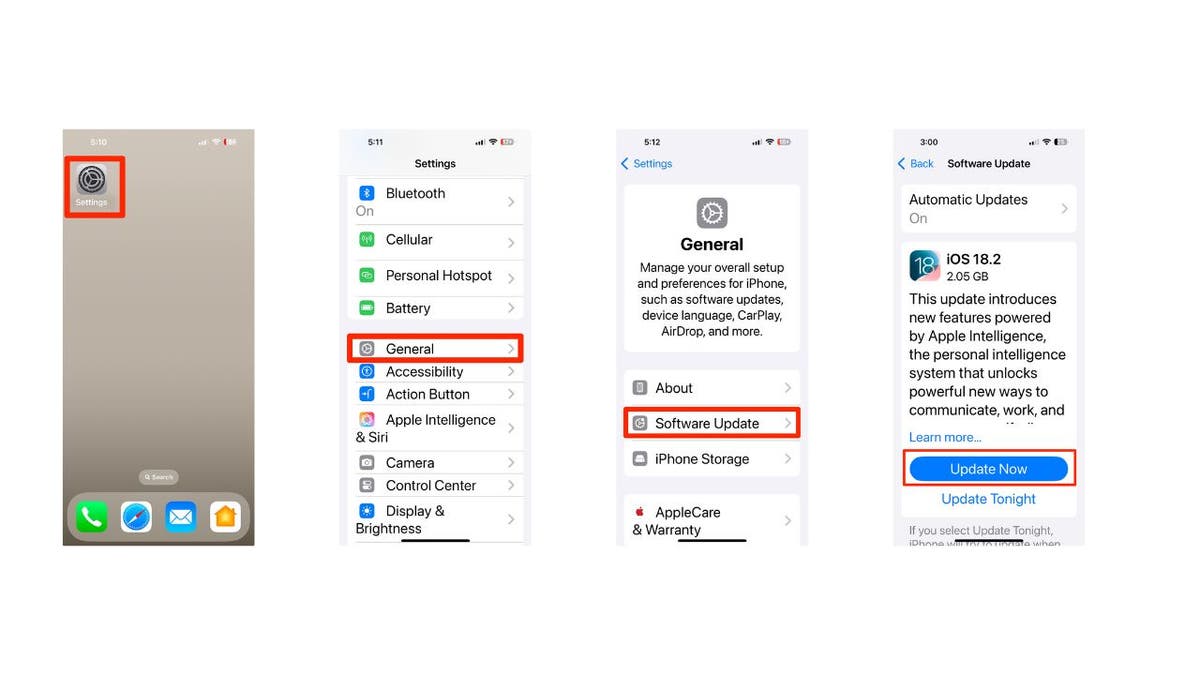
How to update your software to iOS 18.2 or later 

First things first, let’s update your software to iOS 18.2 or later:

  • Open Settings
  • Tap General
  • Select Software Update
  • Tap Update Now
  • Enter your passcode and agree to terms
  • Wait for the installation to complete
How iOS 18.2 now lets you share your AirTag's location with anyone

Steps to update your iPhone’s software (Kurt “CyberGuy” Knutsson)

BRUSSELS SPROUTS CHRISTMAS TREE LIGHTS UP SCIENCE

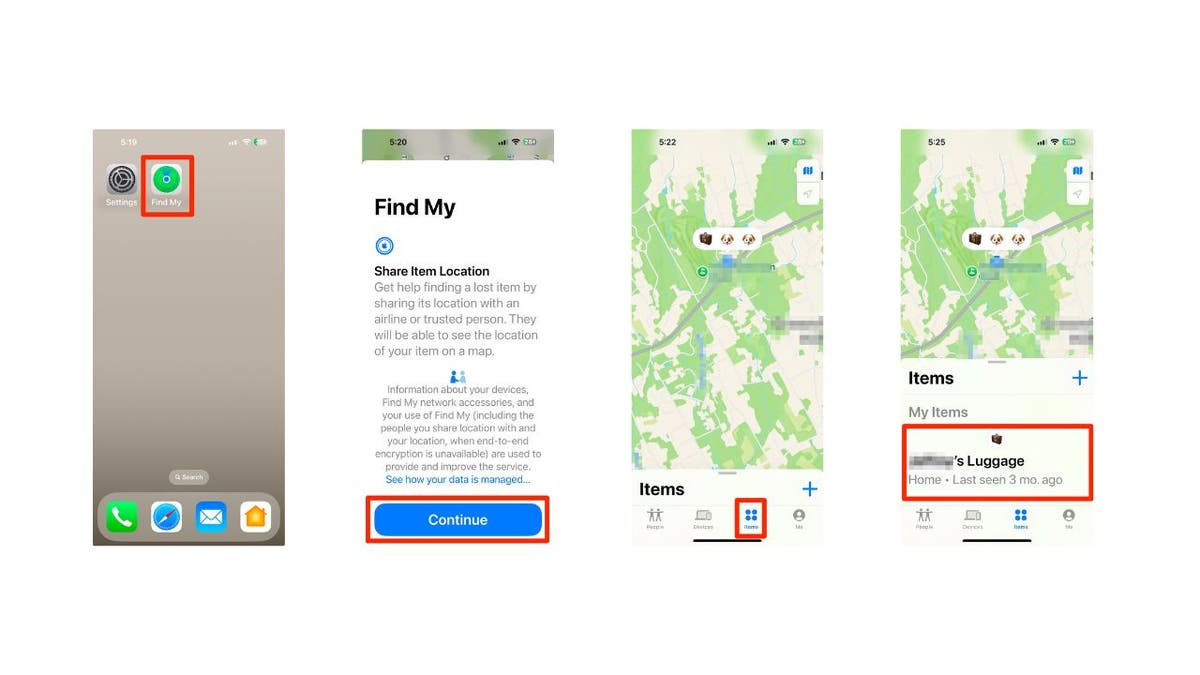
Steps to share your AirTag’s location

Now, let’s move on to how to share your AirTag’s location:

  • Open the Find My app on your iPhone, iPad or Mac
  • Tap Continue at the bottom of the screen
  • Tap the Items tab at the bottom of the screen
  • Select the AirTag or item you want to share
How iOS 18.2 now lets you share your AirTag's location with anyone

Steps to share your AirTag’s location (Kurt “CyberGuy” Knutsson)

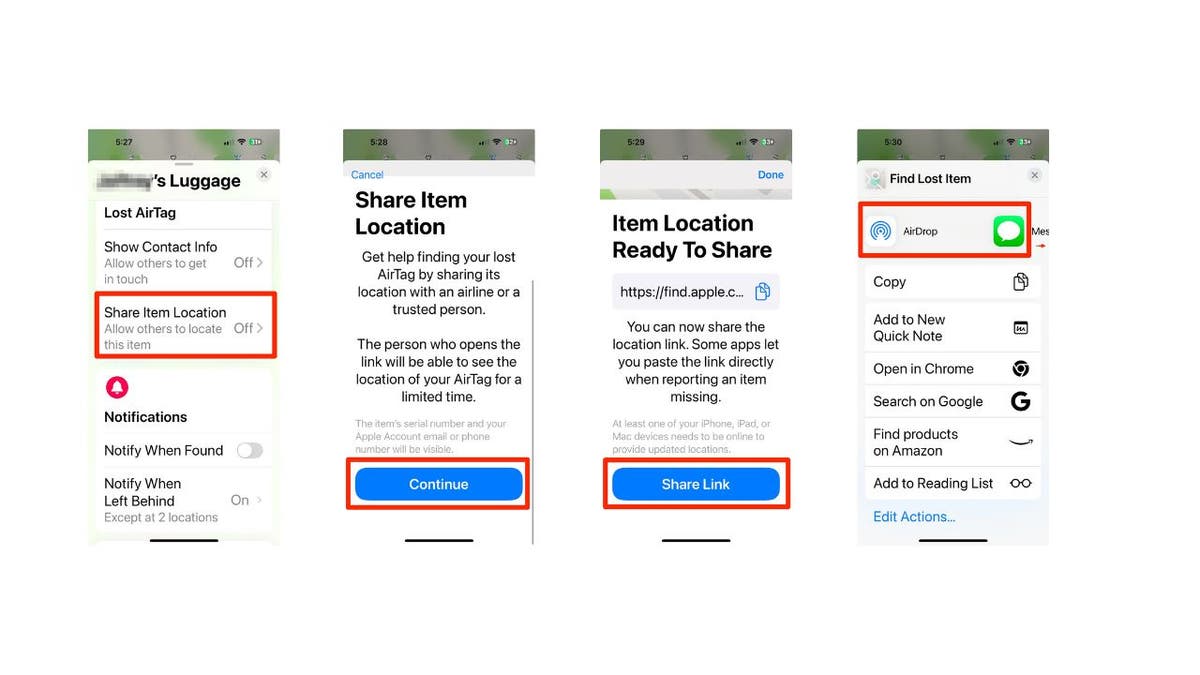
  • Scroll down and tap Share Item Location
  • Tap Continue to generate a link
  • You can now copy the link or use the Share Link option to send it via AirDrop, Messages, email or other apps.
How iOS 18.2 now lets you share your AirTag's location with anyone

Steps to share your AirTag’s location (Kurt “CyberGuy” Knutsson)

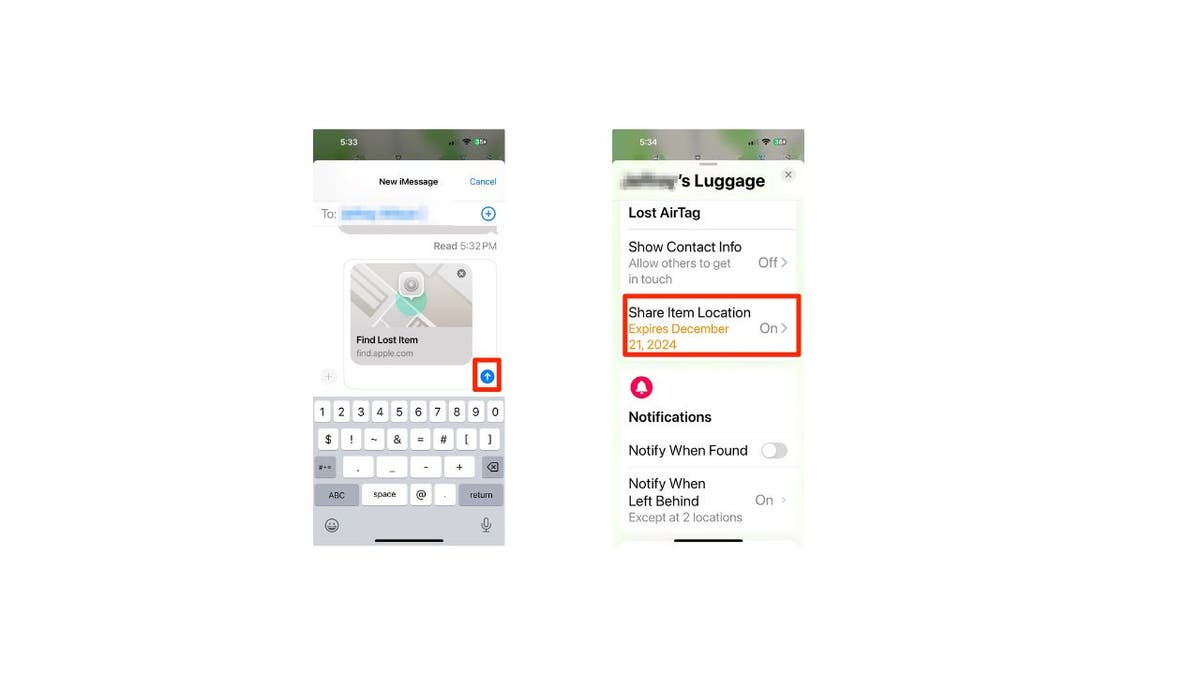
  • Click the up arrow to send it as a text message
  • A reminder that the shared location expires after seven days
How iOS 18.2 now lets you share your AirTag's location with anyone

Steps to share your AirTag’s location (Kurt “CyberGuy” Knutsson)

DID YOU KNOW YOU CAN USE APPLE AIRTAGS WITH YOUR ANDROID PHONE?

Privacy and security

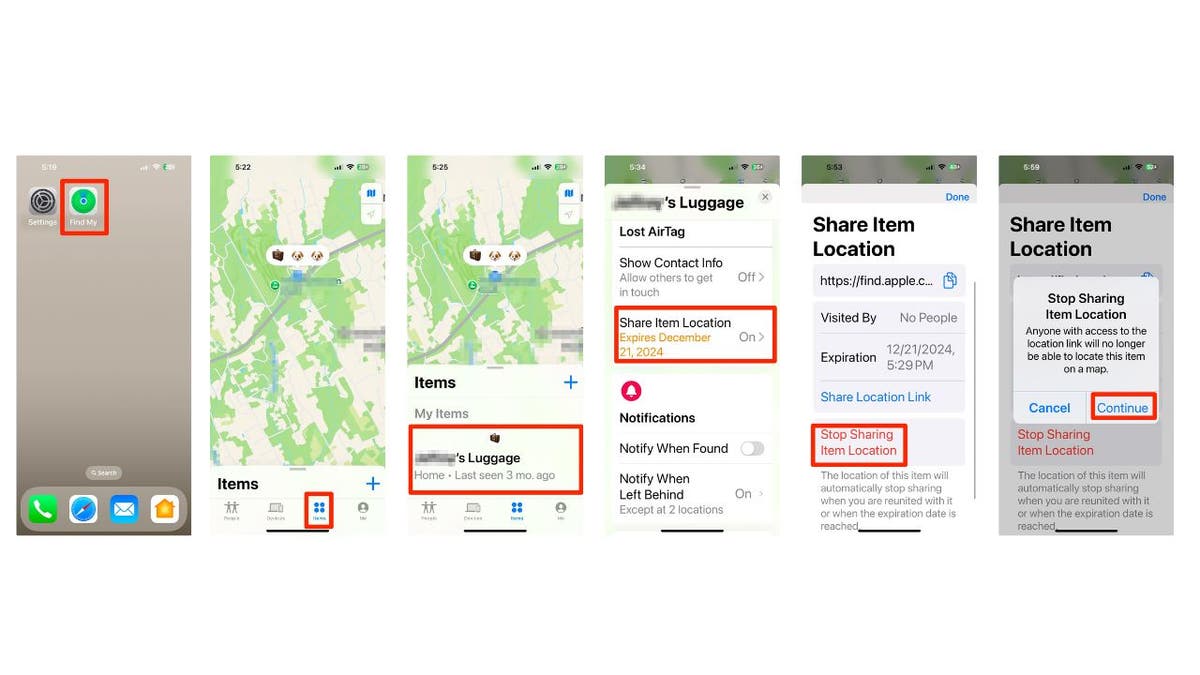
Apple has designed this feature with privacy and safety in mind. The shared location can be disabled by the owner at any time, and it automatically expires after seven days. The item owner can also see how many people have visited the shared link. Here are steps to stop Sharing Item Location:

  • Open the Find My app on your iPhone, iPad or Mac
  • Tap the Items tab at the bottom of the screen
  • Select the AirTag or item for which you want to stop Sharing Item Location
  • Scroll down and tap Share Item Location
  • Click Stop Sharing Item Location
  • Confirm your decision by clicking Continue
How iOS 18.2 now lets you share your AirTag's location with anyone

Steps to stop Sharing Item Location (Kurt “CyberGuy” Knutsson)

Airline integration

One of the great aspects of this feature is its potential to revolutionize luggage tracking. Over 15 major airlines, including Delta, United, Air Canada, British Airways and Lufthansa, plan to integrate this feature into their customer service processes for locating mishandled or delayed baggage.

Note: While Apple has expanded AirTag location-sharing capabilities to include Android users as recipients, the management of AirTags still requires an iPhone or an Apple device. 

SUBSCRIBE TO KURT’S YOUTUBE CHANNEL FOR QUICK VIDEO TIPS ON HOW TO WORK ALL OF YOUR TECH DEVICES

Kurt’s key takeaways

The Share Item Location feature in iOS 18.2 is a significant upgrade for AirTag users. It addresses a common pain point for travelers and offers a secure, user-friendly solution for sharing item locations with trusted parties. As more airlines and organizations adopt this technology, we may see a future where lost luggage becomes a thing of the past.

How have you used technology to keep track of your belongings while traveling, and what challenges or successes have you experienced? Let us know by writing us at Cyberguy.com/Contact.

For more of my tech tips and security alerts, subscribe to my free CyberGuy Report Newsletter by heading to Cyberguy.com/Newsletter.

Ask Kurt a question or let us know what stories you’d like us to cover.

Follow Kurt on his social channels:

Answers to the most asked CyberGuy questions:

New from Kurt:

Copyright 2024 CyberGuy.com. All rights reserved.



Source link