-1.6 C
New York
Monday, February 23, 2026
Home Blog Page 559

Even with glitches, planning your next trip with AI is making me rethink travel

0


With vacation planning, most people fall into two camps: those who love planning and those who hate it.

Artificial intelligence tools like GuideGeek, developed by Matador Network and accessible via Meta’s Messenger app, offer a glimpse into a future where vacation planning is as simple as sending a text.

Yet, as we lean into this new era, it’s clear that these amazingly powerful tools come with their own set of quirks.

CLICK TO GET KURT’S FREE CYBERGUY NEWSLETTER WITH SECURITY ALERTS, QUICK VIDEO TIPS, TECH REVIEWS AND EASY HOW-TO’S TO MAKE YOU SMARTER

passport and boarding pass

Man walking through airport with passport in his hand (Kurt “CyberGuy” Knutsson)

AI travel ‘hallucinations’ can derail a trip

Take, for instance, the phenomenon known as “AI hallucinations.” These occur when the AI, attempting to fill gaps in its knowledge, invents answers. A classic example unfolded when an AI-powered assistant was asked about travel details for “Crete Freeze” instead of “Crete, Greece”. Instead of clarifying the query, the AI crafted a detailed story about a non-existent ice cream parlor in Pittsburgh. While creative, such responses aren’t particularly useful when you’re trying to plan an actual trip.

COUPLE on vacation

A couple on vacation (Kurt “CyberGuy” Knutsson)

MORE: 5 GREAT TIPS FOR PLANNING YOUR NEXT TRAVEL GETAWAY

When tiny missed details turn into big trouble

This isn’t an isolated incident. Across the travel industry, AI tools have mistakenly concocted false job histories and even non-existent travel destinations. This tendency can lead to significant travel planning errors, such as suggesting routes that don’t exist or accommodations that are the stuff of fiction.

Why does this happen? AI systems, particularly those based on generative models, strive to provide answers for every query. In doing so, they sometimes create plausible but incorrect information. While these errors are often corrected quickly, they highlight an important aspect of using AI in travel planning: verification is key.

FAMILY at beach

Family at the beach (Kurt “CyberGuy” Knutsson)

MORE: TRAVELING? BRING THIS TRIPLE PROTECTION FOR SAFER ONLINE BANKING 

Embracing the new AI travel planning experiment

Matador Network has taken steps to mitigate these errors by introducing stringent checks and balances for GuideGeek. They’ve reduced the occurrence of hallucinations significantly, from a startling 14% down to a more manageable 2%. They achieved this by enhancing the AI’s training and integrating real-time data from reliable sources like Skyscanner and Expedia.

Despite these improvements, the responsibility ultimately falls on the travel planner to double-check all AI-generated plans. When using AI tools like GuideGeek, it’s prudent to verify the details of your itinerary as you would with a travel agent. Check flight schedules, hotel bookings and travel routes against trusted sources.

family at the beach 2

A family at the beach (Kurt “CyberGuy” Knutsson)

Verify any travel plans, whether from AI or a human expert

Incorporating AI into travel planning requires a balanced approach. While these tools can efficiently handle vast amounts of data and provide quick responses, their current propensity for errors cannot be overlooked. People should approach AI-generated travel plans with a healthy dose of both excitement and skepticism, reviewing and confirming details to avoid potential pitfalls.

WHAT IS ARTIFICIAL INTELLIGENCE (AI)?

father-daughter at beach

Dad and daughter at the beach (Kurt “CyberGuy” Knutsson)

AI trip planning can open doors you never knew to knock on

The process of integrating AI into travel planning is undoubtedly exciting, and it promises a more streamlined and accessible future for travelers.

Matador Network CEO Ross Borden points to the benefits of AI travel planning, saying, “We all know that typical experience of booking travel online – you’ve got 30 browser tabs open and a headache. GuideGeek is a travel genius that makes creating detailed travel plans much faster and more personalized. As the AI learns about you, the recommendations get more tailored to your interests and how you travel.”

GET FOX BUSINESS ON THE GO BY CLICKING HERE

I checked AI on one of my favorite Hawaiian destinations for trip-planning ideas known mostly by the locals and deeply entrenched experts. AI was able to identify a really fun area to hike in Kaua’i, along with the little-known secret of how to find parking nearby. I seldom see tourists there, and AI is about to change that. What it didn’t know to tell me is what happens if a common rain shower interrupts the hike, turning the elevated trail into a treacherous trench of mud – something a local or expert may have warned you about.
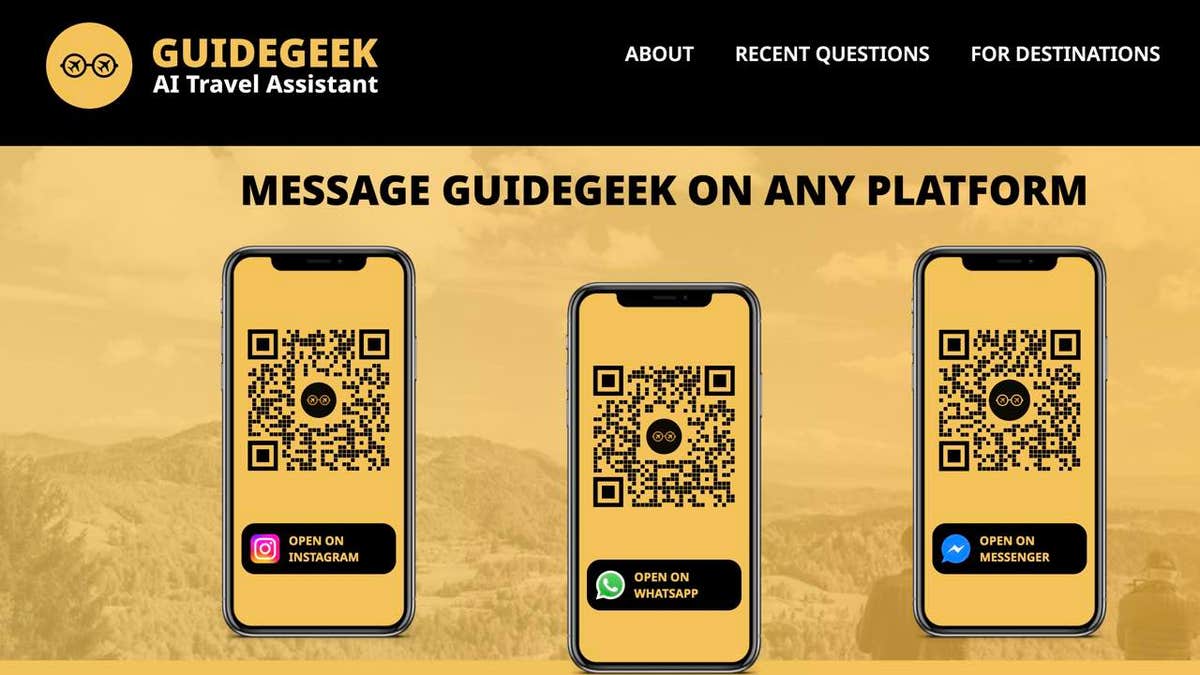
GuideGeek website 1

GuideGeek website (GuideGeek)

MORE: THE BEST TRAVEL GEAR FOR 2024

How to plan travel with AI using GuideGeek

Unlike other travel guides, if you have Instagram, Facebook Messenger or WhatsApp, you do not need to download a separate app to use GuideGeek. All you need to do is go to the main GuideGeek website. In the app you likely have already downloaded, you can either click the link or scan the QR code, which will launch GuideGeek on your designated app.
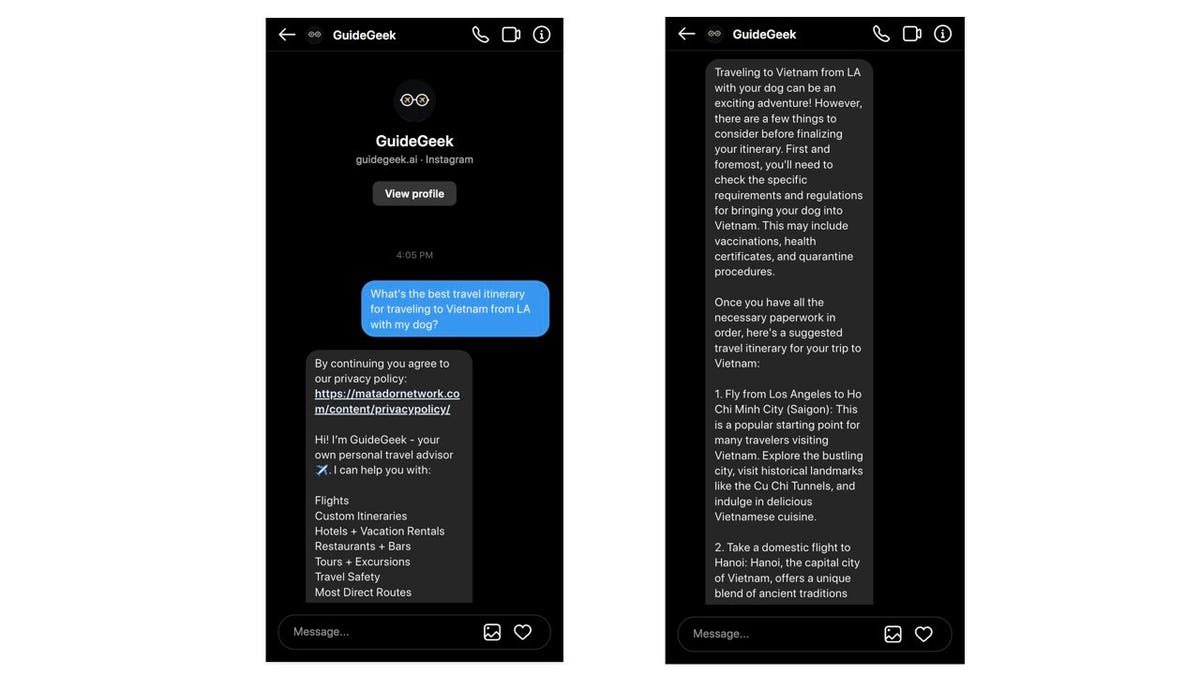
GuideGeek on Instagram

GuideGeek screens on Instagram (GuideGeek)

MORE: 5 GREAT TIPS FOR PLANNING YOUR NEXT TRAVEL GETAWAY

Chat with GuideGeek: Your personal, nonhuman AI travel assistant on Instagram

For instance, if you click “Open on Instagram,” GuideGeek will begin a direct message on the Instagram account you have on your device. You can ask any sort of travel question, and it’ll respond with an answer as a message.

The best part is that once you have opened it, you can continue to dialogue with GuideGeek for other areas of your travel needs – just don’t delete the chat window with GuideGeek. Of course, if you do, it is just as easy to restart another message with GuideGeek.
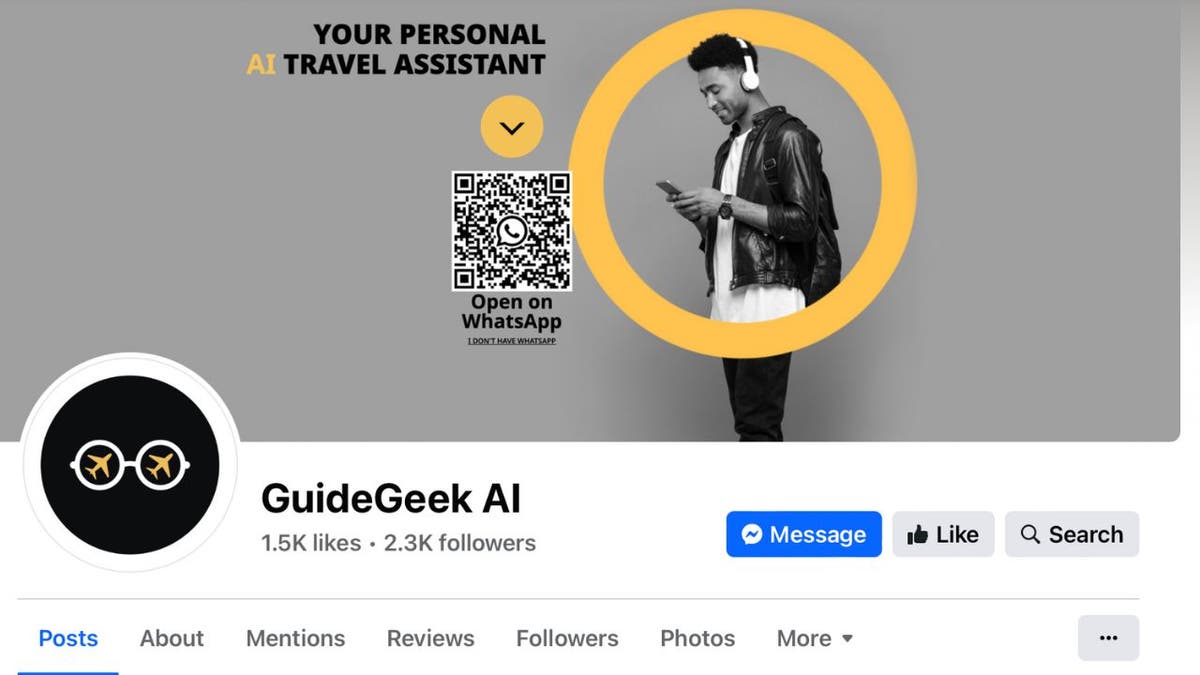
GUIDEgeek on Facebook

GuideGeek AI on Facebook (GuideGeek)

MORE: BEST TRAVEL ADAPTERS OF 2024

Planning travel with GuideGeek vs Google

What’s the difference between using GuideGeek instead of googling your questions? Targeted answers, so you’re not digging around many websites for that one piece of travel information you’re looking for. Additionally, the use of the Matador Network is hooking you up with an established online travel publication located in San Francisco with ​​more than 80 million monthly visitors and 16 million social media followers.

Kurt’s key takeaways

With so much travel information online, it can be difficult to parse through all the data. And sometimes, too much information can actually create decision fatigue. Instead of trying to cobble together an itinerary from your neighbors, family, friends and the internet, you can use AI to pull together an exciting trip – just be sure to check each little detail for accuracy before packing your bags.

CLICK HERE TO GET THE FOX NEWS APP

Have you utilized AI to help start or finish travel planning? If you could have a travel agent available on demand, would you use it? Let us know by writing us at Cyberguy.com/Contact.

For more of my tech tips and security alerts, subscribe to my free CyberGuy Report Newsletter by heading to Cyberguy.com/Newsletter.

Ask Kurt a question or let us know what stories you’d like us to cover.

Answers to the most asked CyberGuy questions:

Copyright 2024 CyberGuy.com. All rights reserved.


Source link

Price analysis 5/20: SPX, DXY, BTC, ETH, BNB, SOL, XRP, TON, DOGE, ADA

0


Price analysis 5/20: SPX, DXY, BTC, ETH, BNB, SOL, XRP, TON, DOGE, ADA

Bitcoin price is chasing after its all-time high and altcoins appear ready to follow.


Source link

Handy hidden features on Instagram, X and Facebook

0


If you’re one Facebook argument away from lighting your social media accounts on fire, I don’t blame you. Before you log out for good, I’ve got a few hidden features that’ll make using your social media accounts stink a little less.

We’re giving away an iPhone 15. Enter to win now!

Stop video autoplay

  • Facebook: Maybe you want to scroll at work undetected or you just prefer the sound of silence. On desktop, disable autoplaying videos under Settings and privacy > Settings > Videos. On mobile, go to Settings & privacy > Settings > Preferences > Media.
  • X: On desktop, click More > Settings and privacy > Accessibility, display and languages > Data usage. On mobile, tap your profile picture to find Settings and privacy.

You can’t stop autoplay on Instagram, which is a dang shame — unless it’s one of my vids that pops up.

AI EXPERT: CHATGPT PROMPTS YOU’LL WISH YOU KNEW SOONER

Love it and list it

  • X: Organize people in private or public lists without following them. Maybe you make a list for cooking tips and another for gadget news — whatever floats your boat. Easy.
  • Instagram: Sort your saved posts into Collections — just like you do on Pinterest. Create a new collection by tapping and holding the bookmark icon below a post, then tapping the + (plus sign). Enter a name, like “Recipes,” and voila! View your collections by tapping the three lines in the top right of your profile, then Saved.

Pin your DMs

  • Instagram: Pin up to three chats to the top of your list for quick access. Just press and hold down on a conversation, then select Pin. No more scrolling to find your besties!
  • Messenger: You can pin an individual message in a chat. Super handy for remembering shared addresses or recipes! From a chat, tap and hold the message you want to pin and tap Pin. To see pinned messages in a chat, tap View Pins.
Icons of facebook, twitter, and whatsapp

The icons of X (then Twitter), Facebook and WhatsApp are seen on an iPhone. (AP Photo/Martin Meissner, File)

Say ‘shhhh’

If you’ve got a turbo-posting friend you want to see a little less from on Facebook or Instagram, tap the three dots on one of their posts and pick Hide. You’ll see their posts a little less often — without the drama of unfollowing them. You can also choose to Mute your pal altogether on the next screen.

Shake to report

Something not working correctly on Instagram? Don’t throw your phone across the room — shake it! This brings up the option to report a technical error. Pretty clever. FYI, this isn’t the place to report stalkers or abuse. To do that, tap the three dots next to a post or a username.

1-MINUTE TECH CHANGES FOR MORE PRIVACY

Split your life

Facebook finally realized we’re not the same people to our friends, family and colleagues. You can set up multiple profiles linked to your Facebook account. On the web version, click your profile picture, then click Create a new profile. Just use it for good, not trolling.

The poke is back

Technically, it’s always been there, but Facebook users are rediscovering the “poke.” What does it mean? Whatever you want it to — from flirting to just being funny. Head to your Pokes page to let people know you’re there, I guess.

Bonus: If you want to step away, try this

Ignoring apps that are literally developed to capture your attention is tough. There are settings built into your phone to make it easier. Namely, app time limits. 

The concept is simple: Set an amount of time you’re allowed to spend on an app, and once you hit it, you’re locked out. You can get around the limit — but remember you set it for a reason in the first place.

The Instagram logo

The Instagram logo is seen displayed on a smartphone. Instagram allows users to shake their device to report “bugs,” or instances of the app not working properly. (Rafael Henrique/SOPA Images/LightRocket via Getty Images)

Use an iPhone? 

Before you begin, enable Screen Time on your device: Under Settings, tap Screen Time. Select Turn On Screen Time, followed by Continue.

Here’s how to set up specific app time limits:

  • Go to Settings > Screen Time and turn on Screen Time.
  • Tap App Limits > Add Limit.
  • Select as many categories as you want or choose All Apps & Categories. To select individual apps, tap a category, then find the app.
  • Tap Next and set the time limit. You can set an amount of time for each day by tapping Customize Days.
  • Tap Add when you’re finished.

TECH LIFE UPGRADES SMARTER THAN THE STUFF ON TIKTOK

How to set time limits on apps for Android

Android’s Digital Wellbeing works similarly. Note that different manufacturers put these settings in different places, so use these steps as a starting point.

  • Open Settings > Digital Wellbeing & parental controls.
  • Tap the chart. Next to the app you want to limit, tap Set timer.
  • Choose how much time you can spend on that app. Then, tap Set.

Just like that, you’re on your way to less doom scrolling.

CLICK HERE TO GET THE FOX NEWS APP

Get tech-smarter on your schedule

Award-winning host Kim Komando is your secret weapon for navigating tech.

Copyright 2024, WestStar Multimedia Entertainment.


Source link

White paper that birthed crypto ZK-proofs receives IEEE ‘Test of Time’ award

0


White paper that birthed crypto ZK-proofs receives IEEE ‘Test of Time’ award

The paper, released in 2014, lays the foundations for blockchain privacy and scaling.


Source link

Is this autonomous security guard robot the protection you need?

0


They’re not your typical office workers. Standing at 5 feet tall and cruising through the corridors at a leisurely 3 mph, these robotic guards are the latest addition to workplace security. 

Gone are the days of the traditional security guard. Now, robots are taking over the night shift and beyond.

robot security 1

How do these security robots work?

Cobalt’s robots are custom-built to navigate the unique challenges of each building, from ramps to elevators. They patrol the hallways, vigilant for signs of trouble – be it an unusual motion after hours or a door left ajar – and report their findings to a human-staffed call center.

CLICK TO GET KURT’S FREE CYBERGUY NEWSLETTER WITH SECURITY ALERTS, QUICK VIDEO TIPS, TECH REVIEWS AND EASY HOW-TO’S TO MAKE YOU SMARTER

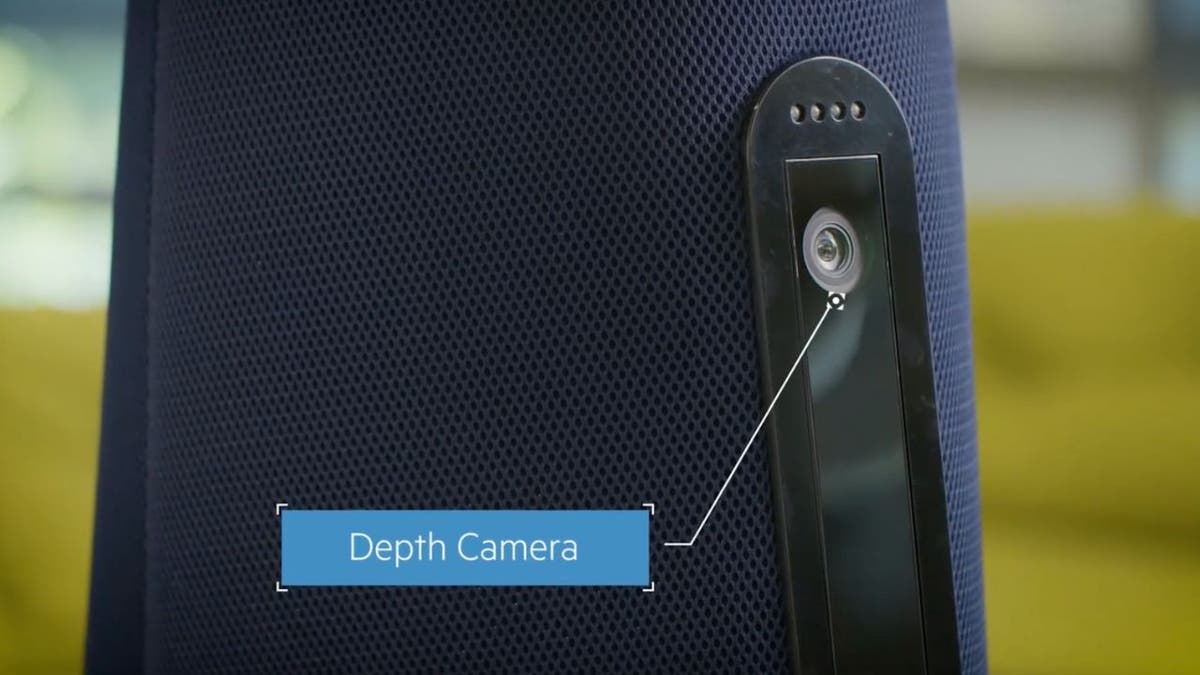
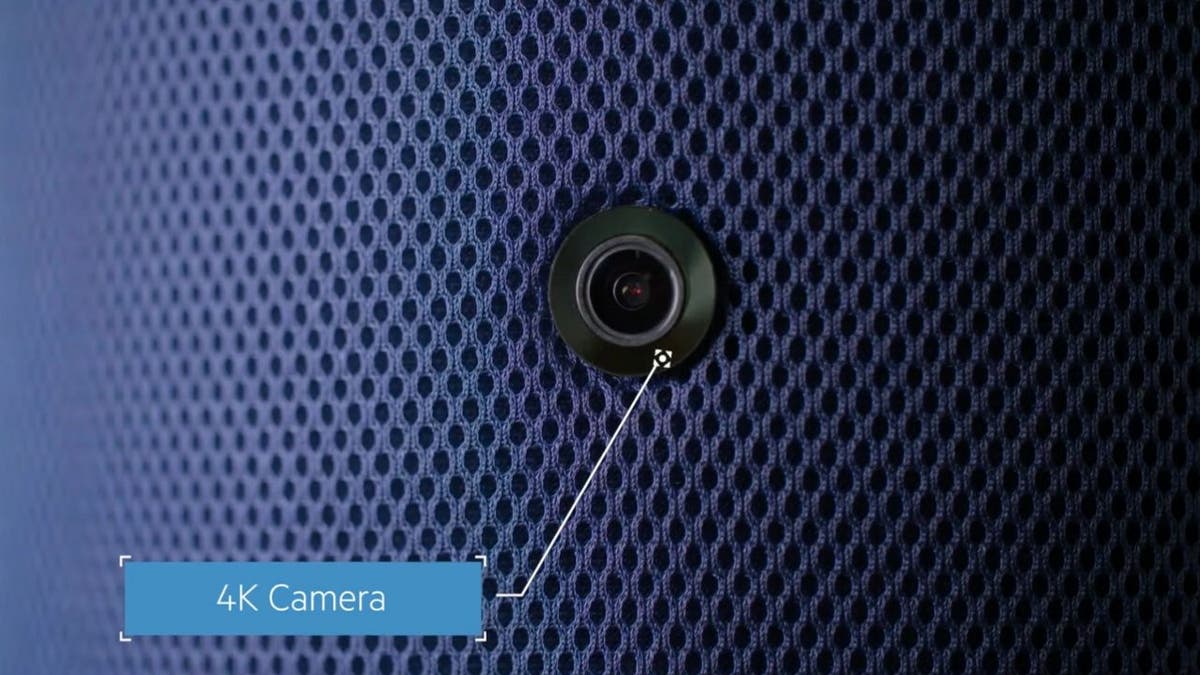
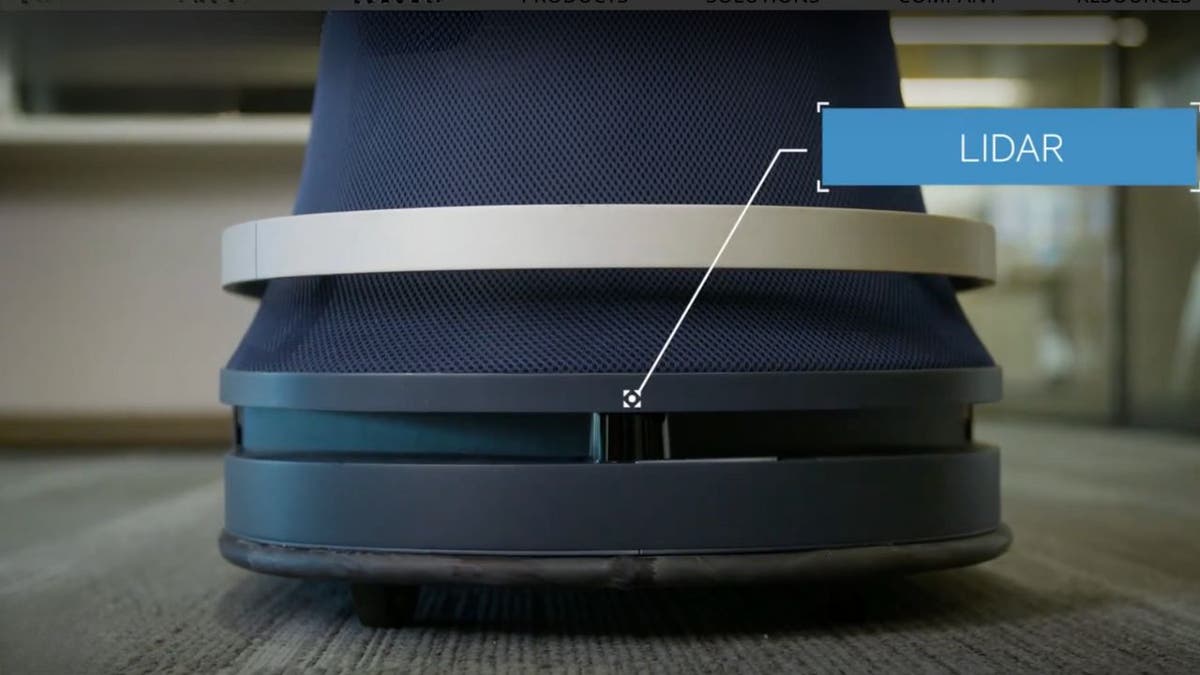
These robots can even spot things that might escape the watchful eye of a security camera. They can do this because they are equipped with a depth camera, heat-detecting thermal sensors, 4K cameras that can see 360 degrees, Lidar, as well as a Microphone array for listening and PA system for announcing.

robot security 2

Interactivity and assistance of the security robot

With a simple tap on the screen, employees can summon a 24/7 specialist to address concerns ranging from spills, unwelcome visitors or suspicious activity. This seamless integration of technology and human oversight lets real-life guards spend more time responding and less time observing now that Cobalt is carefully watching on patrol and reporting back what it detects.

WHAT IS ARTIFICIAL INTELLIGENCE (AI)?

ROBOT security 3

MORE: ELECTRIC HUMANOID ROBOT TO SHAKE UP THE JOB MARKET

Case study: DoorDash

DoorDash has embraced Cobalt’s robotic guards across its corporate sites. The result? Enhanced security operations with fewer sick days, no HR complaints, and a boost in both accuracy and response times for security and safety-related incidents.

robot security 4

MORE: THE SHAPE-SHIFTING UNDERWATER ROBOT PIONEERING THE DEPTHS OF THE SEA

Robots vs. humans: The numbers

The driving force behind this robotic revolution is money. It’s far more economical for companies to deploy robots for round-the-clock security than to rely solely on human guards. According to Forrester Research, opting for a robotic guard over a human can lead to substantial savings – around $79,000 annually. That’s a figure that’s hard to ignore for any business looking to optimize its operations.

5 Is this autonomous security guard robot the protection you need

MORE: APOLLO THE ROBOT JOINS MERCEDES-BENZ ASSEMBLY LINE PRODUCTION

The competitive landscape of the security robot

The security robot market is heating up, with competition between indoor and outdoor models. While Cobalt’s robots are indoor specialists, others like Knightscope and SMP Robots are venturing into both terrains, including malls, hotels and industrial sites. And let’s not forget drones, which are starting to make their mark in the security domain.

robot security 6

Challenges and considerations of security robots

Of course, it’s not all smooth sailing. Security robots have had their share of mishaps, from minor accidents to malfunctioning in critical situations. And there’s the human factor to consider. Sometimes, nothing can replace the reassurance of a human presence in times of distress.

GET FOX BUSINESS ON THE GO BY CLICKING HERE

robot security 7

Kurt’s key takeaways

Despite the occasional glitch, the consensus is clear: Security robots are here to stay, and their presence is set to grow as the technology continues to advance. They may not replace human guards entirely, but they’re redefining the role and allowing humans to focus on more strategic tasks.

CLICK HERE TO GET THE FOX NEWS APP

What’s your take on these new robot guards? Do you think they’re as trustworthy as human security or are we moving too fast into a tech-driven safety zone? Let us know by writing us at Cyberguy.com/Contact.

For more of my tech tips and security alerts, subscribe to my free CyberGuy Report Newsletter by heading to Cyberguy.com/Newsletter.

Ask Kurt a question or let us know what stories you’d like us to cover.

Answers to the most asked CyberGuy questions:

Copyright 2024 CyberGuy.com. All rights reserved.



Source link

How to create a memecoin on Solana?

0


How to create a memecoin on Solana?

Anyone can create a memecoin through Solana without too much hassle. The process simply requires a good idea.


Source link

How to know if your computer got hacked, what to do next

0


Have you ever had that sinking feeling that something’s not quite right with your computer? Maybe it’s running slower than usual or there are new icons on your desktop that you don’t recognize. Well, you might not be just imagining things; you could have been hacked.

While the first reaction may be to panic, the best possible first step if you think you’ve been hacked is to disconnect your computer from the internet and take a deep breath. If you’ve got antivirus software already installed, run the scan immediately. But don’t worry just yet. Before you start fretting about cyberthieves and lost data, let’s take a moment to walk through some crucial steps together. From running a trusty antivirus scan to the nitty-gritty of browser settings and remote access – this is your go-to guide for outsmarting those pesky hackers.

GET SECURITY ALERTS, EXPERT TIPS – SIGN UP FOR KURT’S NEWSLETTER – THE CYBERGUY REPORT HERE

How to know if your computer got hacked, what to do next

A woman grabbing her computer in frustration (Kurt “CyberGuy” Knutsson)

Were you hacked?

1. Run antivirus software ASAP

When you’re running any antivirus scans or troubleshooting, start from the actual antivirus software program. Don’t follow pop-ups or notifications. If there is indeed a compromise, it should show up on the dashboard of the antivirus software program.

Preventative:

  • Keep your antivirus software updated. Hackers are coming up with new viruses often, so if you are up to date, you’re less likely to be compromised. Or the virus is more likely to get caught.
  • Be familiar with your antivirus software notifications and alerts, so if you ever get a pop-up or notification, you’ll be more apt to notice fake ones.
  • Write down the contact information of the antivirus software you’ve installed and have it near the computer.

If you feel pretty confident that you’ve unfortunately been hacked, but your antivirus scan comes up empty, take a break and call customer service of antivirus software directly. Do not follow links to have a rep call you. Use the number you’ve written down, and call them directly so you know you’re not being duped.

If you don’t have antivirus software installed, make sure to install one and do a computer scan. You can find our top recommendations here.

ASK ANY TECH QUESTION AND GET KURT’S FREE CYBERGUY REPORT NEWSLETTER HERE

How to know if your computer got hacked, what to do next

A man typing on keyboard (Kurt “CyberGuy” Knutsson)

HOW TO RECOVER A HACKED FACEBOOK ACCOUNT

2. Reformat or reset to factory settings

Sometimes a virus or other nefarious entities have overrun the computer so badly that you might need to simply reformat or reset it to factory settings. If you’ve uninstalled or deleted suspicious programs or applications only to have them reload upon restarting your computer, you may simply need to start from scratch. This is why it is crucial to have recent backups of your data. Our article, “How to securely get rid of your old PC or Mac,” outlines how to reset to factory settings or reformat your computer.

EXPERT TIPS, LEGIT REVIEWS. GET THE FREE CYBERGUY REPORT NEWSLETTER

3. Delete settings or extensions on browsers or uninstall and reinstall browsers completely

There have been many times I have gone to help my mom with her online accounts, only to be inundated with pop-ups, redirects or random links on her browser bar or menu. It turned out that she had either accidentally downloaded extensions that embedded themselves in the browser or, worse, changed the browser setting to open a spammy website as her main search engine or landing page. You can go to settings or preferences and delete extensions you do not recognize. But if these settings or extensions keep reappearing after deleting and restarting the browser, it is likely a bigger problem. Then, uninstall the browser and see if you can reinstall it. If that brings up the same settings again, then it could be a much more invasive virus or malware that needs to be addressed with an antivirus scan or assistance from a professional.

HOW TO OUTSMART CRIMINAL HACKERS BY LOCKING THEM OUT OF YOUR DIGITAL ACCOUNTS

4. Turn off or restrict remote access

While it is harder for hackers to access your computer if it is completely turned off, if you have allowed remote access, a hacker just needs your computer to be hooked up to a network or the internet in order to take over your device and turn it on.

To prevent remote access to your PC:

  • Click the Windows Start button
  • Input Remote Desktop settings in the search bar
  • In the Remote Desktop settings, ensure that the slider under “Enable Remote Desktop” is set to Off.
  • Review your current processes in Task Manager (Ctrl+Alt+Del) for any unusual or suspicious activities

To prevent remote access on Macs:

  • Click the Apple logo icon in the top left corner.
  • Click System Settings
  • Tap General 
  • Click the Sharing icon
  • Scroll down and uncheck the boxes next to Remote Login and Remote Management to prevent unauthorized remote access.
How to know if your computer got hacked, what to do next

A woman on her laptop (Kurt “CyberGuy” Knutsson)

HOW HACKERS CAN CRAFT AN ATTACK FROM YOUR SOCIAL MEDIA PROFILE

5. Review your activity monitor on your computer and network traffic patterns

Periodically, checking your computer’s activity monitor to check which programs are running and what is using up the most bandwidth is a healthy practice. It will teach you to spot any programs or traffic that is unusual or if someone else is connecting to your computer remotely.

To review this activity on your PC:

  • Go to Control Panel
  • Click Administrative Tools
  • In Event viewer, look for the events that are related to startup and shutdown. Any shutdown will be listed there and which program or user-initiated that startup or shutdown. This way, you can see if these actions are that of a virus or an update process.

To review this activity on your Mac:

  • Go to the menu bar on the top left when you first log on to your account.
  • Select Go
  • In the drop-down menu, select Utilities
  • When a menu pops up, one of the first options should be Activity Monitor.

Or:

  • Go to your Applications folder on your dock (usually located on the bottom or right-hand side of the screen)
  • Go to Utilities folder
  • Select Activity Monitor
How to know if your computer got hacked, what to do next

A man putting in his username and password on tablet (Kurt “CyberGuy” Knutsson)

Top 3 preventative measures to not get hacked

1. Turn on 2-factor authentication

While it may seem like a pain to enter a code received via email or text each time you sign in, this extra step is crucial for security. By activating two-factor authentication, you create a barrier against unauthorized access. Even if a hacker discovers your email or username, they won’t get far without the unique code.

Each login attempt triggers a notification, alerting you to potential threats. Repeated failed attempts will secure your account by either locking it or sending you an alert. In the event of suspicious activity, you can swiftly use a trusted device to reset your password and inform the service provider. It’s a small price to pay for significant protection against cyberthreats.

How to know if your computer got hacked, what to do next

A man backing up his computer (Kurt “CyberGuy” Knutsson)

2. Have strong antivirus software 

The best way to protect yourself from clicking malicious links that install malware in an attempt to get access to your private information is to have antivirus protection installed on all your devices. This can also alert you of any phishing emails or ransomware scams. Plus, think of it like having a digital bodyguard – always on the lookout, always ready to defend you from cyberthreats. Get my picks for the best 2024 antivirus protection winners for your Windows, Mac, Android & iOS devices.

3. Configure your email settings

How to know if your computer got hacked, what to do next

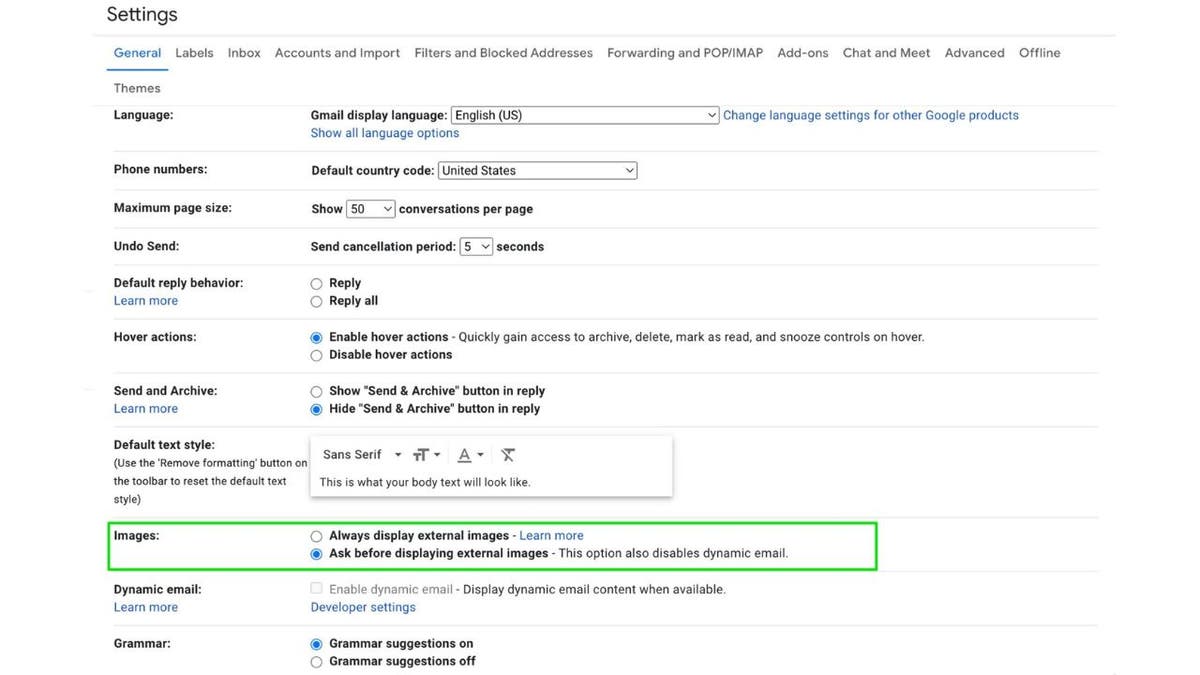
Configure email settings to not automatically images or attachments (Kurt “CyberGuy” Knutsson)

If you configure your email settings to not automatically load content such as images or attachments, then it is harder for viruses or other malware to be automatically downloaded or accidentally opened. If you also have emails received first in rich text format, you can choose which emails load fully with images once you realize it is from a trusted source.

Gmail desktop:

  • Click the settings gear icon
  • Choose See all settings
  • Under the General tab, scroll to the Images section.
  • Select Ask before displaying external images
  • Scroll to the bottom of the page and click Save Changes

Gmail mobile:

  • Tap the hamburger menu (3 horizontal lines)
  • Select Settings
  • Choose the account you want to manage
  • Scroll to the Images section and select Ask before displaying external images.

Apple mail:

  • First, click on Mail in your dock at the bottom of your screen
  • Then click on Mail in the upper left of your screen
  • Click Settings
  • Go to the Viewing tab
  • Uncheck Load remote content in messages

Outlook desktop (PC):

  • Click File
  • Choose Options
  • Select Trust Center
  • Click Trust Center Settings
  • Under Automatic Download, check the option that says Don’t download pictures automatically in standard HTML email messages or RSS items.

Outlook desktop (Mac):

  • Open Outlook
  • Click Preferences
  • Under Email select Reading
  • Choose Security
  • Select Never to prevent image downloads

Yahoo Mail desktop:

  • Click Settings.
  • Choose More Settings.
  • Click Viewing email.
  • Under Show images in messages, select Ask before showing external images.

Start Mail desktop:

Please note that the exact wording of the menu items and options can vary based on the version of Start Mail you are using. 

  • Open Start Mail
  • Click on the Settings icon
  • Navigate to the Email section
  • Look for the Images or Privacy settings
  • Choose the option to Ask before displaying external images or a similar setting that controls the automatic downloading of pictures.

These steps should help enhance your email security by giving you control over which images are displayed, thereby reducing the risk of malware being automatically downloaded or opened. Always ensure your email application is updated to the latest version for the best security practices.

Looking for private and secure email solutions? See Best Private and Secure Email Providers 2024

QUICK TIPS. EXPERT INSIGHTS. CLICK TO GET THE FREE CYBERGUY REPORT NEWSLETTER

Data recovery: Protecting your information against loss

This may not seem relevant to an article about hacking, but having your data off your computer and safely on an external hard drive or the cloud will give you more options if you think you’ve been hacked. If you need help deciding what type of data backup would be best for you, please take a look at these articles:

If a hack is bad enough, sometimes a complete wipe of your system is the only way to salvage your computer. If you have a safe copy of your data, while it might be inconvenient, you will not lose all your data. Also, if you keep more sensitive data off your more frequently used computer, then your data is less likely to be compromised if you get hacked.

Kurt’s key takeaways

At the end of the day, being hacked is a massive inconvenience and can potentially lead to data loss or theft. But don’t lose hope. There are steps you can take to outsmart those pesky hackers and keep your devices secure. The key is staying vigilant and taking preventative measures like using strong antivirus software, enabling two-factor authentication and regularly backing up your data. That way, if you do get hacked, you’ll have a recent backup to rely on and can simply wipe your device clean without losing everything.

It’s also crucial to keep an eye out for any suspicious activity on your computer or network. If something seems off, don’t hesitate to run a full antivirus scan and review your activity monitor for any unauthorized access or programs running in the background. Remember, hackers are always coming up with new tricks, so it’s an ongoing battle to stay one step ahead. But by following the tips outlined here, you’ll be well on your way to keeping your digital life secure and hack-free. Stay vigilant, my friends.

Can you share a personal story where being proactive about computer security paid off or, conversely, where neglecting it led to issues? Let us know by writing us at Cyberguy.com/Contact.

For more of my tech tips and security alerts, subscribe to my free CyberGuy Report Newsletter by heading to Cyberguy.com/Newsletter.

Ask Kurt a question or let us know what stories you’d like us to cover.

Follow Kurt on Facebook, YouTube and Instagram.

Answers to the most asked CyberGuy questions:

Copyright 2024 CyberGuy.com. All rights reserved.



Source link

Kaamel Technology to lead investigation into XLink's $10M breach

0


Kaamel Technology to lead investigation into XLink's M breach

XLink partners with Kaamel Technology to investigate the initial cause of the breach while accelerating previously communicated security upgrades


Source link

Aerodynamic electric hypercar is packing some serious horsepower

0


Join Fox News for access to this content

You have reached your maximum number of articles. Log in or create an account FREE of charge to continue reading.

Please enter a valid email address.

As the automotive world gathered at the 2024 Beijing International Auto Show, a star was born. 

MG unveiled the EXE181 concept, an electric hypercar that had everyone in awe over its aerodynamics.

With a drag coefficient (Cd) of just 0.181, it’s poised to set records if it hits production.

CLICK TO GET KURT’S FREE NEWSLETTER, THE CYBERGUY REPORT

MG hypercar

EXE181 concept car. (SAIC Design)

It is equipped with a power train that likely produces over 1,000 horsepower, which can help it reach a projected top speed of 257.87 mph. This substantial amount of power contributes to the vehicle’s impressive acceleration, allowing it to spring from 0 to 62 mph in just 1.9 seconds.

A nod to history

The EXE181 isn’t just a number; it’s a tribute to MG’s storied past. The original EX181 was the chariot that carried Stirling Moss to a world land-speed record in 1957. Fast-forward to today, and MG’s concept car could eclipse the Volkswagen XL1’s record Cd of 0.189 — the best ever for a production car.

MG hypercar 2

EXE181 concept car. (SAIC Design)

GET FOX BUSINESS ON THE GO BY CLICKING HERE

Why aerodynamics matter

The less drag a car has, the less energy it needs to move. That’s why the EXE181’s potential as the most aerodynamic production vehicle is such a big deal. It’s not just about beating the likes of McLaren Speedtail or Mercedes-AMG ONE; it’s about leading the charge in energy-wise automotive design.

ASK ANY TECH QUESTION, AND GET KURT’S FREE CYBERGUY REPORT NEWSLETTER HERE

MG hypercar 3

EXE181 concept car. (SAIC Design)

HOW A FORMULA E RACECAR WAS BUILT ENTIRELY FROM RECYCLED ELECTRONIC WASTE 

MG’s centenary celebration

2024 marks a century since MG began in Oxford, England, and what better way to celebrate than with the EXE181? It’s a testament to MG’s revival under SAIC’s stewardship and a symbol of its global ambitions. With MG’s exports skyrocketing, the EXE181 could be the crown jewel of a brand reborn.

MG hypercar 4

EXE181 concept car. (SAIC Design)

THE MICRO CAR THAT CAN SQUEEZE INTO JUST ABOUT ANY SPOT

Kurt’s key takeaways

The MG EXE181 represents a brand that’s risen from the ashes, ready to claim its place in the pantheon of automotive greats. As we approach the Goodwood Festival of Speed, all eyes are on MG. Will the EXE181 make the leap from concept to reality? Only time will tell, but one thing is certain: MG is driving into its next century with bold ambition and the wind at its back.

CLICK HERE TO GET THE FOX NEWS APP

How do you think the advancement in aerodynamics, as demonstrated by the MG EXE181 concept, could shape the future of electric vehicles and their impact on the environment? Let us know by writing us at Cyberguy.com/Contact

For more of my tech tips and security alerts, subscribe to my free CyberGuy Report Newsletter by heading to Cyberguy.com/Newsletter

Ask Kurt a question or let us know what stories you’d like us to cover.

Follow Kurt on Facebook, YouTube and Instagram

Answers to the most-asked CyberGuy questions:

Copyright 2024 CyberGuy.com. All rights reserved.


Source link

Real-word asset tokens can stabilize DeFi — Market observers

0


Real-word asset tokens can stabilize DeFi — Market observers

RWA tokenization has become the latest trend in crypto, and early use cases indicate that DeFi protocols are using it for stable collaterals, yield products and more.


Source link