4.6 C
New York
Wednesday, February 11, 2026
Home Blog Page 615

How to hide apps on your iPhone to keep them secret

0


As you know by reading our articles, we emphasize privacy a lot. We believe it is very important, so sometimes, that means keeping certain apps away from curious eyes. Hiding apps on your iPhone is straightforward, whether you’re aiming to declutter your iPhone’s home screen or ensure your privacy. Let’s walk through the steps together.

CLICK TO GET KURT’S FREE CYBERGUY NEWSLETTER WITH SECURITY ALERTS, QUICK VIDEO TIPS, TECH REVIEWS AND EASY HOW-TO’S TO MAKE YOU SMARTER

How to hide apps on your iPhone to keep them secret

Woman on an iPhone (Kurt “CyberGuy” Knutsson)

How to hide a single app on an iPhone

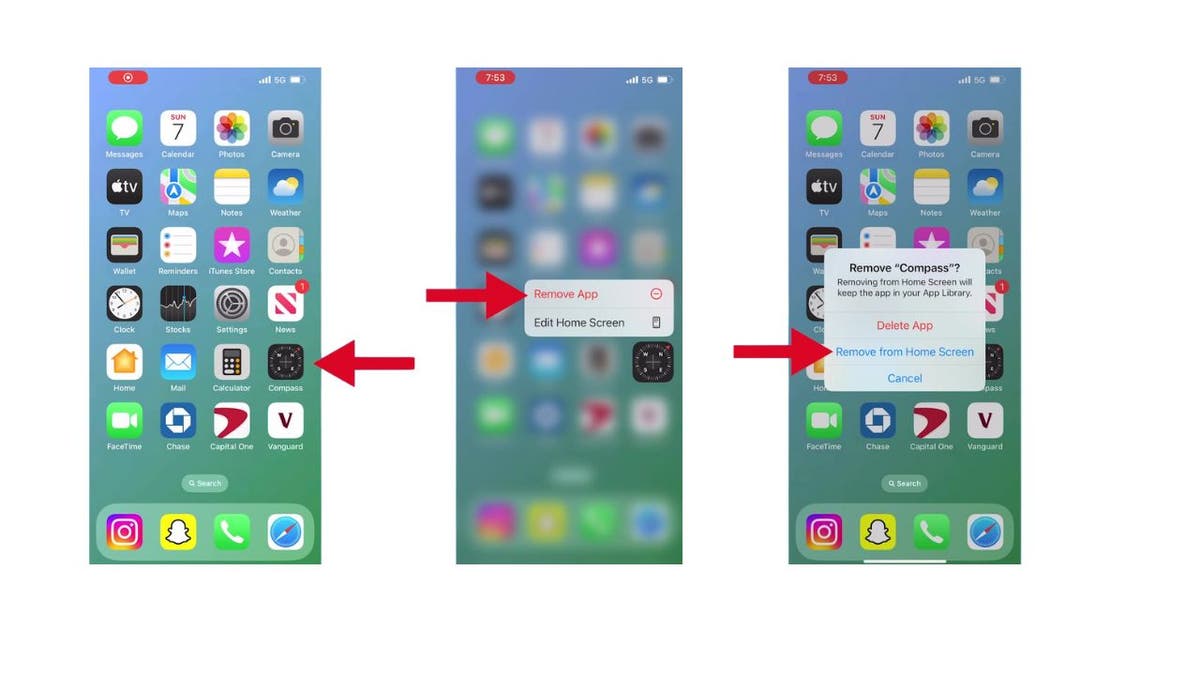
First, let us address how to make a single app vanish from your home screen:

  • Navigate to the screen with the app you want to hide and long-press the app
  • Tap Remove App
  • Tap Remove from Home Screen
How to hide apps on your iPhone to keep them secret

Steps to hide a single app on an iPhone (Kurt “CyberGuy” Knutsson)

The app is now hidden from your home screen but remains accessible through the search function and in your App Library. To access the App Library on your iPhone:

  • Go to your home screen.
  • Swipe left past all of your home screen pages.
  • You’ll see the App Library as the last screen, which organizes your apps into categories.

MORE: BEST ACCESSORIES FOR YOUR PHONE

How to hide a whole page of apps

If you’re looking to hide an entire page of apps, here’s how:

  • Long press on an empty area of the home screen
  • Tap the dots at the bottom of the home screen
  • Tap the check mark under the page you want to remove.
  • Next, tap Done
How to hide apps on your iPhone to keep them secret

Steps to hide a whole page of apps on your iPhone (Kurt “CyberGuy” Knutsson)

Your selected page of apps is now out of sight, creating a cleaner and more organized home screen. 

How to hide an app from search on iPhone

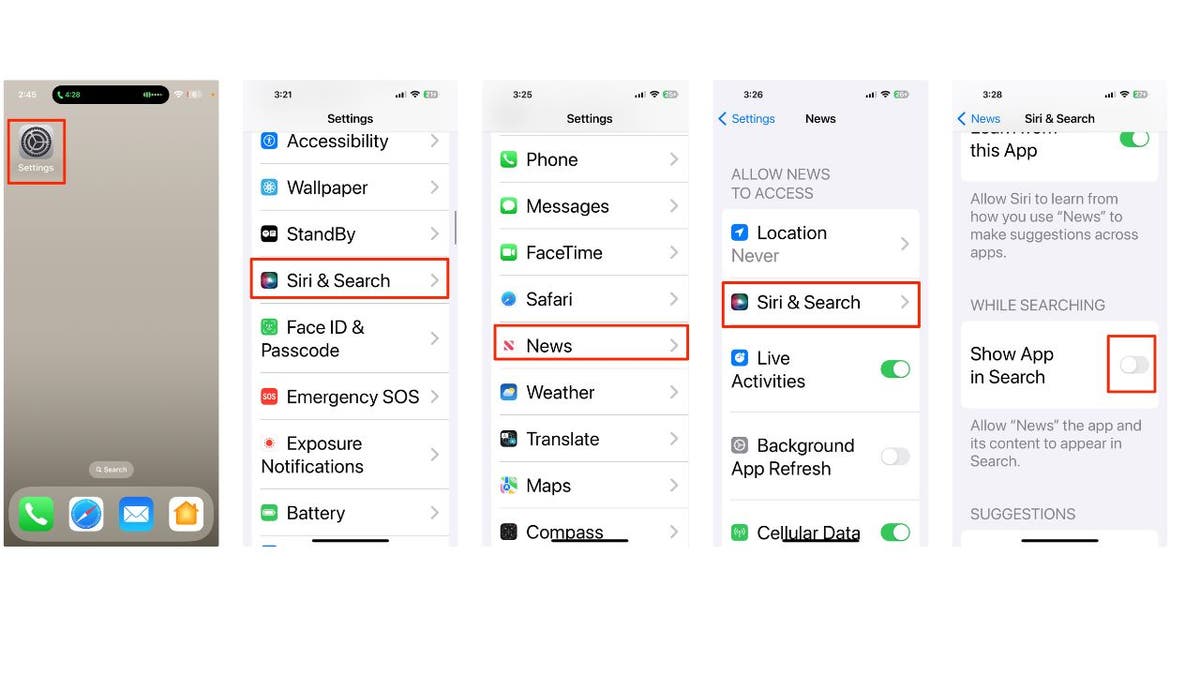
Hiding an app on your iPhone prevents it from showing up on the home screen, but it will still be discoverable through search. If you want to avoid that, you can also hide an app from search on your iPhone:

  • Open Settings
  • Tap Siri & Search
  • Scroll down to locate the app you want to hide and tap it.
  • Click Siri & Search again 
  • Tap Show App in Search
  • When the toggle appears gray, that means the app is hidden from search.
How to hide apps on your iPhone to keep them secret

Steps to hide an app from search on iPhone (Kurt “CyberGuy” Knutsson)

MORE: HOW TO UPDATE YOUR PASSCODE ON YOUR IPHONE

Bringing the app or page of apps back

Change your mind? No problem. Here’s how to bring back your hidden apps:

How to bring back a single app

  • Locate the app in the App Library
  • Long press on the app and drag it back to your home screen.

How to hide apps on your iPhone to keep them secret

How to bring an app back on iPhone (Kurt “CyberGuy” Knutsson)

How to bring back a page of apps

  • Long-press an empty area on your home screen
  • Tap the dots at the bottom of the home screen
  • Then, select the previously hidden page by tapping the empty bubble.
  • Finish by tapping Done
How to hide apps on your iPhone to keep them secret

Steps to bring back a page of apps on iPhone (Kurt “CyberGuy” Knutsson)

MORE: 8 WAYS TO LOCK UP YOUR IPHONE’S PRIVATE STUFF

Kurt’s key takeaways

Customizing your iPhone’s app visibility is about privacy and personalizing your user experience. Whether you’re hiding a single app or an entire page, the process is reversible, giving you the flexibility to change things up as needed. Remember, your apps are just out of sight, ready to be summoned back whenever you choose.

In what situations do you find it most necessary to conceal apps or pages on your iPhone? Let us know by writing us at Cyberguy.com/Contact.

For more of my tech tips & security alerts, subscribe to my free CyberGuy Report Newsletter by heading to Cyberguy.com/Newsletter.

Ask Kurt a question or let us know what stories you’d like us to cover.

Answers to the most asked CyberGuy questions:

Copyright 2024 CyberGuy.com. All rights reserved.



Source link

How to create custom Gmail signature

0


Join Fox News for access to this content

Plus special access to select articles and other premium content with your account – free of charge.

Please enter a valid email address.

Are your emails lacking that professional touch? If the answer is yes, we’re here to help. 

By adding a Gmail signature, you can elevate your email game and make a lasting impression. 

Whether you’re a business professional, freelancer or just want to spruce up your personal emails, follow these simple steps to create a polished Gmail signature.

If you have an iPhone, we have steps to add a custom signature to your emails. Just click here.

CLICK TO GET KURT’S FREE CYBERGUY NEWSLETTER WITH SECURITY ALERTS, QUICK VIDEO TIPS, TECH REVIEWS AND EASY HOW-TO’S TO MAKE YOU SMARTER

Step 1: Access Gmail settings on desktop 

  • Log in to your Gmail account on your desktop
  • Click the gear icon in the top-right corner to open Settings
gmail signature 1

Steps to create a custom Gmail signature on desktop (Kurt “CyberGuy” Knutsson)

  • Then click See all settings
GMAIL signature 2

Steps to create a custom Gmail signature on desktop (Kurt “CyberGuy” Knutsson)

  • Make sure you’re on the General tab

GMAIL REVOLUTIONIZED EMAIL 20 YEARS AGO – AFTER BEING INITIALLY MISTAKEN AS GOOGLE’S APRIL FOOLS’ DAY JOKE

gmail signature 3

Steps to create a custom Gmail signature on desktop (Kurt “CyberGuy” Knutsson)

Step 2: Create your signature

  • Scroll down in the settings until you see the Signature section
GMAIL signature 4

Steps to create a custom Gmail signature on desktop (Kurt “CyberGuy” Knutsson)

  • If there are no signatures, click Create New
GMAIL signature 5

Steps to create a custom Gmail signature on desktop (Kurt “CyberGuy” Knutsson)

  • Where it says, Name new signature, give your signature a name (e.g., “Work”).
  • Then click Create
gmail signature 6

Steps to create a custom Gmail signature on desktop (Kurt “CyberGuy” Knutsson)

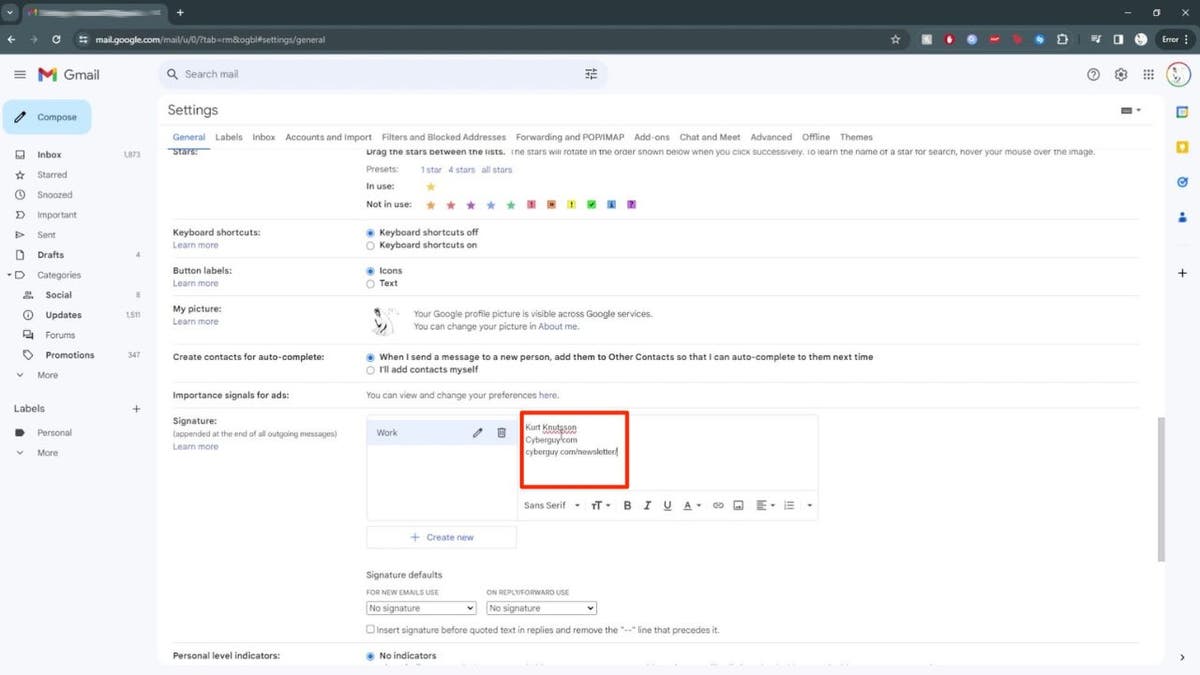
  • Next, craft your signature text: Some things to consider including are your name, job title and company. Add relevant contact information, such as your website, newsletter address, phone number or social media links. Keep it concise and professional.
  • You can adjust the font, style and colors as needed in the task bar right below it.
  • You can also insert a company logo by moving the cursor to the task bar and clicking insert image, select the logo and resize as necessary.
GMAIL signature 7

Steps to create a custom Gmail signature on desktop (Kurt “CyberGuy” Knutsson)

Step 3: Customize for different purposes

Here’s how to create multiple signatures:

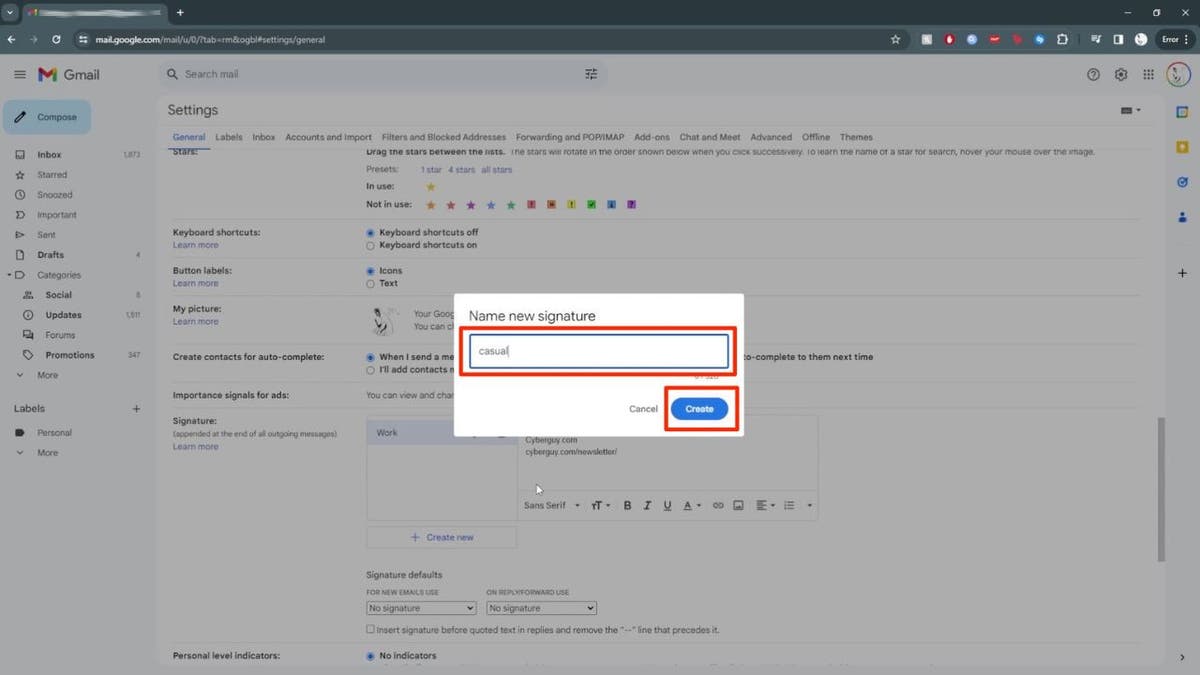
  • Click Create New to make additional signatures
gmail signature 8

Steps to create a custom Gmail signature on desktop (Kurt “CyberGuy” Knutsson)

  • Name them (e.g., “Casual,” “Personal,” etc.)
  • Next, click Create
gmail signature 9

Steps to create a custom Gmail signature on desktop ( Kurt “CyberGuy” Knutsson)

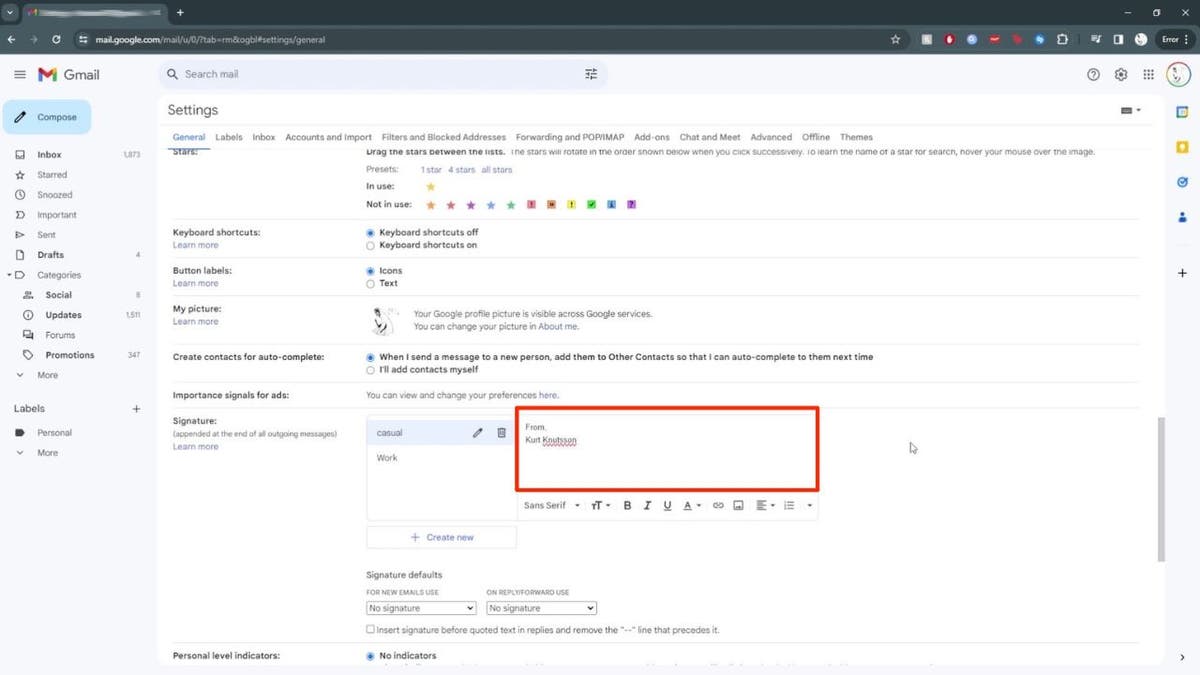
  • Then, type each signature based on its purpose
gmail signature 10

Steps to create a custom Gmail signature on desktop (Kurt “CyberGuy” Knutsson)

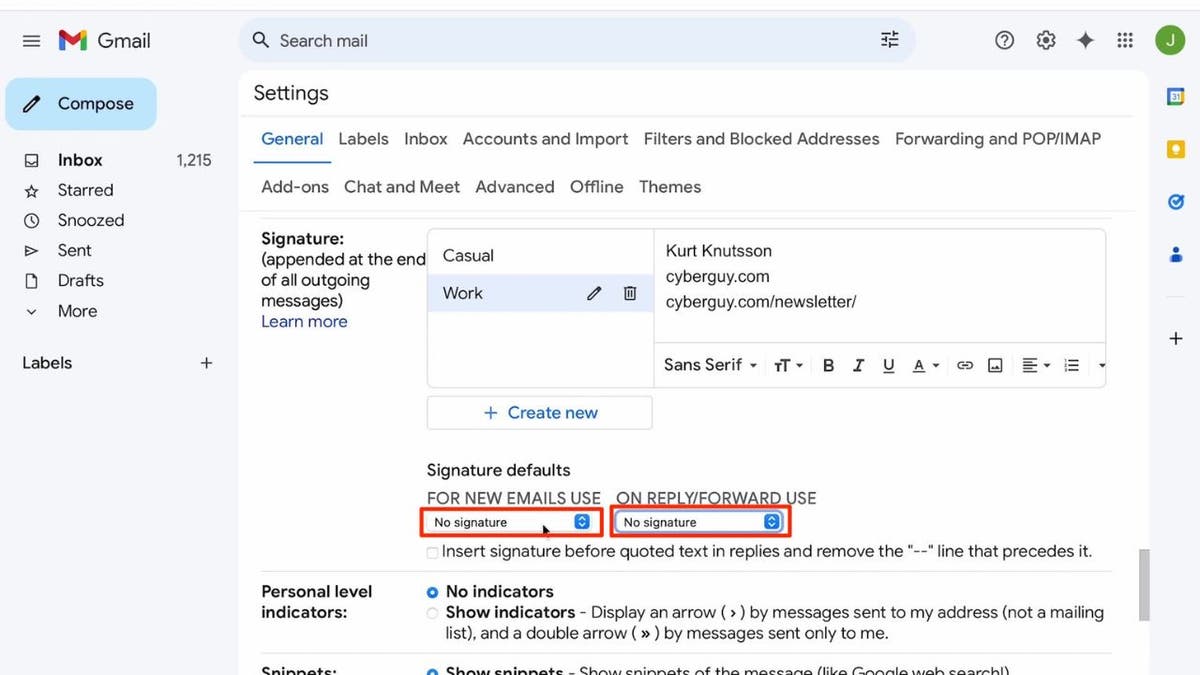
  • Below that, you are going to see a section called Signature defaults. There are two categories available:For New Email Use: This signature will be automatically added to new emails you compose.On Reply/Forward Use: This signature will be added when you reply to or forward an email.
  • For New Email Use: This signature will be automatically added to new emails you compose.
  • On Reply/Forward Use: This signature will be added when you reply to or forward an email.
  • By default, both options are set to No Signature.
  • Click under each category to select the appropriate signature you’ve created.
gmail signature 11

Steps to create a custom Gmail signature on desktop (Kurt “CyberGuy” Knutsson)

Step 4: Fine-tune signature settings

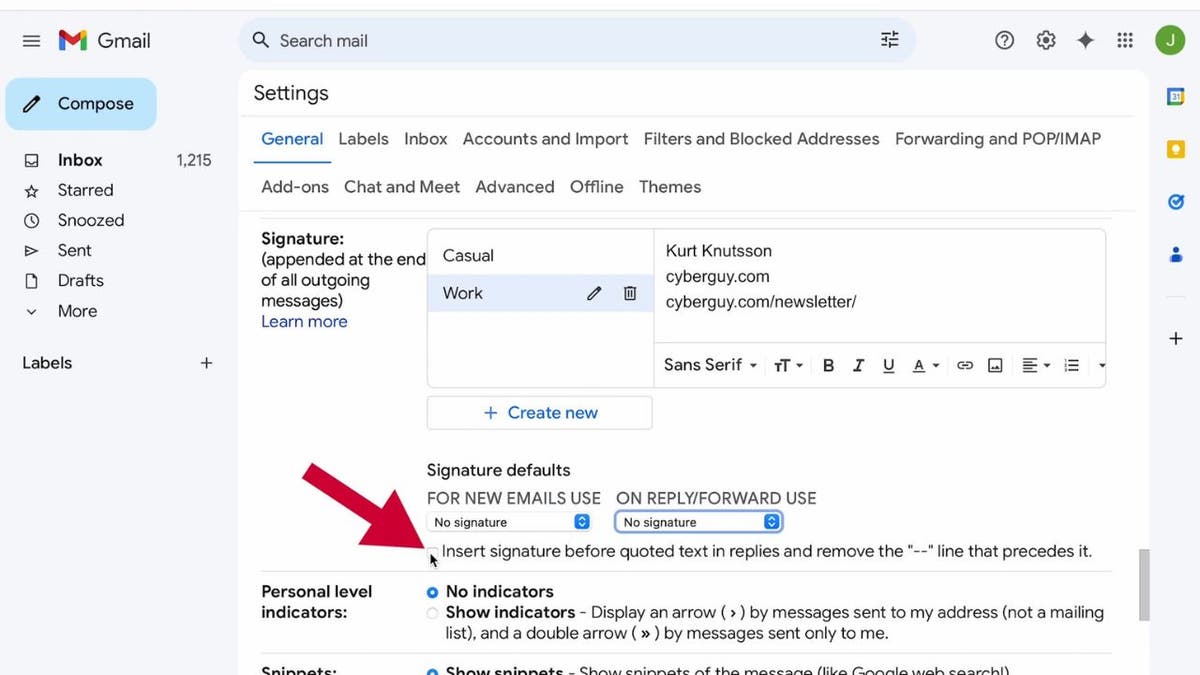
  • Next, click the box if you want to insert your signature before quoted text in replies and remove the “–” line that precedes it.
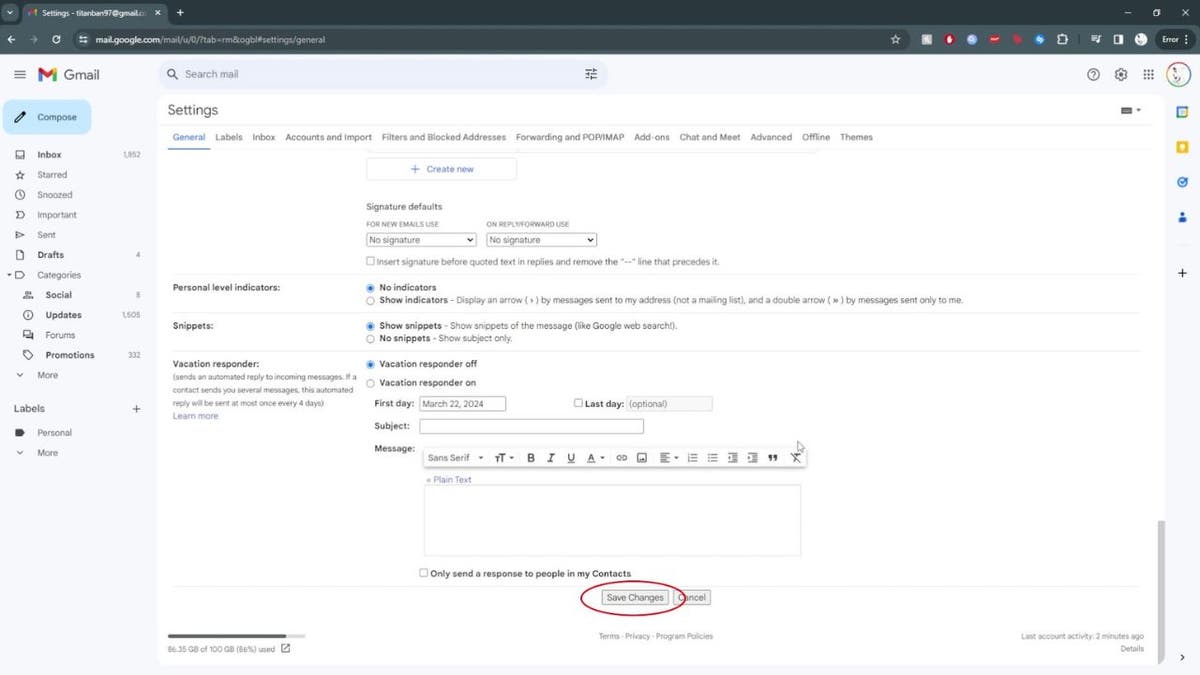
  • Scroll down and click Save Changes.
12 How to create a custom Gmail signature 1

Steps to create a custom Gmail signature on desktop (Kurt “CyberGuy” Knutsson)

MORE: HOW TO USE SMART COMPOSE TO WRITE EMAILS FASTER ON GMAIL

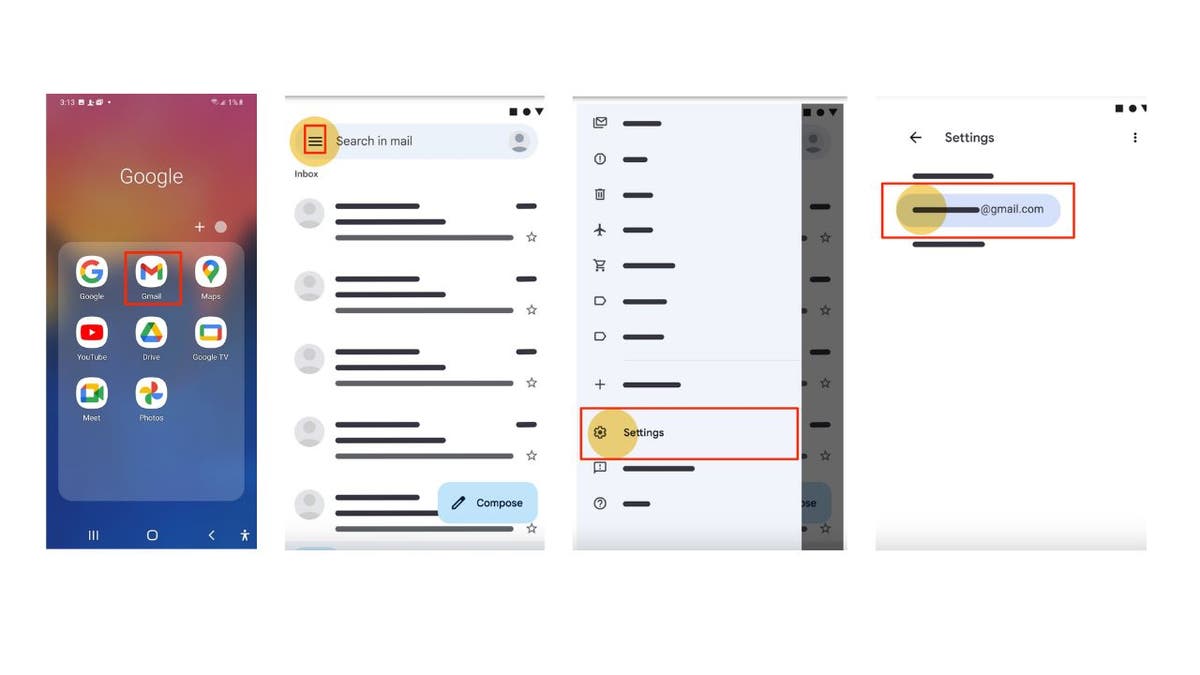
How to set up your Gmail signature on Android

Your signature only shows up in messages you send from the Gmail app.

  • Open the Gmail app
  • In the top left of the screen, tap the three horizontal lines 
  • Scroll to the bottom, then tap Settings
  • Choose the Google Account where you want to add a signature
gmail signature 13

Steps to create a custom Gmail signature on Android (Kurt “CyberGuy” Knutsson)

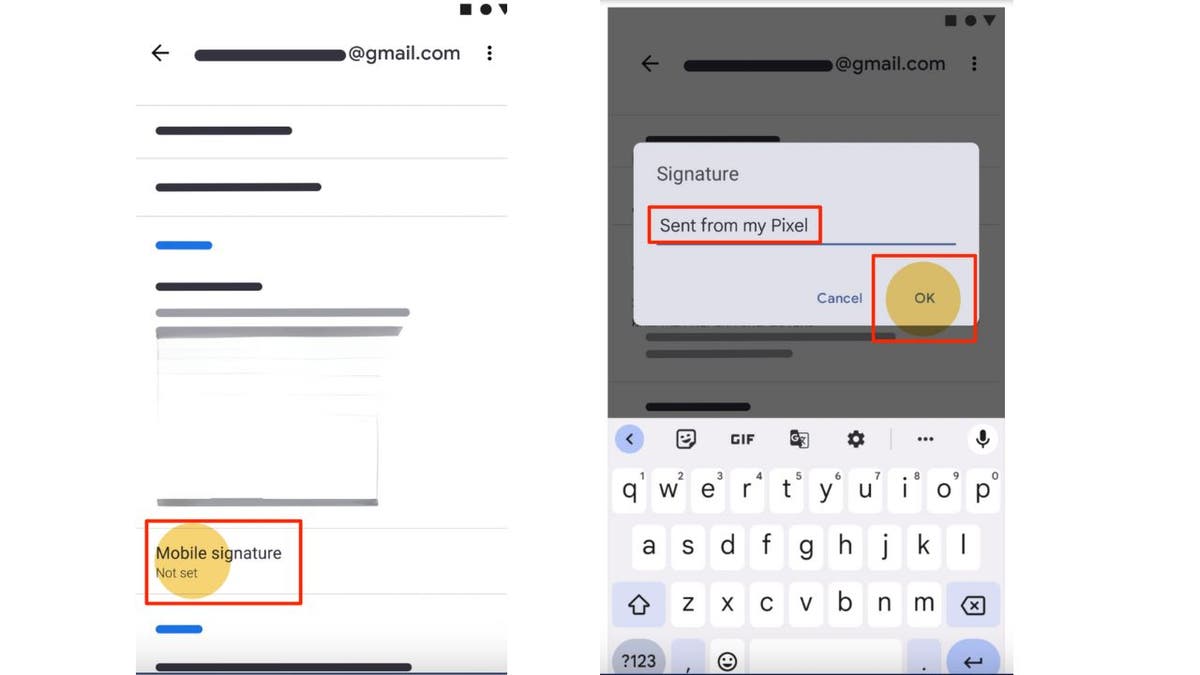
  • Tap Mobile Signature
  • Enter the text for your signature
  • Tap OK

GET FOX BUSINESS ON THE GO BY CLICKING HERE

gmail signature 14

Steps to create a custom Gmail signature on Android (Kurt “CyberGuy” Knutsson)

MORE: TURN THIS GMAIL SECURITY FEATURE ON ASAP

How to set up your Gmail signature on iPhone

Your signature only shows up in messages you send from the Gmail app.

  • Launch the Gmail app on your iPhone
  • Tap the three horizontal lines located in the top-left corner of the screen
  • Scroll down and select Settings
  • Under the “Compose and Reply” section, tap on Signature settings
  • Turn on the switch for Mobile Signature
  • Now, you can type your desired email signature into the provided area. Craft your signature with relevant information, such as your name, job title, web address, newsletter link and phone number
  • Then tap Done 
gmail signature 15

Steps to create a custom Gmail signature on iPhone (Kurt “CyberGuy” Knutsson)

MORE: HOW TO STOP SPAM EMAIL IN GMAIL

Kurt’s key takeaways

Now you know how to set up your Gmail signature on your desktop and your phone. From now on, all your outgoing emails will have that professional touch. Remember to keep it concise, relevant and aligned with your personal or business brand.

CLICK HERE TO GET THE FOX NEWS APP

What’s your biggest email pet peeve? Let us know by writing us at Cyberguy.com/Contact.

For more of my tech tips & security alerts, subscribe to my free CyberGuy Report Newsletter by heading to Cyberguy.com/Newsletter.

Ask Kurt a question or let us know what stories you’d like us to cover.

Answers to the most asked CyberGuy questions:

Copyright 2024 CyberGuy.com. All rights reserved.



Source link

Groundbreaking New Book “IRREPLACEABLE” Reveals the Secret to Thriving in the Age of AI

0

Miami, Florida – April 15th, 2024, – As artificial intelligence (AI) is rapidly transforming every aspect of peoples’ lives, most of them are left wondering how to adapt and succeed. Enter “IRREPLACEABLE: The Art of Standing Out in an Era of Artificial Intelligence,” the highly anticipated book by award-winning AI expert Pascal Bornet, which offers a practical roadmap for how individuals, parents, workers, and organizations can not only survive but thrive with AI. The book is now available on pre-sale and poised to become the definitive guide for navigating the AI revolution.

“AI is not here to replace us, but to challenge us to be more human,” says Bornet. “By becoming IRREPLACEABLE, we can create a future where humans and AI work together harmoniously to solve the world’s greatest challenges.” Drawing on 20 years of pioneering research at the human-AI frontier, Bornet argues that the key to success in the age of AI is to focus on developing the uniquely human capabilities that machines cannot replicate: the “Humics.”

The book also introduces the groundbreaking IRREPLACEABLE framework and guides readers to master “The Three Competencies of the Future” for success in the AI era. Readers will also discover how to:

  • Elevate one’s work performance by leveraging AI, without losing the job to automation.
  • Safeguard and nurture children in a digital age, preparing them to thrive alongside AI.
  • Develop uniquely human abilities that complement AI’s capabilities, fostering unique human-AI synergies.
  • Transform one’s business into a model of efficiency and innovation, while building trust and differentiating on the market.
  • Recognize AI’s potential threats and apply strategies to protect oneself, loved ones, and our shared humanity in a world increasingly dominated by machines.

Advance praise for “IRREPLACEABLE” has been resounding. According to Arianna Huffington, the book is “An essential reading for anyone who cares about the future of work.” The book has already generated significant buzz and is poised to become a major publishing event.

Pascal Bornet is an award-winning expert, author, and keynote speaker on artificial intelligence and automation. He has received numerous accolades for his work and is consistently ranked as one of the top 10 AI and automation influencers globally. Bornet has also served as a senior executive at McKinsey and EY, where he founded and led their global AI and automation practices.

“IRREPLACEABLE: The Art of Standing Out in an Era of Artificial Intelligence,” published by Wiley, is available on pre-sale in all major physical and online bookstores, and on Amazon: https://www.amazon.com/IRREPLACEABLE-Art-Standing-Artificial-Intelligence/dp/1394264402

Media Contact:

Pascaline Therias
Attn: Media Relations
Miami, FL
+1 415.808.9475
pascaline@pascalbornet.com

pascal
Groundbreaking New Book "IRREPLACEABLE" Reveals the Secret to Thriving in the Age of AI 44

US avoids ‘digital security crisis’ after developer uncovers software sabotage

0


  • The U.S. is grappling with significant cybersecurity concerns after a developer uncovered an act of sabotage within a program.
  • The program, deliberately sabotaged by one of its developers, could have carved out a secret door to millions of servers across the internet.
  • Government officials were alarmed by the incident, which has sparked concerns about how to protect open source software.

German software developer Andres Freund was running some detailed performance tests last month when he noticed odd behavior in a little known program. What he found when he investigated has sent shudders across the software world and drawn attention from tech executives and government officials.

Freund, who works for Microsoft out of San Francisco, discovered that the latest version of the open source software program XZ Utils had been deliberately sabotaged by one of its developers, a move that could have carved out a secret door to millions of servers across the internet.

Security experts say it’s only because Freund spotted the change before the latest version of XZ had been widely deployed that the world was spared a digital security crisis.

CHINESE HACKERS HAD ACCESS TO US INFRASTRUCTURE FOR ‘AT LEAST 5 YEARS’ BEFORE DISCOVERY

“We really dodged a bullet,” said Satnam Narang, a security researcher with Tenable who has been tracking the fallout from the find. “It is one of those moments where we have to wipe our brow and say, ‘We were really lucky with this one.’”

Cybersecurity illustration

A software developer was running some detailed performance tests last month when he noticed odd behavior in a little known program. What he found when he investigated sent shudders across the software world and drew attention from tech executives and government officials. (REUTERS/Dado Ruvic/Illustration/File Photo)

The near-miss has refocused attention on the safety of open source software – free, often volunteer-maintained programs whose transparency and flexibility mean they serve as the foundation for the internet economy.

Many such projects depend on a tiny circle of unpaid volunteers fighting to get out from under a pile of demands for fixes and upgrades.

XZ, a suite of file compression tools packaged into distributions of the Linux operating system, was long maintained by a single author, Lasse Collin.

CHINESE CYBER ATTACKS ARE INTENDED TO ‘INDUCE SOCIETAL PANIC’ ACROSS AMERICA, SECURITY DIRECTORS TELL CONGRESS

In recent years, he appeared to be under strain.

In a message posted to a public mailing list in June 2022, Collin said he was dealing with “longterm mental health issues” and hinted that he working privately with a new developer named Jia Tan and that “perhaps he will have a bigger role in the future.”

Update logs available through the open source software site Github show that Tan’s role quickly expanded. By 2023 the logs show Tan was merging his code into XZ, a sign that he had won a trusted role in the project.

But cybersecurity experts who’ve scoured the logs say that Tan was masquerading as a helpful volunteer. Over the next few months, they say, Tan introduced a nearly invisible backdoor into XZ.

Collin didn’t return messages seeking comment and said on his website that he would not respond to reporters until he understood the situation well enough to do so.

Tan did not return messages sent to his Gmail account. Reuters has been unable to ascertain who Tan is, where he is, or who he was working for, but many of those who’ve examined his updates believe Tan is a pseudonym for an expert hacker or group of hackers — likely one working on behalf of a powerful intelligence service.

“This is not kindergarten stuff,” said Omkhar Arasaratnam, the general manager of the Open Source Security Foundation, which works to defend projects like XZ. “This is incredibly sophisticated.”

Tan could easily have gotten away with it had it not been for Freund, the Microsoft developer, whose curiosity was piqued when he noticed the latest version of XZ intermittently using an unexpected amount of processing power on the system he was testing.

Microsoft declined to make Freund available for an interview, but in publicly-available emails and posts to social media, Freund said a series of easy-to-miss clues prompted him to discover the backdoor.

The find “really required a lot of coincidences,” Freund said on the social network Mastodon.

Microsoft CEO Satya Nadella congratulated Freund over the weekend, saying in a post to the social network X that he loved seeing how the developer, “with his curiosity and craftsmanship, was able to help us all.”

In the open source community, the discovery has been sobering. The volunteers who maintain the software that underpins the internet aren’t strangers to the idea of little pay or recognition, but the realization that they were now being hunted by well-resourced spies pretending to be Good Samaritans was “incredibly intimidating,” said Arasaratnam, of the Open Source Security Foundation.

Government officials are also weighing the implications of the near-miss, which has underlined concerns about how to protect open source software. Assistant National Cyber Director Anajana Rajan told Politico that “there’s a lot of conversations that we need to have about what we do next” to protect open source code.”

CLICK HERE TO GET THE FOX NEWS APP

The Cybersecurity and Infrastructure Security Agency (CISA) says it has been leaning on U.S. companies that use open source software to plow resources back into the communities that build and maintain it. CISA adviser Jack Cable told Reuters the burden was on tech companies not just to vet open software but to “contribute back and help build the sustainable open source ecosystem that we get so much value from.”

It’s not clear that software companies are properly incentivized to do so. Online open source mailing lists are teeming with complaints about tech giants demanding that volunteers troubleshoot issues with open source software those companies use to make billions of dollars.

Whatever the solution, almost everyone agrees the XZ episode shows something has to change.

“We got unreasonably lucky here,” said Freund in another Mastodon post. “We can’t just bank on that going forward.”


Source link

Two bodies recovered in Texas County; OSBI yet to release IDs or cause of death

0

Two bodies have been recovered in rural Texas County in Oklahoma, the Oklahoma State Bureau of Investigation announced on Sunday evening. 

“Both individuals will be transported to the Medical Examiner’s Office to determine identification, as well as cause and manner of death. This is still an ongoing investigation,” OSBI said in a post on X. 

This comes less than 24 hours after the OSBI said they had four suspects in custody in connection to the disappearance of two Kansas moms.

Veronica Butler, 27, and Jillian Kelley, 39, were last seen on March 30 heading to pick up children before their car was found abandoned near the Oklahoma-Kansas border, with foul play suspected, police said.

MUGSHOTS RELEASED, REVEALING FIRST LOOK AT SUSPECTS IN CASE OF MISSING KANSAS WOMEN

Hugoton Assembly of God Pastor Tim Singer tells Fox News that Jilian Kelley, left, and Veronica Butler, right, were heading Saturday to pick up Butler’s children to bring them back to a birthday party in Hugoton, Kansas. (Texas County Sheriff’s Office/Oklahoma Highway Patrol/Shutterstock)

The Oklahoma State Bureau of Investigation announced that on Saturday, Tad Bert Cullum, 43, Tifany Machel Adams, 54, Cole Earl Twombly, 50, and Cora Twombly, 44, were taken into custody. 

Adams, one of the women arrested, is reportedly the grandmother of Veronica Butler’s children.

4 PEOPLE ARRESTED IN CONNECTION TO 2 MISSING KANSAS WOMEN: OSBI

Missing persons suspect Tifany Adams

Tifany Machel Adams, 54, is reportedly the grandmother of Veronica Butler’s children. (Oklahoma State Bureau of Investigation – Authorized Page/Facebook)

All four were booked into the Texas County Jail on two counts of first-degree murder, two counts of kidnapping and one count of conspiracy to commit murder in the first degree, OSBI said in a news release. 

CLICK HERE TO GET THE FOX NEWS APP

Oklahoma State Bureau of Investigation truck

The Oklahoma State Bureau of Investigation said Sunday night two bodies had been located in a rural part of Texas County, Oklahoma. (Oklahoma State Bureau of Investigation/Facebook)

The OSBI has not said if the two bodies are related to missing women.

Fox News’ Pilar Arias contributed to this report. 

Fox News AI Newsletter: Tech’s ‘craziest talent war’

0


Welcome to Fox News’ Artificial Intelligence newsletter with the latest AI technology advancements.

IN TODAY’S NEWSLETTER:

– Elon Musk boosting pay of AI engineers to prevent poaching from OpenAI
– AI sports betting platforms’ breaches likely impacting March Madness wagers
– Billionaire investor and New York Mets owner says AI could yield four-day work week for most workers

‘CRAZIEST TALENT WAR’: Tesla CEO Elon Musk said the electric vehicle giant is giving its artificial intelligence engineers a raise as the automaker tries to fend off poaching efforts by ChatGPT creator OpenAI.

COSTLY GAME: More and more sports bettors appear to be turning to artificial intelligence to help counter the notoriously unpredictable tournament, which is often referred to as March Madness.

March Madness logo

A view of an NCAA March Madness logo ahead of a game between the Colorado Buffaloes and the UCLA Bruins on Feb. 26, 2024, in Los Angeles. (Katharine Lotze/Getty Images)

LEISURE TIME: Billionaire investor and New York Mets owner Steve Cohen said in a Wednesday appearance on CNBC’s “Squawk Box,” that he believes that the majority of workers will eventually have a four-day work week and three-day weekend, which will expand opportunities for individuals to engage in leisurely pursuits.

FIGHT AGAINST AI: Comedian George Carlin’s estate has agreed to a settlement with the media company it sued earlier this year over the use of artificial intelligence.

George Carlin on stage with a microphone

File photo of George Carlin. (Kevin Statham/Redferns)

TAKING ON CANCER: After losing his wife to colon cancer, a New York man has dedicated his life to fighting the disease and trying to protect other families from the same tragedy, in part by using machine learning to analyze the outside of the cancer cells.

Roy de Souza and Aisha de Sequeira and children

Roy de Souza and Aisha de Sequeira and children (Roy de Souza)

Subscribe now to get the Fox News Artificial Intelligence Newsletter in your inbox.

FOLLOW FOX NEWS ON SOCIAL MEDIA

Facebook
Instagram
YouTube
Twitter
LinkedIn

SIGN UP FOR OUR OTHER NEWSLETTERS

Fox News First
Fox News Opinion
Fox News Lifestyle
Fox News Health

DOWNLOAD OUR APPS

Fox News
Fox Business
Fox Weather
Fox Sports
Tubi

WATCH FOX NEWS ONLINE

Fox News Go

STREAM FOX NATION

Fox Nation

Stay up to date on the latest AI technology advancements and learn about the challenges and opportunities AI presents now and for the future with Fox News here.


Source link

10 tips to speed up your PC’s performance

0


Have you been having issues with your PC moving at a snail’s pace lately? Don’t panic; it happens to everyone. Before you decide to invest in a new PC or take your computer into a repair shop, there are a few things that you can do first to help your computer get back up to speed.

Here are 10 tips to help you get that slow-moving PC moving quickly again. If you have a Mac, you’ll want to check out our 8 tips to speed up your Mac’s performance.

Man working on computer

When you restart your PC, Windows will close all your applications, which may resolve some slow-down issues. (Kurt “CyberGuy” Knutsson)

The first steps

Tip No. 1 – Restart your PC

Before doing anything, give your PC a quick restart. When you restart your PC, Windows will close all your applications, which may resolve some slow-down issues.

  • In the bottom-left corner of your screen, you’ll find the Windows icon. Click on it to open the Start Menu.
  • Within the Start Menu, you’ll see a power button icon. Click on it to reveal a submenu.
  • From the submenu, select the “Restart” option. Windows will now initiate the restart process.
  • Your PC will close all open applications and perform a full restart. This process may take a few minutes.
  • Once your PC has restarted, log in using your credentials.

Tip No. 2 – Enable automatic updates

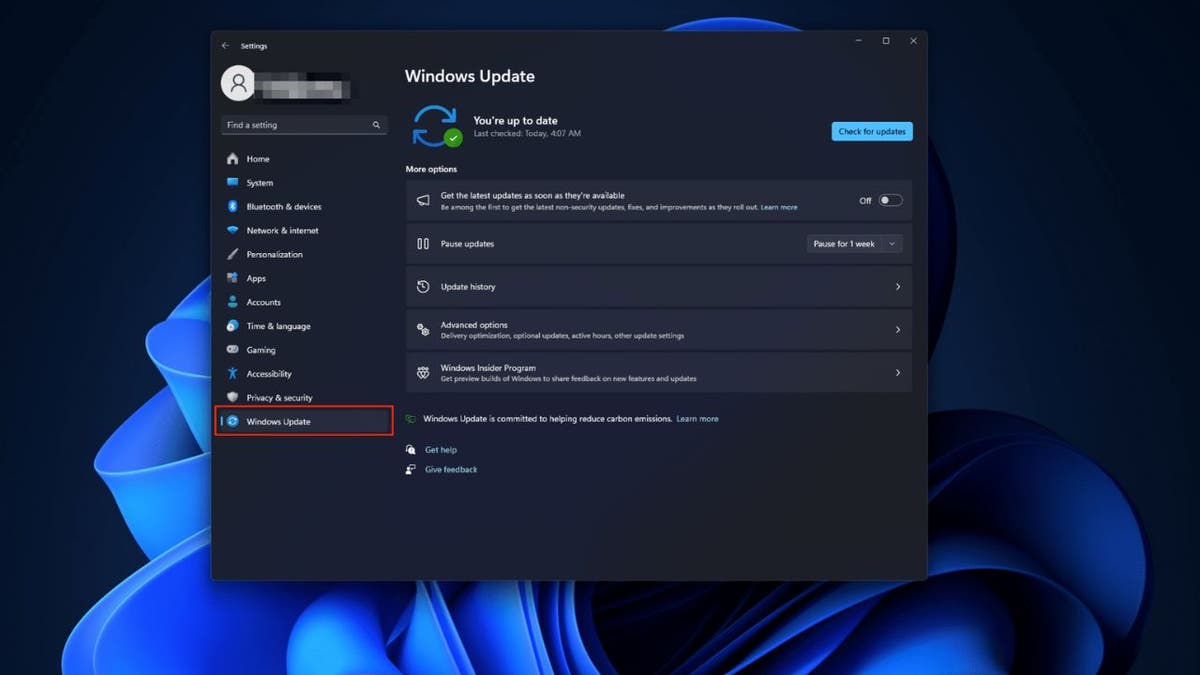
Make sure you are keeping your Windows OS up to date. Microsoft continuously rolls out improvements for bugs that may slow your PC down. Here’s what you need to do:

  • Using the Windows Search Bar in the bottom left of your screen (center on Windows 11), search Windows Update.
  • Then, select Windows Update Settings.
  • Under more options, turn on Get the latest updates as soon as they’re available.
Windows update option on PC

Make sure you are keeping your Windows OS up to date. (Kurt “CyberGuy” Knutsson)

Tip No. 3 – Check your startup applications that can slow things down

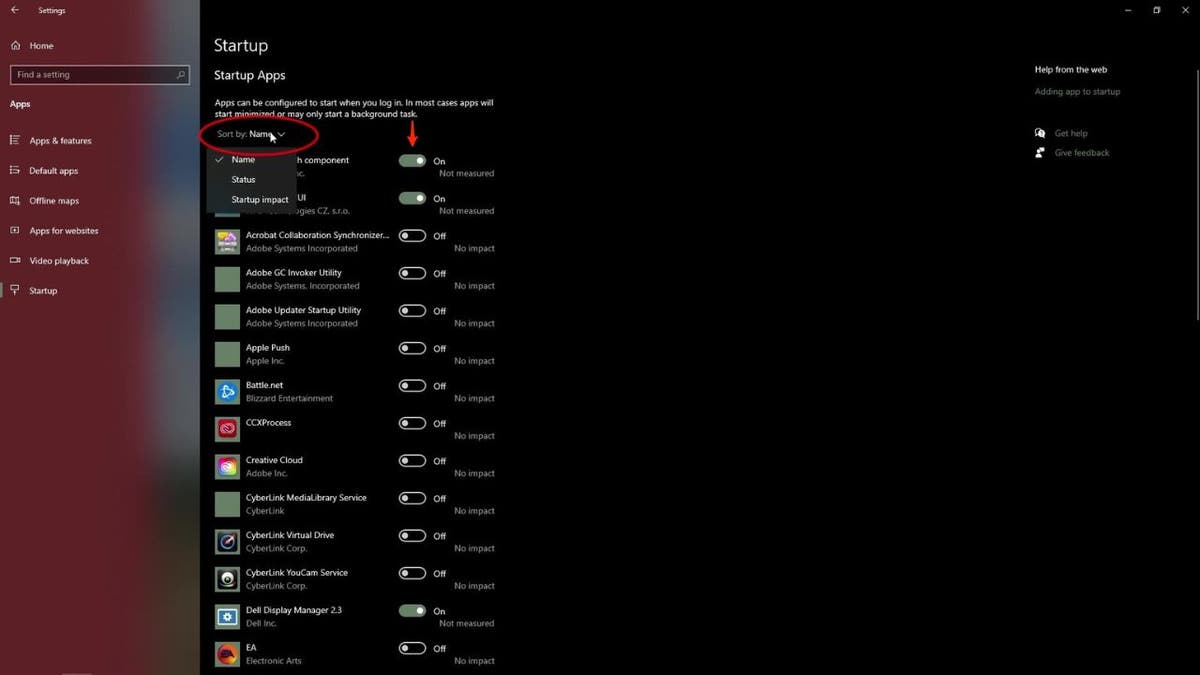
Check which programs open automatically at start-up.

  • First off, on your PC, navigate to the bottom left and click the Windows icon.
  • Then find the gear icon, mouse over the gear icon, and click on Settings.
  • A new window will pop up with your PC’s settings. Look for apps and click on that.
  • At the bottom of the apps list, you should see something that says Startup. Find and click on that.
  • Now, you’ll see a list of all the Startup apps that launch when your PC boots up.
  • At the top of the list, click on “sort by” to select how you want the list sorted.
  • Then, scroll down the list and find whatever programs you’d like to disable for startup.
  • Get rid of things you don’t use that may have found their way here ages ago.
  • When you’ve found one you’d like to turn off, click the little switch next to it. The fewer items left for startup, the less drag there will be on your processing power.
Startup applications screen on PC (Kurt "CyberGuy" Knutsson

Startup applications screen on PC. (Kurt “CyberGuy” Knutsson)

FIRST 10 THINGS TO DO IF YOU GOT A NEW PC

Tip No. 4 – Use Microsoft’s Disk Defragment tool to clean things up

Cleaning your disk with the Windows “Disk Cleanup” tool is an easy way to delete old temporary files and old system data stored on your hard drive, which can slow down your PC’s performance.

  • Go to File Explorer.
  • Right Click Local Disk C: 
  • Click Properties.
  • Click Details.
  • Move to the Tools tab.
  • Run “Optimize and defragment drive.”
Microsoft's Disk Defragment tool on PC (Kurt "CyberGuy" Knutsson)

Microsoft’s disk defragment tool on PC. (Kurt “CyberGuy” Knutsson)

HOW TO SMARTLY ORGANIZE YOUR PHOTOS ON A PC 

Advanced Steps

If none of the above steps helped speed up your PC, you may need to follow these slightly more advanced steps.

Tip No. 5 – Uninstall unused applications

Depending on which PC you bought, there’s a good chance you have a few pre-installed programs on it that you don’t use. Reviewing your applications list and deleting programs you no longer use or were pre-installed on your system is a good idea.

To do this:

  • Search Remove Programs in the Windows Search Taskbar.
  • Click on Add or Remove Programs.
  • Remove any unused applications.

Tip No. 6 – Disable background programs 

Using the Windows Command Center, you can find applications running in the background and close them. This will free up processing power and memory and help speed up your PC. To do this:

  • Launch the Windows Settings app
  • Click on the Apps tab in the left toolbar.
  • From here, all of the applications on your PC will appear. Click the ‘…’ symbol next to the app, and select Advanced Options.
  • Select any app, click on Background Permissions.
  • Change to Never for any app you don’t want to run in the background.

BEST LAPTOPS FOR 2024

Tip No. 7 – Turn off visual effects

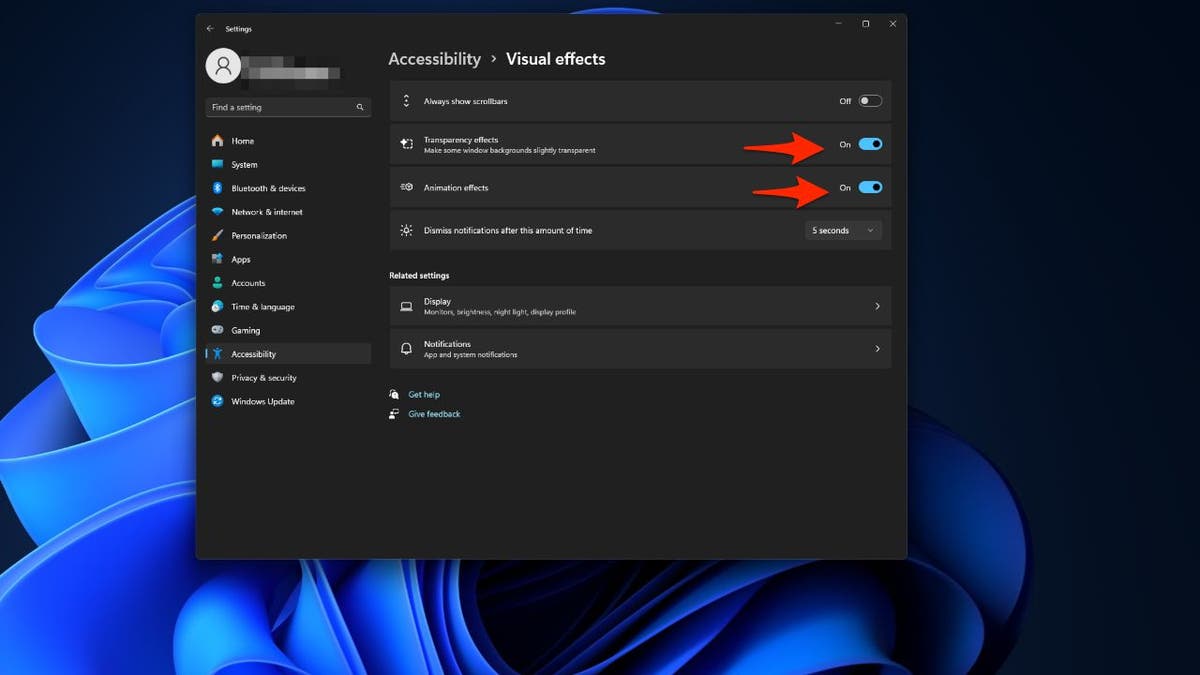
You can turn off visual effects to free up additional memory and processing power.

To do this:

  • Press the Windows Key + U.
  • Click the tab for visual effects.
  • From here, you can turn off any visual effects of your choosing.
Screen to turn off Visual effects on PC (Kurt "CyberGuy" Knutsson)

Screen to turn off visual effects on PC. (Kurt “CyberGuy” Knutsson)

Final Steps

If everything else has failed to speed up your PC’s performance, you can try these next steps. These steps will require a bit of technical know-how, such as how to open and replace components within your PC, so you may have to seek professional help.

Tip No. 8 – Upgrade your RAM

One of the most common issues that causes PCs to slow down is insufficient RAM for all your applications. While 8GB of RAM should be OK for most users, if you notice your PC is slow with 8GB of RAM, it’s worth upgrading to 16GB. Most computer stores can help you with this for a fee. 

Tip No. 9 – Use an SSD

Solid State Drives (SSDs) can greatly enhance your PC’s speed. They offer faster data transfer rates, improved boot and load times, and higher bandwidth compared to traditional Hard Disk Drives. By installing an SSD and moving your operating system and crucial applications to it, you can achieve faster boot, loading and read/write times. 

You have two options when it comes to installing an SSD: doing it yourself or consulting with a professional. If you’re tech-savvy and comfortable with handling computer hardware, you can install the SSD yourself. This involves replacing or supplementing the existing HDD with the SSD and transferring your operating system and files. 

However, most people will want to consult with a professional. They can handle the installation and data transfer for you. Regardless of the method you choose, it’s crucial to back up your data beforehand and ensure your computer is compatible with the SSD you’ve chosen.

Tip No. 10 – Perform a clean re-install of Windows

This should only be attempted by people who are comfortable installing and re-installing operating systems. Otherwise, we recommend getting your PC into a repair shop. If you want to perform a clean install of Windows 11 or 10, simply head to Microsoft’s website and head over to the “Reinstall Windows” page.

Kurt’s key takeaways

It’s never fun when your computer is running slow, and we hope these 10 tips can help you bring your PC back up to speed. The first four steps will be enough for most users, but if you are comfortable and have a good deal of technical experience, you can attempt steps four through 10 or seek professional help to complete them.

Have you encountered any unique challenges while trying to improve your computer’s performance? Let us know by writing us at Cyberguy.com/Contact

For more of my tech tips and security alerts, subscribe to my free CyberGuy Report Newsletter by heading to Cyberguy.com/Newsletter

Ask Kurt a question or let us know what stories you’d like us to cover.

Answers to the most-asked CyberGuy questions:

Copyright 2024 CyberGuy.com. All rights reserved.


Source link

What to do when your own number appears to ring your home phone

0


If you are like me and refuse to give up your home landline, you’re probably no stranger to… well, strange calls. Landlines are more prone to spam calls than cellphones, which offer better call-blocking options

If you’re used to getting the occasional spam call on your landline, you likely already have a system in place to handle it. Perhaps you just hang up the call as soon as you see a number you don’t recognize (or, maybe you recognize it at this point because they call so much!). Or, maybe you even pick up the line and give them a piece of your mind. However, is this the right thing to do?

And what happens when your landline rings and the caller ID lists your number? Strange, right? This is what happened to one of our CyberGuy Report subscribers, who reached out to ask us about it. Crazy as it sounds, this person said the scammer got a hold of their home phone number and used it to call the same number they were spoofing. This is obviously a bit more of a cause for concern than ordinary scammers.

Man yelling into the phone (Kurt "CyberGuy" Knutsson)

Maybe you pick up the line and give spam callers a piece of your mind. But is this the right thing to do? (Kurt “CyberGuy” Knutsson)

If the scammer appears to be calling from your own number

Now, if the scammer you’re seeing on your caller ID seems like they are calling from your own landline phone number, you’ll want to do the steps above in addition to the three steps below:

1) Alert your phone provider: If your number has been spoofed, you should inform your phone company as soon as possible. Depending on the situation, they may be able to guide you on the best way to proceed.

2) Get your personal information offline: There are several ways that phone spoofers can hijack your phone number, but it’s most likely because they can easily find personal information online. There are several tools you can use to find where your personal information is lurking online and get it offline, away from scammers who want to steal your information and exploit that information, whether to commit identity theft or something else.

While no service promises to remove all your data from the internet, having a removal service is great if you want to constantly monitor and automate the process of removing your information from hundreds of sites continuously over a longer period of time. Check out my top picks for data removal services here.

3) Change your number: If all else fails and your phone company is not really able to help, a good idea is to change your home phone number altogether. While you may not want to do this, it may be the only solution, especially if the scammer continues to call you on your same number and if friends and family are getting those calls as well.

Man talking on a landline phone (Kurt "CyberGuy" Knutsson

Engaging with unknown callers can expose you to scams or other forms of fraud. (Kurt “CyberGuy” Knutsson)

HOW TO STOP PHONE NUMBER SPOOFING AND PROTECT YOURSELF FROM SCAMMERS

3 reasons not to engage with scammers who call you

Now, let’s shift our focus to why it’s best not to engage with scammers who call you, regardless of whether they’re using your own phone number or another one. Here are a few reasons why: 

1) Safety: Engaging with unknown callers can potentially expose you to scams or other forms of fraud.

2) Privacy: Even if you’re giving them a hard time, they might still be gathering information about you in the meantime. And, now, with AI voice scams, these scammers can clone your voice to use for other types of scams.

3) Encouragement: Responding to these calls, even negatively, can signal to the caller that your number is active, which might lead to more calls.

END OF ANNOYING ROBOCALLS? FTC CRACKS DOWN ON DECEPTIVE PRACTICES

Man talking on a landline phone (Kurt "CyberGuy" Knutsson)

Ask yourself one simple question: “Did I ask for this call?” If the answer is no, then hang up. (Kurt “CyberGuy” Knutsson)

Stop scam calls: 4 ways to protect yourself

Of course, nobody wants to continue to get scam calls. So, there are a few recommended steps you can take instead:

1) Let the answering machine answer or go to voicemail. This allows you to screen calls without directly engaging with potential scammers. You can avoid direct interaction with them and listen to the message at your convenience to determine if it’s legitimate.

2) Block the numbers: If you notice certain numbers repeatedly calling, you can block them. Take a look at our best landing call-blocking devices. These are especially helpful in blocking robocalls but can also help block individual scammers.

  • Use Star Codes: Many landline phones allow you to block calls by using star codes. For example, you can dial *60 to block specific numbers.
  • Call-Blocking Devices: Devices can be attached to your landline to block unwanted calls. These devices can come preloaded with known spam numbers and allow you to add numbers manually. Check out my favorite call-blocking devices for landlines by clicking here.
  • Service Provider Features: Contact your landline service provider to inquire about any call-blocking features they offer. Some providers have services that can help manage unwanted calls.

3) Report the calls: If you’re in the U.S., you can report unwanted calls to the Federal Trade Commission.

4) Add yourself to the no-call list: Consider adding your phone number to the National Do Not Call Registry, which can help stop some of the scam and telemarketing calls you’re getting.

Remember, while these methods can significantly reduce unwanted calls, it may not be possible to block all spam calls completely. Always exercise caution and avoid sharing personal information over the phone with unknown callers. My rule of thumb involves asking yourself one simple question: “Did I ask for this call?” If the answer is no, then hang up.

HOW TO AVOID BEING DUPED BY ROBOCALLS NOW AND FOREVER

Kurt’s key takeaways

Getting spam calls on your landline is no fun, and even more so when those calls are coming from your own number. Remember, it’s important to protect your personal information and privacy and always to be cautious when dealing with unknown callers. Using the techniques above can help ensure you’re not only using best practices when dealing with scammers but also protecting yourself in the long run from future ones.

How do you think phone companies should address scam calls and caller ID spoofing? Let us know by writing us at Cyberguy.com/Contact

For more of my tech tips & security alerts, subscribe to my free CyberGuy Report Newsletter by heading to Cyberguy.com/Newsletter

Ask Kurt a question or let us know what stories you’d like us to cover.

Answers to the most-asked CyberGuy questions:

Copyright 2024 CyberGuy.com. All rights reserved.


Source link

Violence erupts as novelty shop in Southern California robbed at gunpoint

0

The owner of a novelty gaming store in San Bernardino County is speaking out after his store, which has been open less than a year, was robbed a third time, with the latest thief threatening his employees at gunpoint.

Surveillance cameras at the store, Into the Retroverse, located in the 800 block of West Valley Boulevard in Colton, captured a man dressed in dark clothing, including a hoodie and mask, stroll into the store and walk directly behind one of the display cases.

“He just started taking stuff and said, ‘I need the money,’ and that’s when my buddy Alex went and tried to attack him,” store employee Arturo Garcia told KTLA’s Jennifer McGraw. “That’s when we started doing it in all out brawl.

The April 12 incident occurred at around 8 p.m. and it’s not the first time thieves have targeted the gaming store. Into the Retroverse was robbed on Nov. 6th and Thanksgiving Day last year as well.

Footage of the incident shows the robber in a tussle with two of the store’s employees, one of which was the owner’s brother. After a struggle that left much of the store’s merchandise thrown around the shop, the three men fall to the ground where the gunman was unmasked.

“I tried to throw him to the ground,” employee Alexander Bernal explained. “That’s when he got tired and took out the gun.”

Keeping his gun up and pointed at the employees, the man continued filling his bag with stolen merchandise before eventually leaving the store with an estimated $3,000-$5,000 worth of Pokémon Cards, according to Jovanne Bernal, who owns the novelty shop.

Bernal’s brother, Alexander, said the violence was frightening and he worried the thief would shoot him while he was still on the ground.

“After he pulled out the gun, he said he should’ve messed me up or he should’ve shot me,” Alexander said.

Into the Retroverse, a childhood dream of Jovanne’s, is located in Colton City Plaza across the street from Colton High School and has only been open for seven months.

“It sucks,” he told KTLA. “You spend your life trying to build it and then somebody just walks in and says I’m going to take it and because of how things are, they can.”

The shop owner filed a police report with the Colton Police Department, who already has a detective on the previous robberies at the store but says Colton City Plaza’s management needs to step up security before someone is attacked again or, worse, senselessly gunned down.

“We’re working on it,” is what he says the plaza’s management has told him. “Three times I’ve been broken into in the past six or seven months and they are still working on it.”

$55M in cocaine, more than a ton, seized in Southern California

Jovanne also said that seeing surveillance footage of the violent encounter has shaken him up.

“It’s more personal because you talked to Alex, that’s my brother,” he said. “He’s been supporting me since day one.”

KTLA has reached out to management at Colton City Plaza and are waiting to hear back if there are plans to get more security for the shops and employees renting space in the shopping center.

For the latest news, weather, sports, and streaming video, head to KTLA.

How 1X’s humanoid robot is putting a stop to you having to fold laundry

0


Join Fox News for access to this content

Plus special access to select articles and other premium content with your account – free of charge.

Please enter a valid email address.

Imagine never having to fold laundry again. No more Sunday afternoons spent meticulously tackling this tedious task. Sounds pretty sweet, doesn’t it? 

Well, let me introduce you to Eve, the cool new humanoid robot from 1X, developed in collaboration with the folks at OpenAI. 

Eve isn’t just another gadget; it’s like a sneak peek into a future where household chores are a thing of the past.

CLICK TO GET KURT’S FREE CYBERGUY NEWSLETTER WITH SECURITY ALERTS, QUICK VIDEO TIPS, TECH REVIEWS AND EASY HOW-TO’S TO MAKE YOU SMARTER

eve the robot 1

Eve humanoid robot  (1X)

How the humanoid robot went from basic tasks to laundry folding

Just a month ago, Eve was impressing us with its ability to pick up items, self-charge and perform simple tasks around the house. Now, Eve is tackling one of the most universally dreaded chores — laundry folding. Despite lacking human-like hands and instead using claw grippers, Eve manages this delicate task with surprising precision and care.

WHAT IS ARTIFICIAL INTELLIGENCE (AI)?

EVE the robot 2

Eve humanoid robot  (1X)

MORE: FIRST HUMANOID ROBOT FACTORY IN THE U.S. CAN CRANK OUT 10,000 ROBOTS A YEAR  

Humanoid robots are accelerating at a dizzying pace

Eve’s rapid learning curve is a testament to the incredible potential of artificial intelligence-powered robotics. Within weeks, Eve has moved from performing simple tasks to handling complex, multi-step processes such as sorting items, using tools and, most impressively, folding shirts autonomously. This rapid progression is not just about doing chores; it’s about redefining what robots are capable of achieving.

EVE the robot 3

MORE: AI ROBOT THAT CAN TRIM, EDGE AND BLOW YOUR LAWN FOR YOU  

The significance of Eve’s development

The development of Eve and robots like it represents a significant leap forward in the field of humanoid robotics. These robots are not being programmed for specific tasks; they are learning, adapting and evolving with minimal human intervention.

This approach to AI and robotics is paving the way for a future where robots could become an integral part of our daily lives, assisting with a wide range of tasks.

eve the robot 4

Eve humanoid robot ( 1X)

MORE: FORGET HANDS, TOYOTA’S HUG-READY ROBOT PICKS UP WITH ITS ENTIRE BODY 

The future of robotics is now

Eve’s abilities highlight the broader advancements in the field of AI-driven humanoid robotics. From Agility Robotic’s Digit working with Spanx to Apptronik’s Apollo at Mercedes-Benz, humanoid robots are beginning to make their mark across various industries.

Eve’s success in autonomously folding laundry might seem like a small step, but it’s part of a much larger journey toward creating robots that can perform a wide range of tasks.

eve the robot 5

Eve humanoid robot   (1X)

Are robots here to replace us (or free us)?

While Eve’s ability to take over household chores sounds like a dream, it’s also stirring a lot of conversations. Understandably, some folks are worried about the broader implications, particularly when it comes to job security. How do we balance the convenience offered by robots like Eve with the concern that they could take over jobs, even beyond household tasks?

GET FOX BUSINESS ON THE GO BY CLICKING HERE

You see, as Eve and its counterparts grow more skilled, the question isn’t just about who’s folding laundry. It’s about what roles humans will play in a future filled with such capable robots. Critics argue that as robots become more integrated into various sectors, we might see a significant shift in employment patterns. On the flip side, proponents suggest that this technological leap could free us from mundane tasks, allowing humans to focus on more creative and fulfilling work.

It’s a complex issue, and there’s no easy answer. What’s clear, though, is that Eve’s development isn’t just a technical milestone; it’s a prompt for serious discussions about the future of work, the ethics of AI and how we navigate the inevitable changes technology is bringing to our lives.

eve the robot 6

Eve the humanoid robot  (1X)

Kurt’s key takeaways

As we witness the rapid evolution of robots like Eve, it’s clear that we are on the cusp of a new era in robotics and artificial intelligence. These developments promise not just convenience but a fundamental shift in how we approach tasks and work. With robots capable of learning and adapting at an unprecedented rate, the possibilities are endless. Eve’s journey from performing basic tasks to folding laundry is just the beginning. The future of humanoid robotics is here, and it’s about to change the way we think about technology and its role in our lives.

CLICK HERE TO GET THE FOX NEWS APP

Do you have any concerns or fears about a future where robots seamlessly integrate into our daily lives, potentially taking over tasks currently done by humans? Let us know by writing us at Cyberguy.com/Contact

For more of my tech tips and security alerts, subscribe to my free CyberGuy Report Newsletter by heading to Cyberguy.com/Newsletter

 Ask Kurt a question or let us know what stories you’d like us to cover

Answers to the most asked CyberGuy questions:

Copyright 2024 CyberGuy.com.  All rights reserved.


Source link