18.4 C
New York
Wednesday, March 11, 2026
Home Blog Page 91

Trump admin partners with Musk’s xAI

0


NEWYou can now listen to Fox News articles!

Welcome to Fox News’ Artificial Intelligence newsletter with the latest AI technology advancements.

IN TODAY’S NEWSLETTER:

– Trump admin reunites with Elon Musk in pursuit of AI dominance: ‘Benefit of the country’
– Kodiak AI makes $2.5B Nasdaq debut
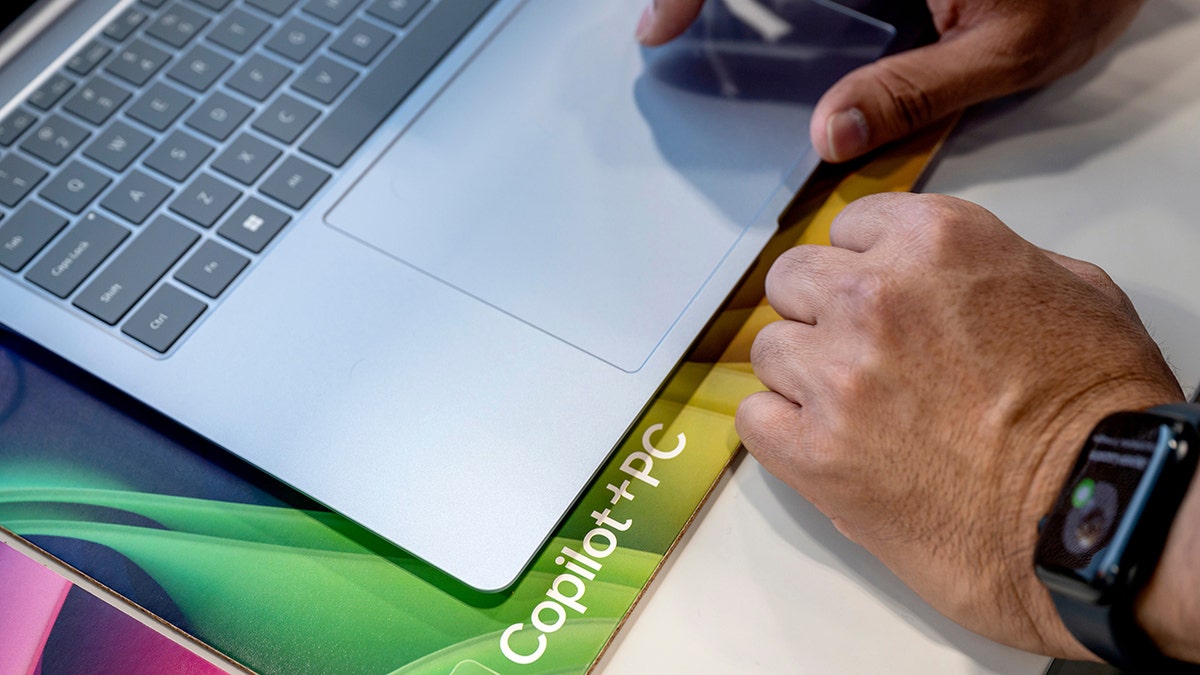
– ‘100 times faster than human thought’: Qualcomm CEO teases new AI laptop

GAME CHANGER: The Trump administration agency that manages the government’s real estate holdings, procurement and technology services is partnering with Elon Musk’s xAI in a move it says will cost effectively streamline federal workflow.

ROLLING IN IT: Kodiak AI founder and CEO Don Burnette details the company’s ‘completely autonomous’ tractor-trailers on ‘The Claman Countdown.’

OUTHINKING HUMANS: Qualcomm CEO Cristiano Amon discusses his partnership with a Saudi-owned A.I. company and the future of PCs on ‘The Claman Countdown.’

KICKER: Qualcomm CEO Cristiano Amon discusses his partnership with a Saudi-owned A.I. company and the future of PCs on ‘The Claman Countdown.’

TECH IN SPORTS: As the NFL’s popularity has grown, so has football fans’ desire to play fantasy football and run their own teams. Super Bowl champion Nick Foles told Fox News Digital that AI has helped him get into fantasy football in his post-playing career. 

Quarterback Nick Foles drops back to pass

Nick Foles, No. 9 of the Indianapolis Colts, drops back to pass during the game against the Detroit Lions at Lucas Oil Stadium on Aug. 20, 2022, in Indianapolis, Indiana. (Michael Hickey/Getty Images)

POWERING AI: The $500 billion Stargate project with the aim of giving the U.S. an edge in the artificial intelligence race is moving forward following the announcement of five new AI data center sites revealed on Tuesday by the companies investing in the project.

BIG MONEY: Chipmaker Nvidia plans to invest up to $100 billion in artificial intelligence firm OpenAI, the companies announced on Monday.

POWER GRID PANIC: The rapid advancement of artificial intelligence is putting newfound urgency in the push for Congress to streamline the permitting process for new energy projects.

DANGEROUS MIX: AI browsers are no longer just an idea; they’re already here. Microsoft has built Copilot into Edge, OpenAI is testing a sandboxed browser in agent mode and Perplexity’s Comet is one of the first to fully embrace the concept of browsing for you.

Man typing on a laptop.

AI browsers promise convenience, but security experts warn they can fall for online scams faster than humans. (Photographer: David Paul Morris/Bloomberg via Getty Images)

Subscribe now to get the Fox News Artificial Intelligence Newsletter in your inbox.

FOLLOW FOX NEWS ON SOCIAL MEDIA

Facebook
Instagram
YouTube
Twitter
LinkedIn

SIGN UP FOR OUR OTHER NEWSLETTERS

Fox News First
Fox News Opinion
Fox News Lifestyle
Fox News Health

DOWNLOAD OUR APPS

Fox News
Fox Business
Fox Weather
Fox Sports
Tubi

WATCH FOX NEWS ONLINE

Fox News Go

STREAM FOX NATION

Fox Nation

Stay up to date on the latest AI technology advancements and learn about the challenges and opportunities AI presents now and for the future with Fox News here.


Source link

10 iOS 26 tricks to make your iPhone smarter and more useful than ever

0


NEWYou can now listen to Fox News articles!

iOS 26 has arrived, bringing a mix of practical upgrades and fun new features that make your iPhone smarter and easier to use. Updating only takes a few minutes, and it ensures you get the latest tools along with Apple’s newest security fixes. From smarter spam filters in Messages to custom alarm snooze times and even polls in group chats, iOS 26 is packed with ways to simplify your day. Here’s how to install iOS 26 and start exploring its best features right away.

5 PHONE SETTINGS TO CHANGE RIGHT NOW FOR A SAFER SMARTPHONE

Sign up for my FREE CyberGuy Report
Get my best tech tips, urgent security alerts, and exclusive deals delivered straight to your inbox. Plus, you’ll get instant access to my Ultimate Scam Survival Guide — free when you join my CyberGuy.com/Newsletter

Illustration of iOS 26 software update

Updating to iOS 26 takes just a few minutes of time. (Kurt “CyberGuy” Knutsson)

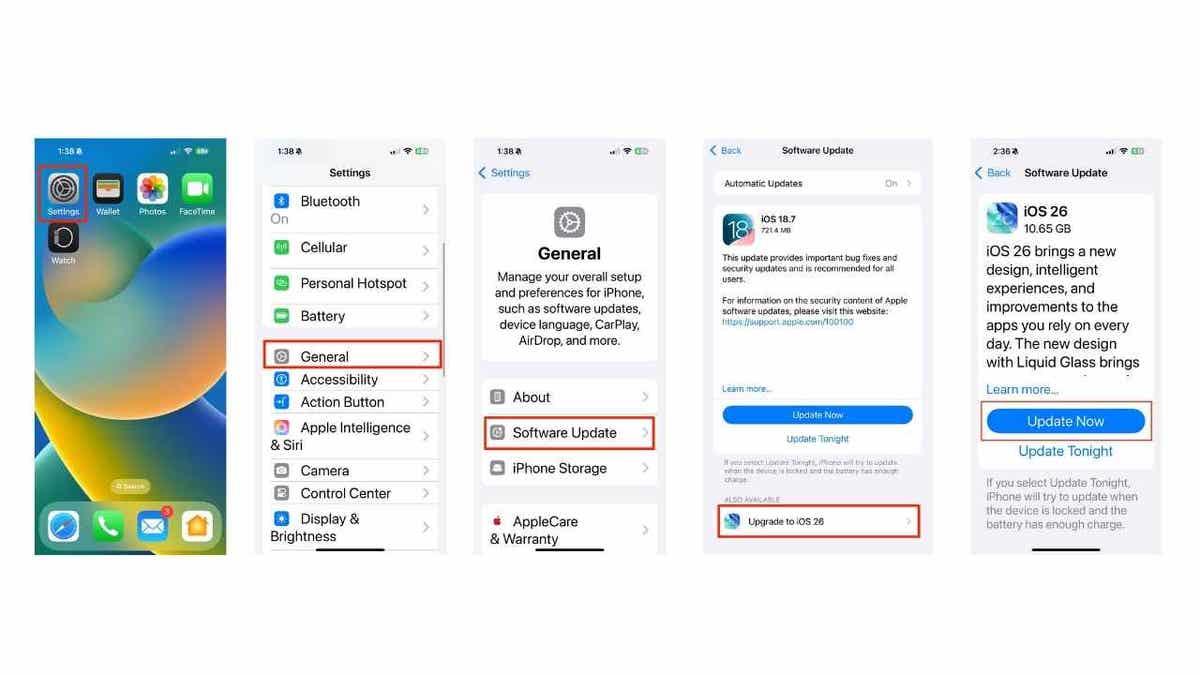
How to update your iPhone to iOS 26

Updating to iOS 26 takes just a few minutes, and it ensures you get the latest features and security fixes. Make sure your iPhone is charged and connected to Wi-Fi before you start.

Follow these steps:

  • Open the Settings app on your iPhone.
  • Tap General.
  • Select Software Update.
  • If iOS 26 is available, tap Upgrade to iOS 26.
  • Click Update Now.
  • Enter your passcode if asked, then agree to the terms.
  • Wait for the download and installation to finish. Your iPhone will restart with iOS 26.
Steps to update iPhone with iOS 26

Your phone will restart with the new update after following the process.

iOS 26 compatible devices:

iOS 26 works on a wide range of iPhones, from the iPhone 11 series through the latest iPhone 17 lineup. Compatible models include:

iPhone 17, iPhone 17 Pro, iPhone 17 Pro Max, iPhone Air, iPhone 16e, iPhone 16, iPhone 16 Plus, iPhone 16 Pro, iPhone 16 Pro Max, iPhone 15, iPhone 15 Plus, iPhone 15 Pro, iPhone 15 Pro Max, iPhone 14, iPhone 14 Plus, iPhone 14 Pro, iPhone 14 Pro Max, iPhone 13, iPhone 13 mini, iPhone 13 Pro, iPhone 13 Pro Max, iPhone 12, iPhone 12 mini, iPhone 12 Pro, iPhone 12 Pro Max, iPhone 11, iPhone 11 Pro, iPhone 11 Pro Max, and iPhone SE (2nd generation and later).

1) Smarter spam message detection

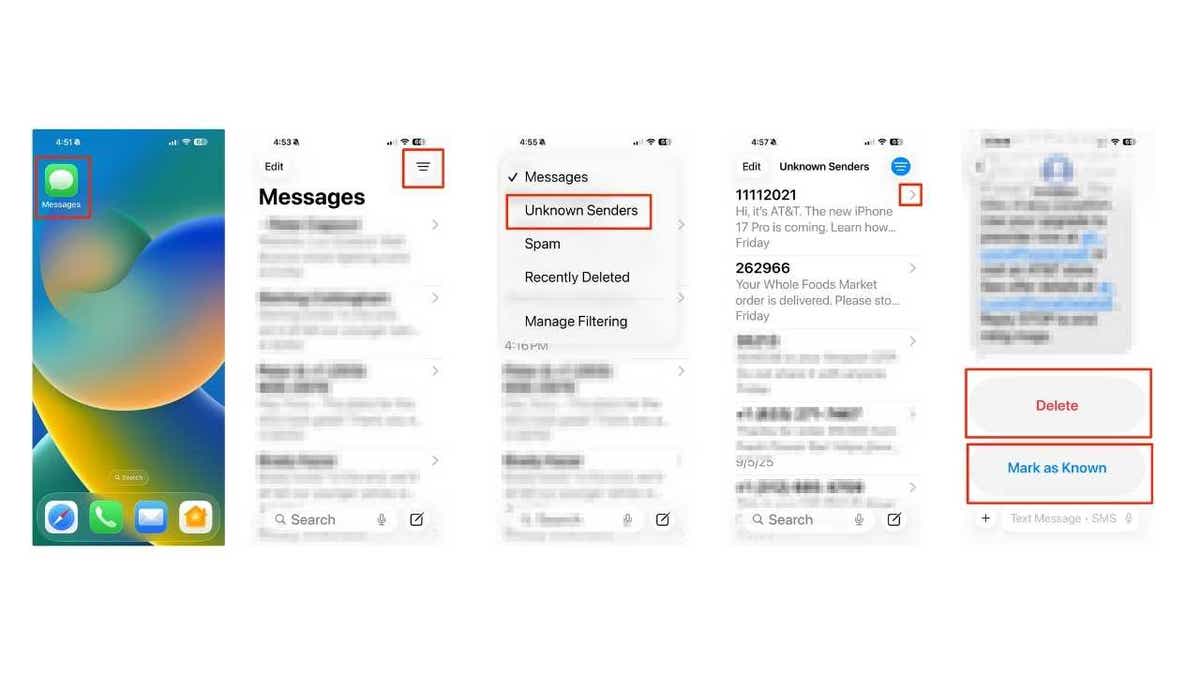
Spam texts arrive at the worst times. iOS 26 filters these unwanted messages into a separate folder, keeping your main inbox clean.   Here’s how to use this feature:

  • Open the Messages app.
  • Click the horizontal lines in the upper right of the screen
  • Go to the Unknown Senders folder.
  • Review texts moved there automatically.
  • Click the right arrow and mark as known or delete the spam.

You can check the “Unknown Senders” folder anytime, mark trusted contacts, or delete the clutter without ever being disturbed by lock screen notifications.

Steps to mark as known or delete the spam in unknown senders folder

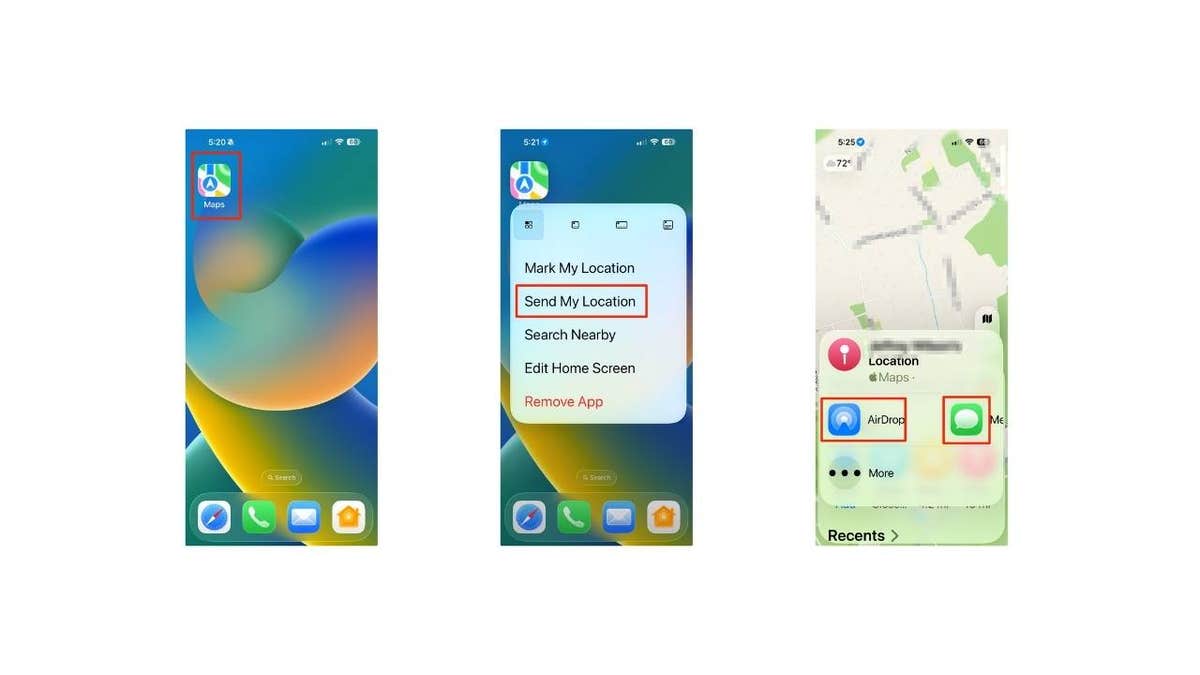
Users are also able to instantly share location via Maps. 

2) Instantly share your location in Maps

iOS 26 makes it simple to send your location without even opening the Maps app. Here’s how:

  • Touch and hold the Maps icon on your Home Screen.
  • Tap Send My Location.
  • From there, you can choose how to share it. AirDrop works best if the person is nearby, while Messages lets you send it instantly to friends or family anywhere.

This shortcut removes the hassle of digging through menus and makes sharing directions effortless.
 

Steps to instantly share your location in Maps

The new update also allows users to sort and view call history by contact.

3) View call history by contact

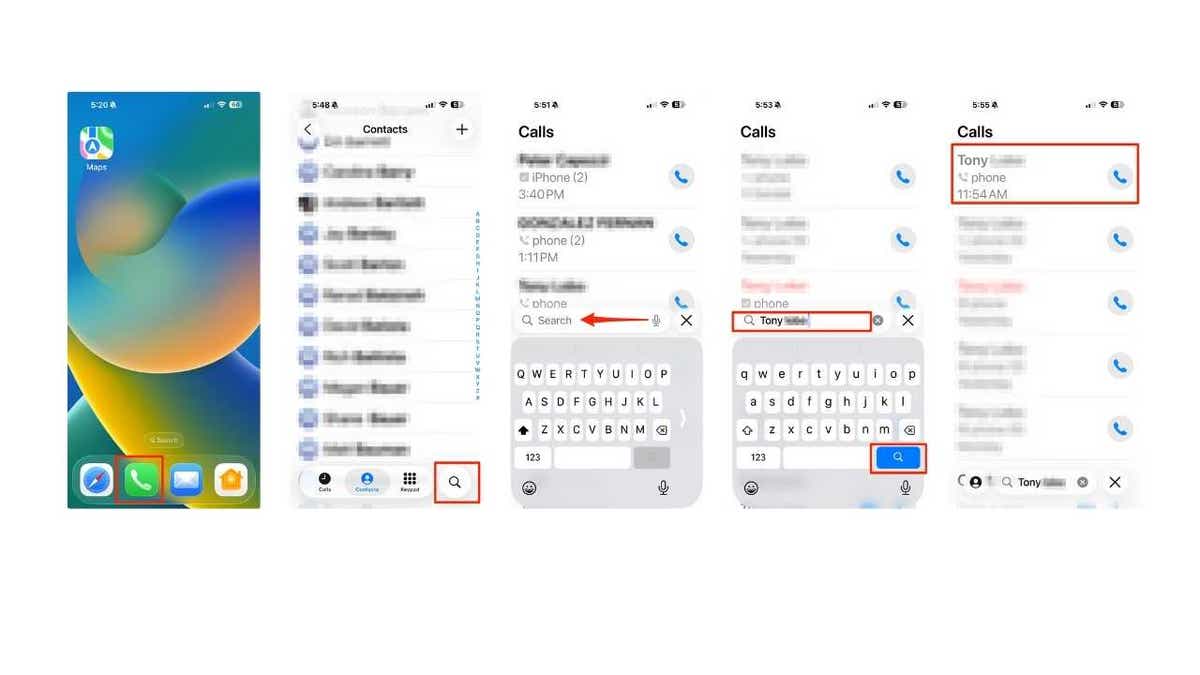
No more endless scrolling. Now you can quickly see every incoming, outgoing, and missed call in one organized list.

  • Open the Phone app.
  • Click the search icon.
  • Type the contact’s name and click the search icon. 
  • Select the contact’s name.
Steps to view call history by contact

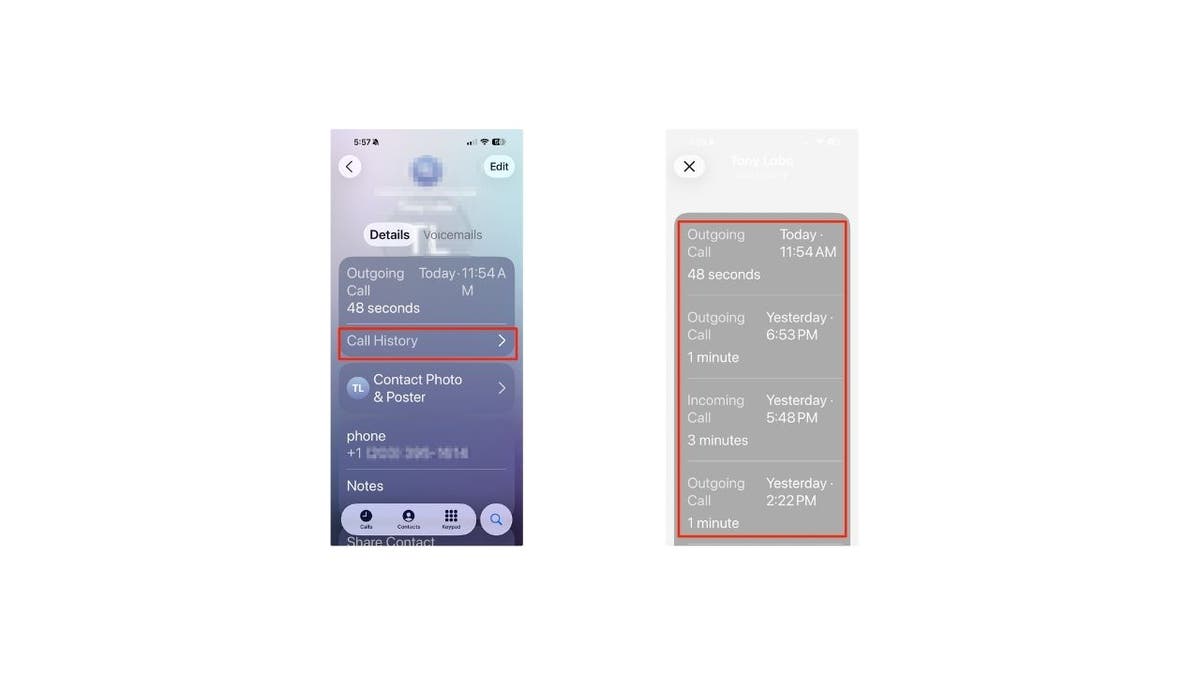
New updates make it easier to view all calls with one person at a glance.

  • Select Call History
  • There you will see all calls associated with that person.

This makes it easy to check all your calls with one person at a glance, without scrolling through your entire log.

Steps to view call history by contact

Specific text can also now be selected in a text message.

Sign up to get more of my Tech Tips in my FREE CyberGuy Report. Sign up for free here:
CYBERGUY.COM/NEWSLETTER 

4) Select specific text in a message

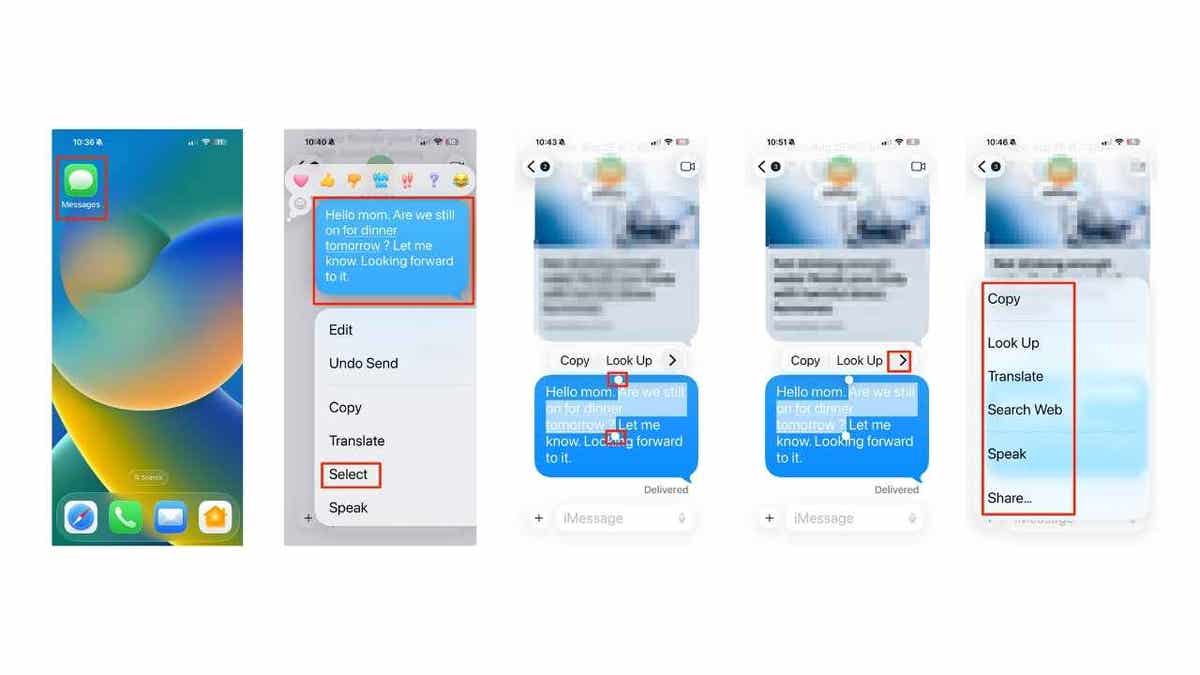
Sometimes you only need one detail instead of the entire message bubble. Here’s how to grab it:

  • Open the Messages app.
  • Long-press the message you want.
  • Tap Select from the menu.
  • Drag the selection handles to highlight just the part you need.
  • Click the right arrow > to choose to copy, look up, translate, search webspeak or share it instantly.

It’s a quick way to pull out only the detail you need, whether that’s an address, a code, or just a single word.

Steps to select specific text in a message

The new update permits users to disable “tap recents to call.” 

5) Disable “Tap Recents to Call”

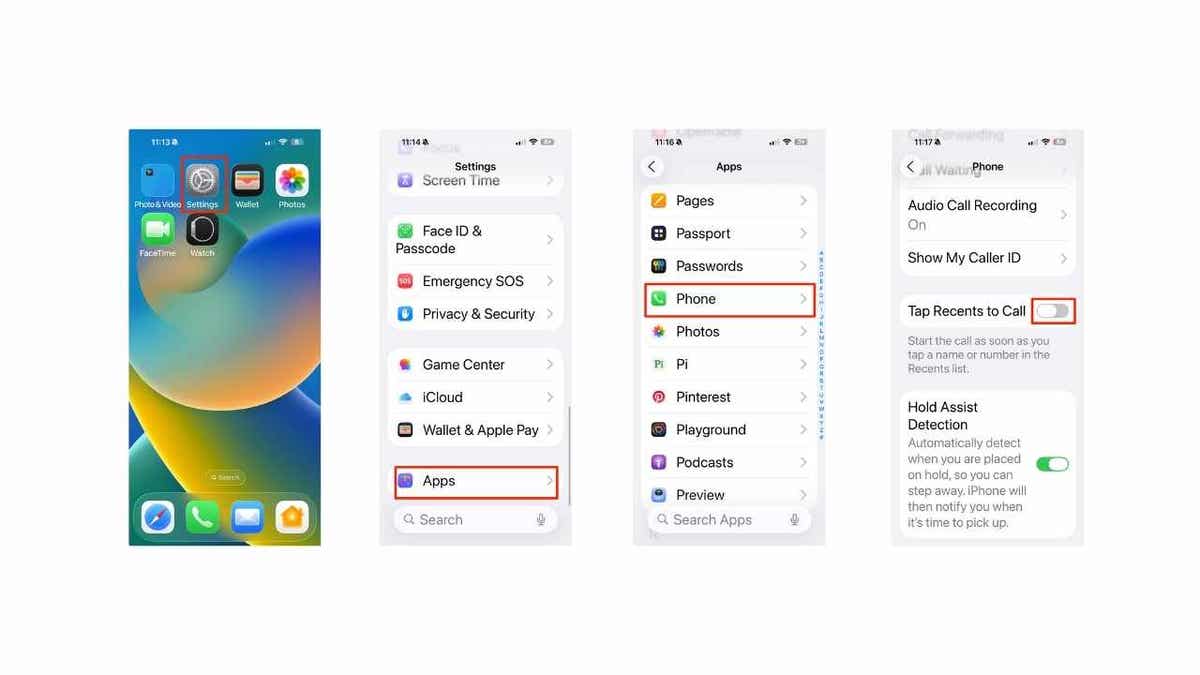
Accidental calls can be embarrassing. iOS 26 lets you turn this off, so tapping a number in Recents won’t instantly dial; you’ll have to press the call button on purpose. Here’s how to toggle off or disable the feature:

  • Open Settings.
  • Scroll down and tap Apps.
  • Choose Phone.
  • Toggle off Tap Recents to Call.

Now your call log stays drama-free. Tapping a number in Recents won’t instantly start a call anymore. You’ll need to press the call button on purpose. That means no more accidentally ringing your boss when you just wanted to double-check the number.

EVEN WITH TRUMP’S TARIFF BLESSING, APPLE HIKES IPHONE PRICES

Steps to disable "Tap Recents to Call"

The above illustration features steps to disable “Tap Recents to Call” in the Settings App.

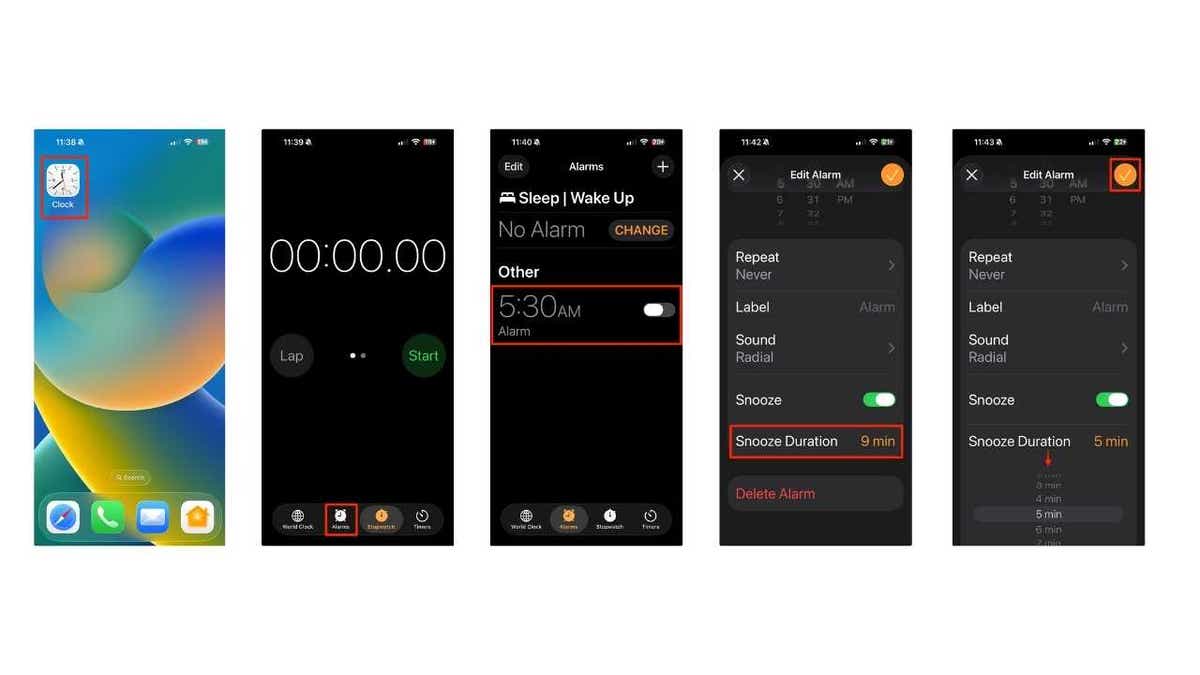
6) Customize alarm snooze options

Not a fan of the default 9-minute snooze? iOS 26 lets you set the interval that actually matches your morning routine. Follow these steps to adjust it:

  • Open the Clock app.
  • Tap the Alarms tab.
  • Select an existing alarm (or tap + to create one).
  • Tap Snooze Duration. 
  • Choose your snooze time from 1 to 15 minutes.
  • Tap Save.

Your mornings become more manageable, whether you’re grabbing a quick 5-minute reset or easing into the day with a longer break.

Steps to customize alarm snooze options

The above illustration shows steps to customize alarm snooze options in Clock App.

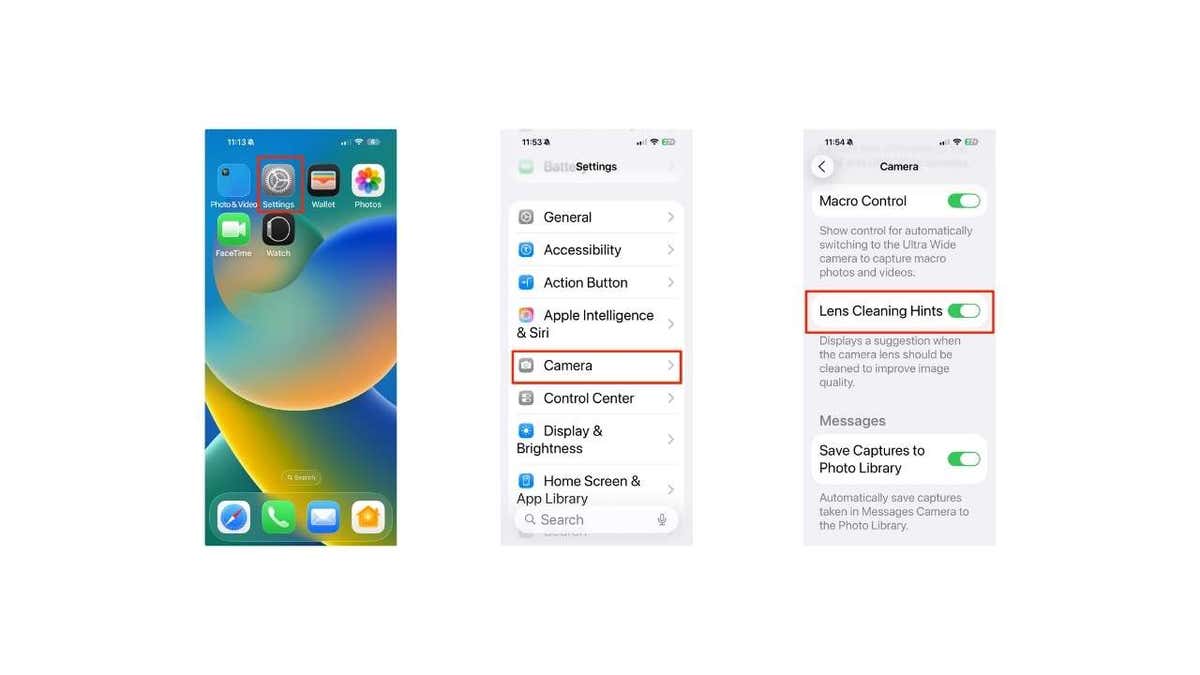
7) Get a dirty lens warning

Nothing ruins a photo faster than a smudged lens. With iOS 26, you can turn on Lens Cleaning Hints, so your iPhone warns you before you take a blurry shot. Here’s how:

  • Open Settings.
  • Scroll down and tap Camera.
  • Find Lens Cleaning Hints.
  • Toggle the switch on.

Now, when your camera detects smudges or haze, iOS 26 will display an on-screen hint in the Camera app, reminding you to “clean the camera lens” before taking your shot.

Steps to get Get a dirty lens warning

Here are steps to get a dirty lens warning in Settings App.

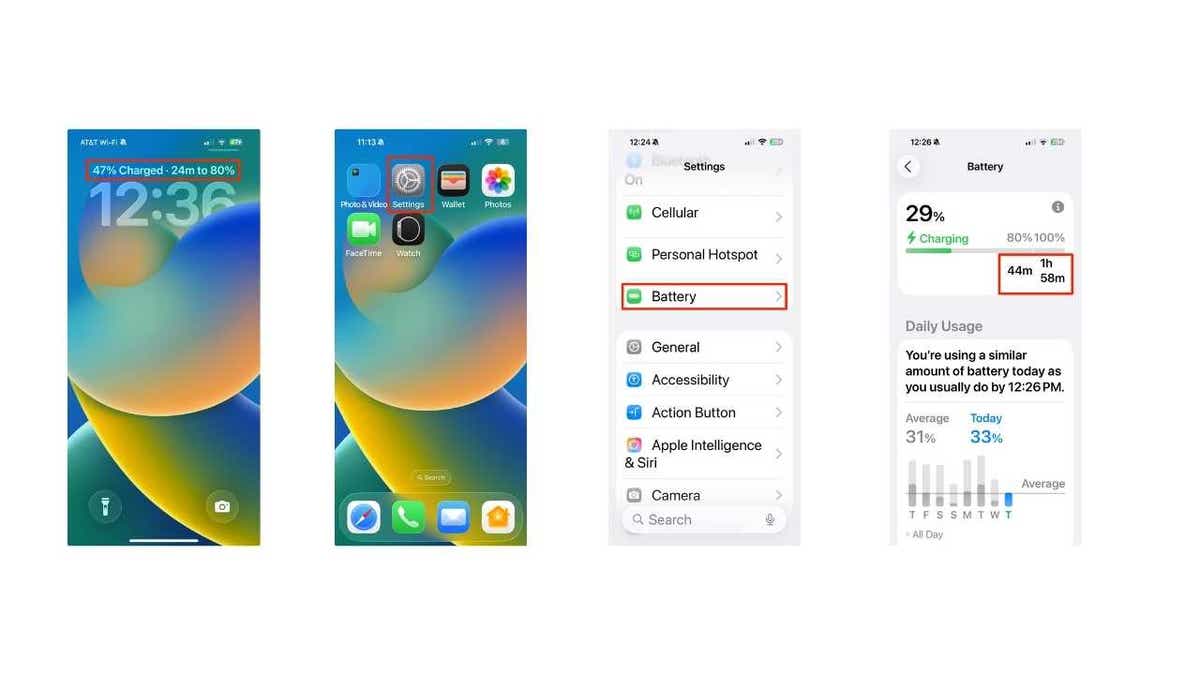
8) See estimated charging time

Ever wonder how long it will take to fully charge your iPhone? iOS 26 now shows you an estimated charging time so you can plan your day better. Here’s how to view it:

  • Plug your iPhone into a charger.
  • Wake your phone, and the Lock Screen will display the estimated time until fully charged.
  • For more details, open Settings.
  • Tap Battery.
  • Look for the Estimated Full Charge Time under the charging status.

This makes it easy to tell whether you’ll be at 100% before leaving the house or if you should pack a charger for later.

Steps to see estimated charging time

This makes it easy to tell whether you’ll be at 100% before leaving the house or if you should pack a backup charger.

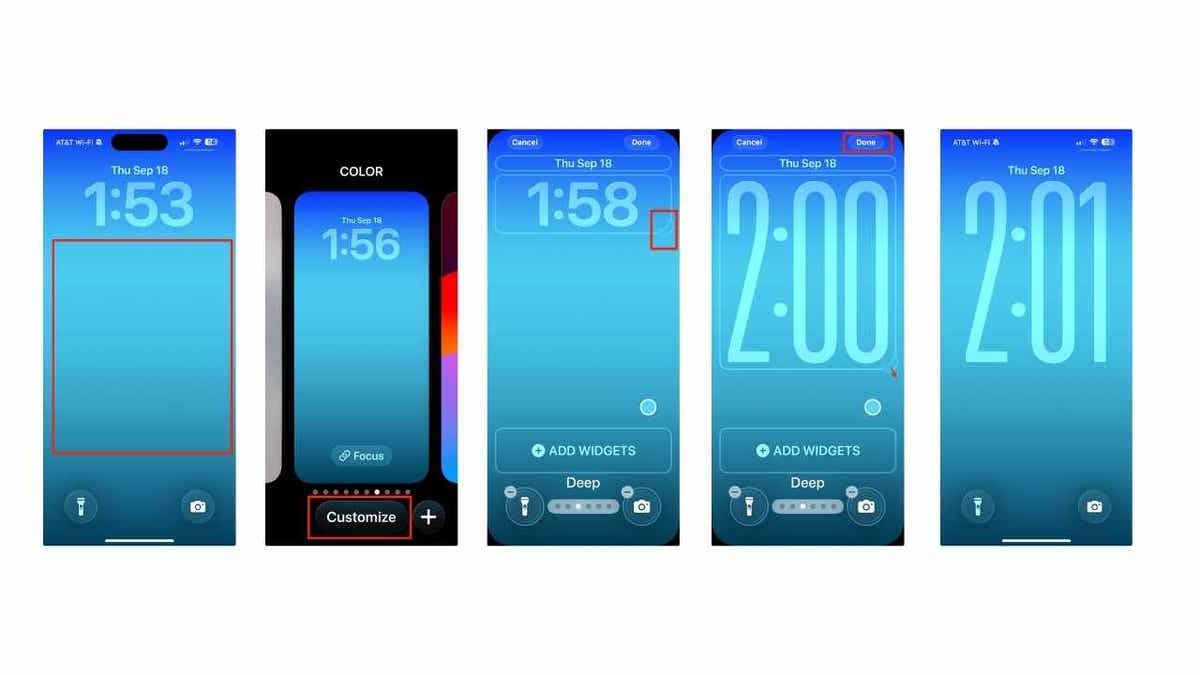
9) Make the clock on your Lock Screen bigger

Want your time display to stand out more? iOS 26 lets you adjust the size of the clock on your Lock Screen for a bolder look. Here’s how:

  • Long-press on your Lock Screen.
  • Tap Customize at the bottom.
  • Use the pull handle on the bottom right to adjust the size.
  • Tap Done to save your changes.

On certain wallpapers, the clock even has a depth effect, slipping behind the subject in your photo. With Photo Shuffle wallpapers, the clock can adjust dynamically, and it also stretches in areas like the Notification Center, giving your iPhone a fresh and lively feel.

CLICK HERE TO GET THE FOX NEWS APP

Steps to make the clock on your Lock Screen bigger

Users can also modify their clock appearance.

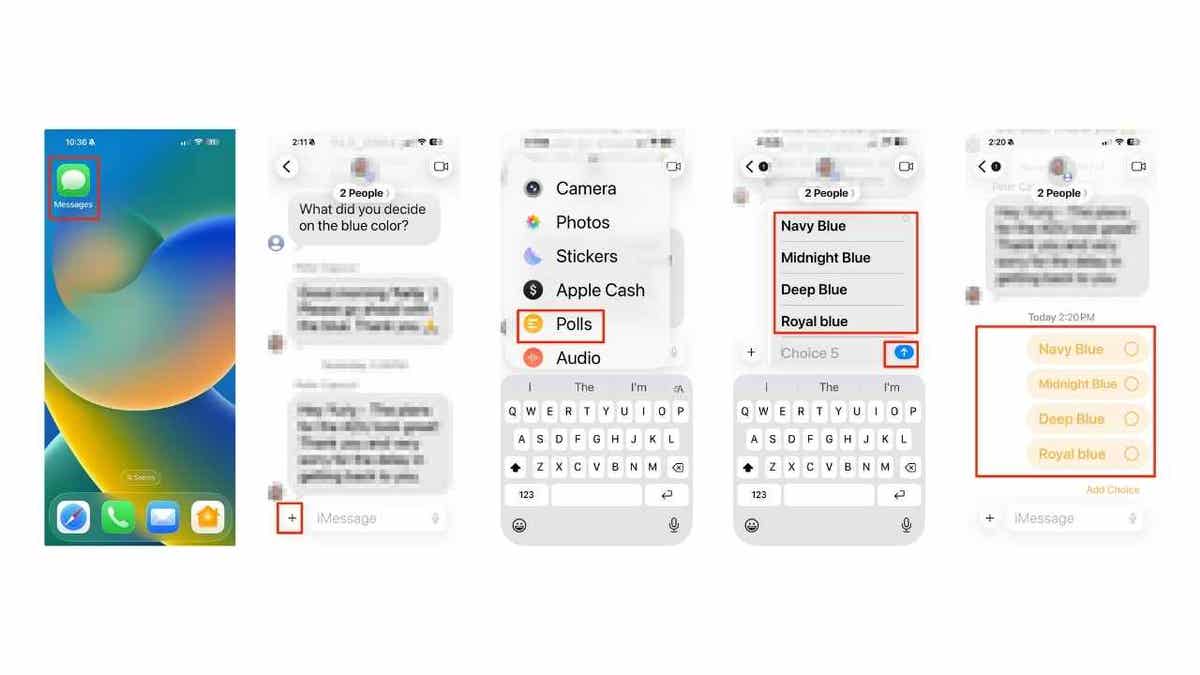
10) Create a poll in iMessage

Can’t decide what color to paint your walls, where to eat, or which movie to watch? iOS 26 lets you create quick polls right inside group chats so everyone can vote. Here’s how:

  • Open the Messages app.
  • Enter a conversation (this works in group chats or individual messages).
  • Tap the + button next to the text box.
  • From the pop-up menu, select Polls.
  • Tap each choice field and type your options (add more choices by typing into the next blank field).
  • When you’re done, tap Send (Up arrow).

Now your friends or coworkers can vote directly in the chat, and you can decide whether to follow the results or just order what you were craving anyway.

Steps to create a poll in iMessage

Users can also now create a polls for others in iMessage. (Kurt “CyberGuy” Knutsson)

Take my quiz: How safe is your online security?

Think your devices and data are truly protected? Take this quick quiz to see where your digital habits stand. From passwords to Wi-Fi settings, you’ll get a personalized breakdown of what you’re doing right — and what needs improvement. Take my Quiz here: Cyberguy.com/Quiz

Kurt’s key takeaways

iOS 26 goes beyond security patches; it’s about convenience and personalization. You can finally adjust your snooze to match your mornings, keep your inbox free from spam, see how long charging will take, and even get a heads-up if your camera lens is dirty before snapping a shot. These small but meaningful updates add up to a smoother iPhone experience.

Which iOS 26 feature are you most excited to try first: polls in iMessage, spam filters, or something else entirely? Let us know by writing to us at CyberGuy.com/Contact

Sign up for my FREE CyberGuy Report
Get my best tech tips, urgent security alerts, and exclusive deals delivered straight to your inbox. Plus, you’ll get instant access to my Ultimate Scam Survival Guide — free when you join my CYBERGUY.COM/NEWSLETTER

Copyright 2025 CyberGuy.com.  All rights reserved. 



Source link

North Korean hackers use AI to create fake military IDs for attacks

0


NEWYou can now listen to Fox News articles!

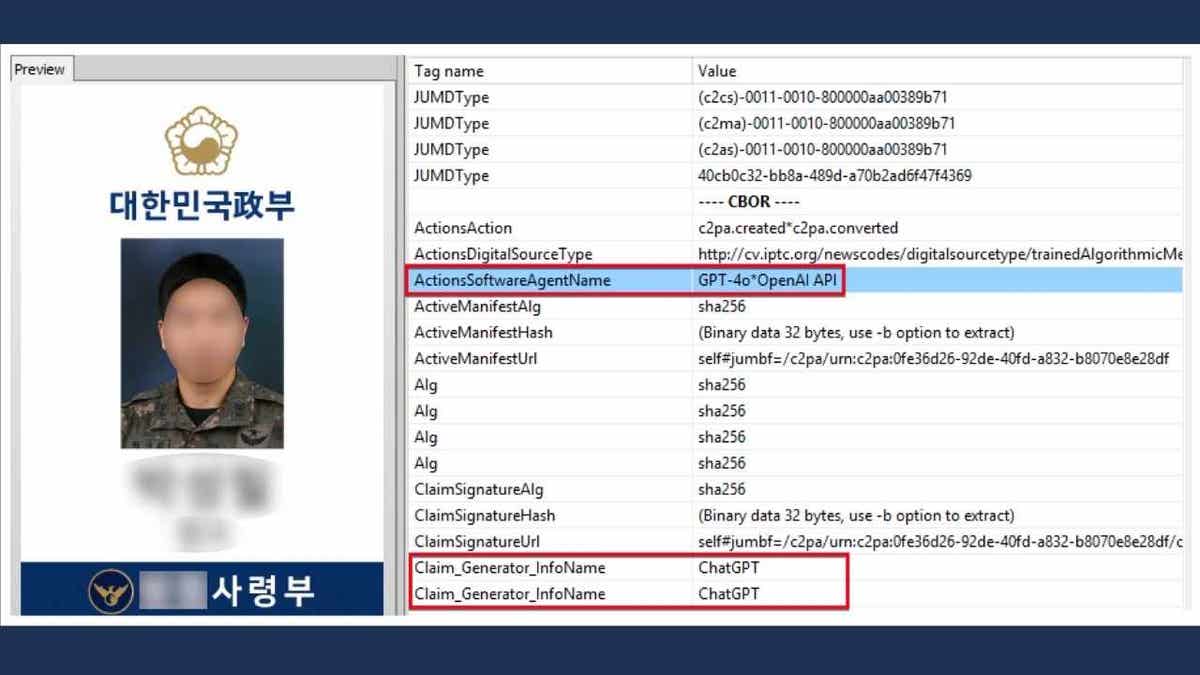
A North Korean hacking group, known as Kimsuky, used ChatGPT to generate a fake draft of a South Korean military ID. The forged IDs were then attached to phishing emails that impersonated a South Korean defense institution responsible for issuing credentials to military-affiliated officials. South Korean cybersecurity firm Genians revealed the campaign in a recent blog post. While ChatGPT has safeguards that block attempts to generate government IDs, the hackers tricked the system. Genians said the model produced realistic-looking mock-ups when prompts were framed as “sample designs for legitimate purposes.”

Sign up for my FREE CyberGuy Report
Get my best tech tips, urgent security alerts, and exclusive deals delivered straight to your inbox. Plus, you’ll get instant access to my Ultimate Scam Survival Guide — free when you join my CyberGuy.com/Newsletter 

AI-Generated Virtual ID Card

Example of an AI-Generated Virtual ID card. (Genians)

How North Korean hackers use AI for global espionage

Kimsuky is no small-time operator. The group has been tied to a string of espionage campaigns against South Korea, Japan and the U.S. Back in 2020, the U.S. Department of Homeland Security said Kimsuky was “most likely tasked by the North Korean regime with a global intelligence-gathering mission.” Genians, which uncovered the fake ID scheme, said this latest case underscores just how much generative AI has changed the game.

“Generative AI has lowered the barrier to entry for sophisticated attacks. As this case shows, hackers can now produce highly convincing fake IDs and other fraudulent assets at scale. The real concern is not a single fake document, but how these tools are used in combination. An email with a forged attachment may be followed by a phone call or even a video appearance that reinforces the deception. When each channel is judged in isolation, attacks succeed. The only sustainable defense is to verify across multiple signals such as voice, video, email, and metadata, in order to uncover the inconsistencies that AI-driven fraud cannot perfectly hide,” Sandy Kronenberg, CEO and Founder of Netarx, a cybersecurity and IT services company, warned.

Metadata of the PNG File

North Korea is not the only country using AI for cyberattacks.

HACKER EXPLOITS AI CHATBOT IN CYBERCRIME SPREE

Chinese hackers also exploit AI for cyberattacks

North Korea is not the only country using AI for cyberattacks. Anthropic, an AI research company and the creator of the Claude chatbot, reported that a Chinese hacker used Claude as a full-stack cyberattack assistant for over nine months. The hacker targeted Vietnamese telecommunications providers, agriculture systems and even government databases.

According to OpenAI, Chinese hackers also tapped ChatGPT to build password brute-forcing scripts and to dig up sensitive information on US defense networks, satellite systems and ID verification systems. Some operations even leveraged ChatGPT to generate fake social media posts designed to stoke political division in the US.

Google has seen similar behavior with its Gemini model. Chinese groups reportedly used it to troubleshoot code and expand access into networks, while North Korean hackers leaned on Gemini to draft cover letters and scout IT job postings. 

GOOGLE AI EMAIL SUMMARIES CAN BE HACKED TO HIDE PHISHING ATTACKS  

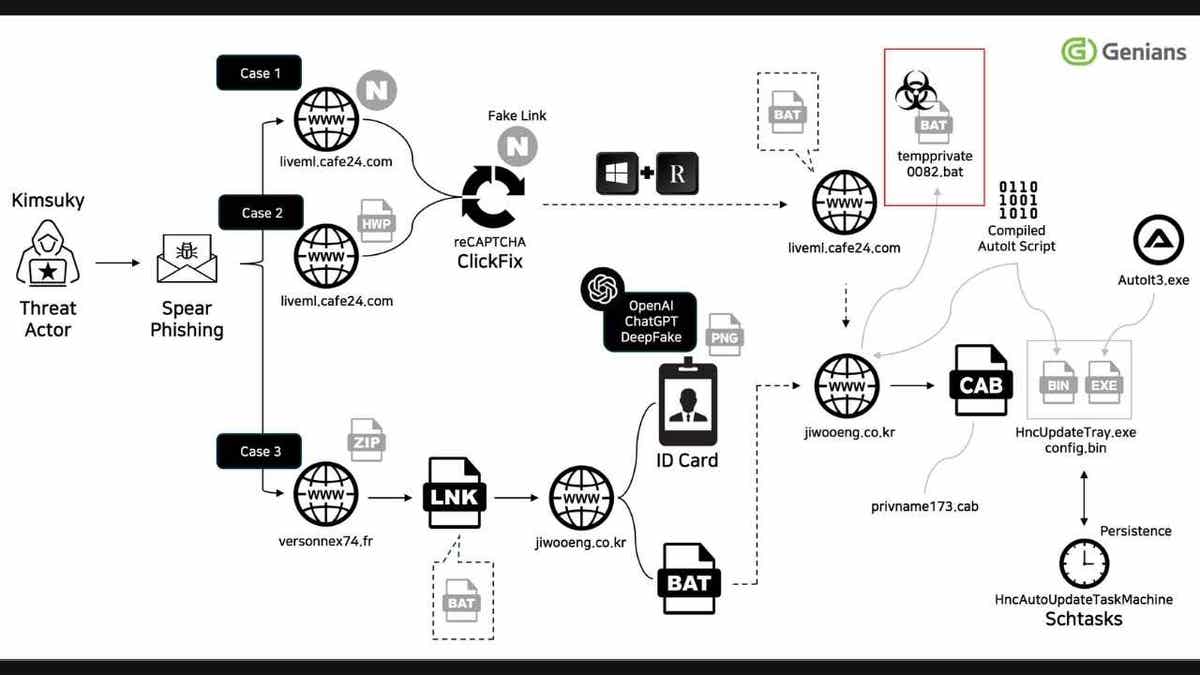
Illustration of attack Scenario

The above features an ilustration of a hackers’ attack scenario. (Genians)

Why AI-powered hacking threats matter now

Cybersecurity experts say this shift is alarming. AI tools make it easier than ever for hackers to launch convincing phishing attacks, generate flawless scam messages, and hide malicious code.

“News that North Korean hackers used generative AI to forge deepfake military IDs is a wake-up call: The rules of the phishing game have changed, and the old signals we relied on are gone,” Clyde Williamson, Senior Product Security Architect at Protegrity, a data security and privacy company, explained. “For years, employees were trained to look for typos or formatting issues. That advice no longer applies. They tricked ChatGPT into designing fake military IDs by asking for ‘sample templates.’ The result looked clean, professional and convincing. The usual red flags — typos, odd formatting, broken English — weren’t there. AI scrubbed all that out.” 

“Security training needs a reset. We need to teach people to focus on context, intent and verification. That means encouraging teams to slow down, check sender info, confirm requests through other channels and report anything that feels off. No shame in asking questions,” Williamson added. “On the tech side, companies should invest in email authentication, phishing-resistant MFA and real-time monitoring. The threats are faster, smarter and more convincing. Our defenses need to be too. And for individuals? Stay sharp. Ask yourself why you’re getting a message, what it’s asking you to do and how you can confirm it safely. The tools are evolving. So must we. Because if we don’t adapt, the average user won’t stand a chance.”

HOW AI CHATBOTS ARE HELPING HACKERS TARGET YOUR BANKING ACCOUNTS

How to protect yourself from AI-powered scams

Staying safe in this new environment requires both awareness and action. Here are steps you can take right now:

1) Slow down, verify, and use strong antivirus

If you get an email, text or call that feels urgent, pause. Verify the request by contacting the sender through another trusted channel before you act. At the same time, protect your devices with strong antivirus software to catch malicious links and downloads.

The best way to safeguard yourself from malicious links that install malware, potentially accessing your private information, is to have strong antivirus software installed on all your devices. This protection can also alert you to phishing emails and ransomware scams, keeping your personal information and digital assets safe.

Get my picks for the best 2025 antivirus protection winners for your Windows, Mac, Android & iOS devices at CyberGuy.com/LockUpYourTech 

2) Use a personal data removal service

Reduce your risk by scrubbing personal information from data broker sites. These services can help remove sensitive details that scammers often use in targeted attacks. While no service can guarantee the complete removal of your data from the internet, a data removal service is really a smart choice. They aren’t cheap, and neither is your privacy. These services do all the work for you by actively monitoring and systematically erasing your personal information from hundreds of websites. It’s what gives me peace of mind and has proven to be the most effective way to erase your personal data from the internet. By limiting the information available, you reduce the risk of scammers cross-referencing data from breaches with information they might find on the dark web, making it harder for them to target you.

Check out my top picks for data removal services and get a free scan to find out if your personal information is already out on the web by visiting CyberGuy.com/Delete

Get a free scan to find out if your personal information is already out on the web: Cyberguy.com/FreeScan 

3) Check sender details carefully

Look at the email address, phone number or social media handle. Even if the message looks polished, a small mismatch can reveal a scam.

4) Use multi-factor authentication (MFA)

Turn on multi-factor authentication (MFA) for your accounts. This adds an extra layer of protection even if hackers steal your password.

5) Keep software updated

Update your operating system, apps and security tools. Many updates patch vulnerabilities that hackers try to exploit.

6) Report suspicious messages

If something feels off, report it to your IT team or your email provider. Early reporting can stop wider damage.

7) Question the context

Ask yourself why you are receiving the message. Does it make sense? Is the request unusual? Trust your instincts and confirm before taking action.

CLICK HERE TO GET THE FOX NEWS APP

Kurt’s key takeaways

AI is rewriting the rules of cybersecurity. North Korean and Chinese hackers are already using tools like ChatGPT, Claude, and Gemini to break into companies, forge identities, and run elaborate scams. Their attacks are cleaner, faster, and more convincing than ever before. Staying safe means staying alert at all times. Companies need to update training and build stronger defenses. Everyday users should slow down, question what they see, and double-check before trusting any digital request.

Do you believe AI companies are doing enough to stop hackers from misusing their tools or is the responsibility falling too heavily on everyday users? Let us know by writing to us at CyberGuy.com/Contact

Sign up for my FREE CyberGuy Report
Get my best tech tips, urgent security alerts, and exclusive deals delivered straight to your inbox. Plus, you’ll get instant access to my Ultimate Scam Survival Guide — free when you join my CyberGuy.com/Newsletter

Copyright 2025 CyberGuy.com.  All rights reserved. 


Source link

Nurse, 106, gives husband’s Pearl Harbor bullet to museum after 80-plus years

0

NEWYou can now listen to Fox News articles!

A lifelong story of love and service has been brought into the public eye through a compelling donation to a World War II-related museum

At 106 years old, Alice Beck Darrow, a former nurse, knows more than most about survival. 

So did her husband, Dean Darrow. The pair met while she was caring for him at Mare Island Naval Hospital in California in 1942.  

WORLD WAR II VETERAN TURNS 100, REVEALS THE SECRETS OF A LONG, HEALTHY LIFE

The young sailor had survived the deadly attack on the USS West Virginia on Dec. 7, 1941. That ship was sunk by six torpedoes and two bombs, according to the National Park Service. One hundred and six people were killed in the attack. 

While Darrow survived the actual bombing, he was shot as he tried to board a rescue boat. 

Alice Beck Darrow, seated in front, wanted to honor the Greatest Generation and help others learn more about their sacrifice through a personal gift.  (Holland America Line )

It was several months later that doctors discovered that a bullet was still lodged in his body. 

Darrow needed to have the bullet removed from his heart. Before surgery, he asked his nurse, Alice Beck, “If I make it through, will you go out with me?” 

She said yes.

RESEARCHERS ZERO IN ON AMELIA EARHART’S DISAPPEARANCE AFTER 88 YEARS

He survived the surgery — and the two were married that same year. 

The bullet became a cherished object for the couple, Beck Darrow said. It was a reminder of the circumstances that brought them together. 

World War II Navy nurse Alice Beck Darrow smiling into camera, wearing a pink lei

Darrow, a living link to WWII history, is pictured holding the bullet that lodged in her husband’s body after he was shot on Dec. 7, 1941. (Holland America Line )

The couple raised four children in California and were married for nearly 50 years. 

She kept the bullet safe throughout their years together, as well as long after her husband’s passing in 1991. 

CLICK HERE TO SIGN UP FOR OUR LIFESTYLE NEWSLETTER

Beck Darrow donated the bullet to the Pearl Harbor National Memorial Museum on Sept. 18, 2025. She did so on that date because that’s when she was staying overnight in Honolulu as part of a 28-day cruise itinerary on Holland America’s Westerdam, she said.   

World War II Navy Nurse Alice Beck Darrow with museum official

Beck Darrow has honored her late husband with a powerful wartime keepsake. “I knew it was the right decision,” she said.  (Holland America Line )

The moment was “deeply emotional” for her, she said in a statement. 

“Holding onto the bullet all these years meant a great deal, but it truly belongs to those who served and sacrificed, and to all who can understand its significance, not just to Dean and me,” she said.

For more Lifestyle articles, visit foxnews.com/lifestyle

“I knew it was the right decision.” 

The ship’s captain, Vincent Smit, said Holland America was “humbled to play even a small role in helping her complete this journey.” 

World War II Navy Nurse Alice Beck Darrow speaking with active duty military members

The Pearl Harbor relic “truly belongs to those who served and sacrificed, and to all who can understand its significance, not just to Dean and me,” said Beck Darrow of her unusual gift. (Holland America Line )

Beck Darrow is one of the last living links to the attack on Pearl Harbor. 

In 2024, she was honored for her role as a nurse

She said last year, “Always have something to look forward to. It gets your body and mind ready for what’s next,” as WTVU reported. 

CLICK HERE TO GET THE FOX NEWS APP

Now, regarding the donation of her personal memento, she said, “I think Dean would feel that returning the bullet to Pearl Harbor is the right thing to do. It honors so many, and I know he would agree it’s the right place for it.”

Real Time host Bill Maher examines meme culture and killing with expert

0

NEWYou can now listen to Fox News articles!

“Real Time” host Bill Maher asked an internet culture researcher Friday about memes to understand how people get “inspired to kill.” 

Memes, or “historical documents” with various interpretations, were engraved on the shell casings of late Turning Point USA founder Charlie Kirk’s suspected assassin, “Real Time” guest Aidan Walker said.

Kirk’s accused killer etched gamer-inspired and antifascist messaging on his casings, including, “Hey, fascist! Catch!” and a reference to a World War II anthem.

MAHER BLASTS HOLLYWOOD LIBERALS FOR NOT ACKNOWLEDGING CHARLIE KIRK’S ASSASSINATION AT THE EMMYS

“But [memes] take on new meanings, I mean this is part of why people get inspired to kill,” Maher said. “Because they get insulted by them, right? They get hurt by them. They have a meaning that a lot of us older people are not getting, correct?” 

Suspected assassin Tyler James Robinson, (L) and a John Brown Gun Club recruiting poster with a nod to the alleged killer found on the Georgetown University campus on Sept. 24, 2025.  (Fox News)

The discussion came in the wake of Wednesday’s deadly shooting at a Dallas I.C.E. facility, where one detainee was killed, and two others were wounded before the shooter took his own life. The gunman reportedly left behind a bullet casing inscribed with the phrase “anti-ICE.” 

He was almost “murdering ironically,” Maher considered. 

MAHER SAYS COMPARING TRUMP TO HITLER MUST END, WARNS IT MAKES IT EASIER FOR KILLERS TO JUSTIFY ASSASSINATIONS

“I mean, that’s a place society has never been,” Maher continued. “Yes, young men are bad and fumbling to get women to agree to what they want to do. But it was never like this. We never had the term incel [involuntarily celibate].” 

A lot of memes can also be ironic, Walker explained.

Five rounds, one of which says "Anti-ICE" in blue letters on it.

FBI Director Kash Patel said investigators recovered these rounds from the scene in Dallas where a gunman opened fire on the local ICE field office on Sept. 24, 2025.  (FBI)

“In a way it’s a little bit like dog whistle…they’re so layered in, you know, I don’t really mean this, but you can put this sort of anti-social or hateful idea behind that,” he described.

The 26-year-old researcher attributed problematic anti-social behavior to not just an affordability crisis but a “crisis of meaning.” 

MANGIONE, CATHOLIC CHURCH SHOOTER, CHARLIE KIRK SHOOTER, ICE SHOOTER ALL USED ENGRAVED BULLETS

“You have a lot of especially young people who don’t see a future for themselves, who feel lonely, who feel alienated,” he discussed. “And they congregate in these online spaces sort of outside of the mainstream where they feel like that online world is more important than their real world.”

wifi iphones smartphones

Friends holding phones (Cyberguy.com)

Walker went on to share “the way out” that he says gives him hope.

“It’s giving people those social bonds… giving everybody the shot at dignity and the shot at being seen in our culture,” he said. 

CLICK HERE TO GET THE FOX NEWS APP

While Republicans like Vice President JD Vance blame “left-wing political radicalization” for recent violence, Maher didn’t mince words in his closing monologue for those arguing the Left is “more approving” of it:

“You keep saying the Left is more approving of political violence – well who do you think that’s going to be aimed at?” Maher asked. “I know it feels exhilarating to make the liberals cry their liberal tears after they made you feel disrespected and looked down on flown over and called the nutty ones. But come on, I thought you were the tough guys. Get over it.”

Apple iCloud Calendar phishing scam bypasses spam filters to steal data

0


NEWYou can now listen to Fox News articles!

Phishing attacks are becoming increasingly sophisticated, and the latest scam takes exploitation of a trusted platform to a new level. Instead of sending generic or suspicious-looking emails, attackers are now abusing Apple’s iCloud Calendar invite system to deliver phishing content directly from Apple’s own email servers.

This clever tactic allows the fraudulent messages to bypass spam filters and appear more legitimate to unsuspecting users. The goal is to alarm you into calling a scammer’s fake support number under the pretense of disputing a fraudulent PayPal transaction. Once contacted, you are manipulated into granting remote access to your devices or sharing sensitive data.

Sign up for my FREE CyberGuy Report
Get my best tech tips, urgent security alerts and exclusive deals delivered straight to your inbox. Plus, you’ll get instant access to my Ultimate Scam Survival Guide – free when you join my CYBERGUY.COM newsletter.

NEW EVITE PHISHING SCAM USES EMOTIONAL EVENT INVITATIONS TO TARGET VICTIMS

Phishing scam presentation.

Scammers exploit Apple’s iCloud Calendar to deliver phishing invites that bypass spam filters. (Brent Lewin/Bloomberg via Getty Images)

How the scam uses iCloud Calendar invites to bypass security

The heart of this scam lies in abusing Apple’s official infrastructure to lend credibility to a phishing attempt. Instead of using a suspicious or easily flagged email address, the attackers send calendar invites from Apple’s genuine domain, noreply@email.apple.com, as reported by Bleeping Computer.

The attacker embeds the phishing message in the “Notes” section of the calendar event, making it appear as a legitimate notification. They send the calendar invite to a Microsoft 365 email address they control, which is part of a mailing list. As a result, the invite is automatically forwarded to multiple real targets, broadening the scam’s reach.

Typically, when emails are forwarded, SPF (Sender Policy Framework) checks fail because the forwarding server isn’t listed as an authorized sender. However, Microsoft 365 uses a technique called the Sender Rewriting Scheme (SRS), which rewrites the return path so that the message still passes SPF checks.

This makes the email appear fully legitimate to both the recipient’s inbox and automated spam filters. As a result, the message is far more likely to reach a user’s inbox without being flagged, increasing the chance the victim will take the bait.

SCAMMERS ARE USING DOCUSIGN EMAILS TO PUSH APPLE PAY FRAUD

Hospital phishing warning.

Cybercriminals leverage Microsoft 365 forwarding and Apple’s email domain to outsmart filters. (Lindsey Nicholson/UCG/Universal Images Group via Getty Images)

Why these phishing scams are particularly dangerous

What makes this campaign especially dangerous is the sense of legitimacy it conveys. Because Apple’s official servers send the email directly, users are far less likely to suspect foul play. The message itself aims to panic the recipient by falsely claiming a large PayPal transaction occurred without the recipient’s consent. The message includes a phone number to “contact support” and dispute the charge, but, in reality, it connects the victim to a scammer.

Once the victim calls the number, the scammer poses as a technical support agent and attempts to convince the caller that the computer has been compromised. The next step is typically to ask the victim to download remote access software under the guise of issuing a refund or securing the account.

In reality, this access is used to steal banking information, install malware or exfiltrate personal data. Because the original message passed security checks and seemed credible, victims often don’t think twice before acting.

DON’T FALL FOR THIS BANK PHISHING SCAM TRICK

Graphic of a hacker wearing a Guy Fawkes mask.

Fraudsters are hijacking iCloud Calendar invites to trick users into calling fake support lines. (Jonathan Raa/NurPhoto via Getty Images)

6 ways you can stay safe from iCloud Calendar scammers

I have listed some useful steps you can take to protect yourself from falling victim to these increasingly sophisticated phishing scams:

1) Treat unexpected calendar invites with caution

If you receive an unexpected calendar invite, especially one containing a strange message or alarming claims, don’t open it or respond. Legitimate companies rarely send payment disputes or security warnings through calendar invites. Always verify suspicious claims by logging into your official account directly.

2) Avoid calling numbers listed in emails or calendar invites

Phishing scams often include phone numbers that connect you to fraudsters posing as support agents. Instead of calling the number in the message, use official contact details found on the company’s official website.

3) Install trusted antivirus software

Antivirus programs protect your computer from malware and phishing sites by blocking suspicious downloads and warning you about unsafe websites.

The best way to safeguard yourself from malicious links that install malware, potentially accessing your private information, is to have strong antivirus software installed on all your devices. This protection can also alert you to phishing emails and ransomware scams, keeping your personal information and digital assets safe. Also, keeping your antivirus updated ensures it can defend against the latest threats.

Get my picks for the best 2025 antivirus protection winners for your Windows, Mac, Android and iOS devices at Cyberguy.com.

4) Remove your personal data from public listings

Hackers are able to send you these phishing emails because they have your data. Using a personal data removal service helps scrub your personal information from data broker websites. This makes it significantly harder for attackers to gather details about you and craft convincing, targeted phishing attacks.

While no service can guarantee the complete removal of your data from the internet, a data removal service is really a smart choice.  They aren’t cheap, and neither is your privacy.  These services do all the work for you by actively monitoring and systematically erasing your personal information from hundreds of websites.  It’s what gives me peace of mind and has proven to be the most effective way to erase your personal data from the internet.  By limiting the information available, you reduce the risk of scammers cross-referencing data from breaches with information they might find on the dark web, making it harder for them to target you.

Check out my top picks for data removal services and get a free scan to find out if your personal information is already out on the web by visiting Cyberguy.com.

Get a free scan to find out if your personal information is already out on the web: Cyberguy.com.

5) Use a password manager

A password manager helps you generate and securely store strong, unique passwords for every account. This reduces the risk of reusing weak passwords that scammers can easily exploit to gain unauthorized access to your accounts.

Next, see if your email has been exposed in past breaches. Our No. 1 password manager pick includes a built-in breach scanner that checks whether your email address or passwords have appeared in known leaks. If you discover a match, immediately change any reused passwords and secure those accounts with new, unique credentials. 

Check out the best expert-reviewed password managers of 2025 at Cyberguy.com.

6) Keep software and systems updated

Regularly updating your operating system, browser and applications helps patch security vulnerabilities that attackers often exploit in phishing scams. Staying current with updates minimizes your exposure to known threats.

CLICK HERE TO GET THE FOX NEWS APP

Kurt’s key takeaway

Scammers are taking phishing attacks in a disturbing new direction by manipulating trusted platforms to deliver malicious content. The safest approach is to treat any unexpected calendar invite, especially those with alarming messages or strange contact numbers, with extreme caution. Never call the number provided in the message or click on any links. Instead, go directly to official websites or your account’s official dashboard to verify suspicious activity.

Have you ever been targeted by a phishing scam disguised as an official message? Let us know by writing to us at Cyberguy.com.

Sign up for my FREE CyberGuy Report
Get my best tech tips, urgent security alerts and exclusive deals delivered straight to your inbox. Plus, you’ll get instant access to my Ultimate Scam Survival Guide – free when you join my CYBERGUY.COM newsletter.

Copyright 2025 CyberGuy.com.  All rights reserved. 


Source link

Delta replaces engines on more than 300 planes after toxic fume incidents

0

NEWYou can now listen to Fox News articles!

Delta Air Lines is replacing certain engines on more than 300 of its Airbus planes after toxic fume incidents contaminated cabin air and sickened crew members and passengers, according to reports.

The airline has been swapping out auxiliary power units (APUs) — small engines that are located in the back of planes — since 2022, The Wall Street Journal reported Thursday. 

The units supply electricity and cabin air when the main engines aren’t running and do not provide propulsion for flight. Delta says the work on its A320 jets is now about 90% complete.

AIRLINES TOLD TO REEVALUATE EMERGENCY EVACUATION PROCEDURES AFTER CARRY-ON CONCERNS

Faulty APUs can leak oil into the plane’s airflow system, allowing toxic fumes and odors to spread through the cabin, potentially even when the units aren’t running. 

Airbus has acknowledged the APU design as a leading factor in these incidents, though other engines on the plane can also leak oil.

Planes such as the Boeing 737, above, use auxiliary power units that can sometimes leak fumes into cabin air. (iStock)

Toxic air events for Delta and other U.S. carriers have surged in recent years, especially on Airbus 320-family jets, the Journal reported earlier this month. The fumes have been linked to brain injuries and other health problems among crew members and passengers and have caused diverted and aborted flights. Some pilots even needed oxygen masks.

One JetBlue flight attendant developed a traumatic brain injury resembling an NFL-style concussion after inhaling toxic fumes that she said smelled distinctly of “dirty feet” while en route to Puerto Rico.

PASSENGER JET ABORTS BOSTON TAKEOFF AFTER FLAME AND SMOKE SPEW FROM ENGINE

Florence Chesson said she felt like she was drugged after taking a deep breath when her colleague asked if she smelled something. 

“I felt like I was talking gibberish,” she told the Journal. “I remember being very repetitive, saying, ‘What just happened to me? What just happened to me?’”

In February, a Delta flight aboard a Boeing 717 filled with thick white smoke pouring in through the vents. An investigation later found that so much oil had leaked from one of the engines that it left the reservoir nearly empty.

The empty economy section of a JetBlue Airways Corp. inaugural flight from John F. Kennedy (JFK) Airport in New York, U.S, to London Heathrow Airport (LHR) in London, U.K., on Thursday, Aug. 12, 2021. Seen from front of plane looking down aisle with empty three-seat rows on either side.

Three former employees are suing various airlines for toxic fume incidents between 2022 and 2024. (Chris J. Ratcliffe/Bloomberg via Getty Images)

A lawsuit filed Sept. 3 by three former JetBlue flight attendants, meanwhile, accuses the airline, Airbus and APU supplier Honeywell of allowing noxious fumes to leak into the cabin between 2022 and 2024, as the Journal also reported. 

DELTA PLANE ABORTS TAKEOFF IN MEXICO CITY AFTER PLANE NEARLY LANDS ON TOP OF AIRCRAFT

The suit claims the exposure caused lasting health effects, including tremors, heart palpitations and memory issues. In one 2022 incident, a child had a nosebleed and four crew members ended up in the hospital. 

Not every event is reported, and airlines use different standards for alerting the Federal Aviation Administration.

The companies named in the suit have not yet responded publicly. Fox News Digital reached out to JetBlue for comment. 

Industry data suggests it’s hard to know exactly how widespread the issue is, since not every event is reported and airlines use different standards for alerting the Federal Aviation Administration.

Internal records show that manufacturers and regulators have known about seal problems in APUs for decades. Honeywell and Pratt & Whitney, two of the biggest suppliers, have faced problems with A320-family models, particularly with seals designed to prevent oil from entering the air supply, as the Journal reported. 

A Delta Airlines Airbus A320 arrives at Los Angeles International Airport from Dallas on March 28, 2025 in Los Angeles, California, seen landing on tarmac with airport in background.

An auxiliary power unit is a small engine that provides electricity and air to an aircraft when the main engines are off. (Kevin Carter/Getty Images)

The companies have issued multiple fixes over the years, and Honeywell rolled out another update in 2023 that it said would improve passenger experience by reducing odor events.

A similar version of Honeywell’s APU is also used on Boeing’s 737 family of jets. American Airlines, meanwhile, began upgrading Honeywell APU seals in April 2023.

MORE FROM FOX NEWS LIFESTYLE

Honeywell and Pratt & Whitney did not comment on the Journal’s reporting.

Replacing older APUs can reduce the risk of leaks but does not completely solve the problem, experts told the Journal. The plane’s main engines, which also pump pressurized “bleed air” into the cabin, can leak oil as well.

Flight attendant seen from behind walking down aisle with passengers in seats on both sides.

Oil fumes in cabins have been a problem for decades, according to reports. (iStock)

Airbus has found that most APU-related fume events are caused by oil or fluids entering through the air inlet. 

Its proposed long-term fix includes moving the inlet to the top of the aircraft and would reduce “smell” events by 85%, but would only be done in new planes.

CLICK HERE TO GET THE FOX NEWS APP

Fox News Digital reached out to Delta and Airbus for comment.

In statements, Delta said fume events are rare, but it takes them seriously. 

A spokesperson also told Fox News Digital, “Other than to reiterate that safety comes before all else at Delta, Delta has no additional comment or guidance at this time.”

CLICK HERE TO SIGN UP FOR OUR LIFESTYLE NEWSLETTER

Airbus reiterated to the Journal that its aircraft meet regulatory requirements and said it continues to work with airlines and regulators to “enhance its aircraft and ensure the best possible cabin environment for passengers and crew.”

How to track medications with iOS and Android health apps effectively

0


NEWYou can now listen to Fox News articles!

Keeping track of medications and medical history can feel overwhelming, especially if you’re caring for yourself and a spouse. Olaf from Valley Stream, New York, put it this way:

“I’m 86, just switched to iPhone. Have trouble finding a system to keep mine and my wife’s medications and medical histories. It seems we need these for each wellness visit. Appreciate your easy suggestions.”

Olaf’s experience is common. Many people struggle to keep their health details organized, especially when doctor visits pile up. The good news? Both iPhone and Android phones come with simple, secure tools that make it easier than ever to track prescriptions, reminders and important health information.

Sign up for my FREE CyberGuy Report
Get my best tech tips, urgent security alerts and exclusive deals delivered straight to your inbox. Plus, you’ll get instant access to my Ultimate Scam Survival Guide – free when you join my CYBERGUY.COM/ newsletter.

APPLE WATCH SERIES 11 GETS FDA-CLEARED ALERT FOR ‘SILENT KILLER’ CONDITION

Person selecting an app on an iPhone.

Both iPhone and Android phones offer built-in health apps that can track prescriptions, reminders and medical details in one secure place. (Silas Stein/picture alliance via Getty Images)

Use the built-in Health apps

iPhone Health app

Your iPhone already has a Health app installed, and it gives you two ways to manage important health details:

Medical ID (for emergency info only)

This section is designed so that first responders and doctors can see your critical health details from the lock screen if needed. Adding medications here does not create reminders. It’s best for storing:

  • Medications you’re taking
  • Allergies
  • Conditions
  • Emergency contacts
  • Doctors

How to set up Medical ID:

  • Open the Health app (white icon with a red heart).
  • Tap your profile photo in the top right.
  • Select Medical ID
  • Scroll down to where you see Medications, Allergies, Emergency Contacts, Conditions, and click Add 
  • Add medications, conditions, allergies, doctors and emergency contacts.
  • Then tap Done in the upper right
  • Turn on Show When Locked so this info is visible on your lock screen in case of an emergency.

Everything you add stays private and encrypted, but you can choose to share details with your doctor or family.

iPhone medications feature (for reminders & tracking)

If you want your iPhone to remind you to take your meds and let you log each dose, you’ll need to use the dedicated Medications feature (introduced in iOS 16):

  • Open the Health app.
  • Tap Browse.
  • Click Medications.
  • Scroll down and tap Add a Medication.
  • Enter the details in the search bar or scan the pill bottle with your iPhone’s camera by clicking the camera icon next to the search bar.
  • Choose the Medication Type and click Next. 
  • Add the medication strength and choose Unit. blue check will appear next to the unit, then click Next.
  • Set the schedule and dosage by first adding “When will you take this?  Then add “At what time?” and the“Duration”. Then tap Next at the bottom of the screen.
  • Choose the Shape of the medication by tapping one of the examples, and then tap Next at the bottom of the screen.
  • Choose colors under Shape and Background, then tap Next. 
  • Review details. You can add Optional Details like Display Name or Notes.  Then, click Done. 

Now, you’ll get notifications on your iPhone and can track whether you’ve taken your meds. The alert will give the option to click, “Taken” or “Skipped”. If you have more than one medication listed you can tap “Log All as Taken.”  Once you click your selection go ahead and click Done. 

SMART TECH TOOLS THAT HELP YOU AVOID DANGEROUS FALLS

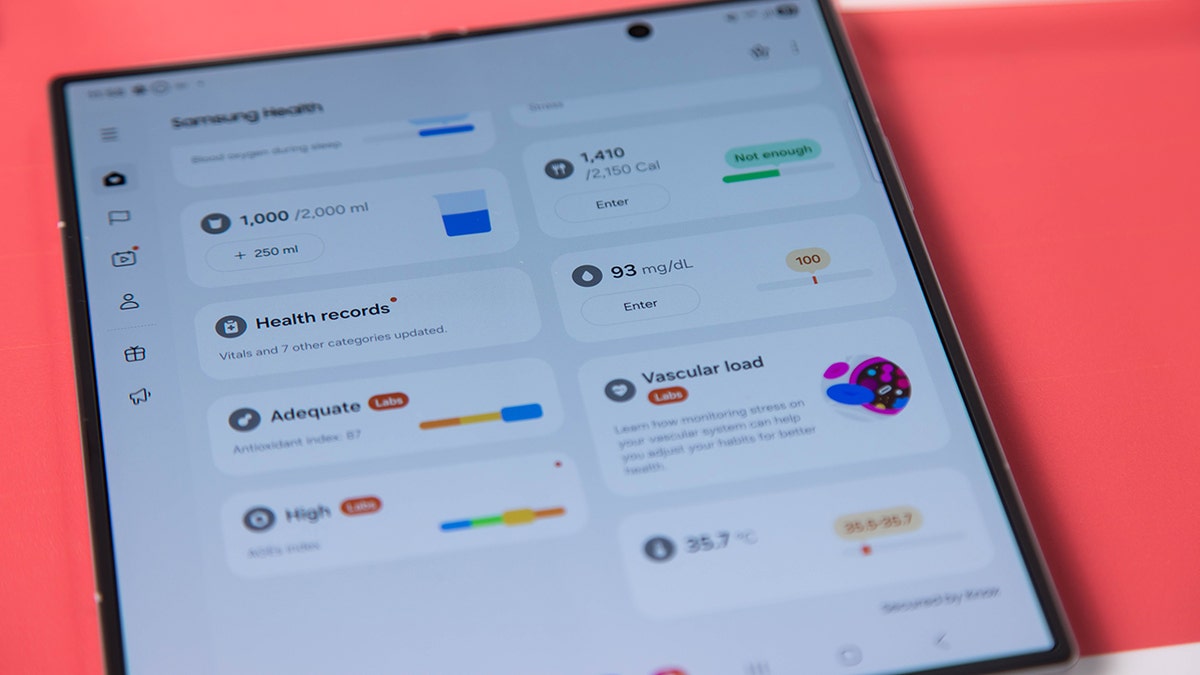
Samsung phone open to the health app.

Samsung Health and third-party apps like Medisafe or MyTherapy help Android users manage medications and set refill reminders. (Michael Nagle/Bloomberg via Getty Images)

Android: Samsung Health app

Samsung Health comes pre-installed on most Samsung phones. It works as a standalone tracker for fitness, sleep and even medication, no extra apps required.

How to set up the Samsung Health app 

Settings may vary depending on your Android phone’s manufacturer 

  • Open the Samsung Health app (often pre-installed, or download from the Google Play Store).
  • Tap Get Started or Start and allow the necessary permissions.
  • Click Continue.
  • Scroll down and select Medications.
  • Click Get Started.
  • Under Add medication, click Enter medication name.
  • Enter the Medication, Type and Strength
  • Then tap Next 
  • You can choose the shape from the icons providedupload an image or take an image from the options, or tap Skip 
  • Next, you can choose a color , then tap Next 
  • Then, set schedule, Every day, Every X days, Every week, Every month or As Needed.
  • Then click Set time and dosageOnce, twice , 3 times, 4 times, 5 times or Custom.  Then tap Done. 
  • Then tap Next.
  • Now to Review medication. Under Quantity, you can add the Number of remaining pills. Then, under it you can enable Refill reminder. Hit Save.

Steps to set up the Samsung Health app (Kurt “CyberGuy” Knutsson)

  • Under this next section, when you add medications, they’ll be checked for possible interactions with other medications you take, as well as with the lifestyle factors. If any of these factors, such as tobacco, cannabis, alcoho or grapefruit juice, don’t apply to you, you can turn them off so you won’t receive warnings about them. Then tap Next.
  • Next, medications that contain allergens like peanuts, milk and eggs can potentially cause allergic reactions. They’ll let you know if a medication you’ve added contains an ingredient that could cause an allergic reaction. You can click Add new allergy or click the + sign next to Peanut FamilyMilk Thistle or Egg and Egg Derivatives. Then click Done.
  • A pop-up will appear at the bottom that reads Medication added. Add another? Click OK.

Use medication reminder apps

To track meds, non-Samsung Android users usually need a third-party app like:

  • Medisafe (very popular, integrates with Wear OS watches).
  • MyTherapy (simple reminder app with symptom logging).

For a focused tool just for meds, these 3 apps work on both iPhone and Android:

1) MediSafe Pill Reminder

Add medications, dosages and schedules. Get reminders when it’s time to take them. You can even manage more than one family member in the app.

  • Download MediSafe from the App Store or Google Play.
  • Tap Get started 
  • Open the app and tap “Add Med.”
  • Enter the medication name in the search bar, and then when it appears, tap it. 
  • Select “What form is the med?” such as pill, injection, solution, drops, inhaler, powder or other.
  • Enter, “What are you taking it for?”
  • Enter, “How often do you take it?
  • Enter, “When do you need to take the dose? Then, click Next. 
  • You are almost done. Would you like to: Set treatment duration, Get refill reminders? Add instructions? or Change the med icon?
  • If not, click Save. 
  • A pop-up screen will say, “You have successfully added medication”. 

With these steps, you’ll never miss a dose, and you can even track medications for your spouse in the same account.

2) MyTherapy

  • Download MyTherapy from the App Store or Google Play.
  • Open the app.
  • Tap Get started.
  • Tap Accept all or Go to settings 
  • It will ask you, “To start with what should we call you?” Add a nickname.  or Skip. You’ll be asked to add your Gender, Year of Birth or you can just skip that.
  • Then click “I’m ready!”
  • Tap Medications.
  • Click Search by name 
  • Type the medication in the search bar.  Then, click your medication. 
  • Choose “How often do you take this medication? Once daily, twice, daily, On demand (no reminder needed). Then tap Next. 
  • Add “When would you like to be reminded? Time and Dose. 
  • Enable next to where it says, “Enable Critical Alerts”.
  • Tap Next. 
  • Next, you will be asked, “Do you want to get reminders to refill your inventory?” If yes, enable next to where it says Remind Me. 
  • Next select your Current Inventory and Remind me when. 
  • Click Save. 
  • It will ask you, What do you take this for? Make a selection and then click Add. 
  • Then scroll down to the bottom of the page and click All set!
  • It may ask you to click Allow notifications. 

Both apps are free to start, simple to use and highly rated, making them great choices for organizing medications and health records.

HOW TO TELL IF YOUR SAMSUNG GALAXY TABLET HAS BEEN HACKED

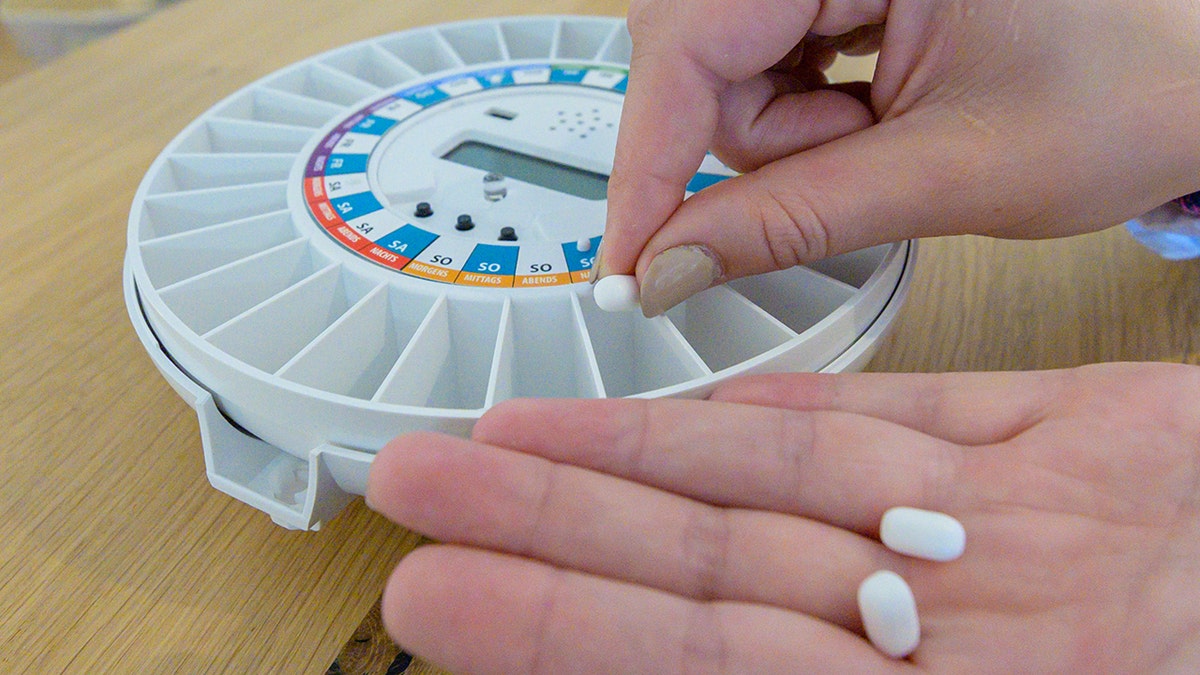
A person filling their pill dispenser.

Smart pill dispensers add another layer of safety by automatically releasing the right dose at the right time, reducing risky mistakes. (Armin Weigel/picture alliance via Getty Images)

Smart pill dispensers prevent risky mistakes

Even with phone apps and reminders, some people prefer a hands-off solution. That’s where smart pill dispensers come in. These devices automatically release the right dose at the right time, so you don’t have to worry about forgetting or double-dosing.

For older adults, this can reduce dizziness or grogginess from medication mistakes, issues that often raise fall risks. Dispensers also provide peace of mind for caregivers who want to be sure their loved one is staying on track.

What to look for in a smart dispenser:

  • Built-in reminders (lights, sounds or phone alerts)
  • Dose tracking so you can confirm meds were taken
  • Caregiver notifications if a dose is missed

Smart dispensers cost more than apps, but they add an extra layer of safety and independence for anyone juggling multiple prescriptions. 

Take my quiz: How safe is your online security?

Think your devices and data are truly protected? Take this quick quiz to see where your digital habits stand. From passwords to Wi-Fi settings, you’ll get a personalized breakdown of what you’re doing right – and what needs improvement. Take my Quiz here: Cyberguy.com.

CLICK HERE TO GET THE FOX NEWS APP

Kurt’s key takeaways

Staying on top of medications can feel like a full-time job, but you don’t have to manage it alone. With the built-in tools on iPhone and Android, plus easy-to-use apps, you can take control of your health with just a few taps. These features give you peace of mind, help you stay consistent and make doctor visits less stressful. For those who need extra support, smart pill dispensers add another layer of safety. They take the guesswork out of managing multiple prescriptions and provide reassurance for both you and your loved ones. By combining apps, reminders, and devices, you can create a system that fits your lifestyle and keeps your health details organized.

Would you be more likely to rely on your phone’s built-in health app or a dedicated reminder app to stay on top of your medications? Let us know by writing to us at Cyberguy.com.

Sign up for my FREE CyberGuy Report
Get my best tech tips, urgent security alerts and exclusive deals delivered straight to your inbox. Plus, you’ll get instant access to my Ultimate Scam Survival Guide – free when you join my CYBERGUY.COM newsletter.

Copyright 2025 CyberGuy.com.  All rights reserved.



Source link

Employer Health Benefits Should Feel Seamless: LifeX’s Vision for the Digital Experience

0
lifeX5
Employer Health Benefits Should Feel Seamless: LifeX’s Vision for the Digital Experience 69

Users expect better digital experiences that seamlessly integrate into their lives. The shift toward personalized coverage options like usage-based employer health benefits and embedded employer health benefits reflects this growing demand for simplicity and efficiency.

Atlanta, GA, September 25, 2025 – Employer health benefits often feel like a necessary evil, something we know we need but seldom think about until the unexpected happens. Yet, in an age where everything is becoming digital, why should navigating employer health benefits be any different? LifeX understands the evolving landscape of customer needs and has set out to redefine how we interact with employer health benefits.

Their mission? To make the entire process feel effortless and intuitive through innovative technology solutions. Imagine managing your policy from your phone, receiving real-time adjustments based on your lifestyle, or resolving claims within minutes—all without jumping through hoops.

This vision isn’t just about convenience; it’s about creating a relationship built on trust and transparency between insurers and policyholders. The future of employer health benefits lies in embracing innovation while prioritizing customer experience—a journey LifeX is leading with enthusiasm.

The digital age has transformed how we interact with services, and employer health benefits is no exception. As consumers embrace technology, their expectations have evolved dramatically. They want instant access to information and seamless interactions.

Mobile apps, chatbots, and online portals are now standard in various industries. Customers expect these innovations within the employer health benefits sector too. The demand for user-friendly platforms is growing as people increasingly rely on digital solutions for everyday tasks.

Technology has become a cornerstone of customer experience in employer health benefits. Users seek personalized offerings that cater to their unique needs without unnecessary friction. This shift fuels an emerging trend toward self-service options where policyholders can manage their policies effortlessly.

As insurers adapt to this new reality, they must prioritize intuitive design and functionality. Each touchpoint must reflect the changing landscape of user behavior while delivering value at every stage of the customer journey.

Benefits of a Digital Employer health benefits Experience:

A digital employer health benefits experience transforms the way customers interact with their policies. It offers instant access to information at any time, allowing users to manage their coverage effortlessly. With self-service platforms, policyholders can update details and file claims without waiting on hold or visiting an office. This empowers individuals and streamlines processes.

Another key benefit is personalization. Advanced technology enables insurers to tailor products based on user behavior and preferences. This creates a more relevant approach to coverage that meets individual needs. Having everything in one app simplifies life for customers. They can track claims, make payments, and chat with support all from their mobile device.

The use of predictive analytics enhances decision-making too. Insurers can analyze data trends which leads to better pricing strategies and improved customer satisfaction across the board.

LifeX leads the charge in making employer health benefits seamless through self-service platforms and custom apps tailored for policyholders. This commitment allows customers to manage their coverage easily while enjoying an omnichannel approach that meets them where they are.

As technology continues to reshape various industries, it also fosters a customer-centric transformation within employer health benefits. The future holds exciting possibilities as more companies adopt these strategies aimed at delivering superior experiences and fostering lasting relationships with clients. Embracing these changes will ensure that insurers remain relevant in an ever-evolving market focused on enhancing user satisfaction and trust.

For more information, visit: https://lifexresearch.com/

Media Contact:

LifeX Research Corp.
Attn: Media Relations
Atlanta, GA
support@lifexresearch.com

20250712 213641736
Employer Health Benefits Should Feel Seamless: LifeX’s Vision for the Digital Experience 70

Capodagli Property Company Unveils Meridia Linden 1001,the Company’s Newest Multi-Family Development

0
LindenNew
Capodagli Property Company Unveils Meridia Linden 1001,the Company’s Newest Multi-Family Development 77

Linden 1001 further cements Capodagli’s commitment to thoughtful, community-focused development in growing New Jersey markets.

Linden, New Jersey, September 25, 2025, Capodagli Property Company is proud to announce the launch of Linden 1001, its newest multi-family residential development and the third project by the company in the city of Linden, offering elevated urban living with exceptional amenities and convenience.

Strategically located near the Linden train station—with direct access to New York City—and within minutes of major highways including the Garden State Parkway, NJ Turnpike, and Routes 1 & 9, Linden 1001 is designed to meet the lifestyle needs of today’s commuters and city-minded residents.

The development features 403 thoughtfully designed units, including spacious 1-bedroom and 2-bedroom layouts. Each apartment home features in-unit laundry, as well as modern kitchens with quartz countertops and premium finishes. Meridia Linden 1001 will begin leasing in Fall 2025 and will offer pet-friendly living to their residents.

For easy indoor/outdoor living, the building offers residents five outdoor courtyard spaces, ideal for relaxing, socializing, or working remotely. The building offers two on-site retail spaces, enhancing resident convenience and neighborhood engagement.

Residents of Meridia Linden 1001 will also enjoy being steps away from the city’s vibrant dining and retail options, offering a perfect balance between comfort, accessibility, and lifestyle.

“Linden 1001 represents the next phase of Capodagli Property Company’s ongoing investment in Linden,” said Nicola Smith, the building’s Property Manager. “We’re proud to bring another high-quality, amenity-rich living experience to a city that continues to grow and attract residents looking for both community and connection.”.

About Capodagli Property Company:

Capodagli Property Company is a premier real estate development, construction, and property management firm specializing in multi-family and mixed-use real estate projects. Founded in 1970, they are recognized for their ability to envision thriving communities on underutilized assets, playing a major role in redeveloping these communities.

Capodagli Property Company develops, owns, and manages over 6,000 rental apartments with over 4,000 units in the pipeline.

They are proud of their reputation for building and managing exceptional residential communities under the brand name “Meridia Living.” Meridia Living strives to ensure all the properties they manage are well maintained while instilling a sense of belonging towards their residents.

For more information on Capodagli Property Company and Meridia Living, visit www.capodagli.com

Media Contact:

Capodagli Property
Attn: Media Relations
201 South Wood Ave.
Linden, NJ 07036
973-694-3000
marketing@meridialiving.com

20250614 195253129
Capodagli Property Company Unveils Meridia Linden 1001,the Company’s Newest Multi-Family Development 78