4.5 C
New York
Wednesday, February 11, 2026
Home Blog Page 616

How 1X’s humanoid robot is putting a stop to you having to fold laundry

0


Join Fox News for access to this content

Plus special access to select articles and other premium content with your account – free of charge.

Please enter a valid email address.

Imagine never having to fold laundry again. No more Sunday afternoons spent meticulously tackling this tedious task. Sounds pretty sweet, doesn’t it? 

Well, let me introduce you to Eve, the cool new humanoid robot from 1X, developed in collaboration with the folks at OpenAI. 

Eve isn’t just another gadget; it’s like a sneak peek into a future where household chores are a thing of the past.

CLICK TO GET KURT’S FREE CYBERGUY NEWSLETTER WITH SECURITY ALERTS, QUICK VIDEO TIPS, TECH REVIEWS AND EASY HOW-TO’S TO MAKE YOU SMARTER

eve the robot 1

Eve humanoid robot  (1X)

How the humanoid robot went from basic tasks to laundry folding

Just a month ago, Eve was impressing us with its ability to pick up items, self-charge and perform simple tasks around the house. Now, Eve is tackling one of the most universally dreaded chores — laundry folding. Despite lacking human-like hands and instead using claw grippers, Eve manages this delicate task with surprising precision and care.

WHAT IS ARTIFICIAL INTELLIGENCE (AI)?

EVE the robot 2

Eve humanoid robot  (1X)

MORE: FIRST HUMANOID ROBOT FACTORY IN THE U.S. CAN CRANK OUT 10,000 ROBOTS A YEAR  

Humanoid robots are accelerating at a dizzying pace

Eve’s rapid learning curve is a testament to the incredible potential of artificial intelligence-powered robotics. Within weeks, Eve has moved from performing simple tasks to handling complex, multi-step processes such as sorting items, using tools and, most impressively, folding shirts autonomously. This rapid progression is not just about doing chores; it’s about redefining what robots are capable of achieving.

EVE the robot 3

MORE: AI ROBOT THAT CAN TRIM, EDGE AND BLOW YOUR LAWN FOR YOU  

The significance of Eve’s development

The development of Eve and robots like it represents a significant leap forward in the field of humanoid robotics. These robots are not being programmed for specific tasks; they are learning, adapting and evolving with minimal human intervention.

This approach to AI and robotics is paving the way for a future where robots could become an integral part of our daily lives, assisting with a wide range of tasks.

eve the robot 4

Eve humanoid robot ( 1X)

MORE: FORGET HANDS, TOYOTA’S HUG-READY ROBOT PICKS UP WITH ITS ENTIRE BODY 

The future of robotics is now

Eve’s abilities highlight the broader advancements in the field of AI-driven humanoid robotics. From Agility Robotic’s Digit working with Spanx to Apptronik’s Apollo at Mercedes-Benz, humanoid robots are beginning to make their mark across various industries.

Eve’s success in autonomously folding laundry might seem like a small step, but it’s part of a much larger journey toward creating robots that can perform a wide range of tasks.

eve the robot 5

Eve humanoid robot   (1X)

Are robots here to replace us (or free us)?

While Eve’s ability to take over household chores sounds like a dream, it’s also stirring a lot of conversations. Understandably, some folks are worried about the broader implications, particularly when it comes to job security. How do we balance the convenience offered by robots like Eve with the concern that they could take over jobs, even beyond household tasks?

GET FOX BUSINESS ON THE GO BY CLICKING HERE

You see, as Eve and its counterparts grow more skilled, the question isn’t just about who’s folding laundry. It’s about what roles humans will play in a future filled with such capable robots. Critics argue that as robots become more integrated into various sectors, we might see a significant shift in employment patterns. On the flip side, proponents suggest that this technological leap could free us from mundane tasks, allowing humans to focus on more creative and fulfilling work.

It’s a complex issue, and there’s no easy answer. What’s clear, though, is that Eve’s development isn’t just a technical milestone; it’s a prompt for serious discussions about the future of work, the ethics of AI and how we navigate the inevitable changes technology is bringing to our lives.

eve the robot 6

Eve the humanoid robot  (1X)

Kurt’s key takeaways

As we witness the rapid evolution of robots like Eve, it’s clear that we are on the cusp of a new era in robotics and artificial intelligence. These developments promise not just convenience but a fundamental shift in how we approach tasks and work. With robots capable of learning and adapting at an unprecedented rate, the possibilities are endless. Eve’s journey from performing basic tasks to folding laundry is just the beginning. The future of humanoid robotics is here, and it’s about to change the way we think about technology and its role in our lives.

CLICK HERE TO GET THE FOX NEWS APP

Do you have any concerns or fears about a future where robots seamlessly integrate into our daily lives, potentially taking over tasks currently done by humans? Let us know by writing us at Cyberguy.com/Contact

For more of my tech tips and security alerts, subscribe to my free CyberGuy Report Newsletter by heading to Cyberguy.com/Newsletter

 Ask Kurt a question or let us know what stories you’d like us to cover

Answers to the most asked CyberGuy questions:

Copyright 2024 CyberGuy.com.  All rights reserved.


Source link

Two new stealthy malware threats are targeting those of you who use Macs

0


Join Fox News for access to this content

Plus special access to select articles and other premium content with your account – free of charge.

Please enter a valid email address.

If you use a Mac, it could be at risk of two new threats. While Apple has a reputation for having ironclad security, these two pieces of malware are designed to trick you and steal your data.

Jamf Threat Labs, an organization that focuses on the safety of Apple products, says the malware threats are part of a year-long attack on Mac systems.  

The group says hackers are using them to harvest data.  Attacks like these are constantly happening, according to the lab. That makes it all the more important for those who use a Mac to ensure your data is locked down.

It’s important to note that, according to the lab, these hackers largely target the crypto industry, putting those individuals, particularly, at risk. That said, all Mac users should still exercise caution.

CLICK TO GET KURT’S FREE CYBERGUY NEWSLETTER WITH SECURITY ALERTS, QUICK VIDEO TIPS, TECH REVIEWS AND EASY HOW-TO’S TO MAKE YOU SMARTER

stealthy malware 1

MacBook Pro  (Kurt “CyberGuy” Knutsson)

Malware posing as ads

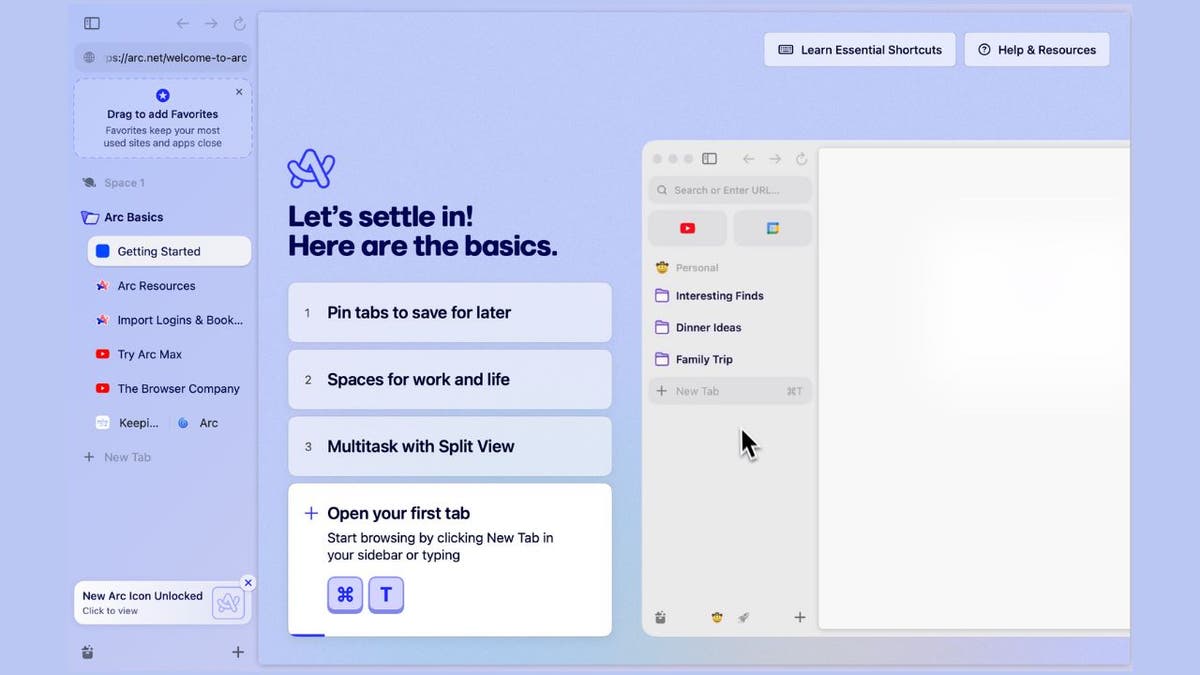
Before we get into the malware, let’s talk about Arc Browser. For those unfamiliar with it, Arc Browser is a Mac web browser that looks to give users a unique experience. First and foremost, the main focus is on the webpage. Any buttons you might find in a traditional browser are relegated to a sidebar. It uses a bookmark system that gives you multiple workspaces. It also has automated tab management.

In other words, many Mac users would consider Arc Browser an upgrade over the already-included Safari. And its ever-growing popularity makes it a huge target for hackers.

ARC browser

Legitimate Arc Browser website  (Kurt “CyberGuy” Knutsson)

MORE: HOW CRYPTO IMPOSTERS ARE USING CALENDY TO INFECT MACS WITH MALWARE

How fake Arc Web Browser ads conceal dangerous malware

In this attack, hackers are hiding malware in advertisements posing as ads for Arc Browser, as seen below.

FAKE arc site

Malicious site aricl[.]net that imitates the legitimate arc.net  (Jamf Threat Labs)

The ad redirects to a malicious lookalike site: arc.net vs. aricl.net

Instead of taking you to the legitimate download page for the Arc web browser, the ad takes you to a lookalike malicious site, aricl[.]net, that imitates the legitimate arc.net and hosts malware.

fake arc site 2

Image of the malicious aricl[.]net site  (Jamf Threat Labs)

Malware disguised as Arc Browser unleashes Atomic Stealer

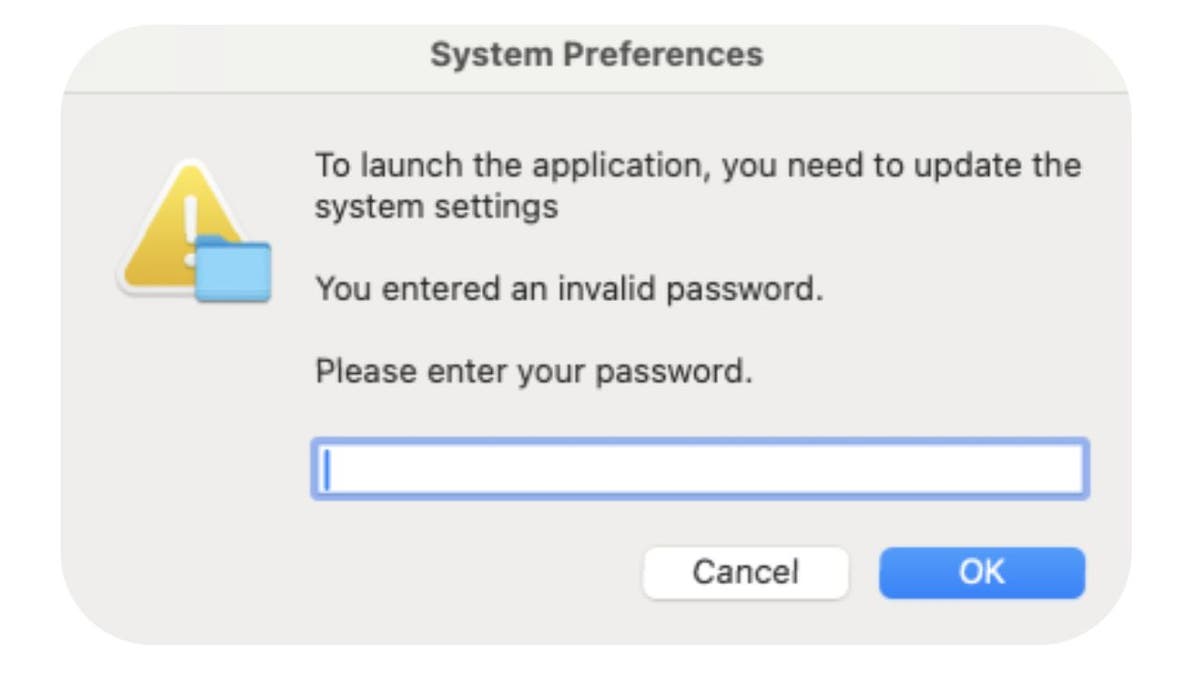
Once you download malware posing as Arc Browser, the malware unleashes an Atomic stealer. It’s a fake prompt that looks like a normal System Preferences prompt asking you for your password. Once the hackers get access to your system password, they can steal other data.

system preferences

Fake system preferences prompt  (Jamf Threat Labs)

Even worse, these so-called “ads” can appear as sponsored advertisements in a Google search. Jamf Threat Labs says these links can only be accessed through a generated sponsored link and not accessed directly. Attempts to access the malicious website directly returned an error message. This is presumably done to evade detection.

Fake meeting software

The researchers at Jamf Threat Labs have also discovered a fake website that offers malware hidden as free group meeting scheduling software. Meethub[.]gg appears to be legitimate. The company posts articles on Medium and has more than 8,000 followers on X, at the time of publishing. It, however, hosts malware that’s related to Realst, another piece of malware designed to drain crypto wallets.

Some of the attacks involving Meethub use social engineering. A hacker might approach their victim looking to interview them for a job or a podcast. In order to meet, they ask the victim to download Meethub’s software. According to Jamf, these attacks can sometimes lead to big paydays for hackers.

stealthy malware 2

Meethub website  (Jamf Threat Labs)

How to protect yourself

1. Don’t download bootleg software: It’s not worth the risk to download bootleg software. It exposes your device to potential security threats like viruses and spyware.  If someone emails you a link for a download, make sure it’s from a reputable source and scan it.

2. Don’t click on suspicious links or files: If you encounter a link that looks suspicious, misspelled or unfamiliar, avoid clicking on it. Instead, consider going directly to the company’s website by manually typing in the web address or searching for it in a trusted search engine. Most often, the first or second result that comes up is legitimate. If you see the word “Sponsored “above the search result, take a beat before clicking it and consider clicking on the result below it.

3. Have good antivirus software: The best way to protect yourself from clicking malicious links that install malware that may get access to your private information is to have antivirus protection installed on all your devices. This can also alert you of any phishing emails or ransomware scams. Get my picks for the best 2024 antivirus protection winners for your Mac, Windows, Android & iOS devices.

MORE: STEALTHY BACKDOOR MAC MALWARE THAT CAN WIPE OUT YOUR FILES 

What to do if you’ve been hacked

If it has already happened, and you’ve been hacked, then you should take immediate action to minimize the damage and secure your device. Here are some steps that you can follow:

Change your passwords

If hackers have recorded your passwords, they could access your online accounts and steal your data or money. On another device (i.e., your laptop or desktop), you should change your passwords for all your important accounts, such as email, banking, social media, etc. You want to do this on another device so the hacker isn’t recording you setting up your new password on your hacked device. And you should also use strong and unique passwords that are hard to guess or crack. You can also use a password manager to generate and store your passwords securely.

Enable two-factor authentication

You’ll want to activate two-factor authentication for an extra layer of security.

GET FOX BUSINESS ON THE GO BY CLICKING HERE

Monitor your accounts and transactions

You should check your online accounts and transactions regularly for any suspicious or unauthorized activity. If you notice anything unusual, report it to the service provider or authorities immediately. You should also review your credit reports and scores to see if there are any signs of identity theft or fraud.

Use identity theft protection

Identity theft protection companies can monitor personal information like your home title, Social Security number, phone number and email address and alert you if it is being used to open an account.  They can also assist you in freezing your bank and credit card accounts to prevent further unauthorized use by criminals. See my tips and best picks on how to protect yourself from identity theft.

Contact your bank and credit card companies

If hackers have obtained your bank or credit card information, they could use it to make purchases or withdrawals without your consent. You should inform your bank and credit card companies of the situation. They can help you freeze or cancel your cards, dispute any fraudulent charges, and issue new cards for you.

Alert your contacts

If hackers have accessed your email or social media accounts, they could use them to send spam or phishing messages to your contacts. They could also impersonate you and ask for money or personal information. You should alert your contacts and warn them not to open or respond to any messages from you that seem suspicious or unusual.

MORE: HOW A FLEW IN iPHONE’S SECURITY COULD LEAVE YOU LOCKED OUT

Kurt’s key takeaways

While Macs are generally secure devices, that hasn’t stopped hackers from stealing data. In fact, these two new attacks show how creative they can be while trying to break into your device. That’s why it’s so important to have good antivirus software and safety practices.

Good safety practices are even more essential for people who trade and use cryptocurrencies in these particular situations. As mentioned before, these attacks focus largely on draining crypto wallets. And while anyone can be hacked, crypto users have a higher risk. So take the time to assess a link before clicking on it. Don’t just download software because someone tells you to. Do your research. At the end of the day, it will help keep your data and your wallet safe.

CLICK HERE TO GET THE FOX NEWS APP

Are you worried about hackers finding more creative ways to break into your computer? If you use crypto, how are you keeping your crypto wallet safe? Let us know by writing us at Cyberguy.com/Contact

For more of my tech tips and security alerts, subscribe to my free CyberGuy Report Newsletter by heading to Cyberguy.com/Newsletter

Ask Kurt a question or let us know what stories you’d like us to cover

Answers to the most asked CyberGuy questions:

Copyright 2024 CyberGuy.com.  All rights reserved.


Source link

How to print your Reminders app lists on your iPhone to take wherever you go

0


Join Fox News for access to this content

Plus special access to select articles and other premium content with your account – free of charge.

Please enter a valid email address.

While you can do pretty much everything on your iPhone, it is nice to be able to translate some of the functionality offline. If you want to have a good old-fashioned list instead of squinting at your phone screen, the good news is that you can print out your lists from your Reminders app.

CLICK TO GET KURT’S FREE CYBERGUY NEWSLETTER WITH SECURITY ALERTS, QUICK VIDEO TIPS, TECH REVIEWS AND EASY HOW-TO’S TO MAKE YOU SMARTER

How to print your Reminders app lists on your iPhone to take wherever you go

A woman looking at her physical grocery list (Kurt “CyberGuy” Knutsson)

Why might you print your Reminders app list?

If you prefer a physical list to carry to the store and check off as you go, or if you want to place the list at home on the refrigerator or on a desk, or even if you want to share your reminders with others, follow the steps below to learn how to print out your lists from the Reminders app on your iPhone.

How to print your Reminders app lists on your iPhone to take wherever you go

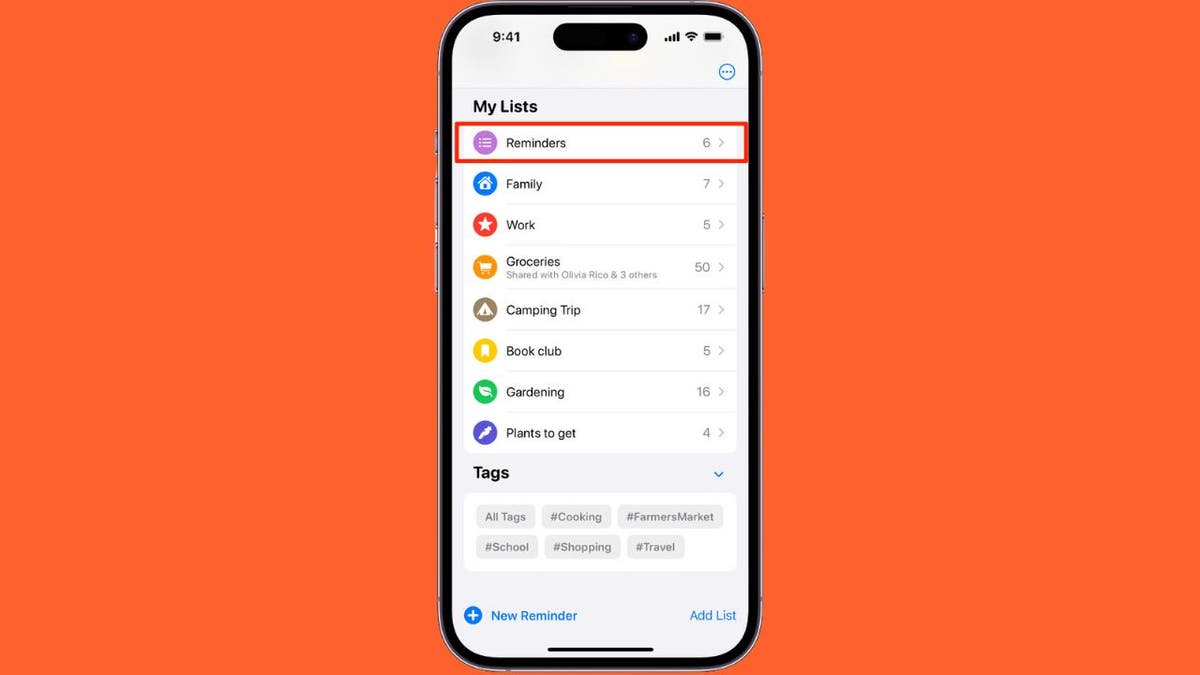
Reminders on iPhone (Apple) (Kurt “CyberGuy” Knutsson)

MORE: TOP PRINTERS OF 2024

How to print a Reminders app list from an iPhone

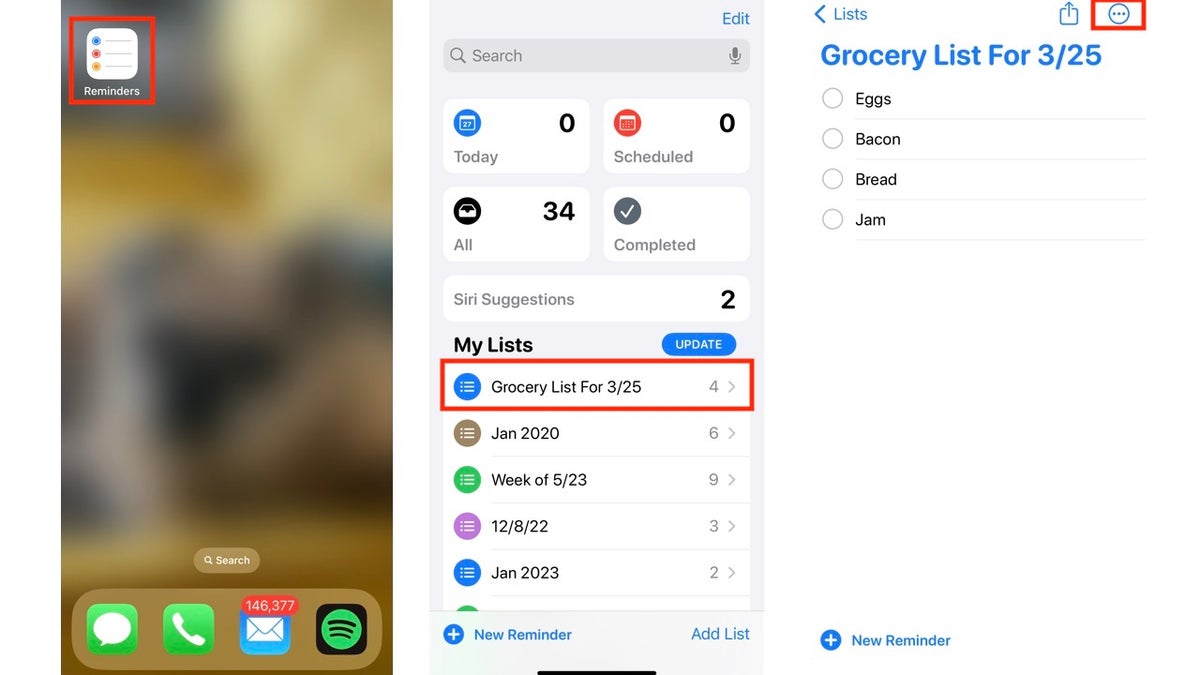
  • Open up the Reminders App on your iPhone
  • Select the list you want to print
  • Tap the icon (a circle with three horizontal dots inside) in the upper right corner of the screen
How to print your Reminders app lists on your iPhone to take wherever you go

Steps to print a Reminders app list from an iPhone (Kurt “CyberGuy” Knutsson)

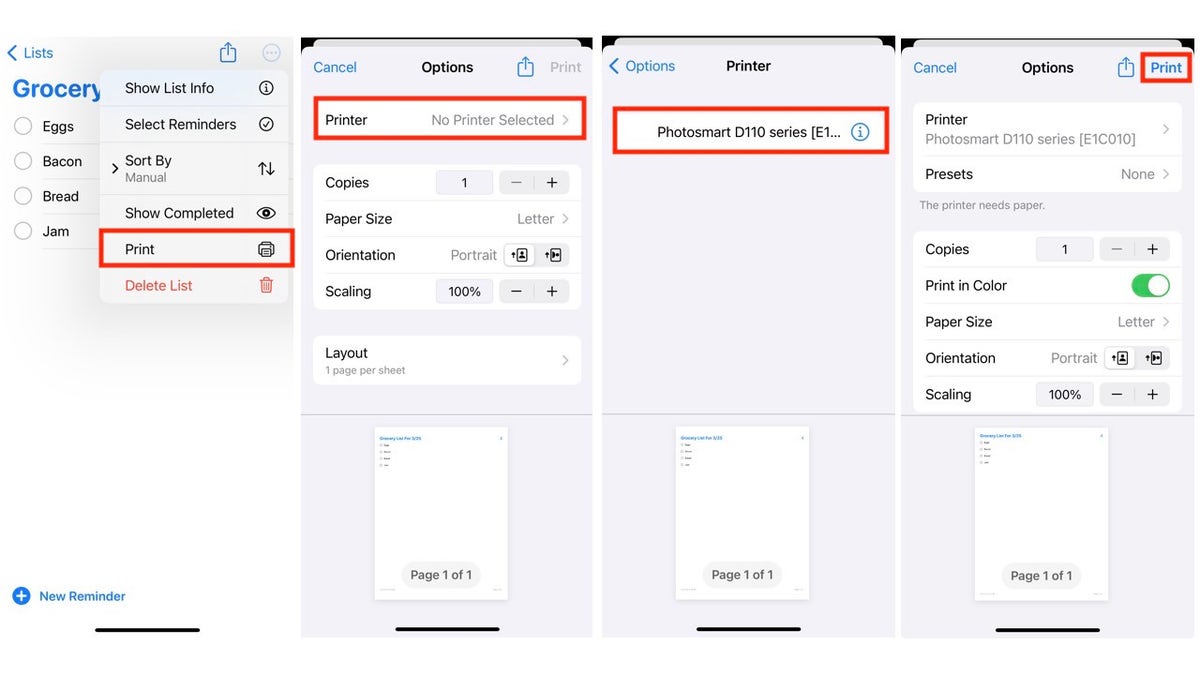
  • Tap Printer
  • If it says ‘No Printer Selected’ under Printer, Tap Printer
  • Select the printer you want to use, and it will send you back to the Options screen.
  • After you’ve selected your preferred settings, tap Print in the upper-right corner of the screen.

MORE: THE CHEAPEST PRINTER INK AND HOW TO MAKE CARTRIDGES LAST LONGER

How to print your Reminders app lists on your iPhone to take wherever you go

Steps to print a Reminders app list from an iPhone (Kurt “CyberGuy” Knutsson)

MORE: 4 WAYS TO PRINT OUT, SAVE, SEND YOUR IPHONE’S TEXT MESSAGES

Printing your Reminders app lists from your iPhone offers several practical advantages. Whether you prefer the tactile experience of a physical list while shopping, want to keep reminders visible at home (perhaps on the refrigerator or a desk) or need to share your lists with others, the process is straightforward.

By following the steps outlined above, you can easily print out your reminders and enjoy the convenience of having them in hand. So, go ahead, put that printer to good use and keep your tasks organized.

Kurt’s key takeaways

While it is great to have all your reminder lists saved in one place, it is equally great to have the ability to print individual lists when you need to make additional notes, physically take them with you or share them with others.

Do you find the tactile experience of a physical list more effective than a digital one? Why or why not? Let us know by writing us at Cyberguy.com/Contact.

For more of my tech tips & security alerts, subscribe to my free CyberGuy Report Newsletter by heading to Cyberguy.com/Newsletter.

Ask Kurt a question or let us know what stories you’d like us to cover.

Answers to the most asked CyberGuy questions:

Copyright 2024 CyberGuy.com. All rights reserved.


Source link

Protect your Android from the Vultur banking Trojan’s remote attacks

0


Join Fox News for access to this content

Plus special access to select articles and other premium content with your account – free of charge.

Please enter a valid email address.

One of the most advanced Trojans targeting banking apps has gotten an upgrade. Vultur has been wreaking havoc on Androids since security firm ThreatFabric discovered it in 2021. According to researchers with NCC Group, the malware has reemerged and is even stealthier than before.

You might remember Vultur for the notoriety it gained for its ability to screen record on devices remotely. It hid in apps, some of which were on the Google Play Store, and infected your device.

But now Vultur has new ways to take over Androids and new methods to trick you into downloading malware. Hackers now utilize everything from text messages to phone calls to dupe their victims. Once they get into your device, they can take total control. Hackers can remotely access and use your phone – all in an effort to take your hard-earned money.

CLICK TO GET KURT’S FREE CYBERGUY NEWSLETTER WITH SECURITY ALERTS, QUICK VIDEO TIPS, TECH REVIEWS AND EASY HOW-TO’S TO MAKE YOU SMARTER

Protect your Android from the Vultur banking Trojan’s remote attacks

Android phone (Kurt “CyberGuy” Knutsson)

Vultur’s new hybrid attack

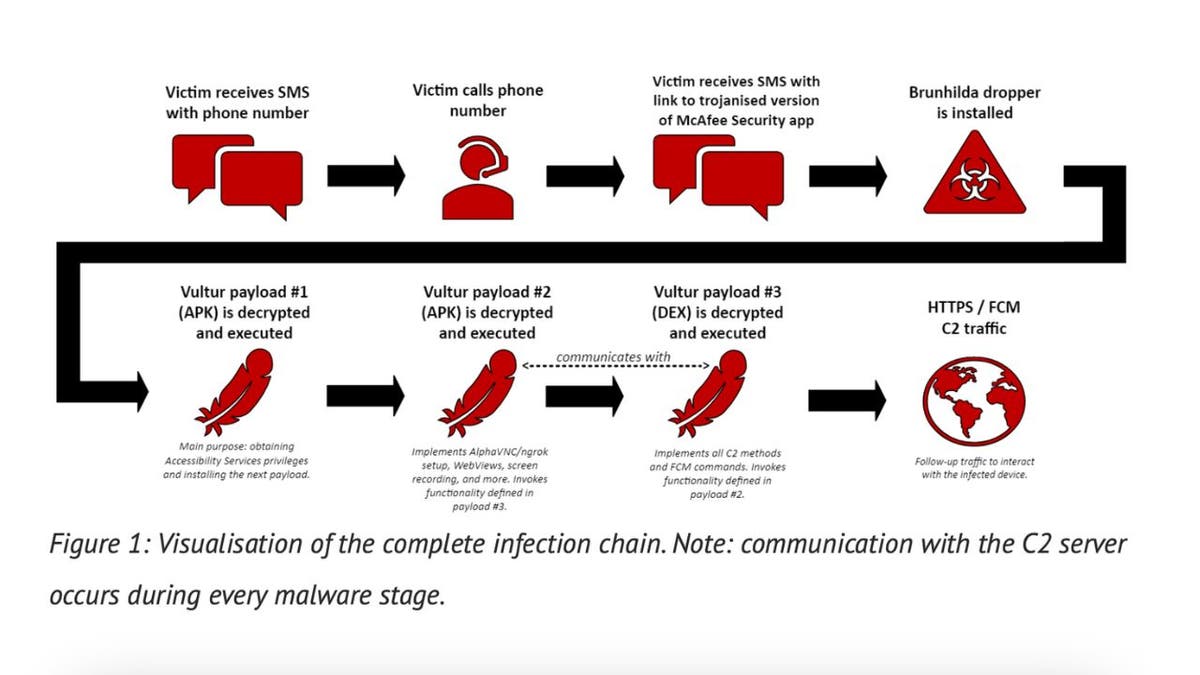
According to NCC Group, this new attack focuses on contacting victims. It begins with a text message urging the victim to call if they didn’t authorize a transaction on their bank account. However, the transaction isn’t real; it’s simply a ruse.

If the victim calls, they will receive instructions to download a McAfee Security app containing the banking Trojan and a text message with the link.

The security app looks normal but actually contains the Brunhilda dropper, a deceptive component hidden within seemingly legitimate apps. In this case, the dropper contains the Vultur Trojan. It then releases and executes the Trojan in three batches. When the third batch is dropped, hackers can gain total control of your Android device.

Protect your Android from the Vultur banking Trojan’s remote attacks

Illustration of infection chain (NCC Group) (Kurt “CyberGuy” Knutsson)

MORE: HACKERS USE PIRATED SOFTWARE TO HIJACK MAC, ANDROID, WINDOWS DEVICES

Vultur’s new features

Vultur was already a very serious threat to Android users. But now, that threat has been significantly upgraded thanks to the level of control hackers can gain. Once Vultur has infected your device, hackers can install, delete, upload and download files. It can even stop apps from running in the first place. If that wasn’t enough, Vultur can bypass Android’s Keylock feature, bypassing your lock screen.

Even more frightening is Vultur’s remote control capabilities. The malware has been able to remotely access devices since it was first discovered in 2021. But now, hackers can instruct the malware to swipe, click, scroll, mute and unmute audio, and more, giving them more control.

Hackers don’t need to worry about staying connected to the device, either. They have leveraged Google’s Firebase Cloud Messaging system to be able to send instructions to infected devices.

Protect your Android from the Vultur banking Trojan’s remote attacks

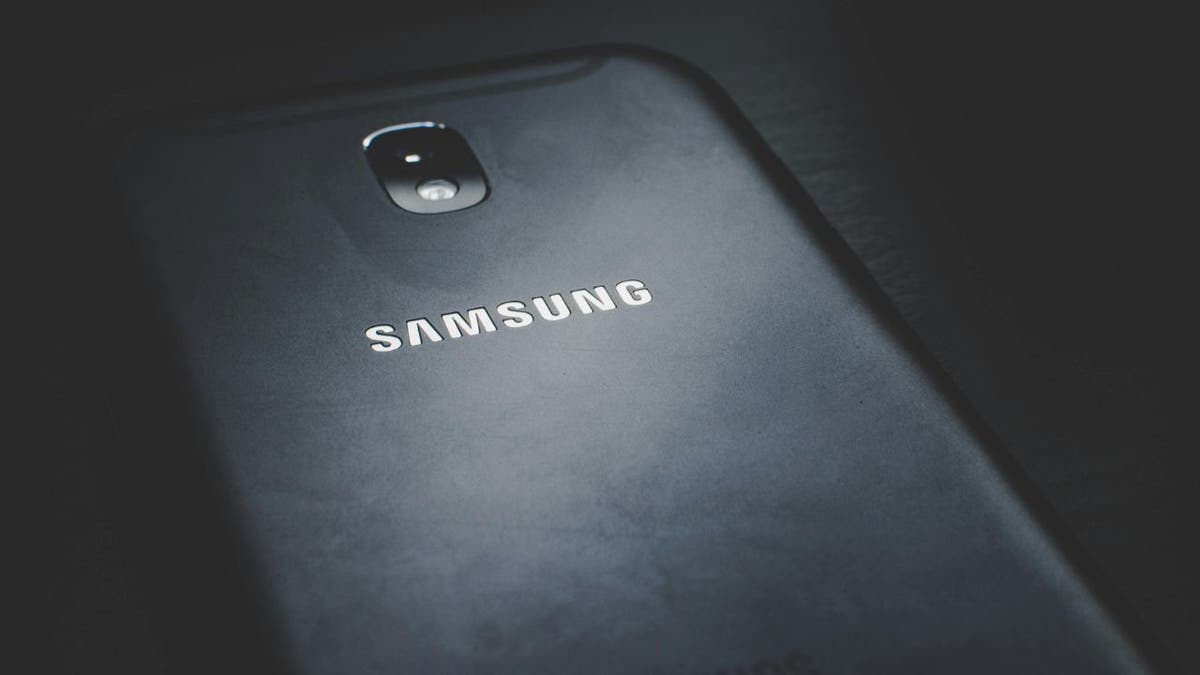
Samsung phone (Kurt “CyberGuy” Knutsson)

How to protect your Android from Vultur

One of the biggest ways to stay away from Vultur is not to call after a hacker texts you about approving a large bank transaction. You can always call your financial intuition yourself to check. But never call an unknown phone number that’s sent to you by an unknown person. Here are some other tips as well:

Avoid sideloading apps and shortened URLs

Try not to sideload apps. That’s when you install apps outside of a legitimate source. Shortened URLs can mislead users into downloading malware.

Be careful granting permissions

Exercise caution when granting app permissions. Consider whether an app truly needs access to certain device functions or data.

Limit the apps you have on your phone

Sometimes, having a lot of apps on your phone can make it easy to be exposed to malware. These apps can let in malicious code over time, and the more apps you have to keep track of and update, the more likely your Android will be vulnerable. Here’s how to delete unnecessary apps from your Android.

Protect your Android from the Vultur banking Trojan’s remote attacks

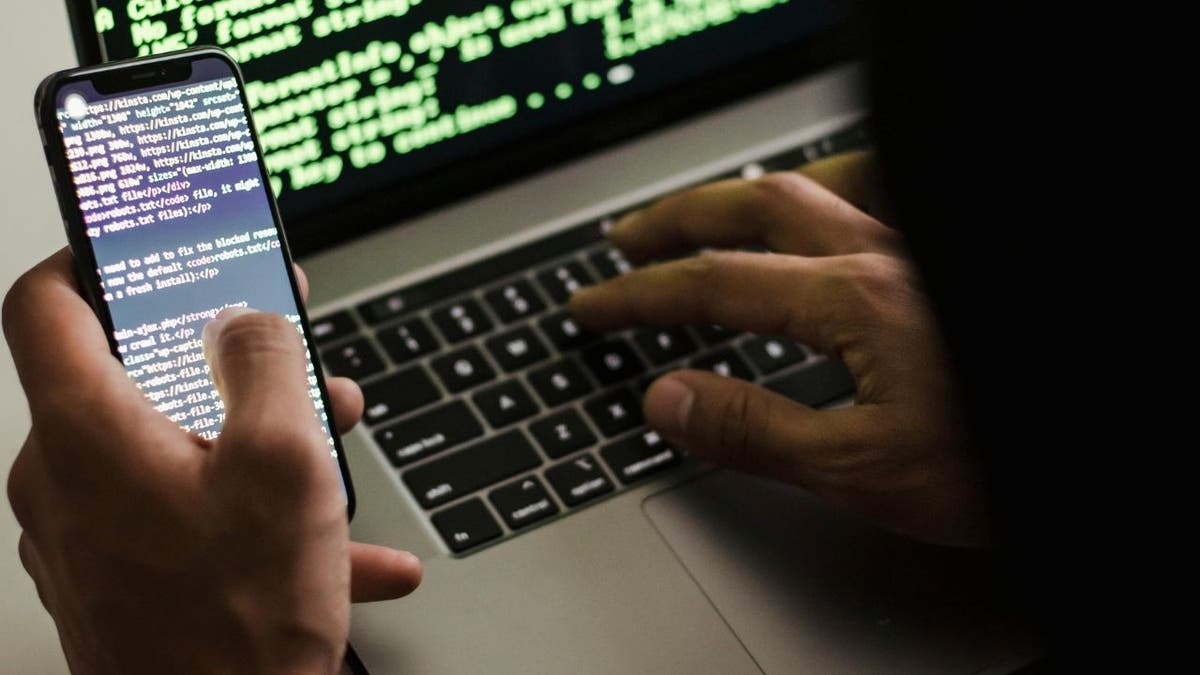
Hacker using Android and laptop (Kurt “CyberGuy” Knutsson)

MORE: WHAT YOU NEED TO KNOW ABOUT VAJRASPY RAT, THE CYBERESPIONAGE TOOL THAT INFILTRATED GOOGLE PLAY

Download apps from reputable sources

Additionally, when you download apps, make sure they are from reliable and legitimate developers. Check reviews and do some research before just hitting “install.”

Keep your Android device updated

Your phone has a way of keeping itself safe with software and security updates. Don’t forget to install them.

Have good antivirus software on all your devices

Installing antivirus protection on all your devices is the best way to protect yourself from malware. Antivirus software will prevent you from clicking on potentially malicious links that may install malware on your devices, allowing hackers to gain access to your personal information. Get my picks for the best 2024 antivirus protection winners for your Windows, Mac, Android & iOS devices.

What should you do if your data is compromised?

If malware has already invaded your device, then you should take immediate action to minimize the damage and secure your device. Here are some steps that you can follow:

Change your passwords

Vultur can give hackers access to everything on your device, including your online accounts and your personal or financial information. To prevent this, you should change your passwords for all your important accounts as soon as possible. However, you should not do this on your infected device because the hacker might see your new passwords. Instead, you should use ANOTHER DEVICE, such as your laptop or desktop, to change your passwords. Make sure you use strong and unique passwords that are difficult to guess or break. You can also use a password manager to generate and store your passwords securely.

Monitor your accounts and transactions

You should regularly check your online accounts and transactions for suspicious or unauthorized activity. If you notice anything unusual, report it to the service provider or authorities immediately. You should also review your credit reports and scores to see signs of identity theft or fraud.

Use identity theft protection

Hackers can access everything on your Android device, including your personal and financial information. They can use this information to create fake accounts in your name, access your existing accounts and pretend to be you online. This can cause serious damage to your identity and credit score.

To avoid this, you should use identity theft protection services. These services can track your personal information, such as your home title, Social Security Number, phone number and email address, and notify you if they detect any suspicious activity. They can also help you freeze your bank and credit card accounts to stop hackers from using them. Read more of my review of the best identity theft protection services here.

Contact your bank and credit card companies

If hackers have obtained your bank or credit card information, they could use it to make purchases or withdrawals without your consent. You should inform your bank and credit card companies of the situation. They can help you freeze or cancel your cards, dispute any fraudulent charges and issue new cards for you.

Alert your contacts

If hackers have accessed your email or social media accounts, they could use them to send spam or phishing messages to your contacts. They could also impersonate you and ask for money or personal information. You should alert your contacts and warn them not to open or respond to any messages from you that seem suspicious or unusual.

Restore your device to factory settings

If you want to ensure that your device is free of malware or spyware, you can restore it to factory settings. This will erase all your data and settings and reinstall the original Android version. Before doing this, you should back up your important data and only restore it from a trusted source.

Kurt’s key takeaways

Vultur is an incredibly sophisticated banking Trojan with some terrifying features. The fact that hackers can gain full control of your Android is scary, making it all the more important that you protect yourself.

These attacks begin with a simple text message. It’s up to you to make the effort to separately call your financial institution and see if anything’s amiss. Just taking an extra 10 minutes can save you from having your entire device compromised and your personal information exposed.

How worried are you about Vultur attacks? How do you protect yourself from attacks targeting your finances? Let us know by writing us at Cyberguy.com/Contact.

For more of my tech tips & security alerts, subscribe to my free CyberGuy Report Newsletter by heading to Cyberguy.com/Newsletter.

Ask Kurt a question or let us know what stories you’d like us to cover.

Answers to the most asked CyberGuy questions:

Copyright 2024 CyberGuy.com. All rights reserved.



Source link

Learn helpful tricks and tips to better utilize Google Maps

0


I grew up in New Jersey, right next to a state park. I still remember riding my bike all day like it was yesterday. Oh, and the time I threw a snowball at a police car and hit the cop inside. That was bad.

Get smart, actionable tech news and tips like this daily in your inbox. Join 500K folks and get the Current. It’s free!

I hadn’t looked at the house in years, so seeing it on a map took me back. While you’re at it, take yourself on a walk down memory lane, too.

CAN YOU SPOT ELECTION DEEPFAKES? HERE’S HOW NOT TO BE DUPED

Blast from the past

There’s something special about seeing what the house you spent your childhood in looks like now — or you can flash back for as long as Google has been collecting pictures in that area.

Google Street View car taking photos for Google Maps

  • Open the Google Maps app and search for a place.
  • At the bottom, tap the place name or address.
  • Scroll and select the photo labeled Street View or select the thumbnail with a Street View icon.
  • While viewing a location in Street View, tap anywhere on the image, then tap See more dates.

💡 I have an idea. While you’re looking at your old house, write down three memories in the Notes app on your phone. Next time you’re with the kids, show them the house and tell them a few stories. So fun!

WHY SOME PEOPLE STILL OPT FOR GLOBES IN AN ERA OF DIGITAL MAPPING

Plan ahead and save on gas

The longer you spend in traffic, the more gas you’ll burn. Google Maps helps you plan a future trip, taking in predicted traffic, routes, and road conditions along the way. 

Here’s how to set a planned time and date for a trip:

A woman reads a map while stopped on the side of the road

  • Open the Google Maps app and tap on the Search here field.
  • Enter a destination and select it from the results.
  • Tap Directions and then the three dots button to the right of the Your location field.
  • Tap Set depart or arrive time.
  • Select Depart at and enter a date and time, then tap Done.
  • You’ll get various route options and details such as time and distance.
  • Select a route and tap Start.

Step inside buildings

US AIRPORTS ADAPT TO TRAVEL SURGE BY EXPANDING USE OF TECHNOLOGY TO PROCESS PASSENGERS

With Google Maps, you can virtually visit the inside of places such as stores, airports, or hotels. It’s fun to check out photos of places uploaded by other people, too.

  • Open the Google Maps app, tap the Search box.
  • Enter a place’s name or an address. Then, at the bottom, tap the place name or address.
  • Scroll until you see photos and tap on a 360 photo. To see more photos of this location, tap Photos.

You might see a Directory option showing floor plans and restaurant and store lists. The numbers at the bottom of the screen allow you to move from floor to floor. The blue dot icon shows you where you are located in the building.

Bonus: Ahoy, matey

Maps in Google

Let’s go from close to home to far away. Google Earth has captured images of thousands of shipwrecks over the decades. To snoop around, open Google Earth and search for the specific coordinates below:

50°23’42.35″N 125°57’25.64″W

64°10’34.46″N 51°43’20.85″W

40°33’24.59″N 74°13’6.22″W

Some people find this so fascinating, they’ve created giant interactive maps. Check out one of the largest here. Super cool, right?

Get tech-smarter on your schedule

CLICK HERE TO GET THE FOX NEWS APP

Award-winning host Kim Komando is your secret weapon for navigating tech.

Copyright 2024, WestStar Multimedia Entertainment. All rights reserved. 


Source link

How to update your PIN or password on your Android

0


Join Fox News for access to this content

Plus special access to select articles and other premium content with your account – free of charge.

Please enter a valid email address.

The security of our personal devices is more important than ever. Donna, a resident of Oklahoma City, Oklahoma, reached out with a distressing situation that many of us might find all too relatable. Her story is a stark reminder of how quickly technology can turn from a tool into a tormentor when in the wrong hands – even if those hands belong to someone we trust.

CLICK TO GET KURT’S FREE CYBERGUY NEWSLETTER WITH SECURITY ALERTS, QUICK VIDEO TIPS, TECH REVIEWS AND EASY HOW-TO’S TO MAKE YOU SMARTER

How to update your PIN or Password on your Android

A person holding an Android phone (Kurt “CyberGuy” Knutsson)

The unwanted hacker

Donna watched in disbelief as her son, armed with a computer science degree and a disregard for boundaries, hacked into her Android. A simple, innocuous-looking message popped up, a common enough occurrence in our daily digital lives, which led to a series of unfortunate events. This message asked her to re-sign into some apps, a gateway her son exploited to wreak havoc.

As Donna describes it, her ability to use her Android dwindled rapidly. Text messaging became an ordeal, her phone’s battery life plummeted, and her pleas for him to stop fell on deaf ears. The situation highlights a grim reality: the people with the capacity to harm us the most might not always be strangers from the digital void but those within our own homes. And while the “how” of her son’s actions became painfully clear, the “why” remained a mystery, leaving Donna grappling with questions that had no easy answers.

MORE: 5 BEST PORTABLE PHONE CHARGERS

Taking back control

Feeling violated and helpless, Donna sought our help, desperate for a solution. Our advice is straightforward yet powerful: change the device’s password. This simple act is often the first defense against unauthorized access, yet many overlook its significance.

For those in Donna’s shoes, particularly Android users, changing your password or screen lock method is a breeze. Here’s how to do it.

 Settings may vary depending on your Android phone’s manufacturer. 

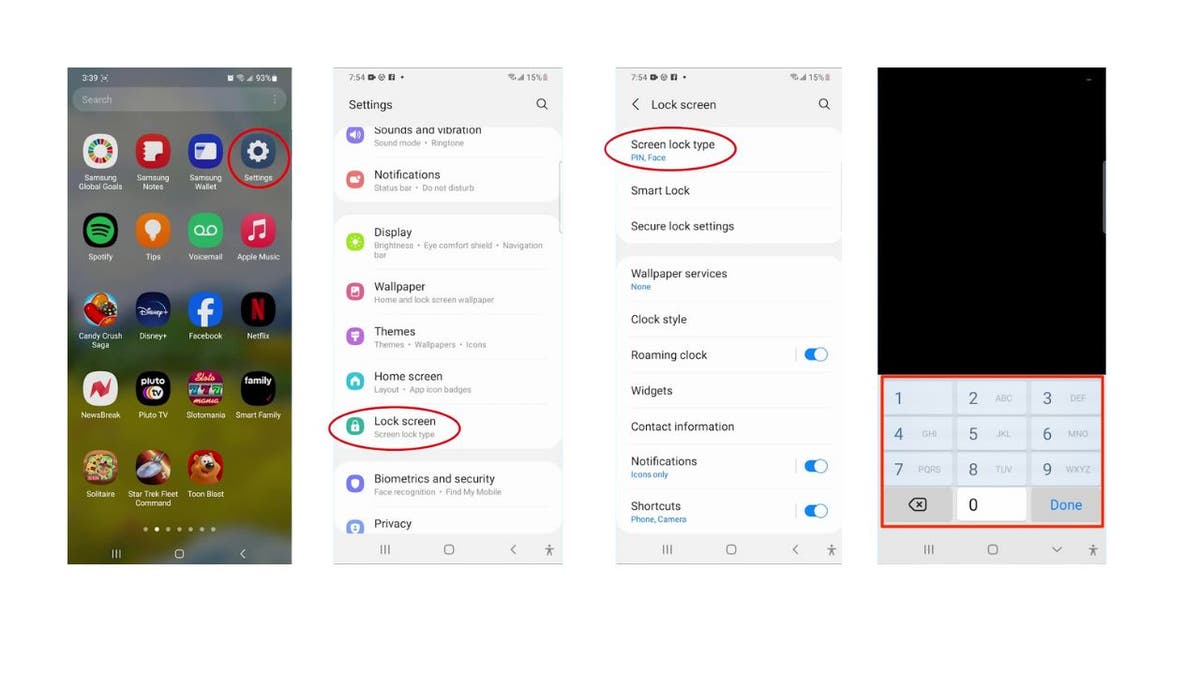
  • Swipe down from the main page of your Android screen and tap the settings icon.
  • Scroll down and select Lock screen. 
  • Then tap Screen lock type. 
  • To make changes, you’ll have to input your current security measure. Then tap Done.
How to update your PIN or Password on your Android

Steps to change lock screen security measure (Kurt “CyberGuy” Knutsson)

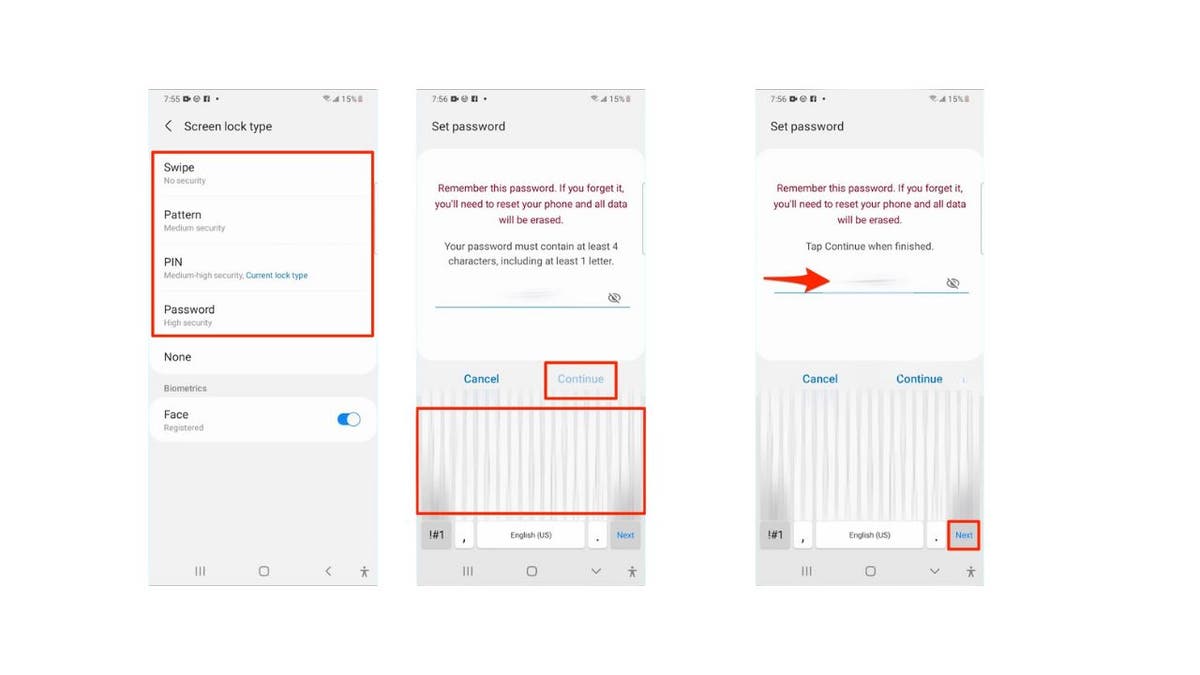
  • Once you input your current security measure, select whatever security measure you want to change.
  • You can select a new PIN, Password, Pattern or Swipe method. I don’t recommend Swipe, though. The more elaborate your choice generally means it will make your Android more secure and harder to crack.
  • Whatever you choose, follow the onscreen prompts to change it to whatever you want, then select Continue.
  • Then, enter it one more time to finalize it. Then tap Next.
How to update your PIN or Password on your Android

Steps to change lock screen security measure (Kurt “CyberGuy” Knutsson)

As far as password security is concerned, consider using a password manager to store and generate complex passwords securely. It will help you create unique, difficult-to-crack passwords that a hacker could never guess. Second, it also keeps track of all your passwords in one place and fills in passwords for you when you’re logging into an account so that you never have to remember them yourself. The fewer passwords you remember, the less likely you will be to reuse them for your accounts.

MORE: BEST ACCESSORIES FOR YOUR ANDROID

Beyond the password change

What if the breach goes beyond a simple lock screen compromise? Donna’s story sheds light on the potential for deeper issues, such as phishing attempts and malware. Here are additional steps to consider:

Review your apps: Uninstall any apps that don’t look familiar or that you don’t remember installing.

Update your phone: Always keep your software up to date to benefit from the latest security patches.

Run a security scan: Use reputable antivirus software to check for malware. The best way to protect yourself from clicking malicious links that install malware that may get access to your private information is to have antivirus protection installed on all your devices. This can also alert you of any phishing emails or ransomware scams. Get my picks for the best 2024 antivirus protection winners for your Windows, Mac, Android & iOS devices.

Consider a factory reset: If all else fails, backing up your data and restoring your phone to its factory settings can be a clean slate.

If these steps don’t resolve the issue, you may want to contact your Android device manufacturer’s customer support for further assistance.

MORE: 5 TIPS YOU DIDN’T KNOW YOU CAN DO ON AN ANDROID

Kurt’s key takeaways

Securing our devices is as much about protecting ourselves from external threats as it is about drawing boundaries that those close to us should respect. Technology is a powerful tool but can become a weapon in the wrong hands.

Have you ever experienced a breach of trust or privacy involving personal technology within your own home? If so, what happened? Let us know by writing us at Cyberguy.com/Contact.

For more of my tech tips & security alerts, subscribe to my free CyberGuy Report Newsletter by heading to Cyberguy.com/Newsletter.

Ask Kurt a question or let us know what stories you’d like us to cover.

Answers to the most asked CyberGuy questions:

Copyright 2024 CyberGuy.com. All rights reserved.


Source link

Advice from fraud specialist who files debit card swindling claims all day

0


While different types of fraud can bring their own elements of frustrations and consequences, debit card fraud can leave your bank account empty almost immediately and be hard to recover from.

That’s why we are so grateful for the email we received from a debit card fraud specialist who shared their incredible knowledge and insight to protect you from debit card fraud.

CLICK TO GET KURT’S FREE CYBERGUY NEWSLETTER WITH SECURITY ALERTS, QUICK VIDEO TIPS, TECH REVIEWS AND EASY HOW-TO’S TO MAKE YOU SMARTER

How to update your PIN or Password on your Android

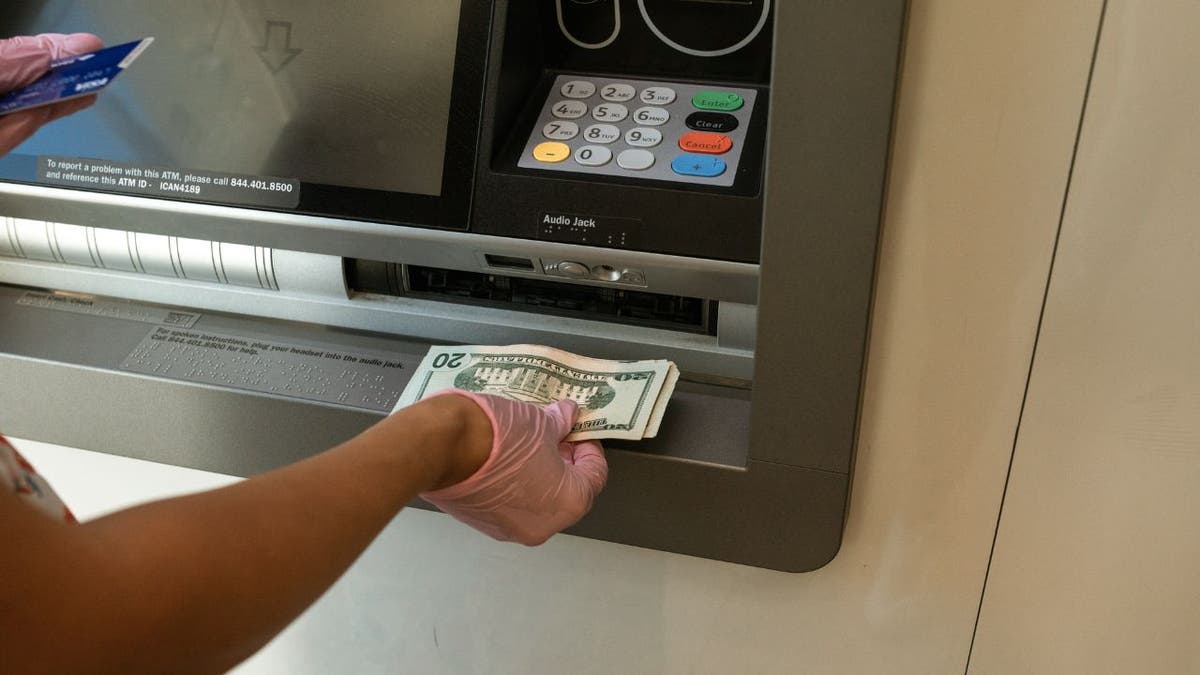
Woman at ATM (Kurt “CyberGuy” Knutsson)

Navigating debit card safety: Do’s and don’ts for smart financial management

As someone who processes debit fraud claims daily, and luckily has never experienced it herself, below are the top do’s and don’ts of debit card use.

1) Safest way to use your debit card: Use your debit card to withdraw money from your own financial institution’s ATM or teller. Preferably transfer larger amounts of money out of a checking account into high-yield savings accounts so that your money isn’t readily available in large sums in a checking account.

2) Why credit cards are generally better for purchases: Don’t use your debit card to make regular or frequent purchases. It is better to use a regular credit card for those transactions. It leaves you less exposed to potential debit card fraud. If a scammer gets a hold of your credit card, it is easier to freeze that card, cancel it or get a new one issued. If your debit card or debit card number gets compromised, you could lose all your cash in your checking account.

How to update your PIN or Password on your Android

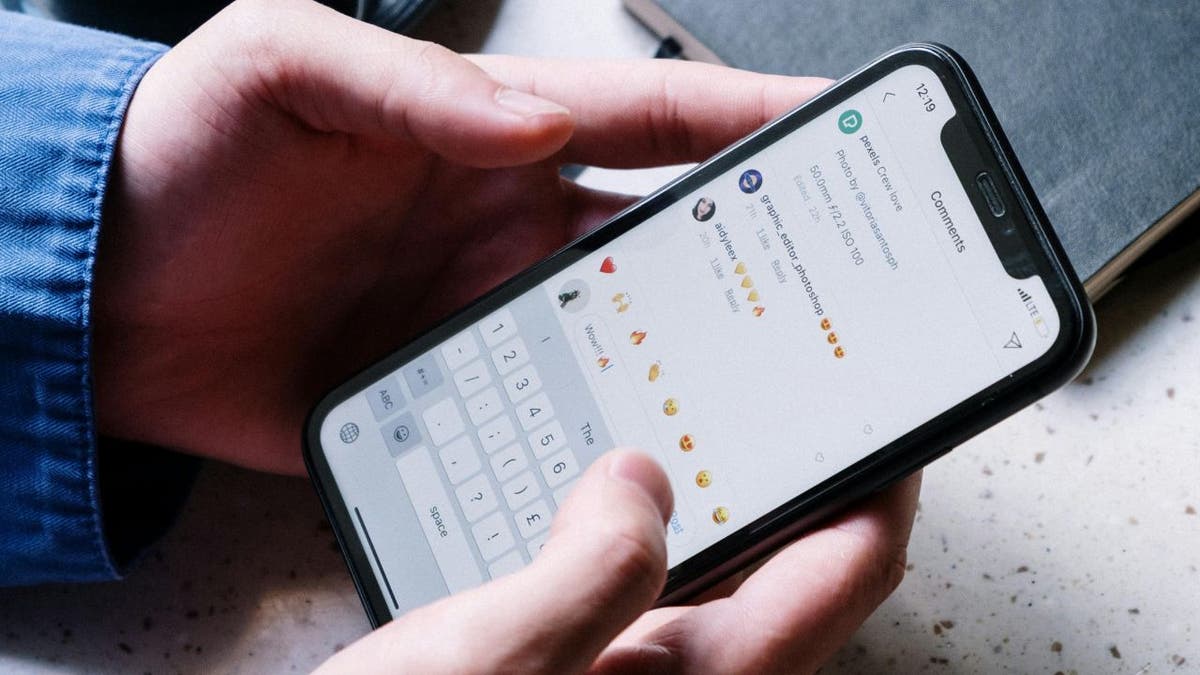
Person using phone to make purchase (Kurt “CyberGuy” Knutsson)

MORE: WHAT TO DO IF YOUR BANK ACCOUNT IS HACKED

3) Consider using mobile wallets for convenience and security: If you must use your debit card to make regular purchases, add it to your smartphone wallet (like Apple Pay or Google Pay) and use it that way instead of swiping your debit card. Not being swiped likely prevents your card from being skimmed. 

4) Protecting your PIN is crucial: Do not write your PIN down on your card or a piece of paper in your wallet.

5) Recurring payments aren’t affected by locking your card: Even if you have recurring payments for bills such as utilities, they usually can still be made if your debit card is locked. When a debit card is locked, single transactions aren’t allowed.

6) Don’t share your debit card: Your debit card is a legal agreement between you and your financial institution. Letting anyone else use your card, even family, may jeopardize your ability to be compensated for fraudulent transactions. Your child accidentally purchasing something with your debit card saved on your mobile app is not considered fraud.

7) Financial reimbursement might not be immediate: While some financial institutions will reimburse fraudulent transactions, they may not be fast enough to cover checks, e-checks or recurring financial transactions. You’d likely be at risk of incurring overdraft fees, non-sufficient funds or late charges from your financial institutions, creditors or merchants – all of which would be costly.

8) Enable alerts to catch fraudulent activity quickly: Most financial institutions offer financial alerts or restrictions for all transactions on checking accounts and cards. Use them so you can be notified of any fraudulent transactions immediately. The faster you can report these charges to your financial institution, the more likely you are to stop scammers in their tracks.

How to update your PIN or Password on your Android

Couple who learned about debit card fraud (Kurt “CyberGuy” Knutsson)

MORE: HOW CROOKS ARE USING SKIMMERS, SHIMMERS TO STEAL YOUR MONEY AT YOUR ATM

How to prevent debit card fraud?

Here are additional steps you can take to help you prevent crooks from gaining access to your debit card:

Keep your card safe physically: Store your debit card in a secure place when not in use. Don’t write down your PIN or keep it with your card. Be cautious when using your debit card in public places and shield your PIN when entering it.

Use strong PINs: Choose a unique and strong PIN that isn’t easily guessable. Avoid using numbers like your birth date, address or easily recognizable sequences. Don’t share your PIN with anyone.

Create strong, unique passwords: for your accounts and devices. Avoid using the same password for multiple online accounts. Consider using a password manager to securely store and generate complex passwords. It will help you to create unique and difficult-to-crack passwords that a hacker could never guess.

Use biometric authentication: Consider using biometric authentication (fingerprint, facial recognition) if your device supports it. This can provide an extra layer of security and convenience for you.

Regularly review your transactions: Frequently monitor your bank statements and transaction history for any authorized or suspicious transactions. Set up account alerts for large transactions or any activity that falls outside your normal spending patterns.

Use secure networks: Avoid using public Wi-Fi networks for sensitive transactions. Public Wi-Fi networks are often unencrypted and vulnerable to hackers who can intercept your data or infect your device with malware.

Use a Virtual Private Network (VPN): When accessing your financial accounts over public networks, you should use a VPN. We recommend using a VPN to protect against hackers snooping on your device as well. VPNs will protect you from those who want to track and identify your potential location and the websites that you visit. See my expert review of the best VPNs for browsing the web privately on your Windows, Mac, Android & iOS devices.

Beware of phishing scams: Be cautious of unsolicited emails, texts or calls asking for your debit card information or login credentials. It could be a phishing scam. Never click on suspicious links or images or download attachments from unknown sources.

Have good antivirus software on all your devices: Keeping hackers out of your devices can often be prevented when you have good antivirus protection installed on all your devices. Having antivirus software on your devices will help make sure you are stopped from clicking on any known malicious links, attachments or images that may install malware on your devices, allowing hackers to gain access to your personal information. Find my review of Best Antivirus Protection here.

Regularly update your software: Keep your computer, smartphone and other devices updated with the latest security patches and updates.

Use two-factor authentication (2FA): If your bank offers two-factor authentication, enable it. This adds an extra layer of security by requiring a second form of verification in addition to your password.

Use secure ATMs: Whenever possible, use ATMs that are located in well-lit and secure areas. Avoid ATMs that appear tampered with or have suspicious devices attached to them or point-of-sale terminals.

How to update your PIN or Password on your Android

A woman taking money out of her account using ATM (Kurt “CyberGuy” Knutsson)

MORE: WHY YOU SHOULD NEVER CARRY THESE THINGS IN YOUR WALLET

Regularly monitor your credit reports: Check your credit reports for any unusual activity that might indicate fraud or identity theft. If you find any errors or discrepancies on your credit reports, contact the credit bureaus and the creditors involved as soon as possible to dispute them.

Consider debit card controls and mobile apps: Some banks offer apps that allow you to turn your card on or off instantly, set spending limits and receive notifications for transactions.

Make purchases from trusted sites: Only use reputable and secure websites for online shopping and payments. Look for a padlock symbol in the address bar before entering your card details.

What to do if you are a victim of debit card fraud?

Contact your bank immediately

Report the fraudulent transactions and request to freeze or cancel your debit card. Your bank will investigate the fraud and may issue you a new card and a refund. Depending on your bank’s policy, you may have to file a written claim or a police report to support your case.

Review your bank statements and credit reports

Check for any other unauthorized charges or suspicious activity on your accounts. You can also get a free copy of your credit report from each of the three major credit bureaus once a year at AnnualCreditReport.com. If you find any errors or signs of identity theft, dispute them with the credit bureau and the creditor.

Use identity theft protection

Identity theft protection companies can monitor personal information, like your home title, Social Security number, phone number and email address, and alert you if it is being sold on the dark web or being used to open an account. They can also assist you in freezing your bank and credit card accounts to prevent further unauthorized use by criminals.

The great part of some identity theft companies is that they often include identity theft insurance of up to $1 million to cover losses and legal fees and a white-glove fraud resolution team where a U.S.-based case manager helps you recover any losses. See my tips and best picks for best identity theft protection.

Kurt’s key takeaways

Though many people use debit cards as they would use their credit cards, there is a whole world of problems that can occur with your debit card if it falls in the wrong hands. Having your debit card information stolen or compromised doesn’t just jeopardize your credit line, it may mean all the money in your account can disappear. If you treat your debit card like a signed, blank check, you’d likely leave it somewhere safe at home.

Considering the potential downsides of debit cards, do you see a future where they become less common due to security concerns? Let us know by writing us at Cyberguy.com/Contact.

For more of my tech tips & security alerts, subscribe to my free CyberGuy Report Newsletter by heading to Cyberguy.com/Newsletter.

Ask Kurt a question or let us know what stories you’d like us to cover.

Answers to the most asked CyberGuy questions:

Copyright 2024 CyberGuy.com. All rights reserved.



Source link

Air Force secretary plans to ride in AI-operated F-16 fighter aircraft this spring

0


Air Force Secretary Frank Kendall told members of the U.S. Senate on Tuesday that he plans to ride in the cockpit of an aircraft operated by artificial intelligence to experience the technology of the military branch’s future fleet.

Kendall spoke before the U.S. Senate Appropriations Committee’s defense panel on Tuesday, where he spoke about the future of air warfare being dependent on autonomously operated drones.

In fact, the Air Force secretary is pushing to get over 1,000 of the AI-operated drones and plans to let one of them take him into the air later this spring.

The aircraft he plans to board will be an F-16 which was converted for drone flight.

PENTAGON SEEKS LOW-COST AI DRONES TO BOLSTER AIR FORCE: HERE ARE THE COMPANIES COMPETING FOR THE OPPORTUNITY

Air Force Secretary Frank Kendall

U.S. Air Force Secretary Frank Kendall told the Senate Appropriations Committee he plans to ride in an autonomously driven aircraft during the spring. (Senate Appropriations)

“There will be a pilot with me who will just be watching, as I will be, as the autonomous technology works,” Kendall said. “Hopefully neither he nor I will be needed to fly the airplane.”

Last month, the Pentagon said it was looking to develop new artificial intelligence-guided planes, offering two contracts for several private companies to compete against each other to obtain.

The Collaborative Combat Aircraft (CCA) project is part of a $6 billion program that will add at least 1,000 new drones to the Air Force. The drones will be designed to deploy alongside human-piloted jets and provide cover for them, acting as escorts with full weapons capabilities. The drones could also act as scouts or communications hubs, according to a report from The Wall Street Journal.

EUROPE SEEKS TO BECOME ‘GLOBAL REFERENCE POINT’ WITH AI OFFICE

Boeing Ghost Bat Drone

A Boeing MQ-28 Ghost Bat fighter-like drone is kept on display at the Australian International Airshow, in Avalon, Australia February 28, 2023.  (Reuters/Jamie Freed)

The companies bidding for the contract include Boeing, Lockheed Martin, Northrop Grumman, General Atomics and Anduril Industries.

Cost-cutting is one of the elements of AI that appeals to the Pentagon for pursuing the project.

In August 2023, Deputy Secretary of Defense Kathleen Hicks said deployed AI-enabled autonomous vehicles would provide “small, smart, cheap and many” expendable units to the U.S. military, helping overhaul the “too-slow shift of U.S. military innovation.”

WHAT IS ARTIFICIAL INTELLIGENCE (AI)?

General Atomics Reaper

A model of a General Atomics MQ-9 Reaper unmanned aerial drone vehicle is displayed during the Farnborough International Airshow 2022 on July 19, 2022, in Farnborough, England. Farnborough International Airshow 2022 will host leading innovators from the aerospace, aviation and defense industries.  (John Keeble/Getty Images)

Military officials have been mum on what the drones will actually look like in terms of size – full-sized planes or smaller.

But the idea is to not fall too far behind China, which has modernized its air defense systems, which are much more sophisticated and put manned planes at risk when they get too close.

Drones have the potential of interrupting such defense systems and could be used to jam them or provide surveillance for crews.

“The initial role for the aircraft was going to be counter-air, but it will have the potential to do other things,” Kendall said during the hearing.

CLICK HERE TO GET THE FOX NEWS APP

He also said the new drone fleet will likely be cheaper than having new manned jets created. The goal is to have the drones cost about a third or less than the $20 million it costs to build an F-35 fighter.

Peter Aitken of Fox News Digital contributed to this report.


Source link

Is your smartphone spying on you without you even knowing it?

0


Researchers at MIT’s Computer Science and Artificial Intelligence Laboratory (CSAIL) recently revealed a startling new privacy threat.

Our smartphones’ ambient light sensors might be turned into makeshift cameras.

woman on iPhone

A woman on her iPhone  (Kurt “CyberGuy” Knutsson)

From brightness adjustment to privacy invasion

Ambient light sensors are commonplace in smartphones, primarily used to adjust screen brightness according to environmental lighting. However, CSAIL researchers have demonstrated that these sensors could potentially be repurposed to capture images of a user’s surroundings.

By employing a computational imaging algorithm, they managed to recover environmental images from the perspective of the phone’s screen, utilizing only the light intensity data from these sensors.

CLICK TO GET KURT’S FREE CYBERGUY NEWSLETTER WITH SECURITY ALERTS, QUICK VIDEO TIPS, TECH REVIEWS AND EASY HOW-TO’S TO MAKE YOU SMARTER

people looking at iPhones

Two people looking at their iPhones  (Kurt “CyberGuy” Knutsson)

A comprehensive privacy threat

The implications of this discovery are far-reaching. 

Ambient light sensors are tiny devices deployed in almost all portable devices and screens that surround us in our daily lives,” notes Princeton University professor Felix Heide. The study underscores a privacy threat that spans a broad spectrum of devices, previously underestimated in its potential impact.

WHAT IS ARTIFICIAL INTELLIGENCE (AI)?

person on cellphone

A person on a cell phone  (Kurt “CyberGuy” Knutsson)

Gesture interception and interaction capture

Beyond static images, the study suggests that ambient light sensors could intercept user gestures, like swiping and sliding, capturing interactions with phones during activities such as video watching. This capability challenges the belief that ambient light sensors are harmless in terms of private data exposure.

iPhone

An iPhone (Kurt “CyberGuy” Knutsson)

MORE: BEST WAY TO PROTECT YOUR DEVICES FROM GETTING HACKED

The call for tighter permissions

Yang Liu, a Ph.D. candidate at MIT EECS and CSAIL, warns that ambient light sensors, in conjunction with display screens, can capture our actions without consent, posing significant privacy risks. The researchers urge operating system developers to tighten permissions for these sensors, reducing their precision and sampling rate.

an iPhone

Person on an iPhone (Kurt “CyberGuy” Knutsson)

Looking ahead: Designing for privacy

To mitigate these security concerns, the study proposes granting users control over ambient light sensor permissions akin to camera permissions. Additionally, future device designs might include ambient light sensors positioned away from the user, such as on the side of the device, to prevent unauthorized visual data capture.

While the study’s findings prompt a reevaluation of sensor permissions and design, it’s equally important to recognize the broader context of smartphone security vulnerabilities. Let’s delve into the realm of spyware, another pressing concern where even the most vigilant users can find themselves compromised.

WOMAN ON SMARTPHONE

A woman talking on her cell phone (Kurt “CyberGuy” Knutsson)

Understanding spyware vulnerability on your smartphone

You might not realize it, but your phone could be more exposed to spyware than you think. Just a small slip-up while you’re browsing the web, and you could accidentally invite a cyber-spy into your life. If you’re an Android user, be extra cautious. Your phone is usually more at risk than iPhones.

But here’s the kicker. Even if you’re super careful, you’re not totally out of the woods. If you don’t update your phone’s software regularly or if you’ve jailbroken it, you’re playing with fire. Here are some telltale signs of spyware on your phone.

woman looks at phone

A woman on her smartphone (Kurt “CyberGuy” Knutsson))

MORE: SNEAKY SPYWARE IS AFTER YOUR MOST SENSITIVE DATA 

The telltale sign of spyware on your phone

Is your phone acting strange? Here are the telltale signs of spyware on your device.

Unusual noises: Beeping, faint voices or static during calls might not just be network issues. They could signal an eavesdropping attempt.

Performance lags: If your phone suddenly slows down or the battery drains rapidly, spyware might be hogging your resources.

Sensors activate unexpectedly: Modern smartphones signal when cameras and mics are in use. If this happens sans your input, investigate promptly.

Mysterious apps and files: New, unrecognizable apps or files might indicate that your phone’s security has been breached.

Excessive pop-ups and spam: An uptick in ads, error messages or scam texts may be adware, a common companion to spyware.

Overheating issues: Like performance lags, overheating can suggest that spyware is overworking your phone’s internals.

iPhone in car

Smartphone on the seat of a vehicle  (Kurt “CyberGuy” Knutsson)

MORE: MALICIOUS ANDROID SPYWARE DETECTED IN OVER 100 POPULAR APPS 

Several steps you can take to protect yourself from spyware on your smartphone

1. Have good antivirus software: Yes, antivirus protection can help detect and disable spyware on your smartphone. The best way to protect yourself from clicking malicious links that install malware that may get access to your private information is to have antivirus protection installed on all your devices. This can also alert you of any phishing emails or ransomware scams. Get my picks for the best 2024 antivirus protection winners for your Windows, Mac, Android & iOS devices.

2. Remove unfamiliar apps and files: If you suspect your phone has been hacked, promptly remove any unfamiliar apps.

3. Restart your device: Rebooting your phone can sometimes stop spyware from running.

4. Update to the latest software: As mentioned before, updates can patch vulnerabilities.

5. Be cautious when browsing: Avoid clicking on suspicious links or downloading files from untrusted sources.

6. Update your phone regularly: Updates often include security patches that can help protect your device from spyware and other vulnerabilities.

7. Don’t jailbreak your phone: Jailbreaking removes security restrictions that can make your phone more susceptible to spyware.

8. Look for unusual activity: This includes unusual noises during calls, performance lags, unexpected sensor activation, mysterious apps or files, excessive pop-ups and overheating.

9. Delete unwanted or unused apps: Some apps use your device’s camera and microphone and collect your data even while it is not in use. Getting rid of unused apps frees up storage space on your phone and declutters your lock screen. It can also eliminate one more potential app that might be collecting information from you unknowingly.

On an iPhone:

  • Hard press the app icon of the app you want to delete
  • Select Remove App
  • You’ll be prompted to confirm your decision in the next window by tapping Delete App
  • Then again by tapping Delete 


On an Android:

  • Go to the Google Play Store app
  • At the top right, tap the Profile icon
  • Select Manage apps & devices, click Manage
  • Select name of the app you want to delete
  • Select Uninstall

Android settings may vary based on the manufacturer’s settings. 

GET FOX BUSINESS ON THE GO BY CLICKING HERE

While it may seem like an extra effort to review and change your apps’ permission settings, it’ll give you more peace of mind knowing which apps have access to specific device functions and data. Most devices now have a dedicated part of their settings to view which apps are using the different functions of your phone and what data it has access to.

10. Changing camera settings: It may seem simple to just give access to your camera to certain apps. This way, you can easily use the camera function whenever you pull up the app to use. There are, however, apps that do not need access to your camera to function. Does your navigation app need access to your camera even when it is not in use? Take back control of your camera by using the steps below to find out which apps have access to your camera and turn it on or off.

On an iPhone:

  • Go to Settings
  • Scroll down and select Privacy or Privacy & Security
  • Select Camera
  • You can see which apps have access to your camera. Of course, you can leave the apps where it makes sense to have access to your camera toggle on. For apps that do not, you can toggle access off (it will be grayed out)

On an Android:

Android settings may vary based on the manufacturer’s settings. 

  • Open Settings
  • Select Apps
  • Select the app you want to change (If you can’t find it, select ‘See all apps’)
  • Select Permissions to view if you allowed or denied any permissions for the app
  • To change a permission setting, select it, then choose Allow only while using the app, Ask everytime or Don’t allow

11. Restrict camera and microphone permissions: Restricting camera and microphone permissions can make it more difficult for spyware to access these features.

On an iPhone:

  • Go to Settings
  • Scroll down and select Privacy or Privacy & Security
  • Select Microphone
  • You can see which apps have access to your microphone. Of course, you can leave the apps where it makes sense to have access to your microphone toggle on. For apps that do not, you can toggle access off (it will be grayed out)

On an Android:

Android settings may vary based on the manufacturer’s settings. 

  • Open Settings
  • Select Apps
  • Select the app you want to change (If you can’t find it, select ‘See all apps’)
  • Select Permissions to view if you allowed or denied any permissions for the app
  • To change a permission setting, select it, then choose Allow only while using the app, Ask everytime or Don’t allow

MORE: NEWLY IPHONE SPYWARE TOOL SOLD TO GOVERNMENTS FOR TARGETED SURVEILLANCE

Kurt’s key takeaways

In a world where our smartphones are virtual extensions of ourselves, the discoveries at MIT’s CSAIL cast a new light on what we often take for granted. As we navigate the delicate balance between convenience and privacy, it’s clear that the devices we depend on daily harbor capabilities far beyond their intended use, prompting a necessary conversation on security, awareness and the evolving landscape of digital privacy.

CLICK HERE TO GET THE FOX NEWS APP

With the revelation that devices we use daily, like smartphones, can be exploited in ways that compromise our privacy — such as converting ambient light sensors into makeshift cameras — what steps do you believe technology companies and governments should take to protect personal privacy? Let us know by writing us at Cyberguy.com/Contact

For more of my tech tips and security alerts, subscribe to my free CyberGuy Report Newsletter by heading to Cyberguy.com/Newsletter

Ask Kurt a question or let us know what stories you’d like us to cover

Answers to the most asked CyberGuy questions:

Copyright 2024 CyberGuy.com.  All rights reserved.


Source link

Restaurant combines an amusement ride with unforgettable fine dining

0


Ready for an amazing restaurant experience that’ll take your taste buds on a wild ride as you move from one incredible room to the next? Sounds like an amusement park experience, right?

If you thought that, you wouldn’t be too far off. 

This unique restaurant is called Eatrenalin, and it’s built around some pretty cool Floating Chair innovation.

CLICK TO GET KURT’S FREE CYBERGUY NEWSLETTER WITH SECURITY ALERTS, QUICK VIDEO TIPS, TECH REVIEWS AND EASY HOW-TO’S TO MAKE YOU SMARTER

roaming restaurant 1

Floating Chair restaurant experience (Eatrenalin)

The unique restaurant experience

The Eatrenalin restaurant is located next to the four-star superior hotel Krønasår in Rust, Germany. Spanning approximately 17,222 square feet, this innovative dining establishment offers a sensory experience like no other.

ROAMING restaurant 2

Floating Chair restaurant experience (Eatrenalin)

MORE: THIS ROBOT CAN COOK BURGERS IN LESS THAN 60 SECONDS

How does the Floating Chair adventure work?

Pioneered by MACK Rides, the superstars of amusement park tech, the Floating Chair is Eatrenalin’s secret sauce. Each chair consists of approximately 2,100 components and weighs about 705 pounds.

This engineering masterpiece whisks you away on an over two-hour adventure for your senses, gently gliding you between themed rooms without you ever needing to budge from your comfy seat.

ADVICE FROM FRAUD SPECIALIST WHO FILES DEBIT CARD SWINDLING CLAIMS ALL DAY

roaming restaurant 3

Floating Chair restaurant experience (Eatrenalin)

MORE: THE BEST TRAVEL GEAR FOR 2024

More than just a joyride

But the Floating Chair is cooler than just a fancy way to get around. It’s designed to work seamlessly with the whole multimedia show. As the chair glides you through each incredible experience, from the refreshing depths of the Ocean room to the mind-blowing vastness of the Universe room, the sights and sounds perfectly match the movement, creating an experience that totally immerses you.

ROAMING restaurant 4

Floating Chair restaurant experience (Eatrenalin)

MORE: THAT’S NOT A HUMAN TALKING TO YOU IN THE FAST-FOOD DRIVE-THRU

A feast for all your senses

Adding to the awesome experience is a culinary masterpiece. Led by a dream team of world-class chefs, Eatrenalin offers an eight-course tasting menu that perfectly complements each themed environment.

Whether you choose the “Red Dimensions” menu with its international flavors or the plant-powered “Green Dimensions” option, the flavors will blow your mind while the Floating Chair ensures a comfy and unforgettable journey.

roaming restaurant 5

Floating Chair restaurant experience (Eatrenalin)

GET FOX BUSINESS ON THE GO BY CLICKING HERE

The technology used to pull off the immersive experience

While the patented Floating Chair from Mack Rides glides guests through these immersive spaces, the multimedia content curated by MACK Animation and MACK Solutions ensures that the visual worlds are truly mesmerizing.

Thomas Mack, a driving force behind this innovation, emphasizes the seamless fusion of new LED screens and projections, creating an interplay of media technology and film.

roaming restaurant 6

Floating Chair restaurant experience (Eatrenalin)

What’s next for Eatrenalin?

If you’re wondering what’s next for Eatrenalin, the owners say they are already eyeing locations in Southern California or Las Vegas, aiming to bring this blend of taste, technology and storytelling close to you here in the States.

roaming restaurant 7

Floating Chair restaurant experience (Eatrenalin)

Kurt’s key takeaways

Eatrenalin proves that cutting-edge tech and fantastic food are a great match. The Floating Chair technology, coupled with the incredible settings and world-class cuisine, creates a one-of-a-kind dining experience that is sure to leave you wanting more.

CLICK HERE TO GET THE FOX NEWS APP

If you could design your own themed room within Eatrenalin, what concept or environment would you choose? Let us know by writing us at Cyberguy.com/Contact.

For more of my tech tips & security alerts, subscribe to my free CyberGuy Report Newsletter by heading to Cyberguy.com/Newsletter.

Ask Kurt a question or let us know what stories you’d like us to cover.

Answers to the most asked CyberGuy questions:

Copyright 2024 CyberGuy.com. All rights reserved.



Source link